Hello friends, hope you all are fine and having fun with your lives. In today's post we will have a look at How to interface keypad with Arduino in Proteus ISIS. Keypad is used almost in every engineering project. If you even look around you will find keypad in many electronic appliances. For example, a simple ATM machine has a keypad on it using which enter our pin code and give commands to the ATM machine. Similarly, calculator also has keypad on it. So, in short there are numerous applications of keypad. You should also read the Real Life examples of Embedded Systems and you will find Keypad in them as well.
Keypad is used where you need to used numerical buttons or you need to use lots of buttons for sending commands so like in some applicatio ...
Hey Guys! I am back to give you a daily dose of information so you can excel and grow in your relevant field and keep coming back for what we have to offer. If you are a hobbyist or student, you require a transistor for the execution of your project every now and then.
Today, I am going to unlock the details on the Introduction to 2n4123. It is an NPN (negative-positive-negative) general purpose transistor which is mainly used for the amplification and switching purpose where collector current around 100mA is required. It is a semiconductor device mainly composed of silicon and comes with three terminals where a voltage applied to the one pair of terminals is used to control the current at the other pair of terminals.
I'll break down each and ev ...
Hello everyone! I hope you all will be absolutely fine and having fun. Today, I am going to share my knowledge about Introduction to 1N4007. It is a PN junction diode. Diodes can be made by combining two different types of semiconductor e.g. P and N. PN junction is a junction formed between P and N types of semiconductors. You guys should also have a look at Introduction to 1N4148.
1N 4007 belongs to the series of 1NXXXX devices. Its an American standard numbering system standard used for semiconductor devices. This standard has been adopted globally now. In 1N 4007 the first part 1N indicates single junction semiconductor. 1N indicates 1 junction whereas N indicates the semiconductor diode. 4007 is the specific number to indicate the particular ...
Hello friends, today's post is, as the name suggests, about the Voice Recognition using EasyVR Shield. Voice recognition is quite a difficult task and usually done on software like MATLAB, but what if someone needs a stand alone project, a kind of autonomous voice recognition project, which doesn't use computer.
EasyVR is the solution for such projects. I recently did one project on this module named as Voice Recognition using EasyVR Shield and it worked really cool so I thought to share this new technology with you guys. I couldn't write the next part of Proteus tutorial, actually firstly I was busy in this project and then I thought to share this one as its quite exciting one. After completing this project, I will come back to Proteus tutorial.
...
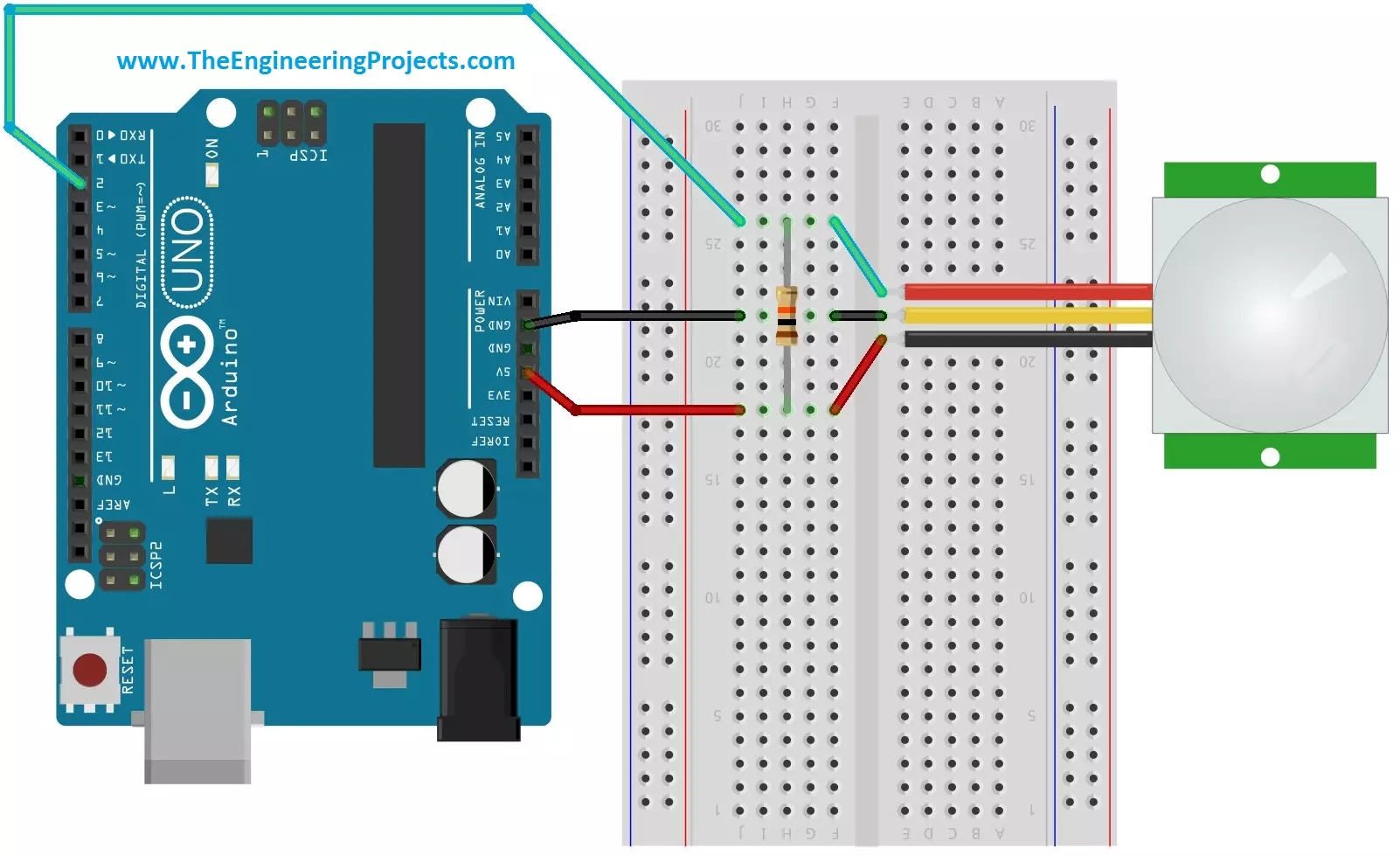
Hello friends, i hope you all are fine and enjoying. Today i am going to share a new project tutorial which is Interfacing PIR sensor with Arduino. First of all lets, have a little introduction about the basics and working of the PIR sensor. PIR sensors are in fact a Passive Infrared Sensor. PIR sensors are actually electronic sensors and they are used for motion detection. They are also used to detect the Infrared waves emitting from a particular object. You should also have a look at PIR Sensor Library for Proteus, using this library now you can easily simulate your PIR Sensor in Proteus software.
PIR sensors are widely used in motion detection projects now a days. Since my today's tutorial is about interfacing of PIR sensor with Arduino micro c ...
Hello Everyone! Hope you’re well today. Happy to see you around. In this post today, I’ll walk you through the Introduction to Arduino Uno WiFi Rev 2.
Arduino Uno WiFi Rev 2 is a microcontroller board based on ATmega4809 and carries an ECC608 crypto chip to ensure a secure and safe WiFi connection. The board contains 14 digital I/O pins, 5 PWM pins, 6 analog pins, one SPI protocol, one I2C, and one UART communication protocol.
I suggest you read this entire post till the end as I’ll detail the complete Introduction to Arduino Uno WiFi Rev2 covering pinout, pin description, features, programming, and applications.
Let’s jump right in.
Introduction to Arduino Uno WiFi Rev 2
The Arduino Uno WiFi Rev 2 is a microcontroller board that is mainly ...
Hi Guys! Hope you are doing great. Today, we will have a look at an electronic component named Diode. We will discuss Diode working, Symbol, Applications and characteristics in detail.
A diode is an electronic component, that allows the flow of current in one direction only. It exhibits low resistance in one direction and very high resistance in the opposite direction. Whoever has been a science student, knows about diodes. Although it seems to be a tiny component of a circuit, apparently it is true but it has a lot of complexities or you can say, it's a storm in a teacup.
Diodes are normally used in rectifiers, where they convert AC signals to DC signals. They come with a wide range of applications including power conversion, radio modulation, l ...
Hello friends, hope you all are fine and having fun with your lives. Today, I am going to share a complete project with you guys. Its an Intelligent Energy Saving System which I designed around two years ago. So, today I thought to share it so that others could also get benefit. In this project, I have used Arduino UNO board for programming purposes. Its not much complicated project but is the basic for many complex projects.
Energy, is a small word, but is the problem of whole world. Particularly when we are talking about electrical energy. IF you consume more electrical energy then you will get quite huge bill at the end of the month. :P So, there's always work done on reducing the consumption of electrical energy and also we compare energy cost ...
Hey Fellas! Hope you are doing well. Today, I am going to unlock the details on the Introduction to Arduino Mega 2560. It is a microcontroller board based on Atmega 2560 microcontroller. Arduino Boards have revitalized the automation industry with their easy-to-use platform where everyone with little or no technical background can get started with learning some basic skills to program and run the board.
I have updated articles previously on Arduino Uno, Arduino Nano, and Arduino Pro Mini. All these boards function similarly in one way or the other. There are some basic features like PCB layout design, size, number of analog pins and breadboard friendly nature that make them different from each other. In terms of coding, all these boards are progra ...
Hello readers, I hope you all are doing great. In this tutorial, we will learn how to interface the BMP280 sensor with the ES32 module to get temperature, pressure and altitude readings. Later, in this tutorial, we will also discuss how to upload these sensor readings to a web server.
BMP280
BMP280 or Barometric pressure sensor is a module used to measure temperature pressure and altitude. The small size and low power consumption feature of this sensor makes it feasible for battery-powered devices, GPS modules and mobile applications etc.
Fig. 1 BMP280 Sensor
The BMP280 is the product of BOSCH which is based on Bosch’s proven Piezo-resistive pressure sensor technology featured with high accuracy, long term stability, linearity and high EMC robus ...