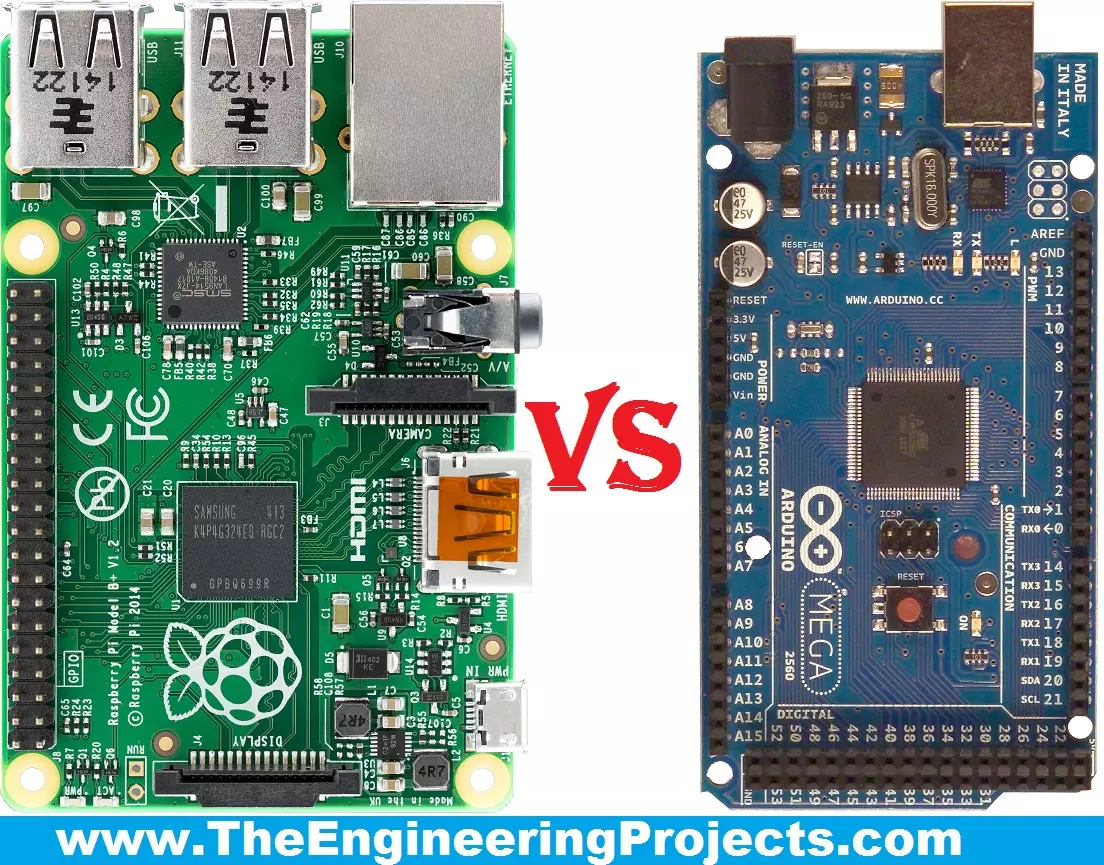
Hello friends, I hope you all are fine and enjoying your lives. Today, I am going to share a comparison titled Arduino Vs Raspberry Pi. Actually, I have been receiving a lot of emails and comments from new engineering students that "we are new in embedded and we want to start our project so please tell us which one is better Arduino or Raspberry Pi?" So, I thought to write a post on Arduino Vs Raspberry Pi and in this post, I am going to make a detailed comparison between the two and will let you know, which one you should use in your project and why?
So, I hope that you are all aware of or at least have heard about these two boards, which are Arduino and Raspberry Pi. If you haven't heard yet then you must have a look at Arduino Official Site and ...
Hi Guys! Hope you’re well today. I welcome you on board. In this post today, I’ll detail the Introduction to CD4035.CD4011 IC belongs to the CD40xx CMOS IC series. The CD4011 chip comes with four independent NAND gates. This device is used to perform the Boolean function Y = A × B or Y = A + B in positive logic. This IC is widely used in many applications including Portable Audio Docks, AV Receivers, and Blu-Ray Players.
I suggest you read this entire post till the end as I’ll walk you through the complete introduction to CD4011 covering datasheet, pinout, features, truth table, alternatives, and applications.
Let’s jump right in.
Introduction to CD4011
CD4011 IC belongs to the CD40xx CMOS IC series. The CD4011 chip comes with four independent NAND gates.
It is important to ...
Hello Guys! I welcome you on board. Happy to see you around. In this post today, I’ll walk you through the Introduction to Arduino MKR GSM 1400.
The Arduino MKR GSM 1400 is a microcontroller board that is based on the SAMD21 microcontroller. This device connects with a cellular network for developing communication. This GSM board is a one-stop solution for developing your sensor network or you can use it as a device sending a text message about the occurring of certain events remotely.
A module from u-blox, the SARA-U201 (which is a power chipset that activates using multiple cellular range bands) is responsible for GSM / 3G connectivity inside the device.
I recommend you read this post till the end as I’ll detail the complete Introduction to A ...
Hello friends, hope you all are fine and enjoying. Yesterday I got a mail from a friend, and he requested me to explain a tutorial about Seven Segment Display. So today, I am going to share my new project tutorial which is Seven Segment Display using 555 Timer in Proteus ISIS. It is a very simple project to understand Modern Digital Electronics.
As you all know, now a days all the Digital Display’s uses Seven Segment Display. So first of all let’s have a little introduction about Seven Segment Display. How they are fabricated and how their LED’s glow in such a beautiful manner? Seven Segment Display (SSD) is the form of electronic device, used to display decimal numbers. Seven Segment Displays are commonly designed in Hexagonal shape but according ...
Hello everyone! I hope you all will be absolutely fine and having fun. Today, I am going to share my knowledge with all of you guys about DC Current Sensor ACS712 Arduino Interfacing. First of all, I would like to tell you about importance of current sensing/measuring. Sensing the amount of current passing through any circuit can be useful in a lot of applications. For example, in low power consuming equipment, current sensing will be helpful to understand the system's impact on its battery life. The current sensing can also be used to make the decisions regarding safety in over current protection circuits.
Simply, we can say that sensing and controlling the flow of the current through the circuits is now a fundamental requirement e.g. over curr ...
Hi Fellas! I hope you’re well today. Happy to see you around. In this post today, I’ll walk you through the Introduction to IRF840.The IRF840 is an n-channel power MOSFET. It is a fast switching and high voltage device that is available with low on-state resistance. As this is an n-channel MOSFET here conduction process is exercised by the movements of the electrons. In other words, though conduction is carried out by both the movement of holes and electrons, electrons are major carriers in this case.
I suggest you read this entire post till the end as I’ll discuss the complete Introduction to IRF840 covering datasheet, pinout, features, equivalent, and applications. Let’s jump right in.
Introduction to IRF840
The IRF840 is an n-channel power MOSFET that supports loads up to 8A an ...
Hi Guys! I welcome you on board. In this post today, we’ll discuss the KSC1845 NPN Transistor. We will have a look at the KSC1845 Datasheet, Pinout, Power Ratings, Equivalents & Applications in detail. As it's an NPN transistor, electrons are the majority charge carriers and thus play a major role in conductivity. KSC1845 is mainly used for fast-switching and amplification purposes.NPN transistor carries 3 terminals, known as:
Emitter
Collector
Base
If the applied voltage at the base terminal exceeds 0.7V, it will forward bias this NPN transistor and the current will start to flow from Collector to Emitter. If the base voltage is less than 0.7V, KSC1845 will remain in the reverse-biased state.
I suggest you buckle up as I’ll discuss the KSC1845 ...
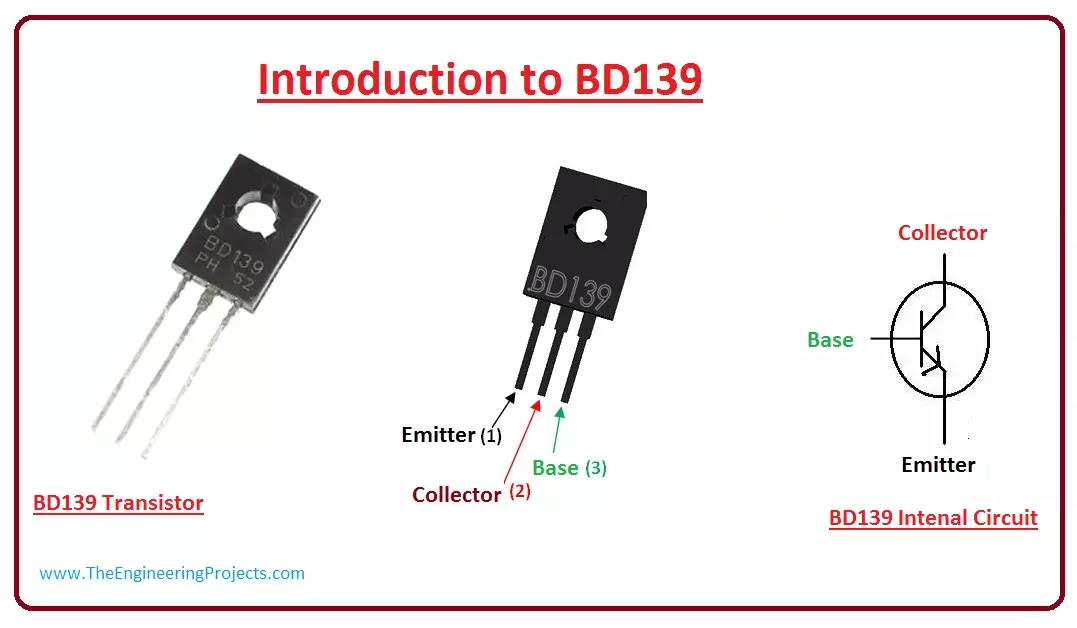
Hello friends, I hope you all are doing great. In today's tutorial, we are gonna have a look at detailed Introduction to BD139. BD139 is a Bipolar NPN transistor, it is mounted in the SOT-32 plastic package. It is designed for audio amplifier and driver utilizing complementary circuits. BD139 has a gain value of 40 to 160, which determine the amplification capacity of a transistor. It has three main pinouts which are a collector, base and emitter. It is used to control (On/Off) bigger loads that consume less than 1.5A.
BD139 is used in different industrial projects such as RF amplifier and Switching Circuits. In today's post, we will have a look at its pinout, Arduino interfacing, applications, Specifications, etc. I will also share some links whe ...
Hello everyone! I hope you all will be absolutely fine and having fun. I am going to give you a detailed Introduction to CD4051 today. CD 4051 is an analog multiplexer and demultiplexer. It has very low OFF leakage current and low ON impedance. Over full voltage ranges, very low power is dissipated by CD-4051.
CD-4051 is an eight (8) channel multiplexer and has three control input named as A, B and C. These inputs connect only 1 out of 8 channels to the output in order to obtain the desired output. Channel I/O terminals became outputs and common O/I become input terminals when CD 4051 is used as a demultiplexer. CD-4051 has a lot of amazing features e.g. binary address decoding on chip, break before make switching eliminates channel overlapping, ...
Hello friends, hope you all are fine. In today's project, we are gonna design Electronic Quiz Project with 8051 Microcontroller. I have done this project recently in which we need to design a quiz project game using 8051 Microcontroller. It was quite a big project and we have to work quite hard to make it done. In this project we have used many components on which I have already post tutorials so that you guys first get introduction to those components. So, first of all you should read Interfacing of LCD with 8051 Microcontroller, after that you must check Interfacing of Keypad with 8051 Microcontroller and finally get your hands on Serial communication with 8051 Microcontroller. These tutorial are must to read because these are all gonna use in t ...