Yesterday, I have posted a new Arduino Lilypad / Nano Library for Proteus in which we have seen how to add that library into Proteus so that you could be able to use these boards in Proteus. That was quite easy. Today I am gonna post a small project in which we will see how to use that library and produce an Arduino Lilypad simulation in Proteus. In this Arduino Lilypad simulation in Proteus, I am gonna use obviously he Arduino Lilypad board along with few LED lightsand will make them blink. Its also quite easy and you can also download the simulation and the hex file at the end of this project but I would suggest you to do it yourself so that you learn something out of it.
Before starting this project, you must have first integrated the Arduino L ...
Hello friends, few day ago I have posted a tutorial on how to do Arduino Simulation in Proteus. In that post, we have used an Arduino Library for Proteus but as this library is in its initial phases that's why currently it supports only three basic Arduino boards which are Arduino UNO, Arduino Mega2560 and Arduino Mega1280. But as we know there are numerous Arduino boards which are used these days. So, I searched a little and I came across this amazing Arduino Lilypad Library for Proteus which has the support for few other arduino boards, so I thought to share it with you guys. I have tested this library myself as always and its 100% working. I have tested it on Proteus 7 and I think it will work fine on Proteus 8 as well. As we have the support f ...
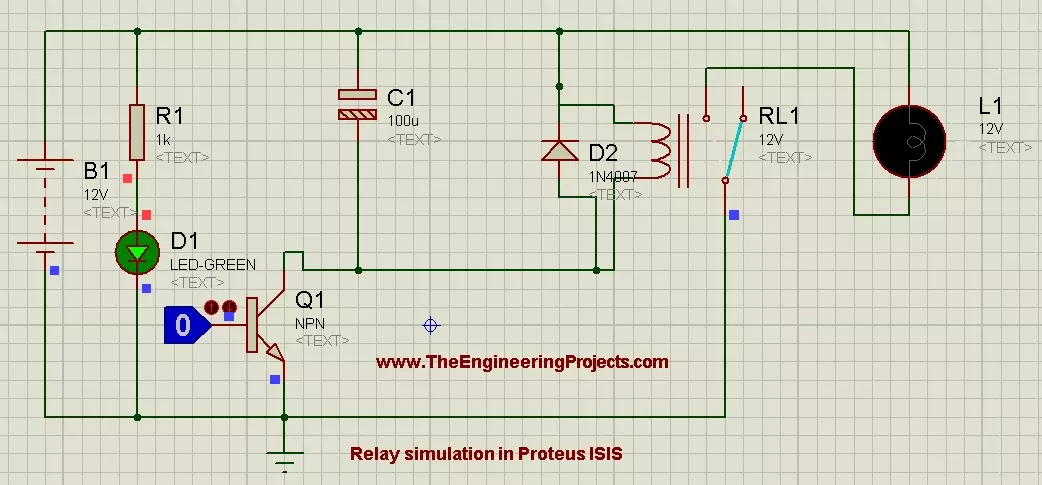
Hello friends, hope you all are fine and having fun. In the previous posts, we have discussed DC motor Control in Proteus ISIS and after that we have discussed the Stepper Motor Control in Proteus ISIS and finally we had a look at Servo Motor Control in Proteus ISIS. Now when you talk about motors control then first thing came in mind is Relay, because relay is the best way of controlling any motor. In today's post, we are gonna have a look at How to Control Relay in Proteus ISIS. Relay is a key components of any electronics or electrical circuit and is usually a problem for the engineers and students. Although, its not as difficult as it seems so I thought to post about it.
In today's post, we will first simulate the Relay in a simple circuit in ...
In today’s post, as the name suggests, we will see how to get data from online webserver using Arduino Wifi in simple steps. Getting data from web server using Arduino Wifi Shield has always remained a problem for the engineers. Its not much difficult task as its usually considered to be. In today’s post, I will create a small project in which I will control two simple LEDs via online web server. It’s really a very interesting project and when I completed it, I felt like Hurrah!!!
Arduino Wifi Shield is used to connect Arduino board with Wifi. After connectivity with Wifi, one can perform many tasks using this shield. We can built a complete server on it and can also use it as a client. Server designed on an Arduino Wifi Shield are usually quite si ...
Hello friends, I hope you all are doing great. Today, I am going to share Circuit Designing of LCD with Arduino in Proteus ISIS. In my previous tutorial, I have posted a tutorial on How to use Arduino Library in Proteus. Using that library, we can easily test Arduino code in Proteus to check whether its working or not. If you haven't read that post then before starting it, first read it, as without adding the arduino library we can't use Arduino in Proteus.
Coming to today's post, as we have done adding the Arduino Library in Proteus, so I thought to do some projects on it and the first one I chose is quite simple one i.e. Circuit Designing of LCD with Arduino in Proteus ISIS. So we will have a look on how to show some characters on LCD using Ardu ...
Hello friends, hope you all are fine and enjoying life. Today's post is about removing a small error named as Recognition Failed in EasyVR, which I encountered while working with EasyVR shield with Arduino UNO. I have posted a complete project on EasyVR shield around a year ago in which I haven't mentioned this error because at that time I didn't encountered it. But today while working with EasyVR shield, I encountered this problem so I thought to share it with you guys.
EasyVR shield is a voice recognition module which is used for recognizing voices and operating accordingly. Using this module, one ca quite easily control anything using voice. In the previous project, I have controlled a robot using voice commands like when I say Forward then it ...
Hello friends, today's post as the name suggests is about how to send SMS with Arduino UNO and SIM900D using AT Commands. There are different types of SIM900D modules available in the market, so it doesn't matter which module you are using. All SIM900D modules work at AT commands basically so today I am going to show you how to send an SMS via AT commands without using any Arduino library. You should first read the AT commands manual which will give you an idea about AT commands. AT commands are special sets of commands which are used for communicating with SIM900 module. Using these AT commands we let our GSM work for us. Like if you want to send SMS then there's a specific AT command for sending the SMS similarly if you want to change the PIN co ...
Hello everyone, I hope you all are doing great. In today's tutorial, I am going to give you a detailed Introduction to Arduino YUN, and we will also have a look at its basic functionalities. Arduino YUN is a latest microcontroller board, manufactured by Arduino. It's the most advanced and highly stylish arduino board. The beauty of Arduino YUN lies in having two on board processors, which I haven't seen yet in any other Microcontroller board. One of them is simple Arduino processor which is similar to that of Arduino Leonardo while the second processor is Atheros AR9331. Atheros supports Linux server, which is the new thing in Arduino YUN. Because of these two processors, one now can do anything in the world of automation as well as web servers. ...
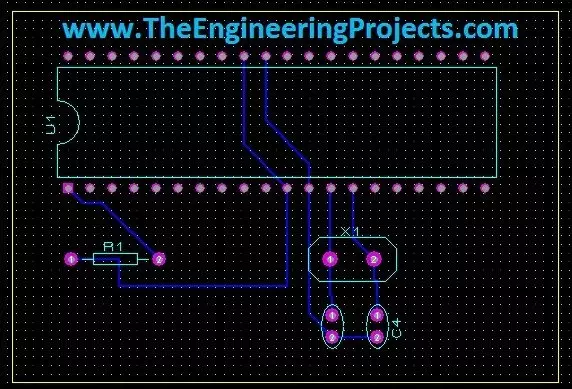
Hello friends, today's the last post of this Proteus tutorial. I have tried my best to explain everything but knowledge is limitless so explore this software, play with it and you will know many new things. Today's topic is about the PCB designing in Proteus. When you install Proteus, you have seen that along with ISIS there's also another package named as Proteus ARES. This Proteus ARES is used for PCB designing. You should also check the Arduino UNO PCB Design for Proteus ARES.
In order to design the PCB in Proteus ARES, first you need to make the circuit of that PCB in Proteus ISIS. You can also make PCB directly but I recommend that use Proteus ISIS first, its quite the easy approach as you don't need to do anything in it and the software in ...
Hello friends, hope you all are having fun in your life.
Today's tutorial is about the component designing in Proteus ISIS. This tutorial actually deals with the presentation of your project. Usually when students give presentation of their projects, then it is asked that add the circuit diagram of their project. Now when students open Proteus in order to design their circuit, they found out that the components they have used in their project are not available in the Proteus Directory. Now what to do ?
In that case, there's a need to design your own component in Proteus and place it in the circuit. Although, this new designed component won't work as the real co ...