Hello everyone! I hope you all will be absolutely fine ad having fun. Today, I am going to given an elaboration on Introduction to LM833. LM-833 is basically a dual general purpose amplifier. It is usually designed for audio systems. LM 833 is the most common Integrated Circuit (IC) available in the market now a days. This is due to its low cost and high performance activities. It uses bipolar technology.
LM-833 has several different features which make it ideal for general purpose applications. These features include dual supply operation, large input voltage swing, higher gain bandwidth product, higher slew rates, small input offset voltage supply etc. LM- 833 has different real life applications. These application ranges include High Fideli ...
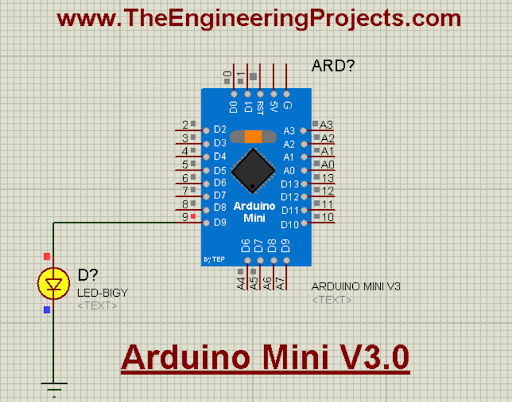
Hello friends! I hope you are doing great. Today, we are discussing the most upgraded version of the Arduino Mini in Porteus. Before this, we have shared the Arduino Mini library for Proteus and the Arduino Mini library for Proteus V2.0 with you. The Arduino Mini Library for Proteus V3.0 has a better structure and has some other changes that make it even better than the previous ones. This will be clear when you see the details of this library.
In this article, I will briefly discuss the introduction of Arduino Mini. You will learn the features of this board and see how to download and install this library in Proteus. In the end, I will create and elaborate a simple project with this library to make things clear. Let’s move towards our first topic:
Introduction to the Arduino Mini
The A ...
Hello Friends! Hope you are doing great. I am back to give you a daily dose of valuable information so you can excel and grow in your relevant field and keep coming back for what we have to offer. Today, I am going to unlock the details on the Introduction to 8051 Microcontroller. This is an 8-bit Microcontroller developed by Intel in the 1980s. It is considered as a small system on an integrated chip that comes with CPU, I/O ports, timers, counters, RAM and ROM. The Microcontroller is a one step forward to a microprocessor.
Both Microcontrollers and microprocessor work in a similar way with some exceptions. Microcottler comes with everything required to run an embedded system like CPU, I/O ports and inbuilt peripherals like timers, counters, ...
Hello friends, hope you all are having fun in your life.
Today's tutorial is about the component designing in Proteus ISIS. This tutorial actually deals with the presentation of your project. Usually when students give presentation of their projects, then it is asked that add the circuit diagram of their project. Now when students open Proteus in order to design their circuit, they found out that the components they have used in their project are not available in the Proteus Directory. Now what to do ?
In that case, there's a need to design your own component in Proteus and place it in the circuit. Although, this new designed component won't work as the real co ...
Hello friends,I hope you all are fine and having fun with your lives. In today's tutorial, I am going to share a new Proteus Library named as Flex Sensor Library for Proteus. I am quite excited while sharing this one because we are the first one to design this library and share it online. Although, I wanna add one thing here that most of the flex sensors are analog sensors and their resistance changes over bending and believe me I have tried my best to design an analog sensor but despite the efforts we couldn't so I am sharing a digital version of Flex Sensor. So, its not gonna detect how much its bent but it will detect whether its up or bent. So, I thought to share it with you guys. It's better to have something than nothing. You should also have ...
Hello everyone! I hope you all will be absolutely fine and fun. Today, I am going to tell you that how to make a simple algorithm for Stepper Motor Speed Control using Arduino. I have already discussed with you about DC Motor Direction Control using Arduino, Matlab and NI LabVIEW. Moreover, I have also discussed the DC Motor Speed Control using Arduino,Matlab and LabView. If you are working on Stepper Motor, then you must have a look at Stepper Motor Direction Control using Arduino, Stepper Motor Direction Control using Matlab and Stepper Motor Direction Control using NI LabVIEW. Now, in this tutorial I will explain you about the program which will helpful for Stepper Motor Speed Control using Arduino. Before going into the details of this tutori ...
Hello friends, I hope all are fine and having fun with your projects. We have covered enough Arduino commands in this Arduino Tutorial for Beginners series and now we are ready to create a simple project by interfacing an LED (Light Emitting Diode). Today, I am going to share a very Simple Arduino LED Example in Proteus ISIS. First I will blink single LED using Arduino UNO and then I will blink multiple LEDs in Proteus.
When you start working on Arduino then Arduino LED example is the first example which you must try because its the easiest one. Moreover, we all know that we have a small LED connected to pin # 13 on each Arduino so you can also check your Arduino as well that whether its working or not. So, let's get started with Simple Arduino LE ...
Hello friends, I hope you all are doing great. In today’s tutorial, we will have a look at What is Bistable Multivibrator and how it can be used in different circuits. In this type of multivibrator, the circuitry can operate in any state according to a signal provided at its input while it does not happen in a monostable multivibrator. This arrangement is also defined as a flip flop because flip flop also operates at more than one condition. It also has the ability to store a single bit of information so it is mostly used in logic circuits and in computer data storage part.
This vibrator like other vibrators is used for the production of square waves with providing some delay. These circuits are constructed with numerous kinds of semiconductor components. The most used semiconductor dev ...
Hello friends, I hope you all are doing great. In today's tutorial, we are gonna have a look at detailed Introduction to C2383. C2383 is a silicon Epitaxial NPN Transistor, it is manufactured for color television to control the sound submissions. It is an expedient which operate on the high voltage the value of VCEO is 160 volts. It is corresponding to A1013 transistor in design.
It is assembled in TO-92 MOD type of casing and has the dimension of 210±20um 240um×240um. It manufactured by the famous electronic company of Toshiba. In today’s post, we will have a look at its fortification, smashup, prominence, proposals, etc. I will also share some links where I have correlated it with other microcontrollers. You can also get more material about it i ...
Hello readers, I hope you are all doing great. In this tutorial, we are going to discuss the OTA web updater on the ESP32.
We already covered the fundamentals of OTA programming in ESP32, in our previous tutorial where we used the Arduino IDE to upload OTA code into the ESP32 module using the network port.
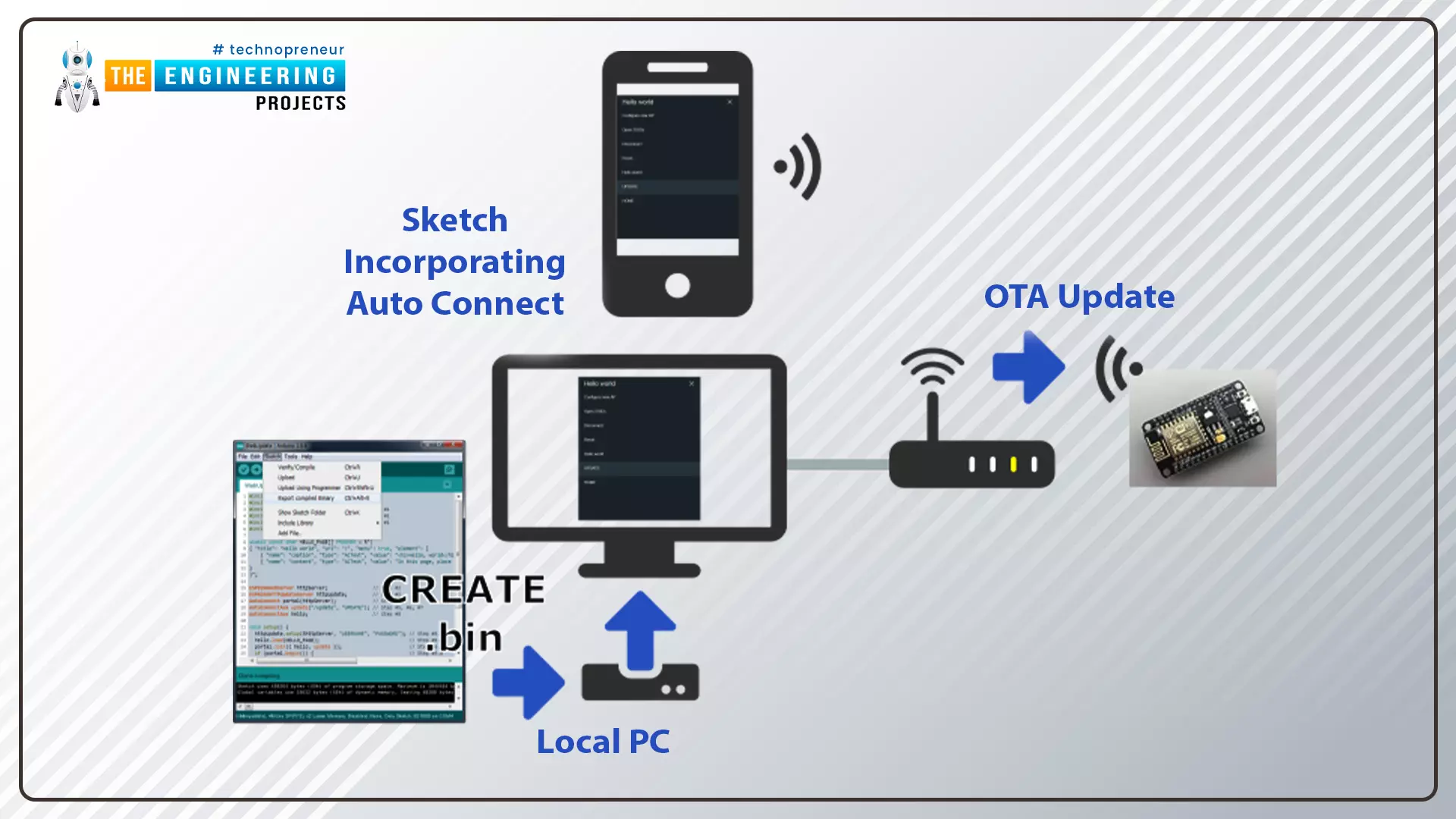
In the OTA web updater, you need to create a web server page for OTA programming.
[caption id="attachment_166886" align="aligncenter" width="1920"]
ESP32 OTA web updater[/caption]
Fig.1 ESP32 OTA web updater
Over the Air Web Updater
"Over-the-air" refers to the ability to wirelessly download an application, configuration, or firmware to internet-enabled devices, also known as IoT. (OTA). It functions similarly to our computers, laptops, tab ...