Hi Friends! Glad to have you on board. In this post today, we’ll cover How to Download Proteus Library of Arduino Modules.
If you are a regular reader of our blog, you must have noticed that we are sharing Proteus Libraries of different embedded sensors & modules on regular basis. Moreover, we have also launched version 2.0 of few libraries. So, today I am going to provide links to download Proteus Library of all Arduino Boards designed by TEP.
So, let's get started with How to Download Proteus Library of Arduino Modules:
Download Proteus Library of Arduino Modules V2.0
It's the most advanced version of Arduino Proteus Library and consists of 6 Arduino Boards in total, named as:
Arduino UNO
Arduino Mega 2560
Arduino Mega 1280
Ardu ...
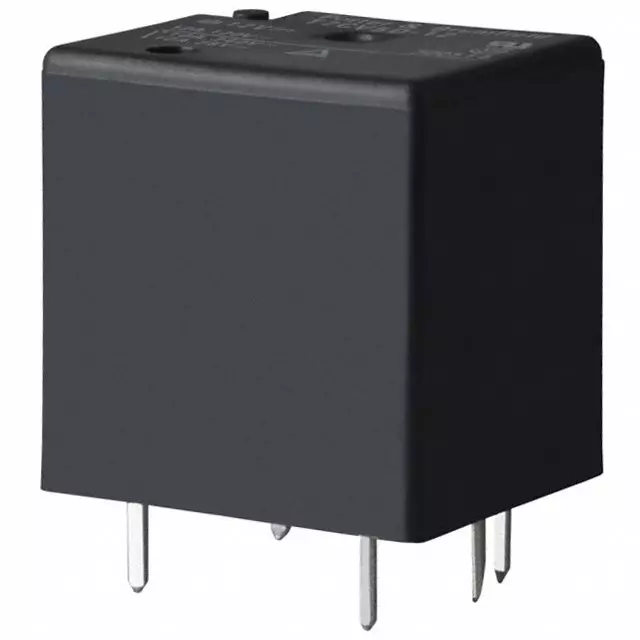
Hello friends, I hope you all are doing great. In today's tutorial, I am going to explain the Relay Interfacing with Microcontroller using ULN2003A. In the previous lecture, we have discussed the detailed Introduction to Relay along with its working. Now we are going to practically interface the relay with a microcontroller to design an automatic switch. Relay is a key component in almost every electronic circuit. It can be
used as a switch and can also be used as a voltage regulator.The microcontroller I am going to use here is PIC18F4552 but you can use any other Microcontroller. You just need to change the syntax of coding but the logic will remain the same. Here, I am using ULN2003A to control the relay and from this relay, we can control anything.So, let's get started:
Relay Inte ...
Hello friends, I hope you all are doing great. In today's tutorial, we are gonna have a look at detailed Introduction to MPR121. MPR121 is a touch sensor controller, its working is like the capacitor's working principle. This module has twelve electrodes points, it communicates via I2C protocol. When any objects come closer to an electrode point, we can observe the presence of an object by variation in capacitance of an electrode. It's working voltage should be between 2.5 to 3.6 VDC.
MPR121 is used in different industrial projects and electronic devices such as mobile phone and remote control systems. In today's post, we will have a look at its working, pinout, protocol, applications, etc. I will also share some links where I have interfaced it with other microcontrollers. If you have ...
Hello Everyone! Hope you’re well today. Happy to see you around. In this post today, I’ll walk you through the Introduction to FR107.Fr107 is a fast recovery diode mainly used for converting alternating current to direct current. It can support loads under 1A and carries a peak inverse voltage of 1,000 V.Read this post all the way through as I’ll detail the complete Introduction to FR107 covering datasheet, pinout, features, characteristics, and applications. Let’s get started.
Introduction to FR107
Fr107 is a fast recovery diode mainly used in fast-switching applications. It comes with two terminals called an anode and a cathode. The grey-colored band identifies the cathode side while the other side is the anode.
A highly efficient and ...
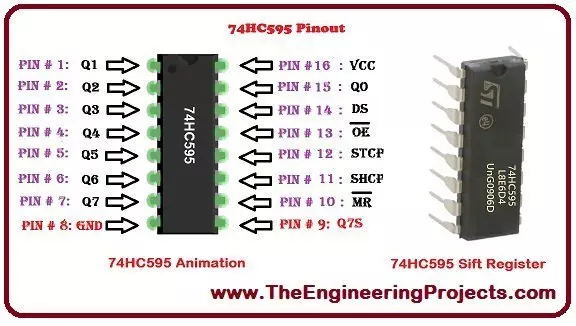
Hello everyone! I hope you will be absolutely fine and having fun. Today, I am going to explain all of you about Introduction to 74HC595. It is basically a shift register. It has an ability to store and to shift the data of 8 bits. First of all the data is written on the register serially and then it goes to the storage register. All of the output lines are controlled by this register.
74HC595 register is a very high speed device based on Complementary Metal Oxide Semiconductor (CMOS). 8 bit data register receives the data from the input DS. This data is then transferred from the input shift register to the output shift register. 74HC595 has a vey wide range of applications in daily life. It can be used as serial to parallel data converter, can ...
Hey Guys! I am back to give you a daily dose of information so you can excel and grow in your relevant field and keep coming back for what we have to offer. If you are a hobbyist or student, you require a transistor for the execution of your project every now and then.
Today, I am going to unlock the details on the Introduction to 2n4123. It is an NPN (negative-positive-negative) general purpose transistor which is mainly used for the amplification and switching purpose where collector current around 100mA is required. It is a semiconductor device mainly composed of silicon and comes with three terminals where a voltage applied to the one pair of terminals is used to control the current at the other pair of terminals.
I'll break down each and ev ...
Hey Fellas! Hope you are doing well. I feel pleasure to have you on this platform. Today, I'll discuss the detailed Introduction to Arduino Duemilanove which is a Microcontroller Board, introduced by Arduino.cc and is based on ATmega168 or ATmega328. It comes with 14 pins that can be used both ways: Input or Output. Duemilanove means "2009" in Italian.
Arduino boards have always been a good pick for hobbyists and students who intend to design projects that are mainly related to embedded system and automation. These boards are similar to microcontrollers, with little advantage over them as they come with some built-in peripheral features, setting you free from buying external components to employ automation in your project.
If we focus on Arduino ...
Hello friends, I hope you all are doing great. In today's tutorial, I am going to share a new Rain Sensor Library for Proteus. I have got a lot of requests for designing this sensor. So finally it has been designed by our team and is ready to use in your Proteus Simulations.
Rain Sensor, as the name shows, is used for detection of rain and is common sensor used in Embedded Systems Projects. Both analog and digital rain sensors are available these days but we have only designed the digital Rain Sensor. It will give digital output and its output will be HIGH when there's rain and will remain LOW if it won't detect any rain.
As Proteus is a simulation software and we can't actually bring the rain so that's why I have placed a TestPin. If you apply H ...
Hello everyone! I hope you all will be fine and having fun. Today, I am going to give you a detailed Introduction to MAX232. It is an Integrated Circuit(IC) embedded in a single chip and acts as a voltage-level converter. MAX 232 is capable of converting 5V TTL Logic level to TIA/EIA-232-F level and can take up to +-30V input. It is normally used for the communication between microcontroller and Laptop/PC.We can use MAX-232 to convert Transistor Transistor Logic (TTL) voltage level to RS232 and vice versa. RS232 is the method of transferring data using serial communication. MAX 232 is a dual receiver or driver having a capacitive voltage generator to supply RS232 voltage levels from a single supply of 5V. Each receiver converts RS232 inputs to 5V either Transistor Transistor Logic (TTL) ...
Hello friends, I hope you all are doing great. In today's tutorial, I am going to share a new IR Proximity Sensor Library for Proteus. Proximity Sensors are not available in Proteus and we are sharing its Proteus library for the first time. So far, I have only shared Proteus Libraries of digital sensors but today I am sharing an analog sensor, so too excited about it.
In the next few days, I will keep on sharing Proteus Libraries of different analog sensors, so if you want any sensor in Proteus, then let me know in the comments. IR Proximity Sensors are used to detect hurdles/obstacles placed in their path. They are normally used on robots for path navigation and obstacle avoidance. So, let's have a look at How to download and simulate IR Proximit ...