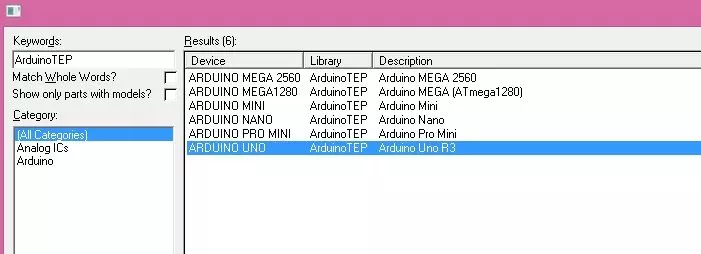
Hello friends! In this tutorial, we will install the Arduino Library for Proteus and use it to simulate a small Arduino circuit. This package brings several classic Arduino board components together, so you can choose a board that matches your project without installing each original library separately. Updates Arduino Library for Proteus Latest version: Arduino Library for Proteus V4.0 (October 2026): six boards with working LEDs, a RESET button and a built-in serial monitor Earlier versions: V3.0 (2023) · V2.0 (2021) · V1.0 (2015, this tutorial) One board only? UNO · Mega 2560 · Mega 1280 · Nano · Pro Mini · Mini (V4.0) Helping Tools Serial Monitor Advance : a serial terminal window for the UART of your board Serial Monitor Expert : the serial monitor with extra debugging tools LCD Libra ...
Hello friends! Today we will connect an Android phone to an Arduino through USB and exchange commands in both directions. This is useful when you want a wired control panel, a portable instrument display or a direct connection without configuring Bluetooth or Wi-Fi. We will start with one classic Arduino Uno and a small LED-control sketch. After that, we will revisit the original two-Arduino arrangement, which lets a computer monitor the bytes travelling through the phone connection. The second board is a debugging aid, not a requirement for Android communication. The important details are the phone's USB host support, the board's USB interface, permission to open the device and a clearly defined message format. Once these are understood, we can build a useful connection without treating U ...
Hello friends! Today we will connect two nRF24L01 radio modules to two Arduino boards and send a small command from one board to the other. We will start with the radio interface and wiring, install the RF24 library, and then use one complete sketch with a selectable transmitter or receiver role. The useful part of this project is not simply making a number appear in Serial Monitor. We also want to understand which settings must match, what an acknowledgment proves and how to distinguish an SPI connection problem from a wireless communication problem. Those distinctions make the same hardware much easier to use in a sensor node or remote-control experiment. The examples below target two Uno R3 boards and ordinary nRF24L01+ modules. The original wiring illustrations, demonstration video and ...
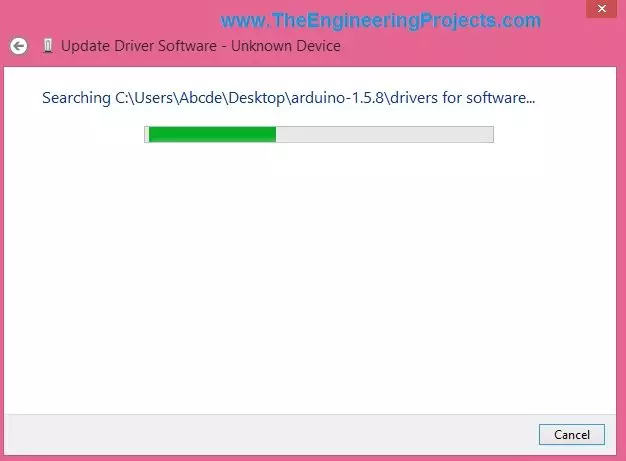
Hello friends! Today we will install or troubleshoot an Arduino USB driver in Windows. If you have followed our introduction to what Arduino is , this is the next practical step: making sure the computer can recognize your board before uploading a sketch. Many boards work as soon as they are connected because Windows already has a suitable driver. Others need a board package or a driver for their USB interface. We will first identify which situation applies, then use Device Manager to inspect the connection and complete a small upload test. The screenshots below come from the original Windows tutorial. They remain useful for understanding the manual installation sequence, but their dialog labels and Arduino software version are historical. Follow the corresponding controls in your Windows ...
Hello friends! This page organizes our Arduino projects into a practical learning path. We will begin with board setup and a first sketch, then move through displays, sensors, communication and combined applications. The aim is to help you choose the next useful exercise instead of searching through an unrelated collection of links. Work through the projects actively. Read the circuit, predict the result, run a small example and explain any difference you observe. You can also explore our Arduino projects for beginners and the corresponding PIC microcontroller project guide when comparing learning paths. The collection includes historical boards, software and simulation packages. Keep each tutorial's exact hardware and version requirements in mind. An example written for a classic Uno or a ...
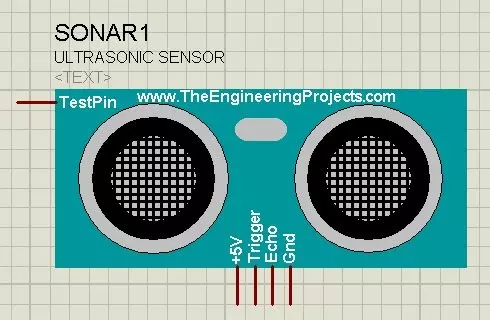
Hello friends! Today I will show you how to install our Ultrasonic Sensor Library for Proteus and use it with an Arduino Uno. We will begin with the library files, place the sensor on a schematic, connect its simulation input and then read the distance through the Virtual Terminal. This is the original HC-SR04-style library introduced in this tutorial. Updates Ultrasonic Sensor Library for Proteus Latest version: Ultrasonic Sensor Library for Proteus V2.0 (October 2026): HC-SR04 with real TRIG and ECHO timing, Simple and Advance devices, test tools and an Arduino demo Earlier versions: V1.0 (2015, this tutorial) Other distance and motion sensors: JSN-SR04T · Sharp IR · TF-Luna LiDAR · VL53L0X · PIR HC-SR501 · RCWL-0516 · IR Obstacle FC-51 Helping Tools Serial Monitor Advance : a serial ter ...
Hello friends! If you are developing an embedded project and need help with its firmware, The Engineering Projects can discuss your microcontroller programming requirements with you. Your project may involve a new prototype, a circuit that is not responding correctly or an existing program that needs a clearly defined improvement. Useful programming work starts with understanding the hardware and the required behaviour. A sentence such as “control a motor with a sensor” describes an idea, but it does not yet define a complete system. We need to know which motor, which sensor, how quickly the controller must respond and what should happen when a signal disappears. This page explains the types of work you can discuss with us, the information to prepare and the deliverables to agree before de ...
Hello friends! In this guide, we will learn how to use Proteus ISIS and ARES, starting with a simple circuit and gradually moving toward microcontroller simulations and PCB design. I have kept the original tutorial collection so that you can follow a lesson in detail whenever you reach that stage. Our goal is to understand the complete development process. We will draw a circuit, calculate what it should do, simulate its behavior, examine signals with instruments and then prepare a physical board layout. Each stage answers a different question, so a successful simulation is one step in the process rather than the final proof of a finished product. If you are new to Proteus, follow the sections in order. If you already use it, choose the topic you need from the linked lessons. Some screensh ...
Hello friends, I hope you are doing well. In this tutorial, we will build a simple serial terminal in Visual Basic 2010. The application will detect the COM ports available on a Windows computer, open a selected port, transmit text, receive incoming data and close the connection cleanly. This article keeps Visual Basic 2010 because that is the environment used in the original project and screenshots. According to the official Microsoft lifecycle record , Visual Studio 2010 reached the end of support in July 2020, so you should use a supported Visual Studio and .NET version for a new production application. However, the serial communication principles explained here still apply to maintenance work, laboratory computers and older engineering projects. We will begin with the electrical and pr ...