Hello friends, I hope you all are doing great. In today's lecture, we will have a look at the I2C Communication with STM32 Microcontroller board. I am going to use the Nucleo board for today's lecture. In the previous lecture, we have discussed STM32 Serial communication both in Interrupt Mode and polling Mode. Today, we will study another way of communication(i.e. I2C) with STM32. So, let's first have a look at what is I2C Communication: What is I2C Communication? I²C (Inter-Integrated Circuit) is a two-wire serial communication system used between integrated circuits. Like any serial protocol, one of its advantages is that of using only two lines that transmit or receive a sequence of bits, the limit is the communication speed which has been improved over the years. The bus was conceived ...
USART is the acronym for U niversal S ynchronous- A synchronous R eceiver- T ransmitter, and is the advancement of the old UART that was unable to handle synchronous communications; in computers, it deals with the management of communication via the RS-232 interface. Generally, in the communication between devices, there is a transmitter and receiver that can exchange data bidirectionally, thus it happens for example in the communication between the microcontroller and third-party peripherals. What is Serial Communication? In serial communications, the transmitting device sends information (bitstream) through a single channel one bit at a time. Serial communications are distinguished from parallel communications where the bitstream is sent over several dedicated lines altogether. Over the ...
We will use for our examples STM32CubeIDE released by ST and completely free. STM32CubeIDE is a development tool and supports multi operative system (SO), which is part of the STM32Cube software ecosystem. STM32CubeIDE allows using a single platform to configure peripherals, to generate/compile/debug the code for STM32 microcontrollers and microprocessors. The framework used is Eclipse®/CDT, as tool-chain for the development is used GCC toolchain and GDB for the debugging. To start the project, you must first select the MCU and then initialize and configure the peripherals the user wants to use. At this point, the initialization code is generated. At any time, the user can go back and change initializations and configurations, without affecting the user code. We will dive into these steps ...
To become familiar with the world of microcontrollers it is necessary to have a development board (also known as a kit), which generally allows you to start working on it easily. Fortunately, the ST provides a wide portfolio of development boards. In this guide, we will describe and use the Nucleo board. The Nucleo has been introduced a few years ago and its line is divided into three main groups: Nucleo-32; Nucleo-64; Nucleo-144. Nucleo-32 Development Board The number of pins available, so the package, gives the name to the board: Nucleo-32 uses an LQFP-32 package; Nucleo-64 and LQFP-64; Nucleo-144 an LQFP-144. The Nucleo-64 was the first line introduced and counts 16 different boards. The Nucleo boards have interesting advantages compared to the Discovery. First, is the cheaper cost, you ...
In this guide, we will explain step by step to start programming on the STMicroelectronics (STM) platform, especially the STM32 family. The term, "STM32" refers to a family of 32-bit microcontroller integrated circuits based on the ARM® Cortex®M processor. The architecture of these CPUs (Central Processing Unit) is ARM (Advanced Risk Machine) which is a particular family of Reduced Instruction Set Computing (RISC). RISC architecture differs from Complex Instruction Set Computing (CISC) for its simplicity that allows you to create processors capable of executing instruction sets with shorter times. Why use STM32? The advantages are many, and now we will list a part of them: ST offers a wide portfolio of solutions depending on the developer's needs. We can find products that combine differen ...
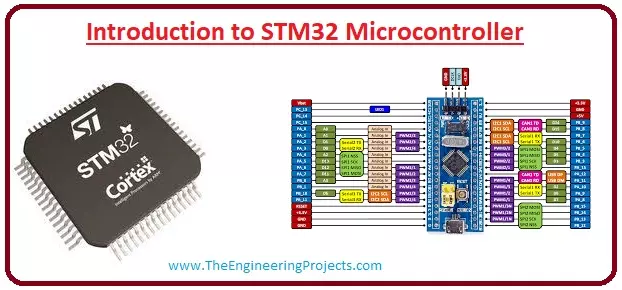
Hello friends, I hope you all are doing great. In today’s tutorial, we will have a look at Introduction to STM32 Microcontroller. This microcontroller is a new category of a microcontroller family it is a thirty-two-bit microcontroller also compatible with the ARM and Cortex M processor. Due to thirty-two bits compatibility, this module provides good performance, processing of digital signal and consumes less power and voltage. The modules used in most of the industries due to their compatibility with the cortex M0, M0+, M3, M4. In today's post, we will have a look at its working, features, pinouts, applications and some other related parameters. So lets with the Introduction to STM32 Microcontroller. Introduction to STM32 Microcontroller The STM32 is a type of microcontroller that offers ...
Hello friends! In this tutorial, we will learn how an XBee module carries data between electronic devices without a signal cable. We will begin with a simple wireless sensor example, identify the hardware and communication settings involved, and then work through the calculations that help us choose a power supply and estimate data capacity. Libraries XBee Simulation Libraries Latest library: XBee Library for Proteus V1.0 (January 2016) Other RF modules: nRF24L01 · nRF24L01 PA LNA · CC1101 · RFM69HCW · HC-12 · 433MHz RF Helping Tools Serial Monitor Advance : a serial terminal window for the UART of your board Serial Monitor Expert : the serial monitor with extra debugging tools LCD Library for Proteus V3.0 : 16x2, 20x4 and I2C LCDs to show your readings This is the first lesson in our XBee ...