Hello friends, I hope you all are doing great. Today, I am going to share the STM32 Blue Pill Library for Proteus. The Blue Pill is the board that brought STM32 to hobbyists: an STM32F103C8T6 - an ARM Cortex-M3 at 72 MHz with 64 KB of flash and 20 KB of RAM - on a small blue board that costs less than an Arduino Nano. With this library it runs your STM32 Arduino sketch in Proteus 8.5, with the STM32 core's pin names.
STM32 Blue Pill Library for Proteus
Latest version: V1.0 (October 2026, this tutorial)
Other new Arduino boards: UNO R4 WiFi · Nano ESP32 · UNO WiFi Rev2 · Nano 33 IoT · UNO Q · UNO R4 Minima · Nano Every · MKR WiFi 1010 · Nano RP2040 Connect · STM32 Black Pill · Nucleo-F401RE · Teensy 4.1 · Arduino Due · Arduino Leonardo · Arduino Micro · BBC micro:bit V2 · GIGA R1 WiFi
Motor drivers: L298 · L9110S · TB6612FNG · BTS7960 · A4988 / DRV8825 · 28BYJ-48 + ULN2003 · PCA9685 Servo · Relay Module
Input modules: Joystick · Rotary Encoder · Membrane Keypad · TTP229 Keypad · TTP223 Touch · IR Remote · Fingerprint R307
Other displays: OLED · Nokia 5110 · LCD 128x64 · ST7735 · ST7789 · ILI9341 · TFT Shield 2.4 inch · TFT Shield 3.5 inch · E-Paper
Ethernet libraries: Ethernet Shield · Ethernet Shield 2 · W5500 Module · W5100 Module · ENC28J60 Module · ENC28J60 Nano Shield · Ethernet Rev3 · LAN8720 Module · WT32-ETH01 · USR-TCP232-T2
Helping Tools
- Laptop WiFi Monitor: a laptop on the Wi-Fi of your design: a browser, a TCP / UDP terminal and ping
- Mobile WiFi Monitor: a smartphone that opens the pages of your board and sends it commands
- Serial Monitor Advance: a serial terminal window for the UART of your board
The demo is a motorised rotary table, the kind that indexes a part under a drill or turns a camera for a panorama. A KY-040 encoder sets the angle, an A4988 driver turns a NEMA 17 stepper to it, a 128 x 64 ST7920 LCD shows a dial, and a W5500 Ethernet module gives the table a page with presets for a phone and a laptop.
NOTICE: Proteus has no STM32F103 model, so our team has put a lot of effort into building this board ourselves: the Blue Pill's pins, button and LEDs are all our own model, and your sketch compiles with our free TEP Boards for Proteus add-on. Your feedback is the fuel that keeps us going, so please tell us what you think in the comments below or in the STM32 Blue Pill board of our forum. And if our free libraries help you, you can buy us a coffee. So, let's get started with the STM32 Blue Pill Library for Proteus:
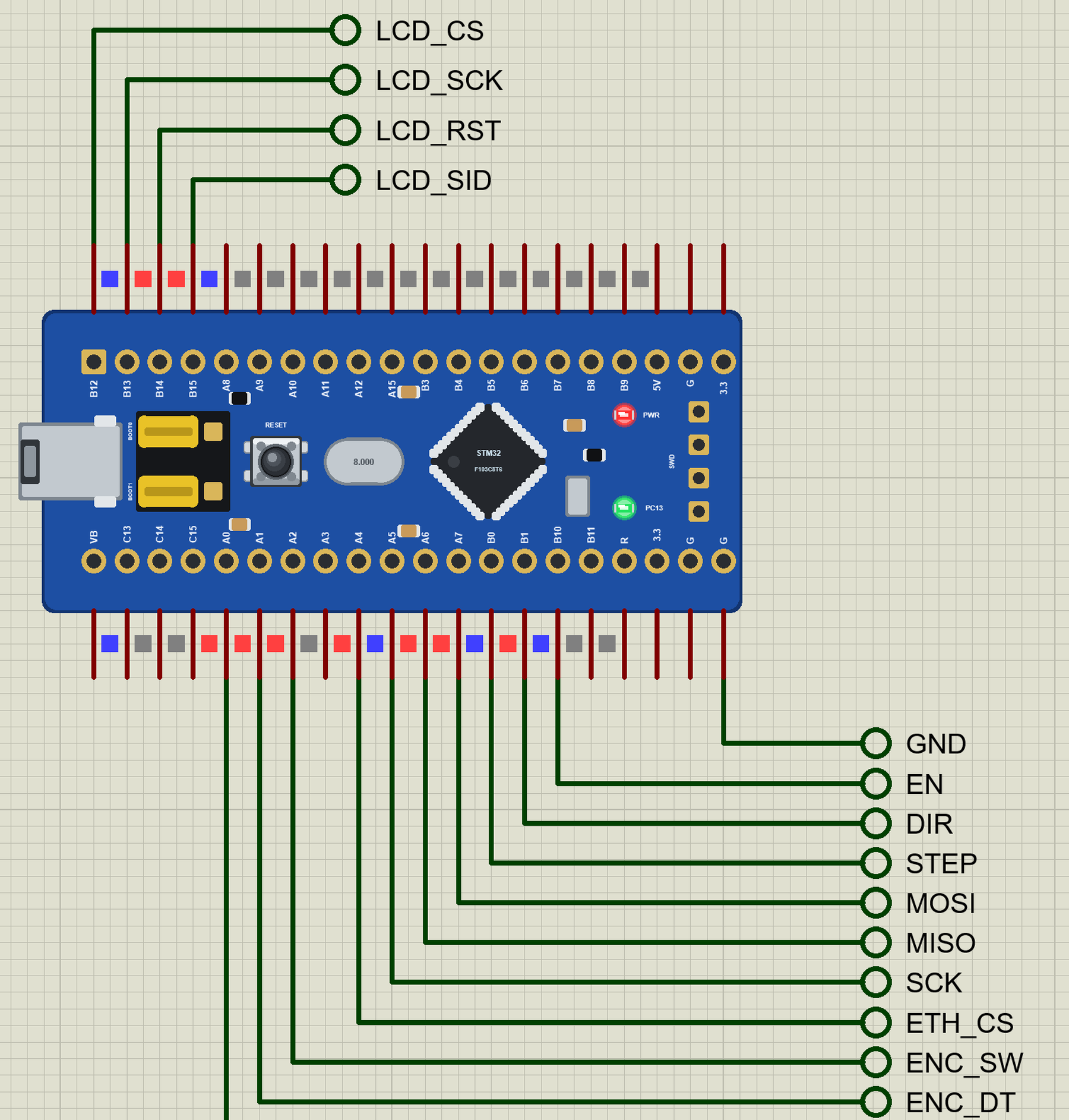
What is the STM32 Blue Pill?
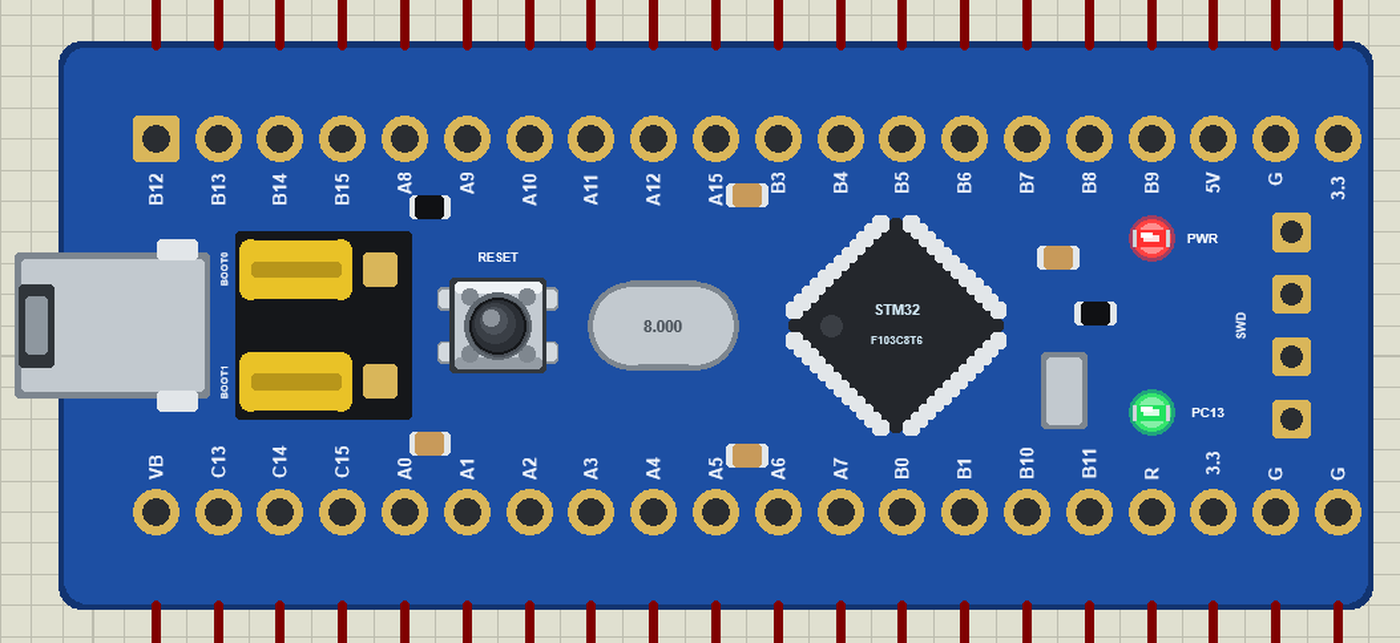
"Blue Pill" is the nickname of a generic board made by many Chinese factories since about 2016. It carries the STM32F103C8T6, a chip turned 45 degrees in the middle of the board, an 8 MHz crystal for the CPU and a 32.768 kHz crystal for the real-time clock, a micro-USB socket, a RESET button and two yellow jumpers, BOOT0 and BOOT1, that choose where the chip starts from. A red LED shows the power and a green one sits on PC13, lit when the pin is LOW. A 4-pin SWD header at the end takes an ST-LINK for programming and debugging.
| Blue Pill (F103) | Black Pill (F411) | |
|---|---|---|
| Chip | STM32F103C8T6, Cortex-M3 at 72 MHz | STM32F411CEU6, Cortex-M4F at 100 MHz |
| Memory | 64 KB flash, 20 KB RAM | 512 KB flash, 128 KB RAM |
| USB | micro-USB, needs a bootloader or a programmer | USB-C, DFU bootloader built in |
| Buttons | RESET; BOOT0 / BOOT1 jumpers | BOOT0, NRST, KEY (PA0) |
| User LED | green, PC13 (lit when LOW) | blue, PC13 (lit when LOW) |
| Pins | 2 x 20, 32 GPIOs (PB11, no PB2) | 2 x 20, 32 GPIOs (PB2, no PB11) |
The pinout is the one the STM32 Black Pill Library for Proteus copied: the same rows, almost the same order, the same names. A sketch written for one runs on the other with hardly a change.
Why the STM32 Blue Pill?
Thousands of tutorials, CNC controllers, 3D-printer boards and student projects are built on the STM32F103, and the Blue Pill is the cheapest way to get one. It has plenty of timers, three serial ports, two I2C and two SPI buses, a CAN controller and a 12-bit ADC - a big step up from an 8-bit Arduino, while the Arduino IDE still works through STM32duino. For motion control, data logging and anything with many pins it remains a favourite.
Features of the STM32 Blue Pill Library for Proteus
- The board as it looks: the blue Blue Pill with its two rows of pins, micro-USB, the BOOT0 / BOOT1 jumpers, RESET, the crystals, the STM32F103 at 45 degrees, the SWD header and the two LEDs.
- Your sketch: a .hex for "STM32 Blue Pill F103C8 (TEP Proteus)" with the STM32 core's names - PA0 to PC15, LED_BUILTIN = PC13 - analogRead, analogWrite, attachInterrupt, Serial, Serial1 on PA9 / PA10, Wire on PB6 / PB7, SPI on PA4 to PA7.
- RESET and the LEDs: R and the button reset the board, the green LED lights when PC13 is LOW, the red one shows the power.
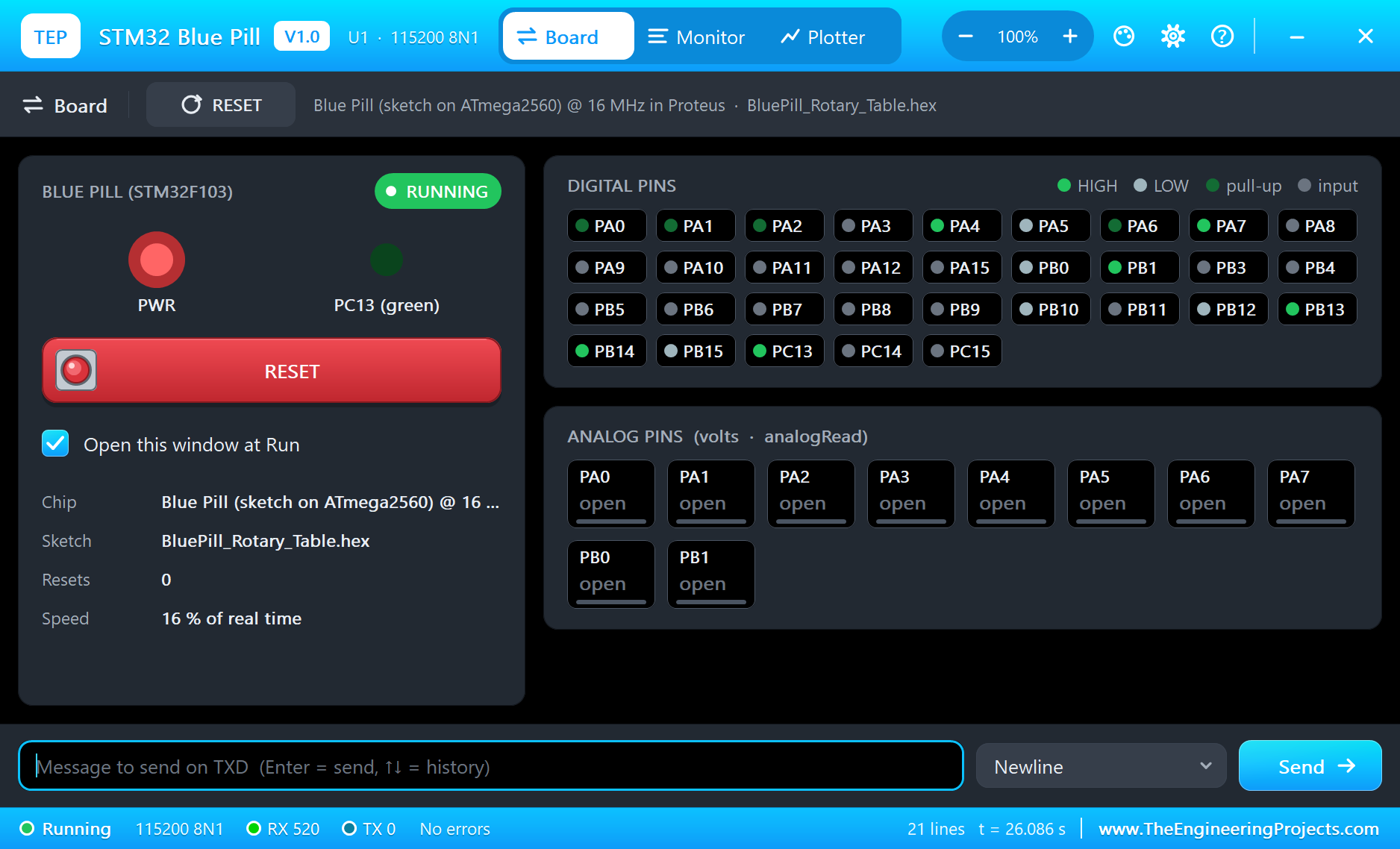
- The serial monitor: the built-in monitor on the USB with Monitor, Plotter and Board tabs - our TEP header, no Windows title bar.
- A complete package: about 3.9 MB with the board, the add-on, the A4988 and NEMA 17, KY-040, LCD 12864 and W5500 libraries and the demo, without the source code of the models.
The STM32 Blue Pill in Proteus
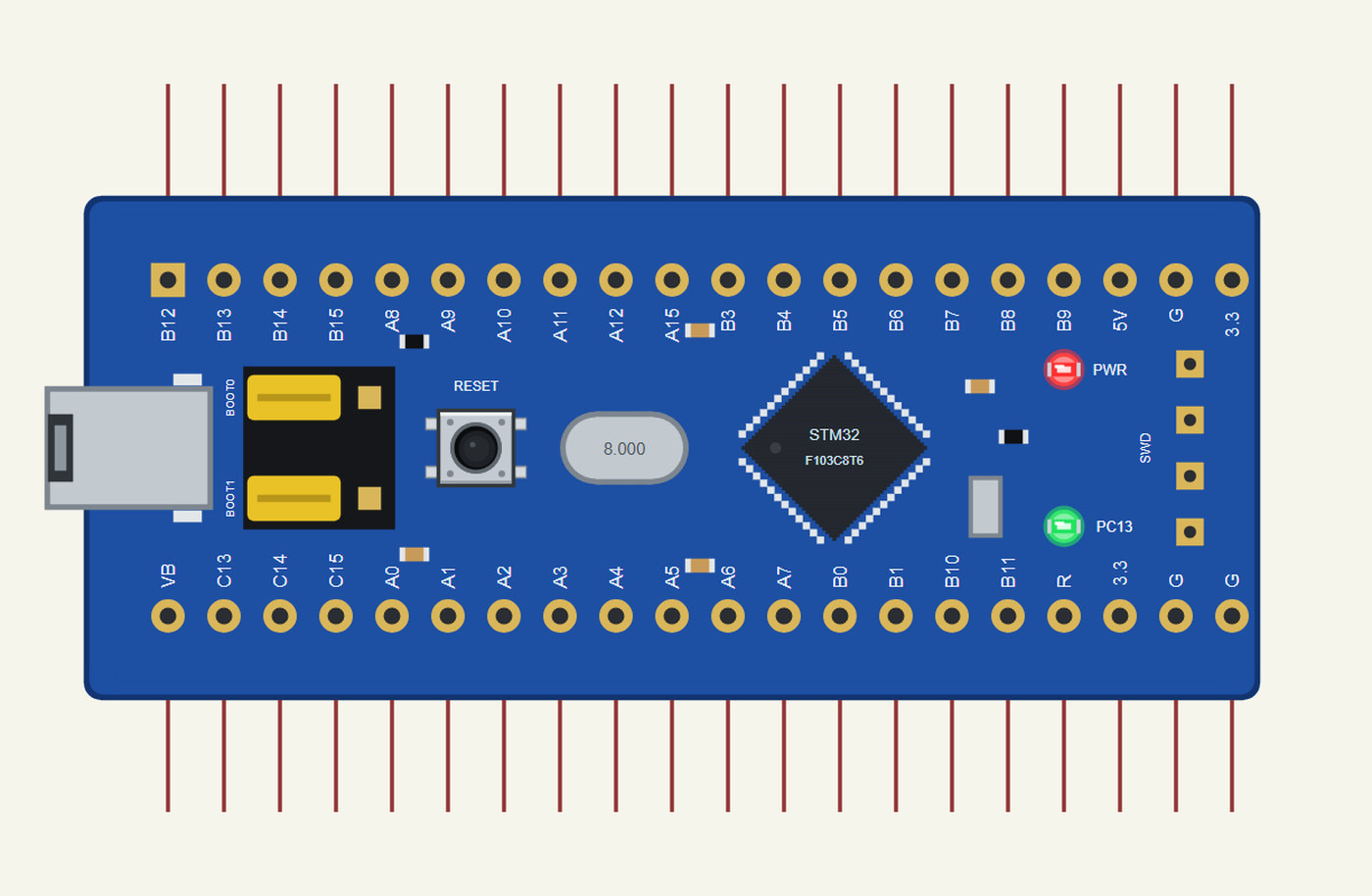
Search BLUE PILL in Pick Devices; the device STM32 BLUE PILL is in TEPBLUEPILL.LIB (Microprocessor ICs, STM32 Boards), with the prefix U. The board lies with micro-USB on the left: on top B12 to B9 with 5V, G and 3.3 at the end, at the bottom VB, C13 to C15, A0 to A7, B0, B1, B10, B11, R and the supplies. Click the micro-USB to open the serial monitor.
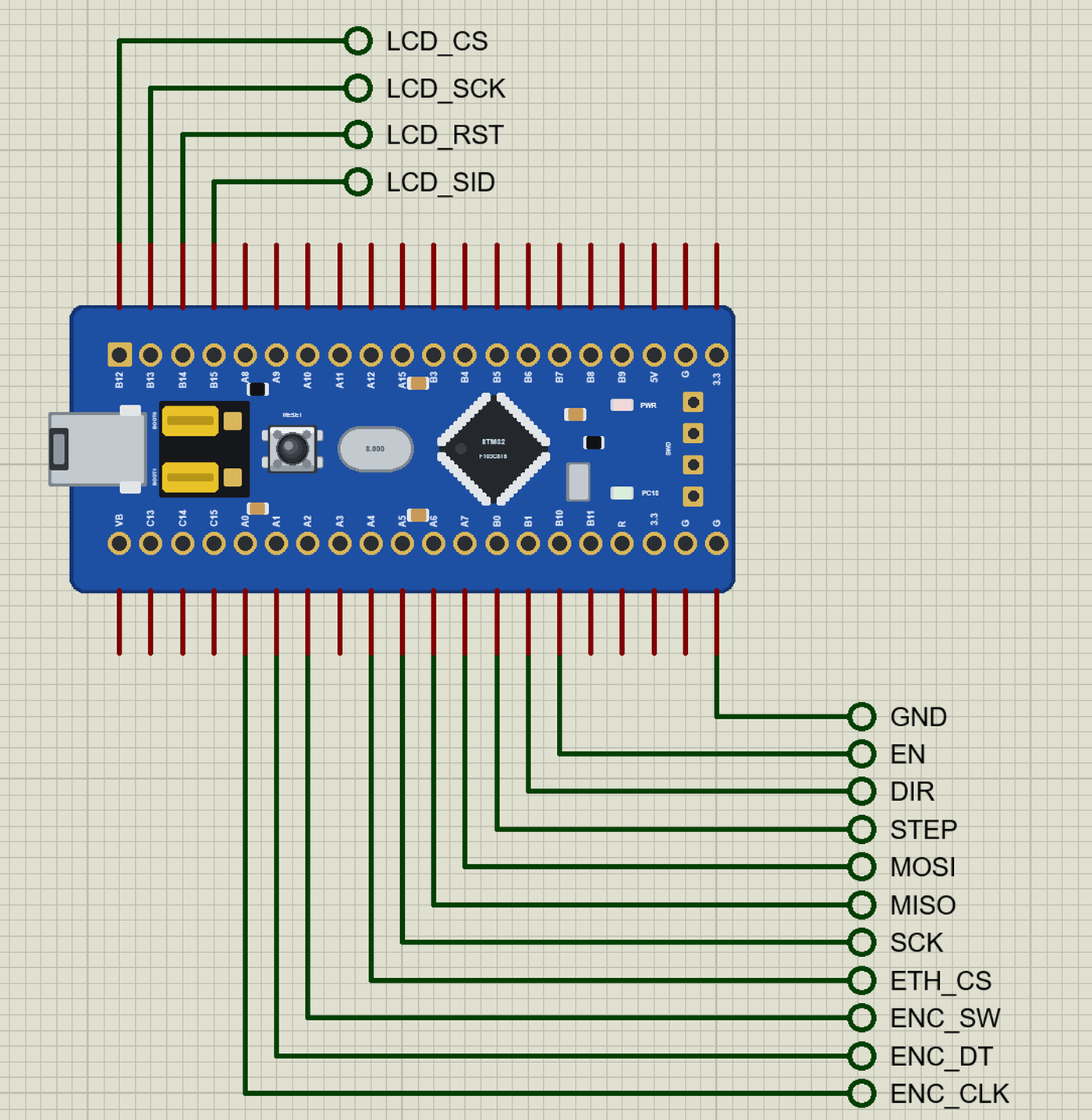
The Pins
| Pins | What the library does with them |
|---|---|
| PA0 to PA7, PB0, PB1 | GPIO, analogRead (ADC1 channels 0 to 9), PWM, interrupt |
| PA9 / PA10 | Serial1 TX / RX |
| PB6 / PB7 | Wire SCL / SDA |
| PA4 to PA7 | SPI1 SS / SCK / MISO / MOSI |
| PC13 | GPIO and the green LED (LED_BUILTIN, lit when LOW) |
| the other A, B and C pins | GPIO, PWM, interrupt |
| R | RESET: LOW holds the board in reset |
| 3.3, 5V, G | 3.3 V, 5 V, ground |
Download STM32 Blue Pill Library for Proteus
Click the button below to download STM32-Blue-Pill-Library-for-Proteus-v1.0.zip (about 3.9 MB, without the source code of the models):
STM32 Blue Pill Library for Proteus V1.0- README.txt: installation, the demo, the pins, the properties, troubleshooting and the limits.
- Proteus Library Files:
TEPBLUEPILL.LIBand the demo's parts:TEPSTEPPER.LIB,TEPKY040.LIB,TEPLCD12864.LIB,TEPW5500MOD.LIB,TEPLAPTOP.LIBandTEPMOBILE.LIB. - Proteus Model Files:
TEPNET.DLL(the board, the W5500, the laptop, the phone and the network),TEPSTEPPER.DLL,TEPKY040.DLLandTEPLCD12864.DLL. - Arduino Code: the demo sketch and the TEP Boards for Proteus add-on 1.29.0.
- Proteus Simulation: the demo project, its HEX file and copies of the DLLs.
No Proteus yet? Read How to Download and Install Proteus 7 and 8. New to libraries? Follow How to Install a New Library in Proteus.
How to Install STM32 Blue Pill Library for Proteus
- Close Proteus and extract the whole zip file, for example to your Desktop.
- Copy the files from Proteus Library Files into the LIBRARY folder of Proteus.
- Copy the DLLs from Proteus Model Files into the MODELS folder, replacing an older TEPNET.DLL.
- Delete
TEPBLUEPILL.IDXfrom the LIBRARY folder if it is there. - For your own sketches, copy Arduino Code\TEP Boards for Proteus\hardware into your Arduino sketchbook (Documents\Arduino) and restart the Arduino IDE; the board is STM32 Blue Pill F103C8 (TEP Proteus). For the demo install U8g2 and Ethernet from the Library Manager.
- Start Proteus, press P and search for BLUE PILL.
Demo: a Motorised Rotary Table
A rotary table holds a part and turns it to exact angles: 90 degrees to drill the next hole, 15 degrees for the next tooth of a gear, a full turn for a 3D scan. A stepper motor is the natural drive - it moves in fixed steps, so the controller knows the angle without a sensor, as long as it never loses a step.
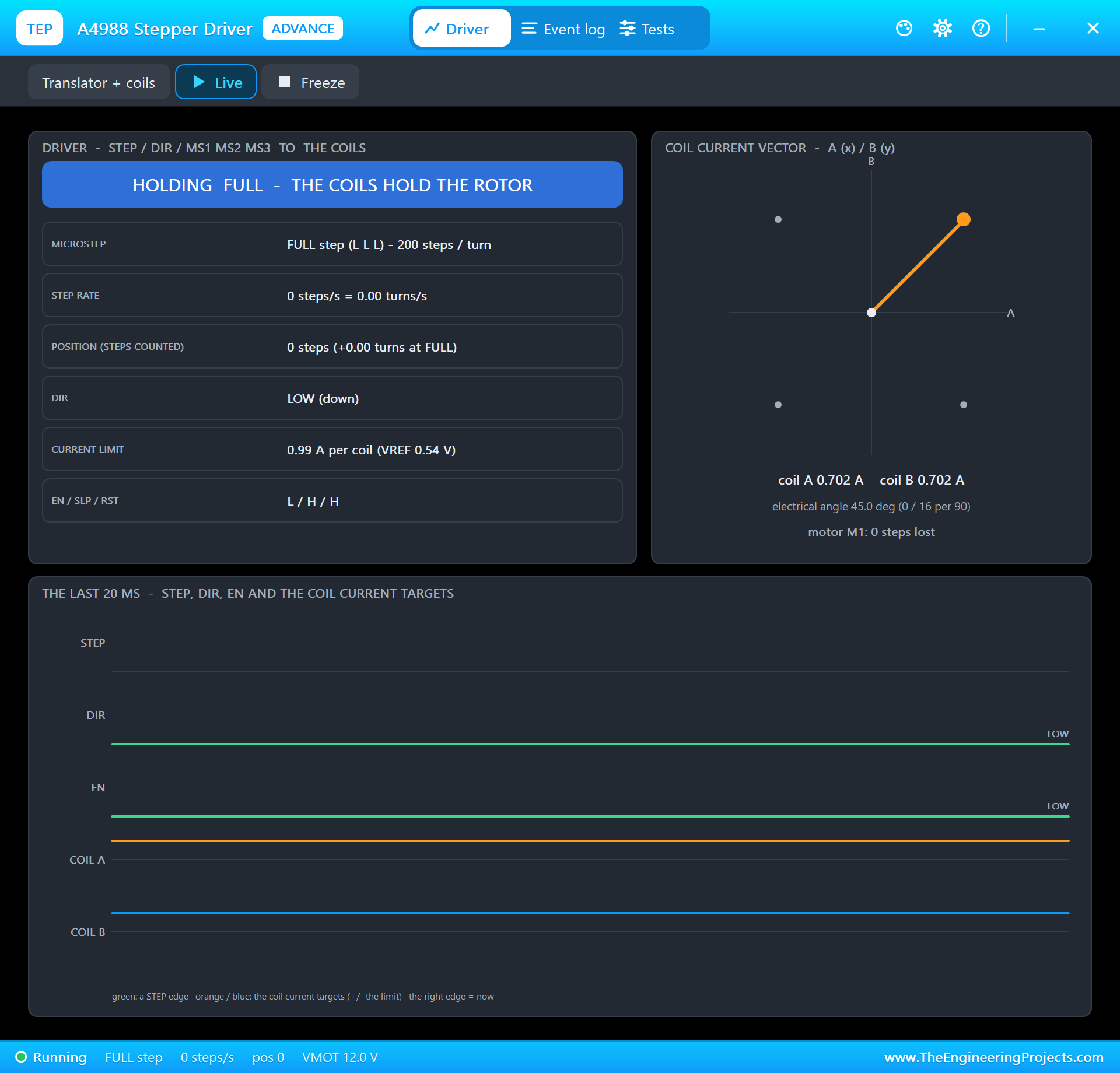
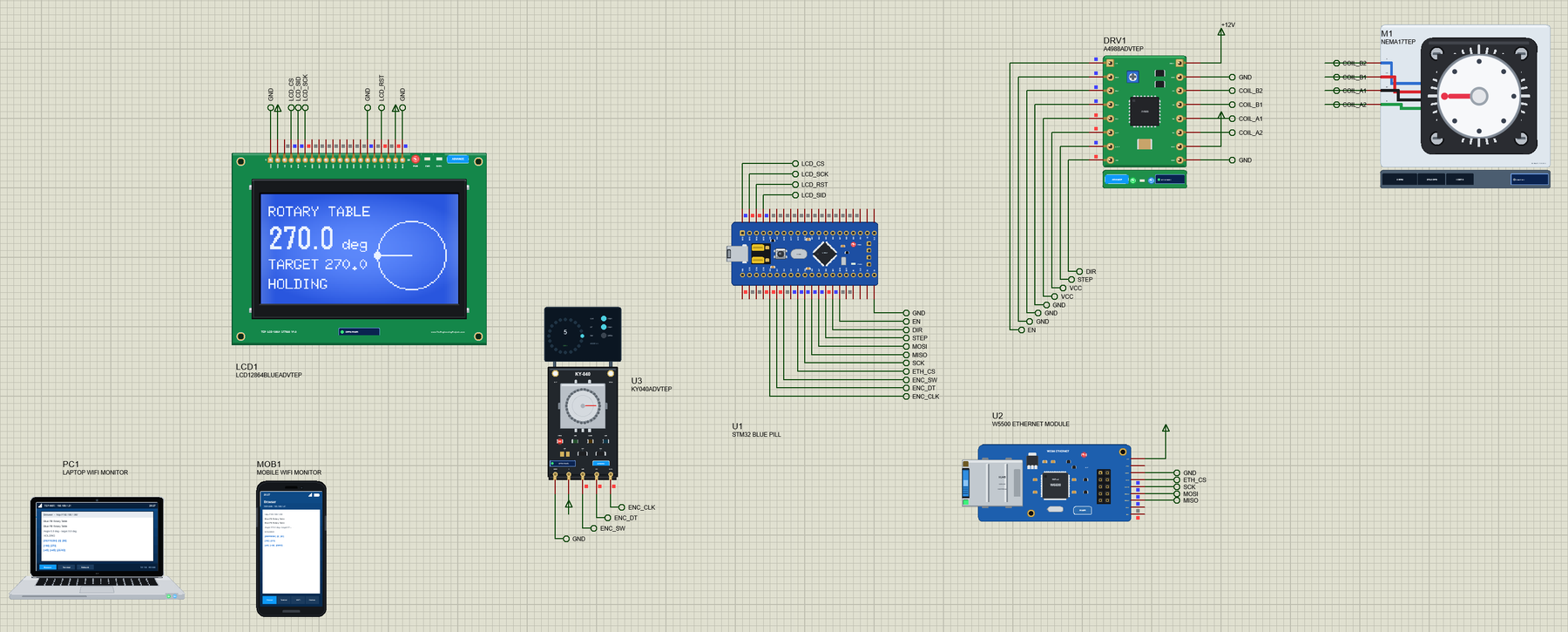
Open Blue-Pill-Rotary-Table.pdsprj. U1 runs BluePill_Rotary_Table.hex. DRV1 and M1 are the driver and the motor from our A4988 and DRV8825 Stepper Driver Library for Proteus, U3 the encoder from our Rotary Encoder Library for Proteus, LCD1 the display from our LCD 128x64 Library for Proteus and U2 the module from our W5500 Ethernet Module Library for Proteus. The driver, the encoder and the LCD are the Advance versions: each opens its pop-up window at Run, as the W5500 does. PC1 is the Laptop WiFi Monitor and MOB1 the Mobile WiFi Monitor.
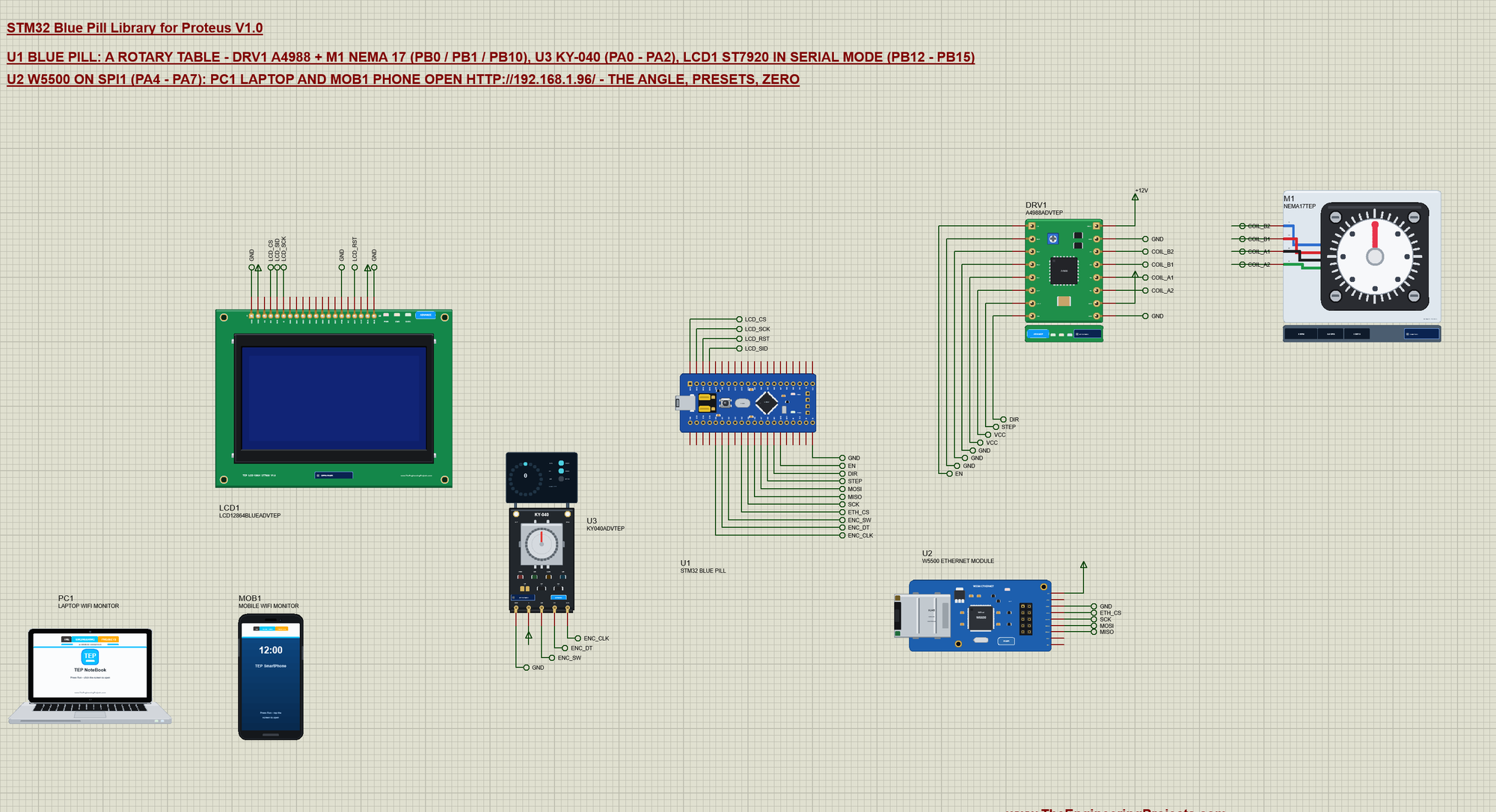
| Part | Pins | Blue Pill pins | Notes |
|---|---|---|---|
| A4988 (DRV1) | STEP, DIR, EN | PB0, PB1, PB10 | MS1 to MS3 on GND: full steps; RST and SLP high |
| NEMA 17 (M1) | A+, A-, B+, B- | the A4988's 1A, 1B, 2A, 2B | 200 steps a turn; the A4988's VMOT on +12V |
| KY-040 (U3) | CLK, DT, SW | PA0, PA1, PA2 | 20 clicks a turn; SW with the pin's pull-up |
| ST7920 LCD (LCD1) | RS (CS), E (SCLK), RW (SID), RST | PB12, PB13, PB15, PB14 | serial mode: PSB on GND |
| W5500 (U2) | SCS, SCLK, MISO, MOSI | PA4, PA5, PA6, PA7 | SPI1, the fixed address 192.168.1.96 |
Reading the Encoder Without Missing a Click
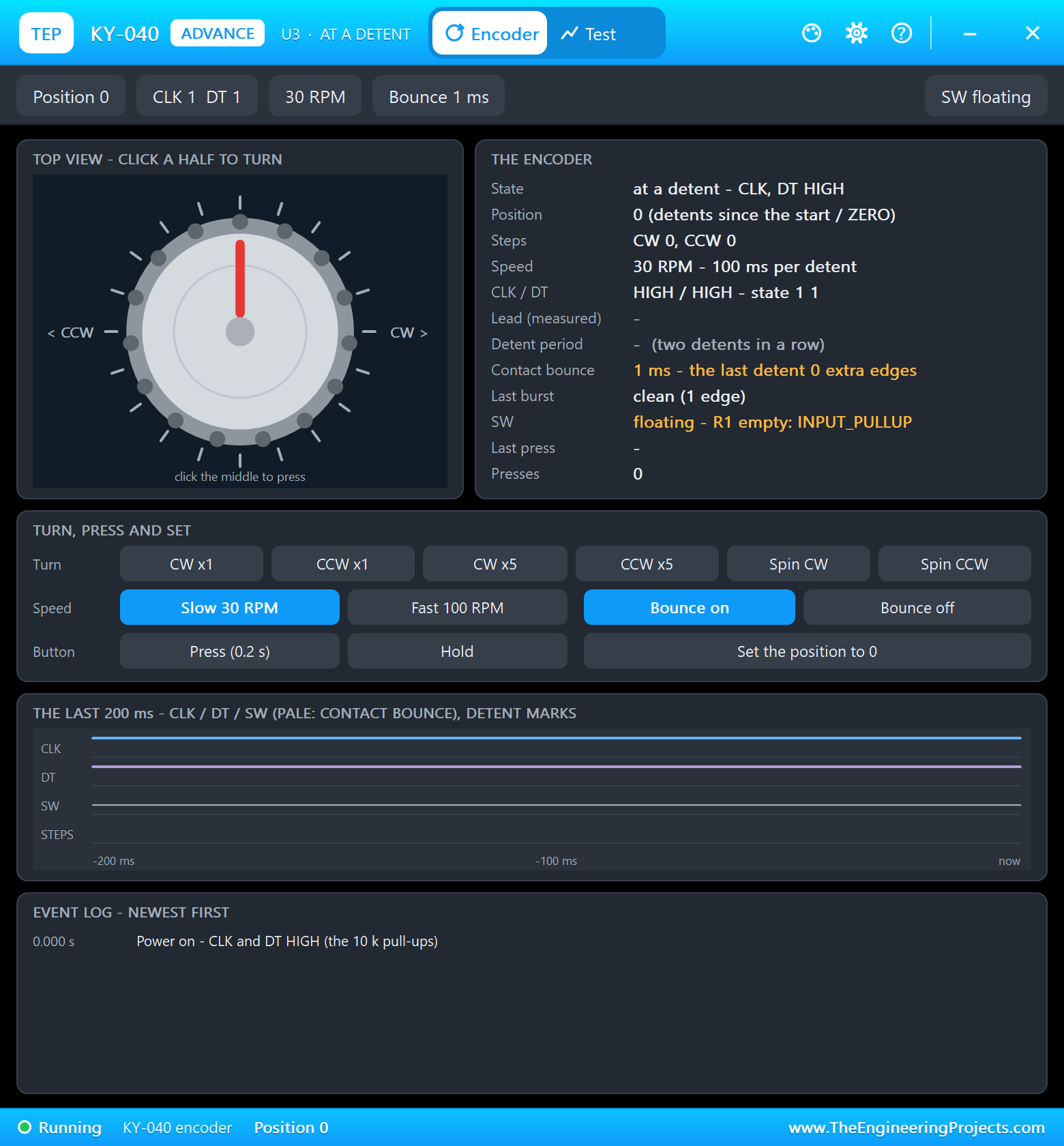
A KY-040 gives two square waves, CLK and DT, a quarter of a cycle apart; which one changes first tells the direction. Its contacts also bounce - each edge comes as a short burst - and a sketch that only looks at DT when CLK falls counts some bursts twice and turns the wrong way. Our KY-040 model bounces like a real one, so the sketch follows every edge of both pins through a small table: a real step adds one quarter, a bounce adds and takes it back again. A click counts only when both pins are back HIGH at a detent:
const int8_t QUAD[16] = {0, -1, 1, 0, 1, 0, 0, -1, -1, 0, 0, 1, 0, 1, -1, 0};
void onEdge() {
  const uint8_t now = (digitalRead(ENC_CLK) << 1) | digitalRead(ENC_DT);
  quarter += QUAD[(ab << 2) | now];
  ab = now;
  if (now == 3) {
    if (quarter >= 2) clicks++; else if (quarter <= -2) clicks--;
    quarter = 0;
  }
}
attachInterrupt(digitalPinToInterrupt(ENC_CLK), onEdge, CHANGE);
attachInterrupt(digitalPinToInterrupt(ENC_DT), onEdge, CHANGE);The KY-040 has 20 clicks a turn and the motor 200 steps, so one click is 10 steps - 18 degrees: the table turns exactly as far as the knob. The push button sets the zero; a second press within 200 ms is a bounce and is ignored:
  const bool sw = digitalRead(ENC_SW) == LOW;              // the encoder's button: one zero per press (a bounce within 200 ms is ignored)
  if (sw && !swWas && millis() - swAt > 200) { swAt = millis(); zero(F("the encoder")); }
  swWas = sw;
Driving the Stepper
An A4988 needs only two signals: a pulse on STEP moves the motor one step, the level on DIR picks the direction. The sketch never waits for a move: every pass of loop() it checks whether the next step is due - 150 steps a second - and gives one pulse. The green LED shows a move:
void stepper() {
  if (position == target) {
    if (moving) {
      moving = false; digitalWrite(LED_BUILTIN, HIGH); drawn = false;
      Serial.print(F("At ")); Serial.print(angleOf(position), 1); Serial.println(F(" deg"));
    }
    return;
  }
  if (!moving) { moving = true; digitalWrite(LED_BUILTIN, LOW); digitalWrite(EN_PIN, LOW); }
  if (micros() - lastStep < STEP_US) return;
  lastStep = micros();
  const bool forward = target > position;
  digitalWrite(DIR_PIN, forward ? HIGH : LOW);
  digitalWrite(STEP_PIN, HIGH); delayMicroseconds(4); digitalWrite(STEP_PIN, LOW);
  position += forward ? 1 : -1;
}
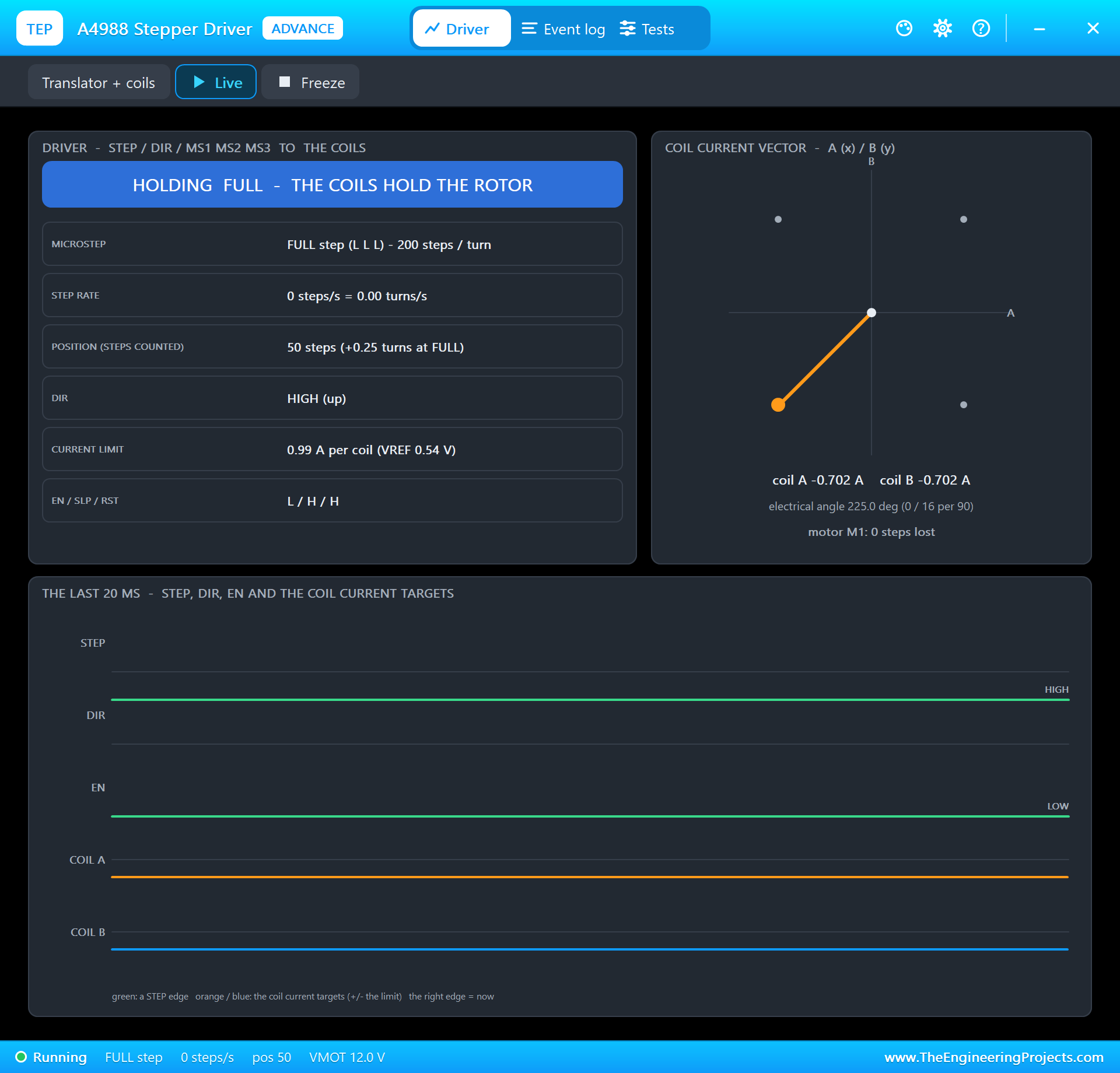
The demo runs the A4988 in full steps (MS1 to MS3 LOW): 200 steps a turn and the strongest holding torque. Tie the MS pins HIGH and the same motor makes 3200 microsteps a turn - smoother and quieter, but every step is a sixteenth as large and the sketch must send sixteen times as many pulses. The current limit is set by the small potentiometer on the module; its Advance pop-up shows the current each coil gets.
A preset from the page takes the shortest way round: from 350 degrees to 10 it goes forward 20, not back 340:
void goToAngle(float deg, const __FlashStringHelper *from) {    // the shortest way round to that angle
  long want = lround(deg * STEPS_PER_TURN / 360.0);
  long d = (want - position) % STEPS_PER_TURN;
  if (d > STEPS_PER_TURN / 2) d -= STEPS_PER_TURN;
  if (d < -STEPS_PER_TURN / 2) d += STEPS_PER_TURN;
  goTo(position + d, from);
}
The LCD in Serial Mode
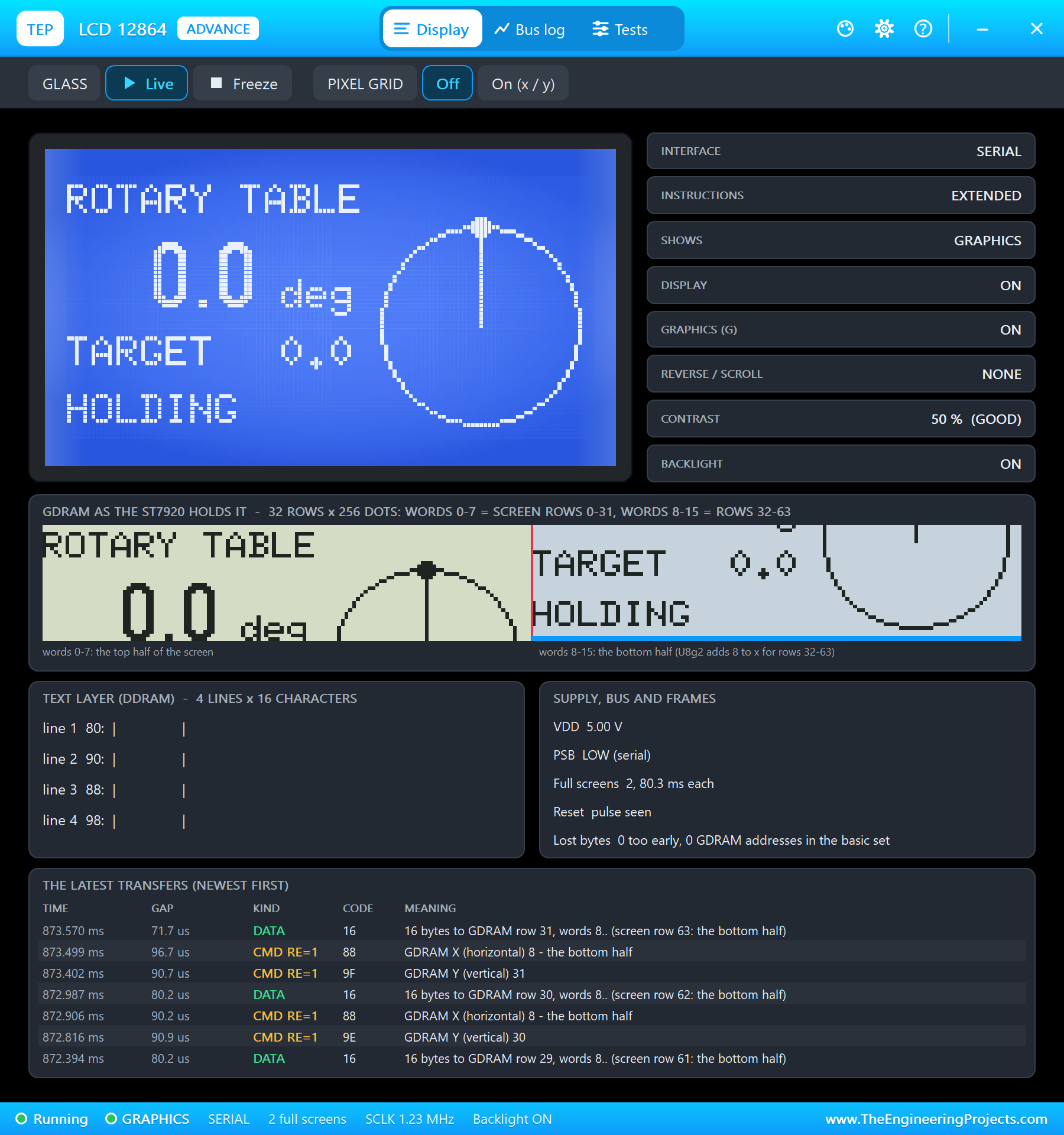
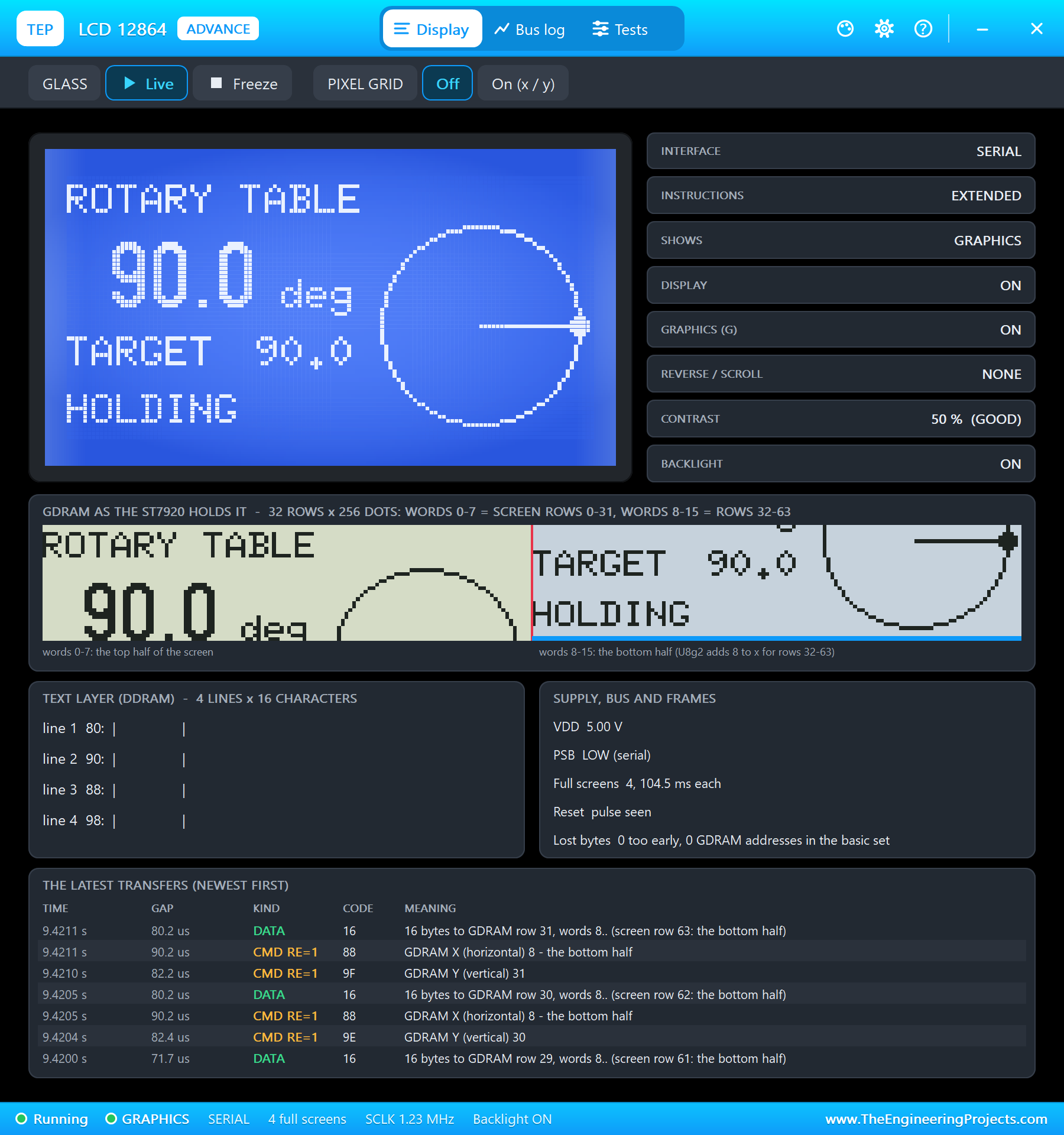
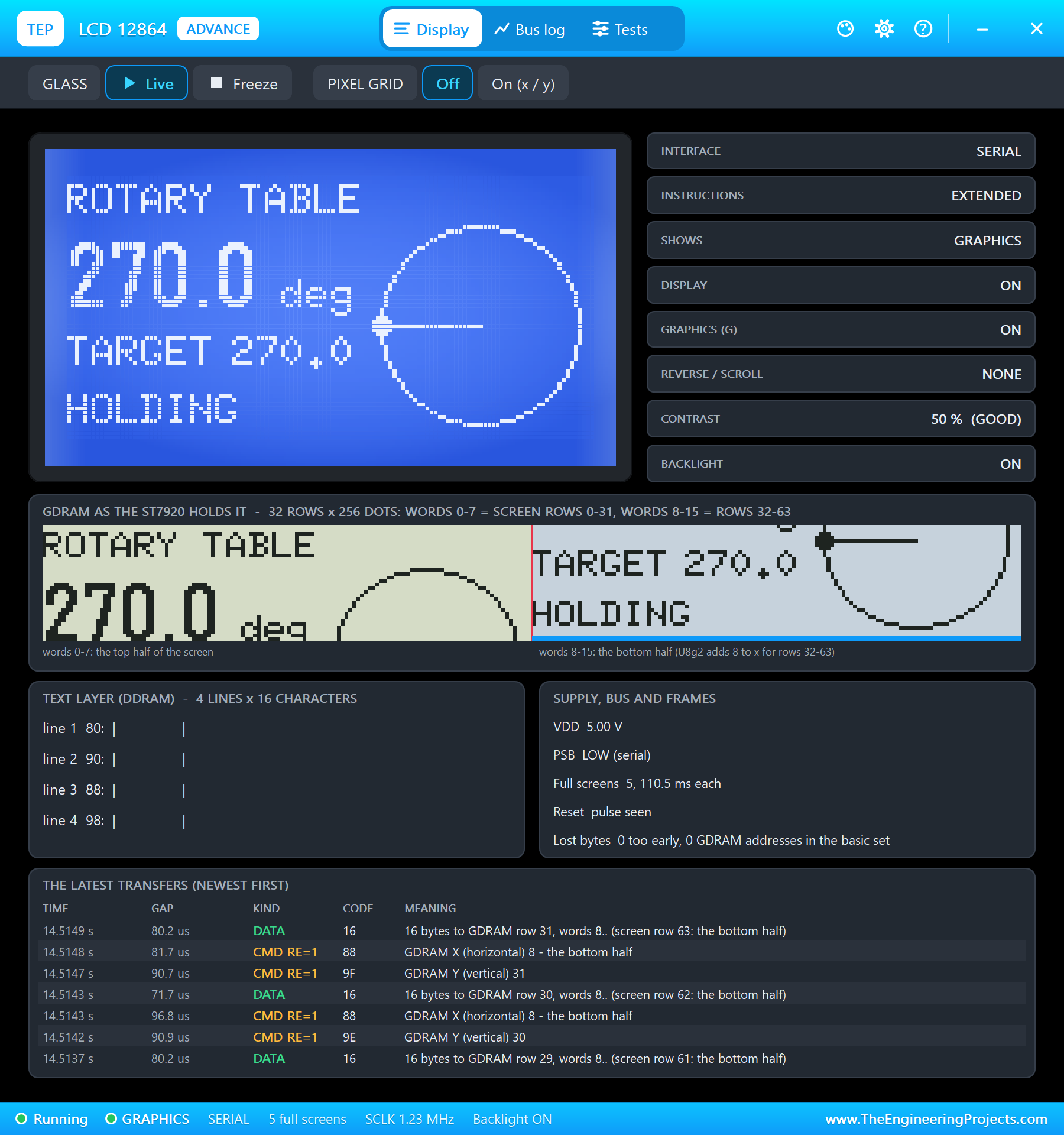
The ST7920 can talk over 8 data lines or over three wires. With PSB on GND it uses the three-wire serial mode, which U8g2 drives in software on PB12, PB13 and PB15. The page-buffer version (the _1_ in the name) needs only 128 bytes of RAM:
U8G2_ST7920_128X64_1_SW_SPI lcd(U8G2_R0, PB13, PB15, PB12, PB14); // clock, data, CS, resetThe screen shows the angle in large digits, the target and a dial with a needle for the angle and a dot for the target:
    lcd.drawCircle(100, 36, 24);                           // the dial: 0 at the top, clockwise
    lcd.drawLine(100, 36, 100 + 22 * sin(a * PI / 180), 36 - 22 * cos(a * PI / 180));
    lcd.drawDisc(100 + 24 * sin(t * PI / 180), 36 - 24 * cos(t * PI / 180), 2);
A full redraw takes a few tens of milliseconds, long enough to make the motor stutter, so the sketch redraws only while the table holds:
if (!moving && !drawn) drawLcd(); // the LCD only while the table holds: a redraw would stall the stepsThe Network Page
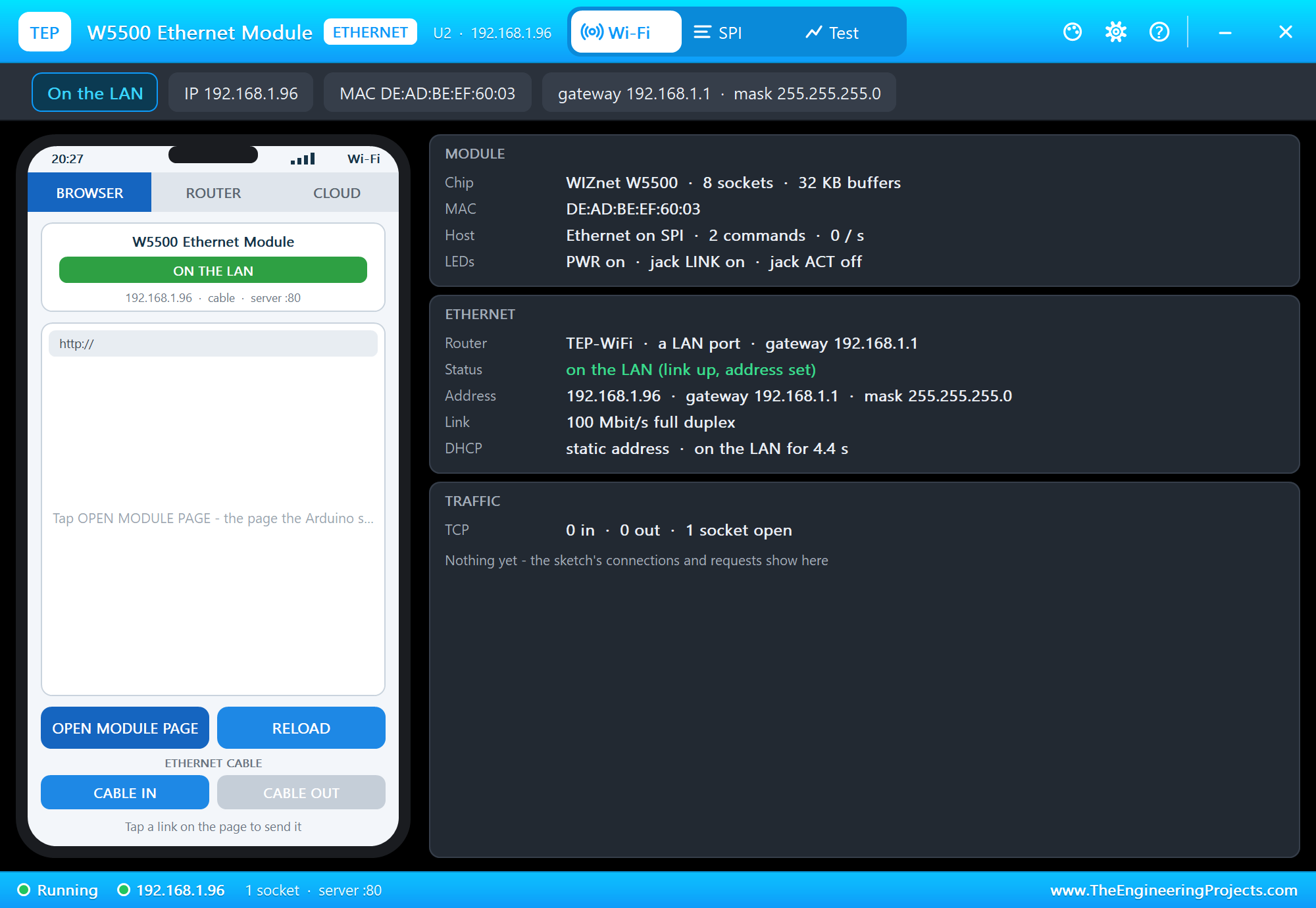
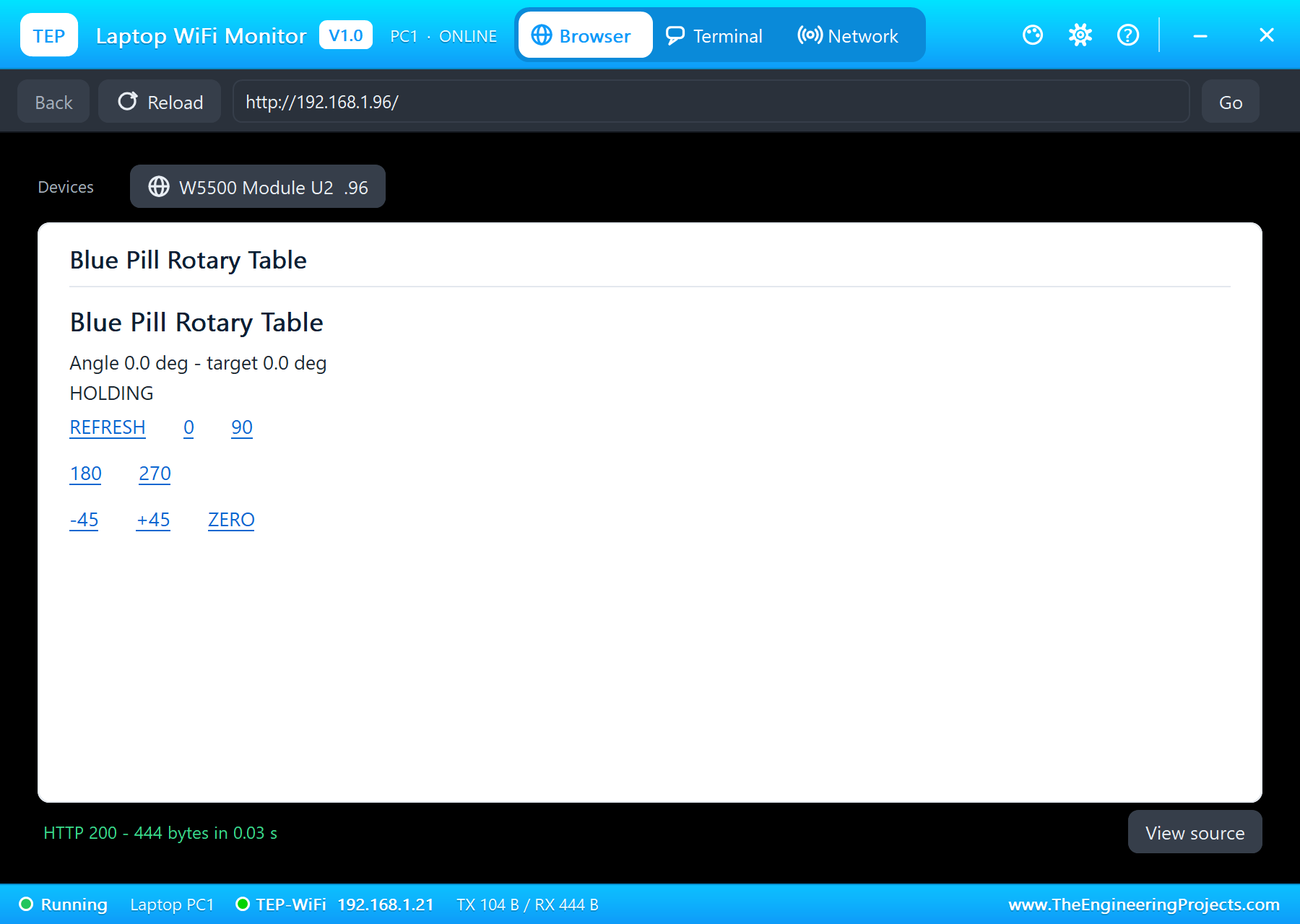
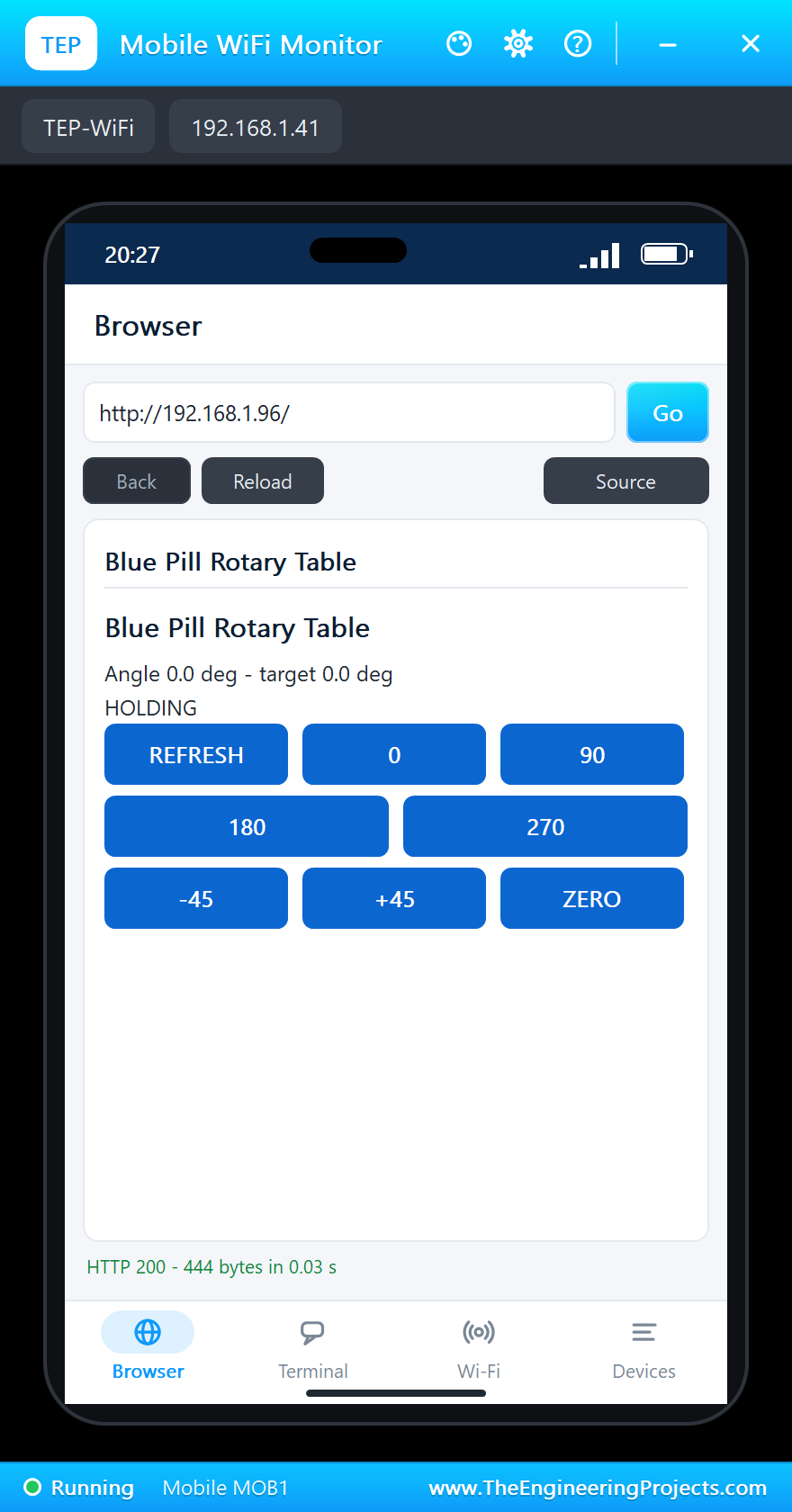
The W5500 sits on SPI1 with its chip select on PA4. The Ethernet library starts it with a fixed address; the page shows the angle and the target and offers REFRESH, 0, 90, 180, 270, -45, +45 and ZERO:
  Ethernet.init(ETH_CS);
  Ethernet.begin(mac, ip, dnsServer, gateway, subnet);
Run the Demo
Press Run. The serial monitor opens, the W5500 comes up on the LAN and the LCD shows 0.0 degrees:
Blue Pill Rotary Table - The Engineering Projects
W5500: 192.168.1.96, link ON
Page: http://192.168.1.96/
Turn the encoder: 18 degrees a click; press it to set the zero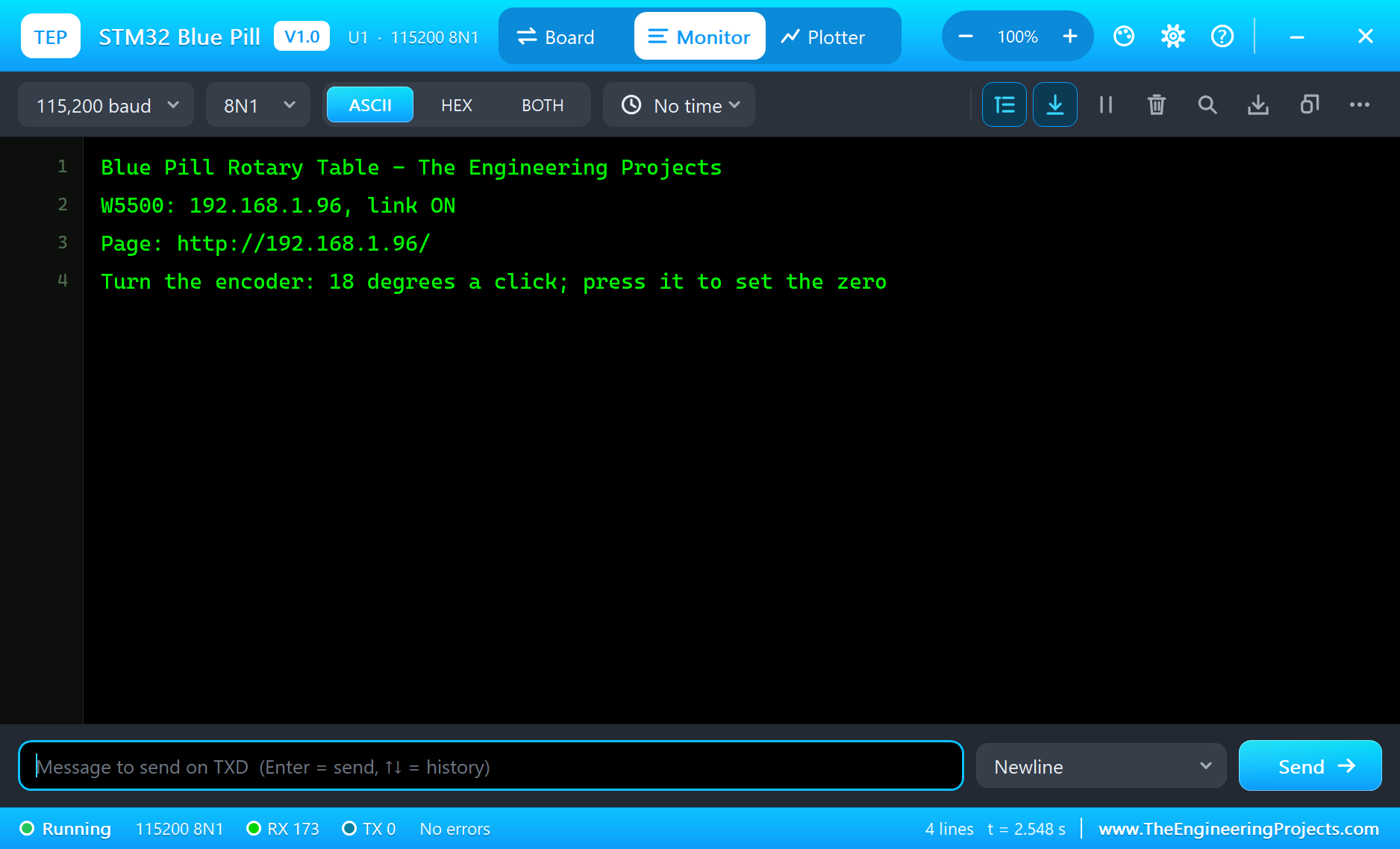
Open the Page
On the laptop click Browser and Go; on the phone the same - both open http://192.168.1.96/:
Turn the Knob
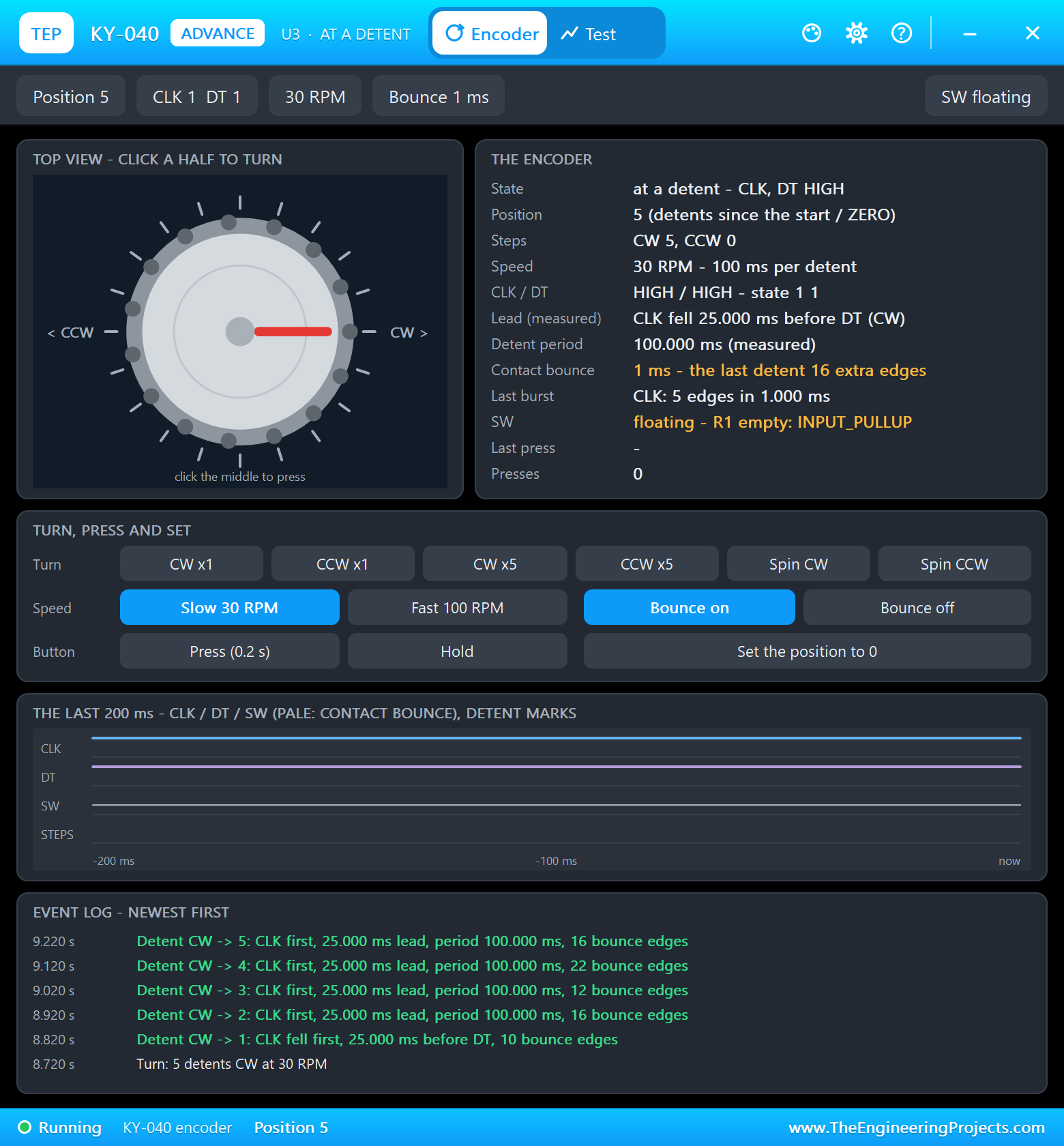
On the KY-040's pop-up click CW x5: five clicks, with contact bounce. The table starts at the first click; clicks that arrive during a move add to the target, and the table stops at 90 degrees - 50 steps:
A Preset from the Phone
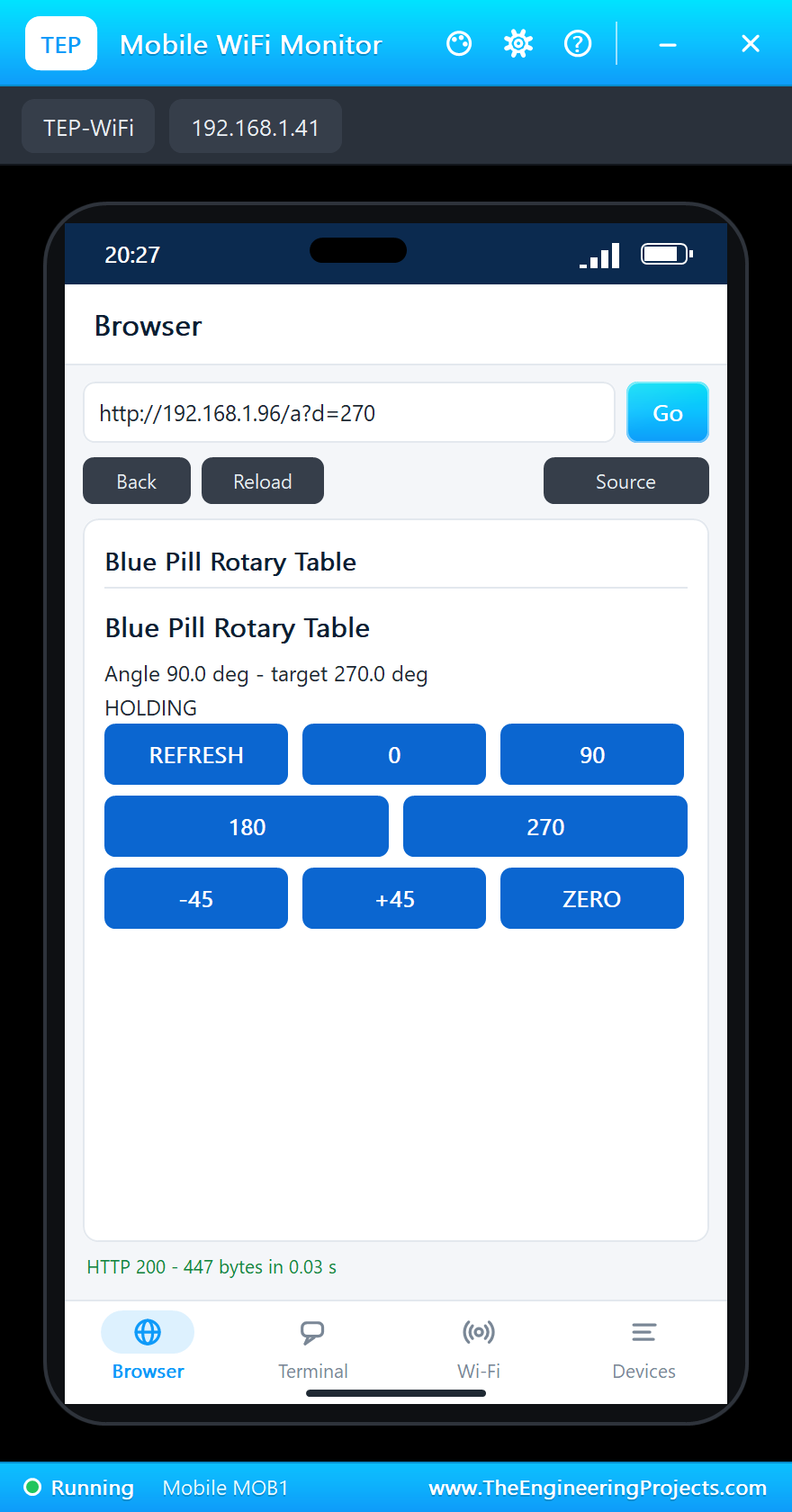
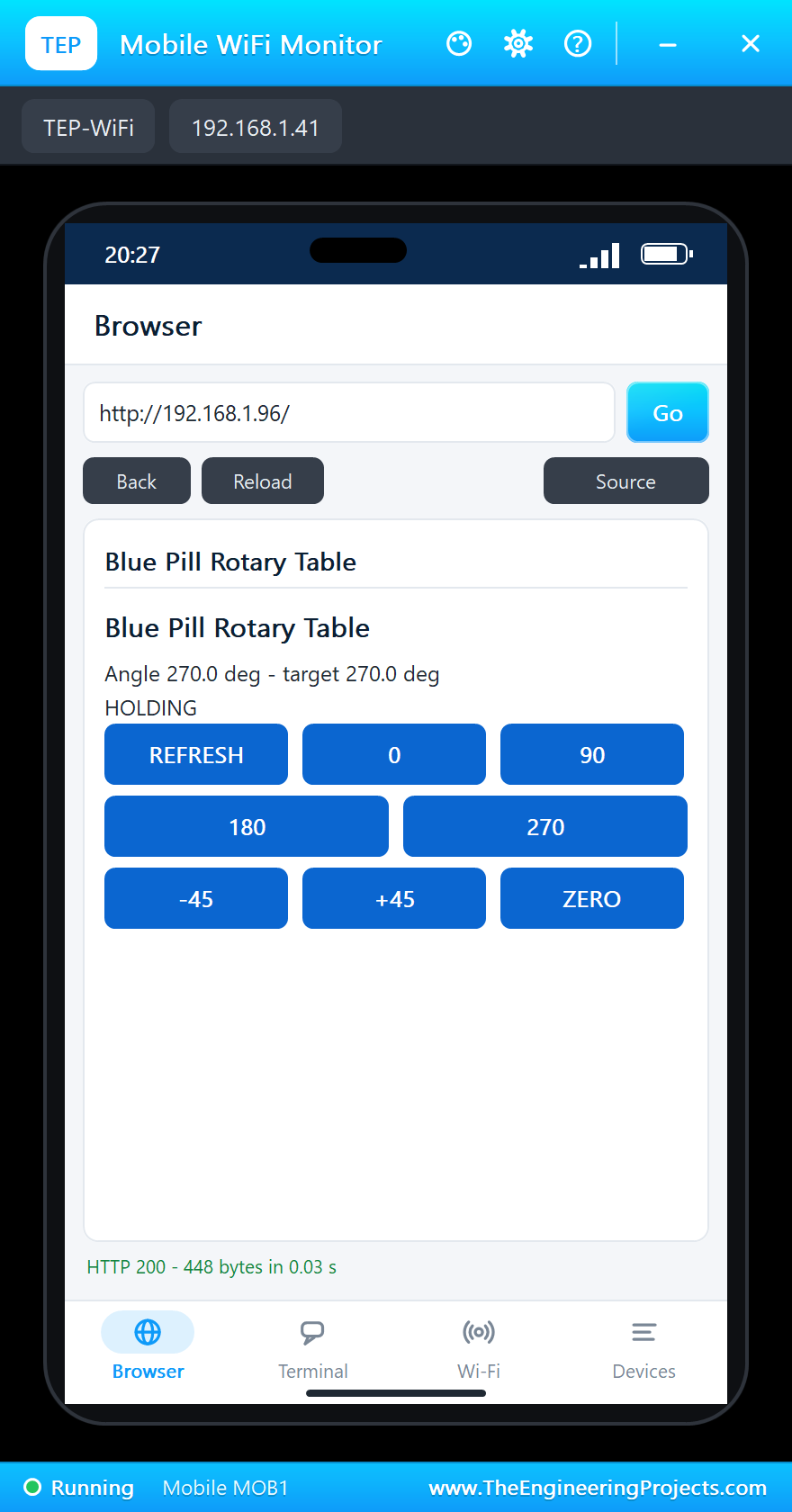
Tap 270 on the phone: half a turn forward. The page answers at once with MOVING; REFRESH shows the table holding at 270:
A New Zero
Click Press on the KY-040's pop-up: the table stays where it is and this angle becomes 0. Then tap +45 on the phone - 45 degrees from the new zero:
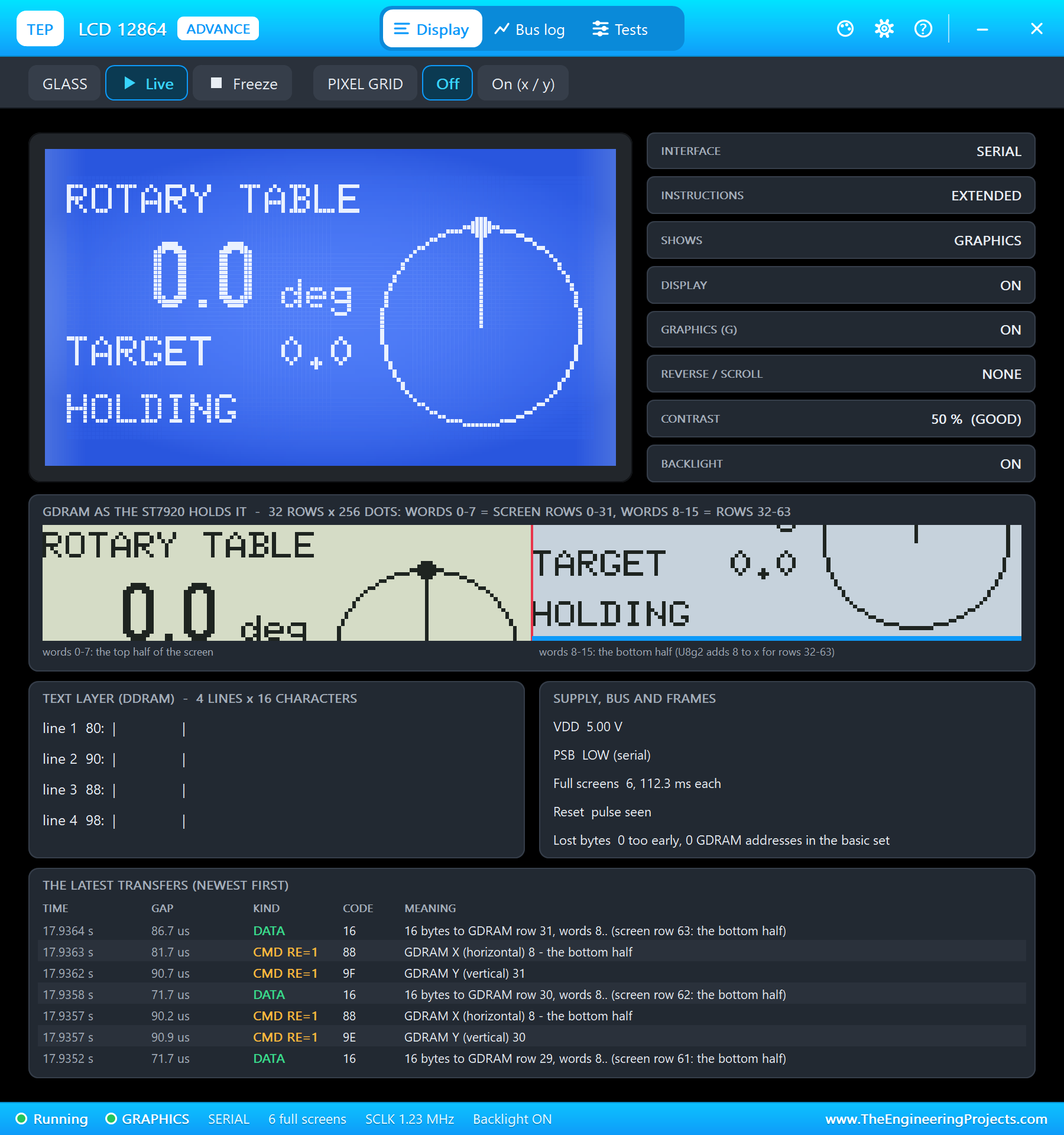
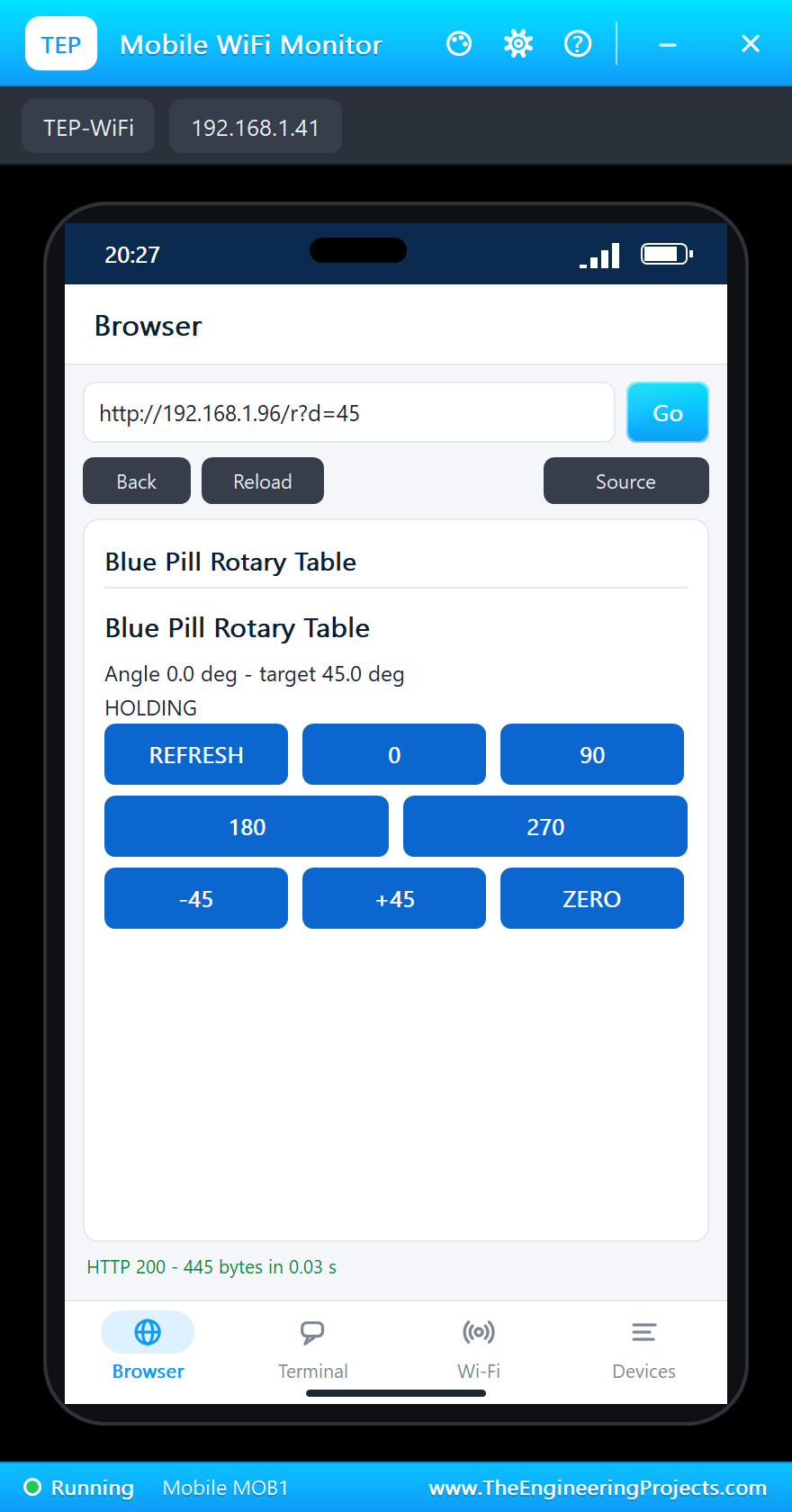
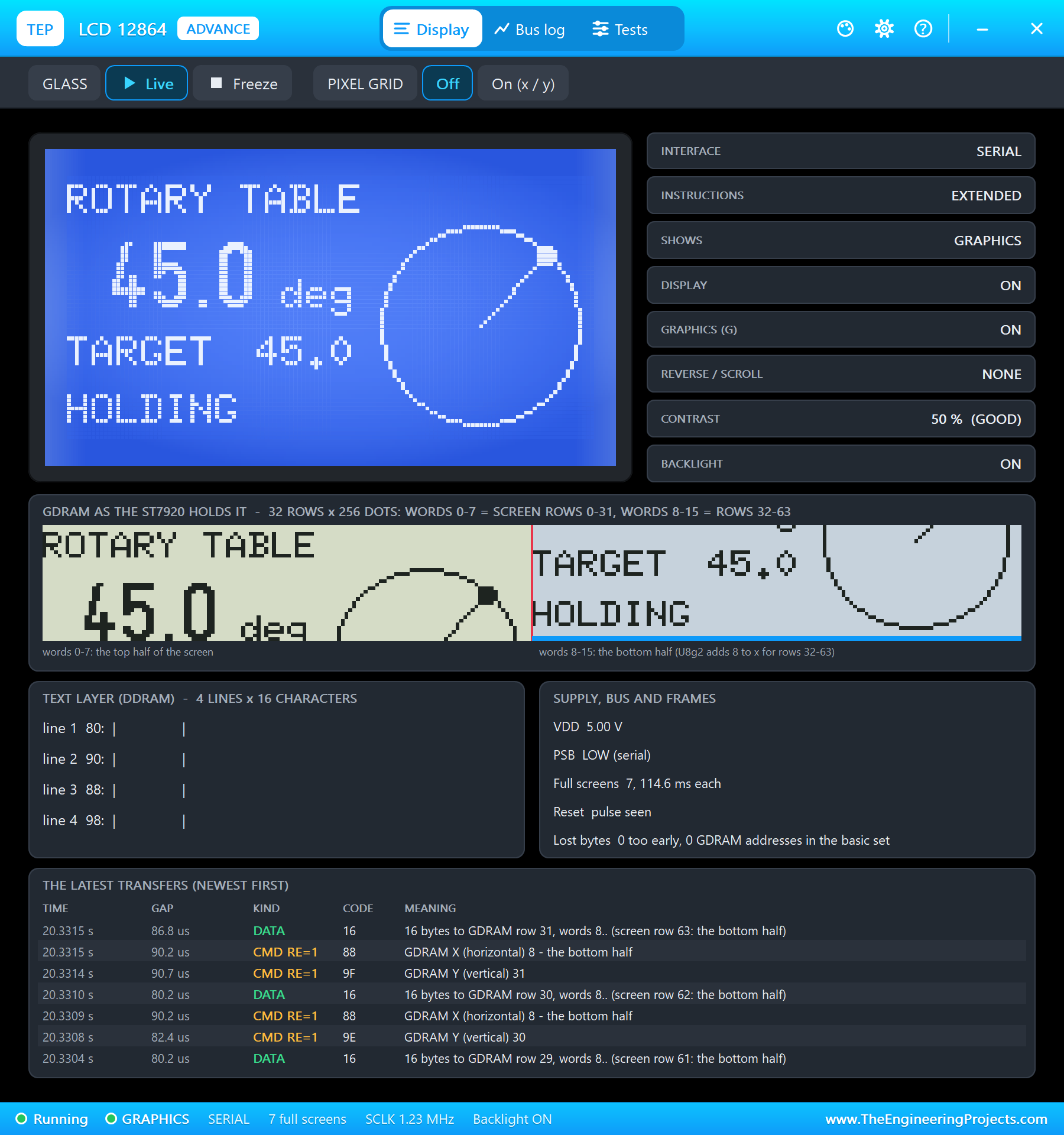
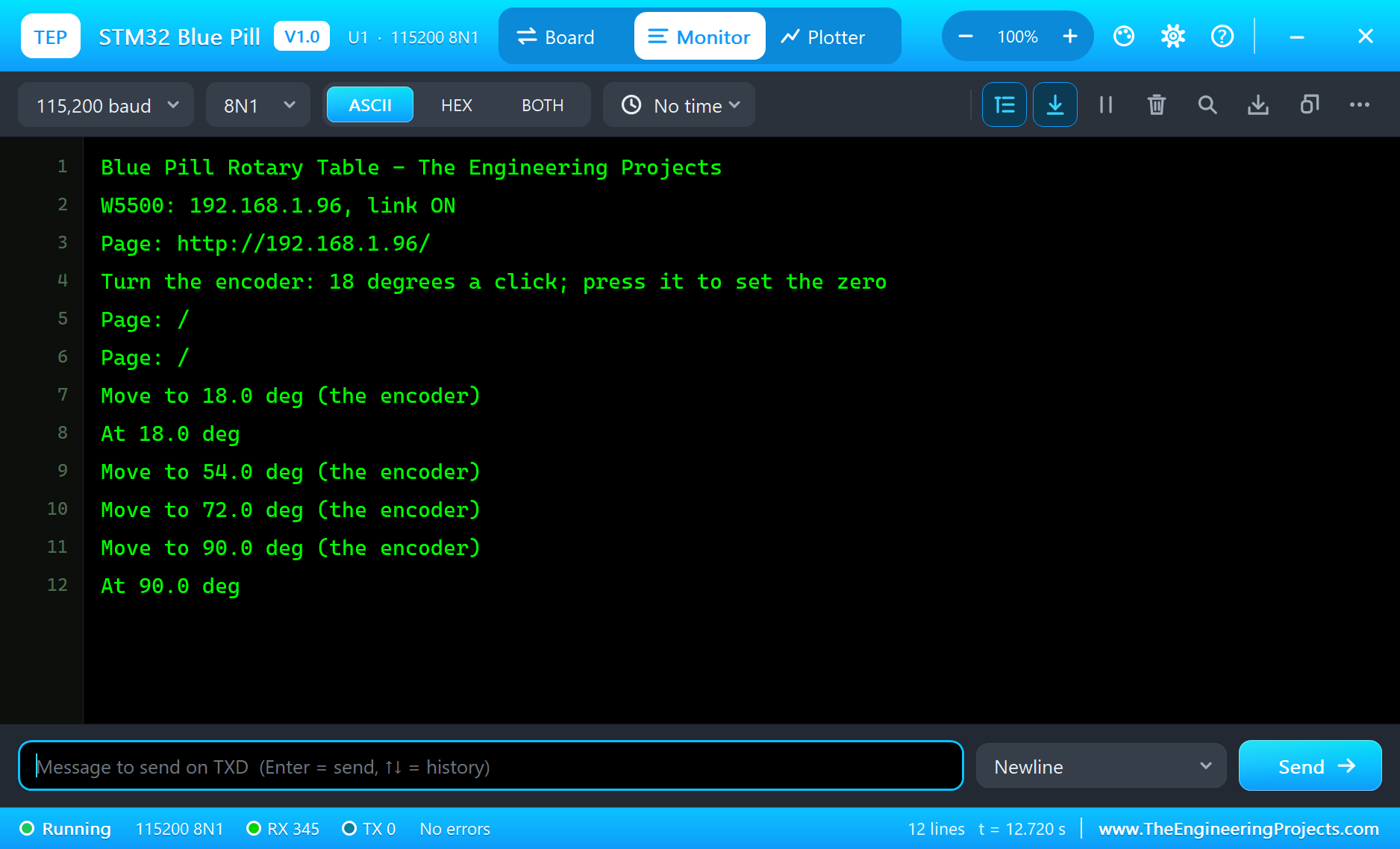
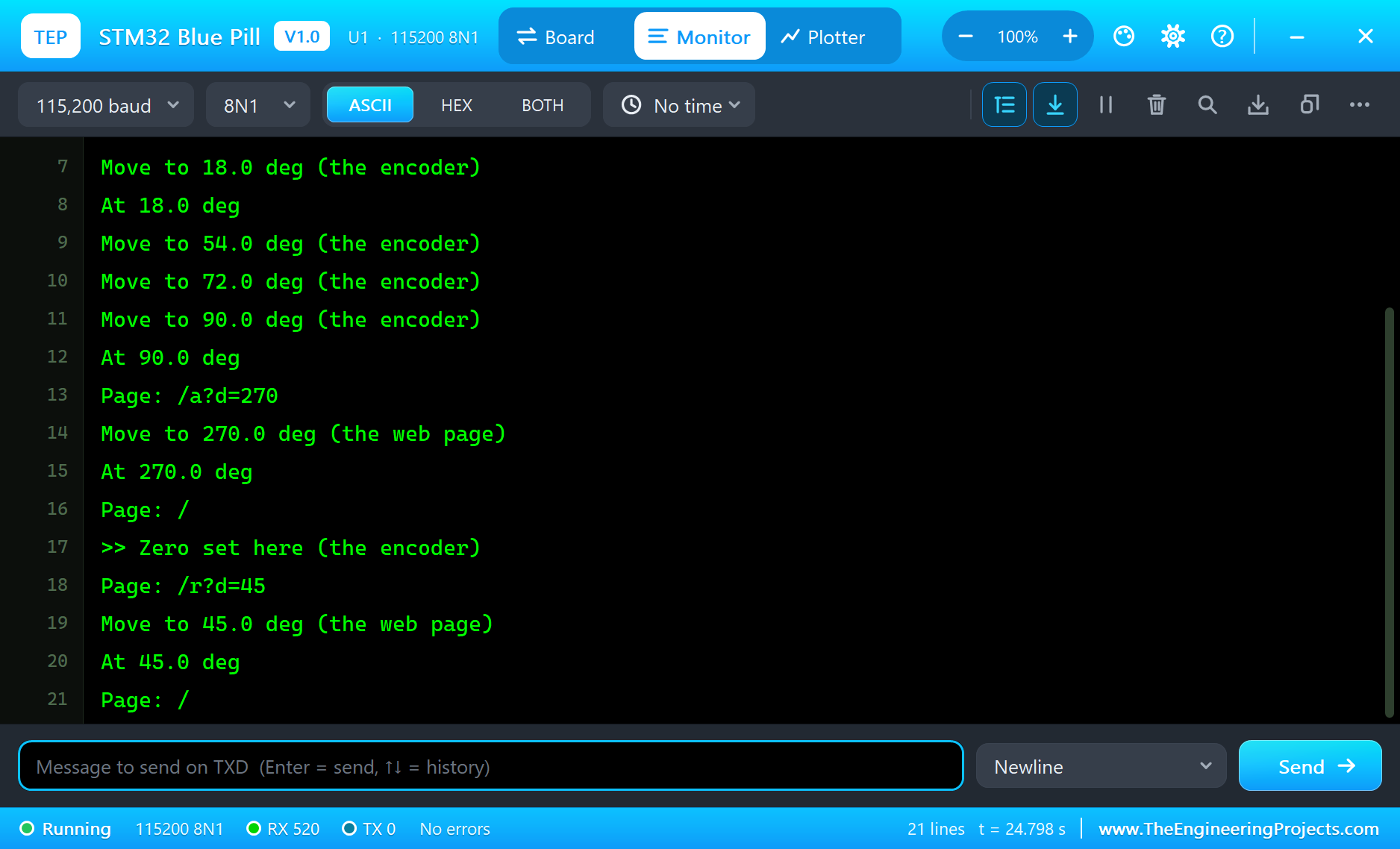
The built-in serial monitor, in the look of our TEP Serial Monitor Advance for Proteus, logs every move:
Move to 18.0 deg (the encoder)
At 18.0 deg
Move to 54.0 deg (the encoder)
Move to 72.0 deg (the encoder)
Move to 90.0 deg (the encoder)
At 90.0 deg
Page: /a?d=270
Move to 270.0 deg (the web page)
At 270.0 deg
Page: /
>> Zero set here (the encoder)
Page: /r?d=45
Move to 45.0 deg (the web page)
At 45.0 deg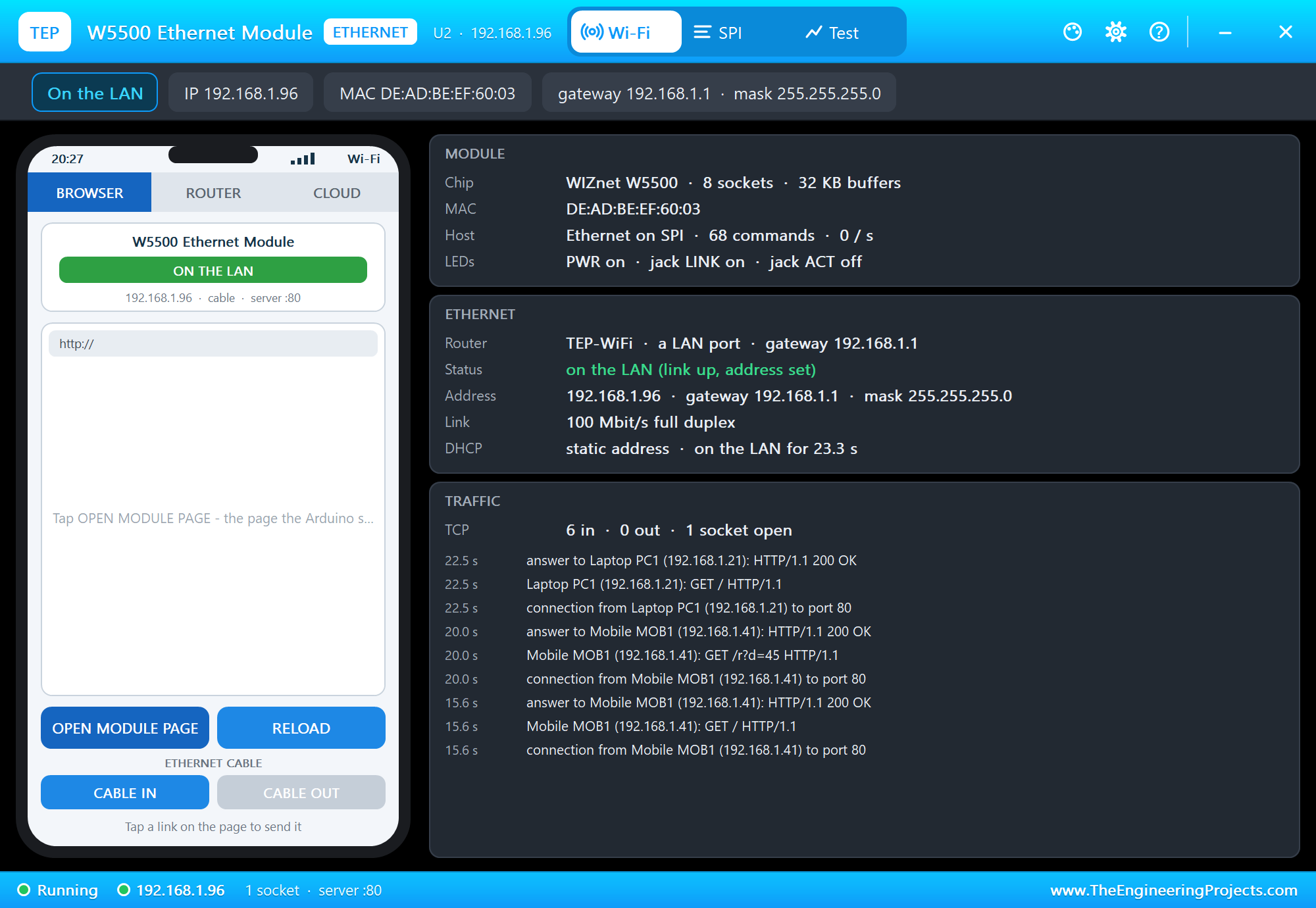
Try It Yourself
- Click Spin CW on the KY-040 and watch the clicks pile up into one long move.
- Turn Bounce off on the KY-040 and back on: the count stays right either way.
- Type
GOTO 123.4orSTATUSin the monitor. - Set MS1 to MS3 HIGH (1/16 steps), change
STEPS_PER_TURNto 3200 and rebuild.
Ideas to Extend the Table
- Ramp the speed up and down (an acceleration profile) so a heavy load does not lose steps.
- Add a home switch on a free pin and find the true zero at start-up.
- Divide a turn into N equal parts for gear cutting: N on the page, NEXT to index.
- Save the zero in the emulated EEPROM so a power cut does not lose it.
Your Own Sketches
Write the sketch in the Arduino IDE with the board STM32 Blue Pill F103C8 (TEP Proteus), use Sketch > Export Compiled Binary and set the board's PROGRAM property to the .hex. For a real Blue Pill install STM32duino ("STM32 MCU based boards") and select the BluePill F103C8 - the same sketch, with the same pin names.
Things to Know Before Using a Real Blue Pill
- Uploading: the Blue Pill has no USB bootloader from the factory - use an ST-LINK on the SWD header, or a USB-serial adapter on PA9 / PA10 with BOOT0 = 1.
- Clones: many boards carry a copy of the STM32F103 (CS32, GD32); most work, some need a different upload setting.
- The USB resistor: on many boards R10 has the wrong value (10k instead of 1.5k), so USB serial may not enumerate.
- 3.3 V pins: most pins tolerate 5 V, the analog ones do not; the A4988 and the KY-040 work at 3.3 V logic.
Properties of the STM32 Blue Pill
| Property | What it does |
|---|---|
| PROGRAM | the sketch: a .hex from TEP Boards for Proteus (board "STM32 Blue Pill F103C8") |
| MONITOR, BAUD, AUTOOPEN | the built-in serial monitor: on, its baud rate (115200), open at Run |
Troubleshooting
- The motor does not turn: EN LOW enables the A4988, RST and SLP must be HIGH, VMOT needs its +12V supply.
- The table jumps or turns the wrong way on a click: decode both CLK and DT; swap them for the other direction.
- The LCD stays blank: serial mode needs PSB on GND; CS PB12, SCLK PB13, SID PB15.
- "No W5500 found" or "link OFF": SCS on PA4, SCLK PA5, MISO PA6, MOSI PA7; the module's CABLE is IN.
- The page shows old values: use REFRESH; the monitors do not reload by themselves.
Limitations of the Simulation
- Your sketch gets 8 KB of RAM in the simulation and runs slower than on the STM32F103 at 72 MHz with 20 KB.
- The STM32's own peripherals (HAL, timers by register, DMA, USB, CAN, the RTC) and BOOT0 / BOOT1 are not modelled.
- The router, the addresses and the windows are TEP additions.
- STM32 is a trademark of STMicroelectronics; this library is not made or endorsed by STMicroelectronics or by Labcenter.
- Tested in Proteus 8.5 in October 2026 (the demo as shipped, about 27 s of simulation in 187 s on our PC with the four pop-ups, the monitor and both tools open). Proteus 7 is not supported.
So, that was all about the STM32 Blue Pill Library for Proteus. I hope it helps you build and test your STM32 projects before you touch the hardware - a stepper that never loses its place, an encoder read the bounce-proof way, a graphic LCD and a wired network page in one simulation. If you have any questions, ask in the comments and I will help you out. Till the next tutorial, take care and have fun!