The engineering field is not typically known for its literary style or its compelling prose, in large measure because engineering is better known as an applied field than a theoretical one. Most engineering students expect to spend their time working with mathematical equations and applying these equations to discover engineering solutions rather than researching term papers. But engineering is a discipline with an academic component, and research is an essential element of its academic aspect. In short, if you’re a student in an engineering program, you need to be able to write a great research paper just as much as you need to be able to solve complex mathematical problems. However, many students in application-based fields like engineering are much more comfortable with numbers than the ...
Hey Fellas! I am back to give you a daily dose of useful information. Today, I'll uncover the details on the Introduction to Arduino Due. It is a microcontroller board based on Atmel SAM3X8E, 32-Bit ARM microcontroller. It is developed by Arcuino.cc with the intention to provide an easy pathway for the beginners to get a hands-on experience with the module without any prior technical knowledge. You can just plug the device into the computer through a USB cable and start playing with it right away. Arduino Modules are a step ahead of a single microcontroller. If your project is mainly based on a microcontroller, you need to buy external peripherals and connect them with the controller in order to lay out an automation into your project. Arduino Boards has made things easy more than ever bef ...
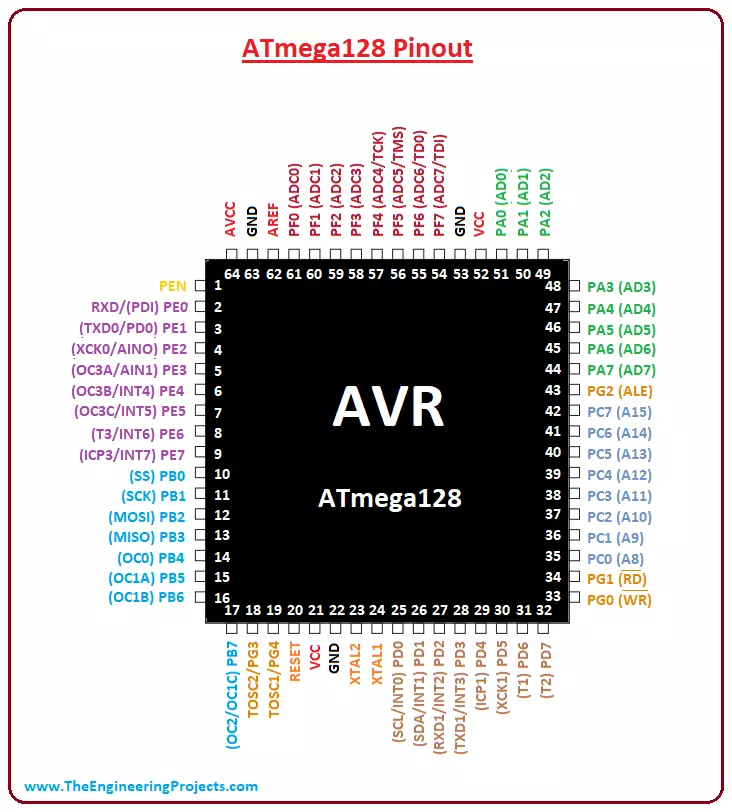
Hey Guys! Hope you are doing well. I am back to feed you with valuable information relating to engineering and technology. Today, I'll uncover the details on the Introduction to ATmega128. It is an AVR, 8-bit low power microcontroller, that comes with a 64-pin interface and is based on RISC architecture. Availability of 133 Powerful Instructions with single clock cycle and 32 x 8 General Purpose Working Registers make this device an ideal choice for many applications where decent code execution is required. The memory space incorporates on this module is more than normal AVR controllers including Program memory around 128K, enough to store the number of instructions on a single chip. In this post, I'll try to cover each and everything related to ATmega128, so you can get clear idea what is ...
Hello Guys! Hope you are doing well. Today, I'll discuss how you can Build Your Work’s Credibility with Plagiarism Checker. The term Plagiarism is the practice of taking someone else's idea and passing them off as their work. It is considered a fraud. Nowadays, plagiarism checker is introduced, and many companies use them to check if your work is your own or you're lying. If you've done a lot of hard work on your content but even then, it still matches someone else's work so you would be considered as a fraud. To not face this situation, you should try the Plagiarism Checker by PlagiarismSoftware.net. Build Your Work’s Credibility with Plagiarism Checker To become a successful writer, you need to have the skills to produce a work which contains no plagiarism. If you publish the article on ...
Hi Friends! Hope you are doing well. I am back to give you a daily dose of useful information so you can excel and improve as per your technical needs and requirements. Today, I'll uncover the details on the Introduction to ATmega8 . It is an 8-bit AVR microcontroller that is based on RISC CMOS technology and comes with a 28-pin interface for the PDIP package . The Program memory is 8K Flash while RAM and EEPROM are 1K and 512 bytes respectively. Microchip has been the main source for producing PIC and AVR microcontrollers that are mainly used in embedded and industrial automation systems. These modules can perform a number of functions on a tiny chip, preventing you from spending too much and purchasing external components for laying out automation in the relevant project. In this post, I ...
Hi Friends! Hope you are doing well. Today, I will highlight and discuss the details on Which Engineering Field Should You Pick? Mystery Unlocked. If your parents are traditional and orthodox in nature, you are left out with only two options picking as a career i.e. Engineer or Doctor. Former is related to math while later involves the comprehensive study of human biology. In this post we cover we cover the best engineering field for you? Or Engineering is for you anyway? There are lots of question coming around and making your mind confused when you pass out your high school and are on the verge of selecting engineering field as a career. With that being said, picking the right type of engineering is not a one night process, it starts right in your school days when you are studying and ta ...