Hello friends, hope you all are fine and having fun with your lives. Today's post is about How to Reset Arduino Programmatically. Sounds a bit weird, yes it is :) but literally in some cases, this technique is the only choice you have. It recently happened to me in one of my projects, that's why I know How important it is. Before going into details, let's first have a look at the resetting feature of Arduino.
If you have worked on any Arduino board, then you must have noticed the RESET pin in Arduino and you may wonder what's the use of this pin. So, today this pin is gonna get useful. Moreover, you have also noticed that when you upload the code to your Arduino board then the Arduino resets, another way of resetting Arduino is by opening the Seri ...
Hello Guys! I welcome you on board. Happy to see you around. In this post today, I’ll walk you through the Introduction to Arduino MKR GSM 1400.
The Arduino MKR GSM 1400 is a microcontroller board that is based on the SAMD21 microcontroller. This device connects with a cellular network for developing communication. This GSM board is a one-stop solution for developing your sensor network or you can use it as a device sending a text message about the occurring of certain events remotely.
A module from u-blox, the SARA-U201 (which is a power chipset that activates using multiple cellular range bands) is responsible for GSM / 3G connectivity inside the device.
I recommend you read this post till the end as I’ll detail the complete Introduction to A ...
Hello friends, hope you all are fine and having fun with your lives. Today, I am going to share a Traffic Signal Control using Arduino. Few days earlier, I have posted the same tutorial but it was Traffic Light Signal Using 555 Timer in Proteus ISIS and today we will do the same thing but using Arduino programming. Its quite a simple but good starting project on Arduino. So, if you are new to Arduino then must give it a try.
Traffic Signal Control is quite a usual thing. We see traffic signals daily on our roads and usually engineers are asked to design such projects in their initial semesters. If we look at the traffic signals then we can see they are simply turning ON and OFF lights at some fixed regular intervals. and the pattern is quite simpl ...
Hello friends, I hope you all are doing great. In today's tutorial, I am going to show you Arduino 74HC595 Interfacing and we will have a loook at How to Increase Arduino Output Pins with 74HC595. Suppose you are working on some project where you need to control 20 LEDs with Arduino UNO and you know we will 12 digital Pins so we can't control all of these 20 LEDs with Arduino UNO. We can use Arduino Mega as well but if we wanna stick to Arduino UNO then we need to increase its Output Pins and we will use 74HC595 for that purpose.
You should read this basic Introduction to 74HC595, it will help you to better understand this shift register. It's a Serial In Parallel Out Shift register and we will give it value serially from single Pin of Arduino and ...
Hello friends, hope you all are fine and having fun with your lives. Today, I am going to share on How to measure Frequency using Arduino board. Its quite a simple tutorial but is an essential one especially when you are working on some power related project. Because in Power projects, you have to measure the frequency of AC voltages. I was working on a project in which I have to do dimming of AC Lamp so in that project I have to measure the frequency of AC signal.
I have designed this project using Arduino UNO and have simulated in the Proteus software, which you all know is my favorite simulating software. :) The code is also quite simple which I have given below for download. The simulation is also included in download package but again I sugge ...
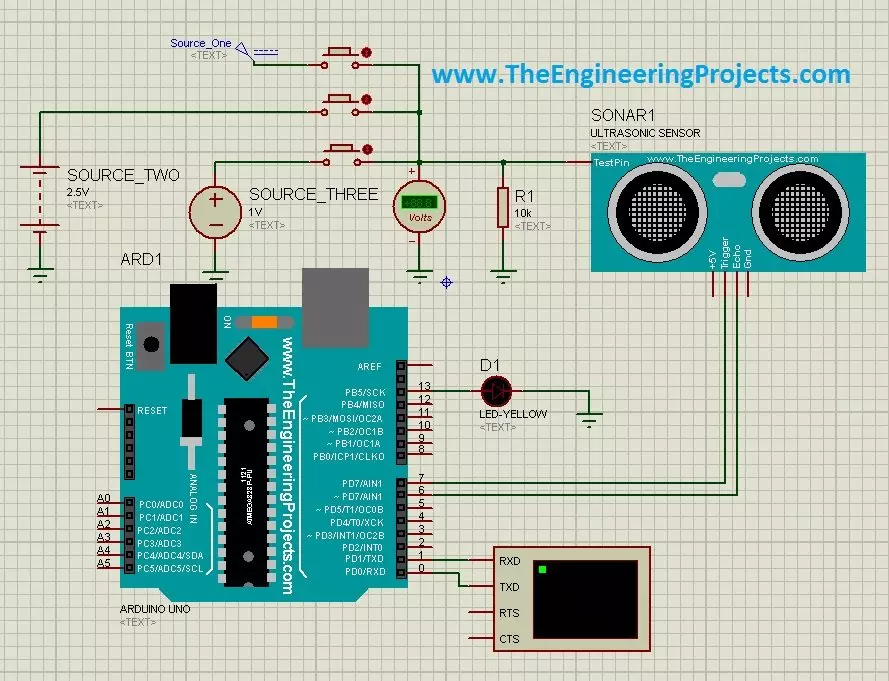
Hello friends, a few days ago I posted an Ultrasonic Sensor Library for Proteus, using which one can easily simulate ultrasonic sensor in Proteus. The post was highly praised by the reader and I have received quite good feedback from the followers. So, I thought of sharing some more examples related to it so that users can get a complete understanding of how to use Ultrasonic sensors in Proteus. Today, we are gonna have a look on different Ultrasonic Sensor Simulation in Proteus. If you haven't read the previous post then first have a look at it because without the installation of Ultrasonic Sensor Library in Proteus, you won't be able to use these examples. Ultrasonic Sensor is used widely in Embedded Systems.Today, I am gonna share three examples of Ultrasonic Sensor Simulation in Proteu ...
Hello friends, I hope you all are doing great. In today's tutorial, I am going to do an Arduino 74HC165 Interfacing and we will have a look at How to increase Input Pins of Arduino. 74HC165 is a shift register and works on the principal of Parallel In Serial Out. In my previous tutorial Arduino 74HC595 Interfacing: Increase Output Pins, we have seen How to increase the output pins of Arduino and today we are gonna do exact the opposite and we will increase the input pins.
74HC165 will take 8 parallel inputs from different sensors or buttons etc and will send them to serial OUT Pin, which will be connected to Arduino. So, if you are working on a project where you want to get data of 15 or 20 digital sensors then you can use this shift register and ...
Hello friends, I hope you all are fine and having fun with your lives. In today's tutorial, I am going to show you How to use Arduino Serial Monitor. It's not gonna be a very big post but its really very essential if you wanna learn Arduino coding. Because Arduino Serial Monitor is a great debugging tool and it helps a lot in Arduino Projects. In the previous post we have seen How to use digitalRead in Arduino and if you recall that tutorial then you must remember that in it we have used some Serial printing. So that's what we are gonna cover in today's tutorial.
Before going into the details, I must suggest you to first read these two posts because in those tutorials I have shown the serial communication which is essential for Serial Monitor Work ...
Hello friends, hope you all are fine and having fun with your lives. In today's post, I am gonna share How to get Hex File from Arduino. It's quite a simple post and I have already explained it many times in my posts but still, I am getting a lot of messages regarding it that's why I thought to write a separate post for it. First of all, let's have a little introduction about it. If you have worked on PIC Microcontrollers or Atmel etc then you have seen that you always get hex files from their compilers and then you burn that hex file in the respective Microcontroller using their programmer or burner. But that's not the case with Arduino. In Arduino boards, you simply plug it with your computer and you hit the Upload button and the code automatica ...
Hello geeks, welcome to our new project. In this project, we are going to make a very interesting project which is an Up-Down counter. Most of us who have an electronics background or studied digital electronics must know the counter. Counter is a simple device which counts numbers. As per the digital electronics, there are two types of counter, the Up counter which counts in increasing order and another is Down counter which counts in decreasing order. And every counter has a reset limit, on which the counter resets to its initial value and starts the counting again. The limit of every counter depends on the bits of counter. For example, we have a 8 bit Up counter which means it will count upto 255 and afterwards it will reset and will start agai ...