Hi Guys! Hope you are getting along with life pretty well. I always strive to keep you updated with most valuable information related to engineering and technology. Today, I'll discuss the detailed Introduction to Arduino Leonardo . It is a microcontroller board based on the ATmega32U4 and comes with 23 digital input/output pins. It is developed by Arduino.cc, aiming to provide easy to use interface with the ability to perform a number of functions on a single chip. It incorporates everything required to drive the automation in the relevant project. Simply connect this device with the USB cable or power it up using DC adapter and start playing with it In this post, I'll try to cover each and everything related to Arduino Leonardo, so you don't need to wrestle your mind browsing the whole i ...
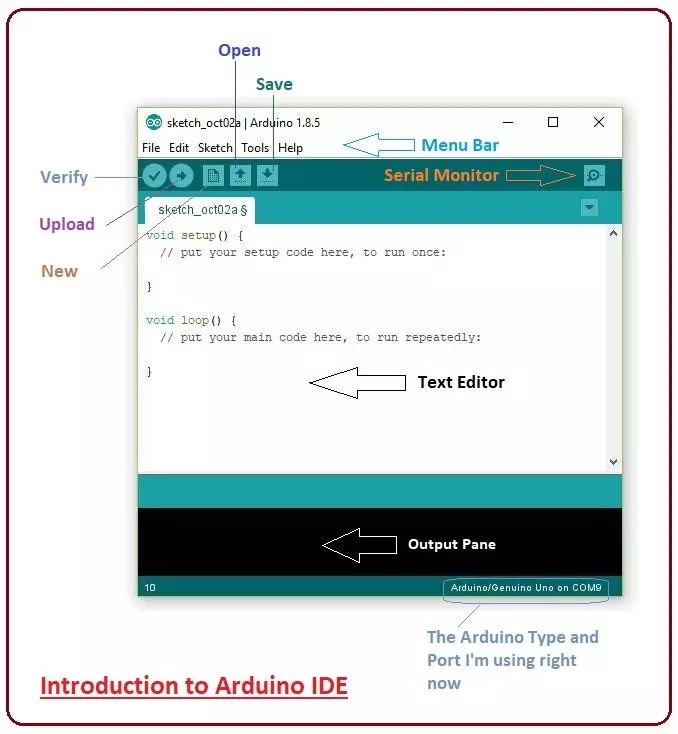
Hey Guys! Hope you are doing well. Today, I'll discuss the detailed Introduction to Arduino IDE, where IDE stands for Integrated Development Environment - An official software introduced by Arduino.cc , that is mainly used for writing, compiling and uploading the code in almost all Arduino modules/boards. Arduino IDE is open-source software and is easily available to download & install from Arduino's Official Site . In this post, I'll take you through the brief Introduction of the Software, how you can install it, and make it ready for your required Arduino module. Let's dive in and get down to the nitty-gritty of this Software. Introduction to Arduino IDE Arduino IDE is an open-source software, designed by Arduino.cc and mainly used for writing, compiling & uploading code to almost all Ar ...
Hey Guys! Hope you are getting along with life pretty well. Welcome you onboard. Today, I'll unlock the details on the Introduction to Arduino Micro . It is a Micro board, based on the ATmega32U4 microcontroller and comes with built-in USB, making it easily compatible with the computer. Arduino Micro, as the name suggests, is the smallest board in the Arduino Community. It is comparable to its counterparts like Arduino Nano and Arduino Promini. In this tutorial, I'll discuss each and everything related to Micro board including its main features, pinout, pin description, the software used and applications. Let's dive in and explore everything you need to know about this tiny board. Introduction to Arduino Micro Arduino Micro is the smallest board in the Arduino Community and is mainly based ...
Hi Friends! Hope you are doing well. Today, I'll give you a detailed Introduction to Arduino LilyPad . It is an Arduino Microcontroller Board, based on ATmega168 / ATmega328 and is introduced by Leah Buechley and SparkFun Electronics . This board is mainly developed for e-textiles and wearables projects. As per the designed purpose, it can be attached to fabric, sensors, power supplies, and actuators. You may need a conductive thread for joining this board with the required object. In this post, I'll try to cover each and everything related to Arduino LilyPad, what is this about and how it is used for the development of desired projects. Let's jump right in and get down to the nitty-gritty of this board. Introduction to Arduino LilyPad Arduino LilyPad is an Arduino Main Board that is mainl ...
Hey Friends! Hope you are doing well. Today, I'll discuss the details on How to use digitalWrite Arduino Command. The digitalWrite command in Arduino is used for writing the status of the digital Pin. The Pin assigned to this command must be an OUTPUT pin so that it can transfer data to other components like LEDs, motors, and actuators and use them as per your needs and requirements. Arduino boards have always been a great choice for both experts and newbies, as they come with built-in peripheral functions, and no need of external components is required to drive automation and develop some basic functions on the relevant project. Basic Arduino Software is used as a compiler and no separate burner is required to burn the required code into the board. You can simply plug the board with the c ...
Hi Friends! Hope you are doing well. In this post, I'll uncover the details on How to use pinMode Arduino Command . The pinMode defines the Arduino Pins, if they are used as an input or output. The INPUT_PULLUP is another option achieved by pinMode, that is mainly used to place a virtual pull-up resistor to the input pins. We have started Arduino Tutorials for Beginners quite a while now for the newbies, who are really interested to get a hands-on experience with Arduino. Generally, Arduino is known as a Microcontroller, but it is a step ahead of it. The PIC microcontrollers require some basic circuit to start with but Arduino brings revolution in the automation industry by removing the need of developing any basic circuit. Although Atmega328 is the Microcontroller used in Arduino UNO. Als ...
Hey Fellas! I am back to give you a daily dose of useful information. Today, I'll uncover the details on the Introduction to Arduino Due. It is a microcontroller board based on Atmel SAM3X8E, 32-Bit ARM microcontroller. It is developed by Arcuino.cc with the intention to provide an easy pathway for the beginners to get a hands-on experience with the module without any prior technical knowledge. You can just plug the device into the computer through a USB cable and start playing with it right away. Arduino Modules are a step ahead of a single microcontroller. If your project is mainly based on a microcontroller, you need to buy external peripherals and connect them with the controller in order to lay out an automation into your project. Arduino Boards has made things easy more than ever bef ...
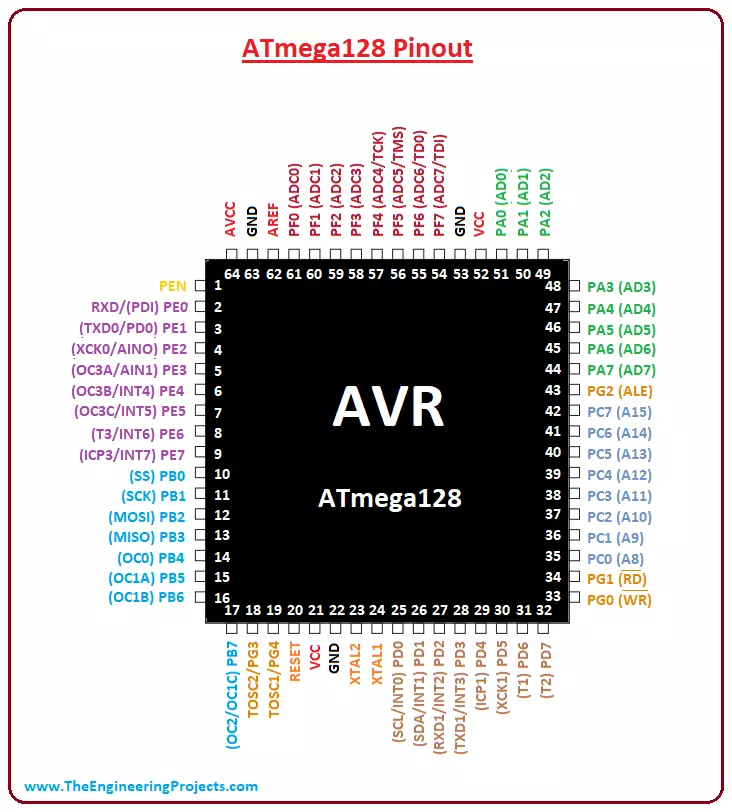
Hey Guys! Hope you are doing well. I am back to feed you with valuable information relating to engineering and technology. Today, I'll uncover the details on the Introduction to ATmega128. It is an AVR, 8-bit low power microcontroller, that comes with a 64-pin interface and is based on RISC architecture. Availability of 133 Powerful Instructions with single clock cycle and 32 x 8 General Purpose Working Registers make this device an ideal choice for many applications where decent code execution is required. The memory space incorporates on this module is more than normal AVR controllers including Program memory around 128K, enough to store the number of instructions on a single chip. In this post, I'll try to cover each and everything related to ATmega128, so you can get clear idea what is ...
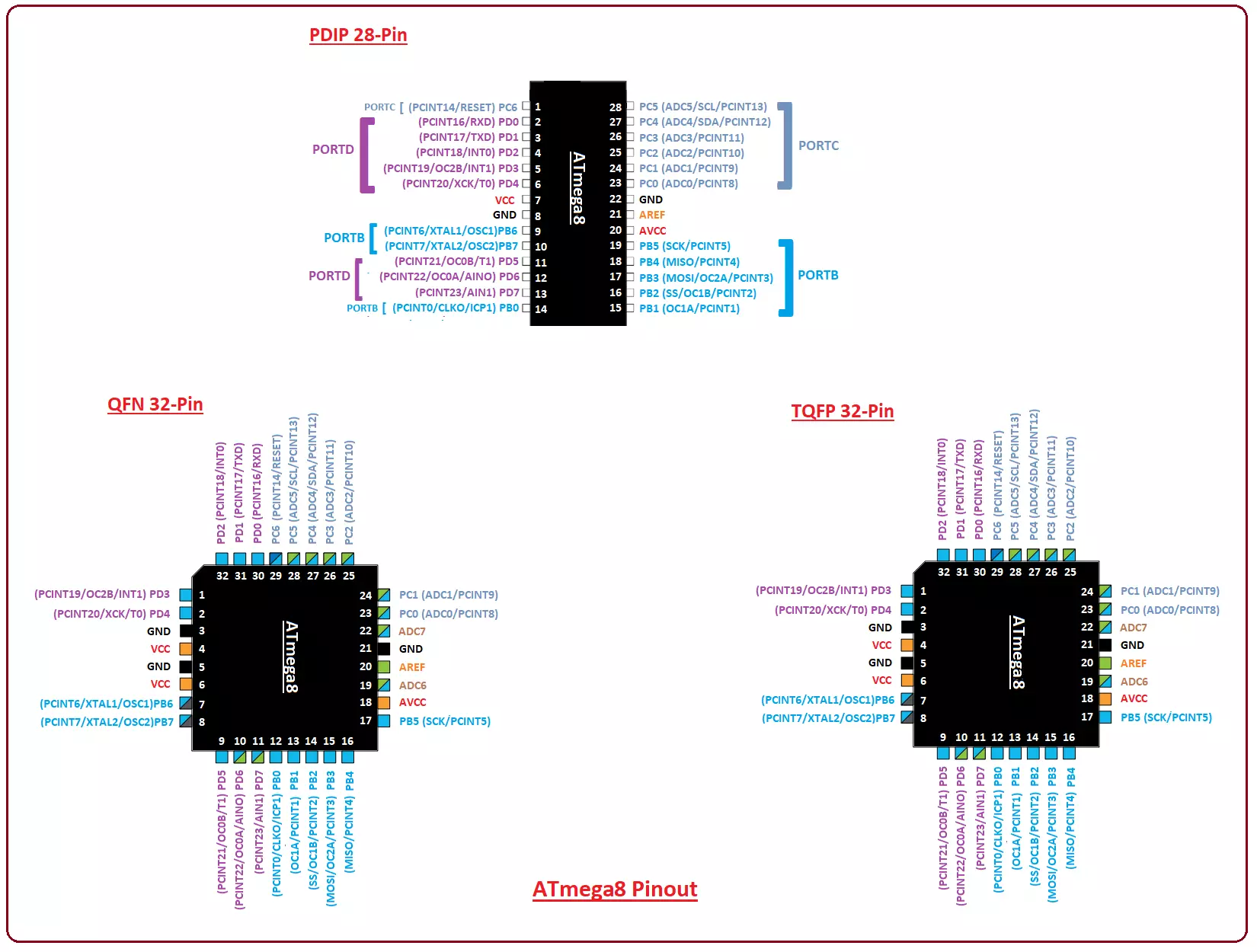
Hi Friends! Hope you are doing well. I am back to give you a daily dose of useful information so you can excel and improve as per your technical needs and requirements. Today, I'll uncover the details on the Introduction to ATmega8 . It is an 8-bit AVR microcontroller that is based on RISC CMOS technology and comes with a 28-pin interface for the PDIP package . The Program memory is 8K Flash while RAM and EEPROM are 1K and 512 bytes respectively. Microchip has been the main source for producing PIC and AVR microcontrollers that are mainly used in embedded and industrial automation systems. These modules can perform a number of functions on a tiny chip, preventing you from spending too much and purchasing external components for laying out automation in the relevant project. In this post, I ...
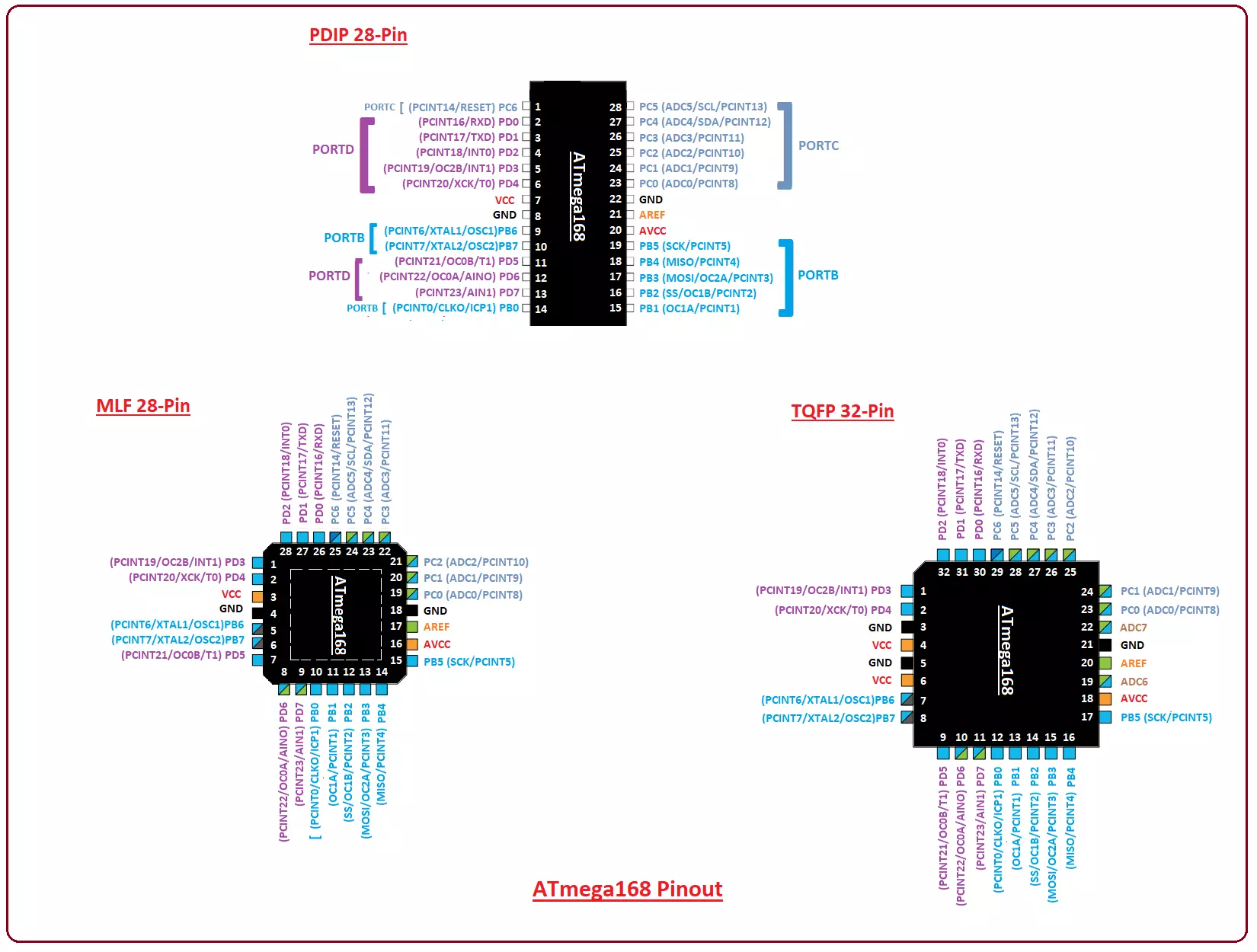
Hi Friends! Hope you are doing well. We always strive to give you valuable information as per your needs and requirements so you keep coming back for what we have to offer. Today, I'll uncover the details on the Introduction to ATmega168 . It is an 8-bit AVR microcontroller that comes with 32-pin interface and is mainly based on RISC CMOS technology. The Program memory is 16K, based on Flash, and incorporates read-write capabilities. The module comes with a wide temperature range from -40 to 85 ºC while operating voltage ranges from 1.8 to 5.5 V. If you are working on project that is related to automation and embedded systems, you can not write off the importance of this module that comes with an ability of performing a number of functions at once on a single chip. In this post, I'll cover ...