Hi Friends! Happy to see you here. I welcome you on board. In this post, I’ll walk you through the Introduction to BC639. BC639 is a high current gain bipolar junction transistor that falls under the NPN transistor family. It constitutes a high collector current and low collector-emitter saturation voltage and is widely used for amplification and switching purposes. It is used to drive load under 500mA. Collector Dissipation is 0.625W while DC Current Gain (hfe) ranges from - 40 to 160 with transition frequency 200MHz. In this post, I’m going to discuss all nitty-gritty of the BC639 transistor covering pinout, working, power ratings, alternatives, applications, and physical dimensions.
Continue reading.
Introduction to BC639
BC639 is an NPN bi ...
Hello friends, hope you all are fine and having fun with your lives. Today's post is about getting started with pixy camera. Now, the first thing comes in mind is what is Pixy Camera so let's first have a little introduction about Pixy Camera on which I recently worked. Pixy Camera is a small camera board which uses NXP microcontroller. Its a very powerful board and can get easily interfaced with simple Arduino UNO board. So, now we can do image processing even on Arduino UNO. Image Processing needs a powerful board that's why we can't interface simple webcam with Arduino UNO or mega etc. Before using pixy camera, when I need to do on board image processing I always used either Arduino YUN, Raspberry Pi or Arduino USB host shield but still it was ...
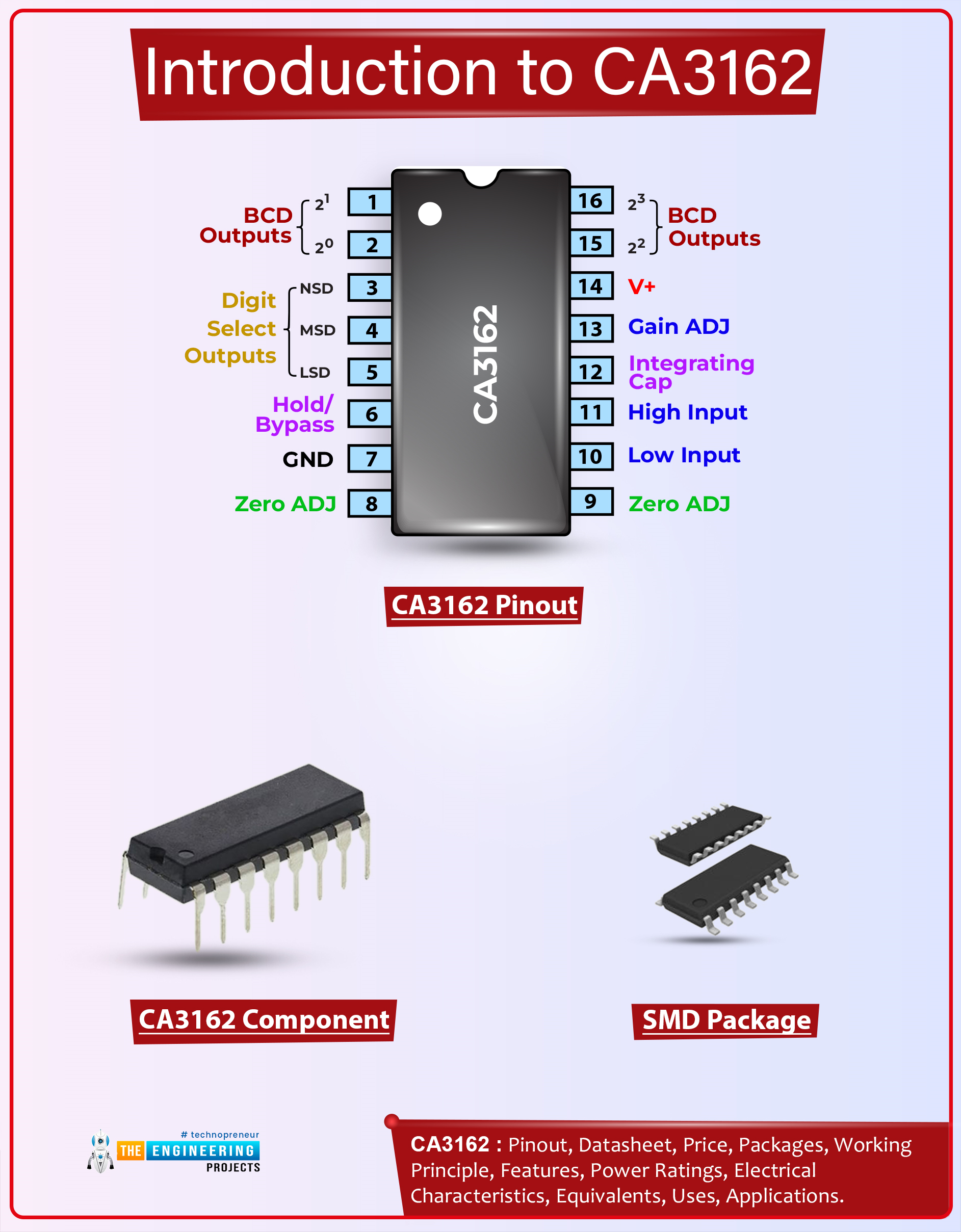
Hi Friends! I welcome you on board. Happy to see you around. In this post today, I’ll detail the Introduction to CA3162.The CA3162 is a monolithic A/D converter, offering a 3-digit multiplexed BCD output. It comes with an ultra-stable internal band-gap voltage reference. With differential input, this device provides a choice of low-speed (4Hz) or high-speed (96Hz) conversion rate. It is a 16-pin device that provides dual slope A/D conversion.
I suggest you buckle up as I’ll walk you through the complete Introduction to CA3162 covering datasheet, pinout, features, and applications. Without further ado, let’s get started.
Introduction to CA3162
The CA3162 is a monolithic A/D converter that offers a 3-digit multiplexed BCD output. It is available with ultra-stable internal bandgap vo ...
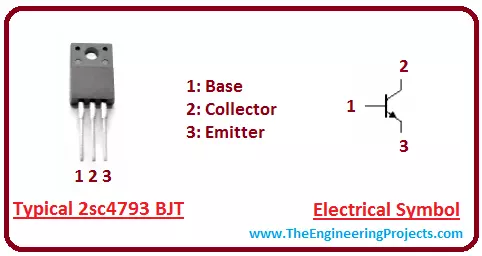
Hey Guys! I aspire you a very happy and promising life. My job is to give you daily dose of information so you can stand out of the party. Today, I am going to uncover the details on the Introduction to 2sc4793. It is an NPN (Negative-positive-negative) bipolar junction transistor (BJT) which is mainly used for amplification and switching purpose. I'll give you a brief details about this transistor and try to cover as many aspects as possible related to this transistor. Let's hop on the board and explore what kind of transistor is this and what are its main applications? Let's get started.
Introduction to 2sc4793
2sc4793 is an NPN bipolar junction transistor where P-doped layer is sandwiched between the two N-doped layer.
It is mainly three t ...
Hi Friends! Hope you’re well today. Today, I am going to share the Proteus Library of Current Sensor WCS1600. This sensor is not available in the Proteus Components Library and we’re sharing it for the first time. The Current Sensor WCS1600 is used to measure the current flowing through the circuit and is used in embedded systems and robotics projects. If you are new to this sensor, you must first design its simulation before playing with the hardware.
Before we move further, let’s have a brief overview of WCS1600 Current Sensor:What is WCS1600 Current Sensor?
WCS1600 comes with a drift linear hall sensor IC which gives precise and accurate values. The hall sensor IC is 9.0 mm in diameter through the hole and is incorporated with a temperature compensation circuit. To measure the p ...
Hello Fellas! I aspire a happy and prosperous life for you. We always enjoy when you keep coming back for what we have to offer. Today, I am going to unlock the details on the Introduction to 2sa1015. It is a low frequency PNP (positive-negative-positive) bipolar junction transistor which is mainly used for general purpose amplification. It mainly consists of N doped semiconductor which exists between the two layers of P doped material. I'll try to cover every aspect of this transistor so you don't have to go anywhere else for finding the information regarding this transistor. Let's hop on the board and explore the details on this PNP transistor.
Introduction to 2sa1015
2sa1015 is a PNP low frequency transistor which is mainly used for genera ...
Hello friends, I hope you all are doing great. In today's tutorial, we are gonna have a look at detailed Introduction to MPR121. MPR121 is a touch sensor controller, its working is like the capacitor's working principle. This module has twelve electrodes points, it communicates via I2C protocol. When any objects come closer to an electrode point, we can observe the presence of an object by variation in capacitance of an electrode. It's working voltage should be between 2.5 to 3.6 VDC.
MPR121 is used in different industrial projects and electronic devices such as mobile phone and remote control systems. In today's post, we will have a look at its working, pinout, protocol, applications, etc. I will also share some links where I have interfaced it with other microcontrollers. If you have ...
Hello friends, I hope you all are doing great. As we are working on Raspberry Pi libraries for Proteus these days, so today, I am going to share another awesome library i.e. Raspberry Pi Zero W Libary for Proteus. We have already shared the Raspberry Pi Pico, Raspberry Pi 3 & Raspberry Pi 4 Libraries for Proteus, I hope you have already installed these libraries.We have only designed the exterior look of this module, it won't be able to read the Python code. You can use this module to design circuit diagrams of your projects or to demonstrate your project in the presentation. Although, just for fun, we have added the Arduino UNO firmware to it. So, you can add the Arduino hex file in it. Something is better than nothing.So, let's install the Proteus Library and simulate Raspberry Pi Ze ...
Hello everyone! I hope you all will be absolutely fine and having fun. Today, I am going to give a detailed discussion on Introduction to LF411. LF-411 is a Junction Field Effect Transistor (JFET) input Operational Amplifier (Op-amp). It is the most common module available in the market these days due to its cost efficiency. LF 411 has low input offset voltage. Input offset voltage drift is guaranteed for LF-411. A very low supply current is needed for this device. It provides higher slew rates as well as high gain bandwidth product.
Moreover, LF411 also provides lower input bias current as well as lower input offset currents. It is an 8 pin operational amplifier. The details about its pins will be discussed later. Due to its low cost and high ...
Hello Guys! I welcome you on board. Happy to see you around. In this post today, I’ll walk you through the Introduction to Arduino MKR GSM 1400.
The Arduino MKR GSM 1400 is a microcontroller board that is based on the SAMD21 microcontroller. This device connects with a cellular network for developing communication. This GSM board is a one-stop solution for developing your sensor network or you can use it as a device sending a text message about the occurring of certain events remotely.
A module from u-blox, the SARA-U201 (which is a power chipset that activates using multiple cellular range bands) is responsible for GSM / 3G connectivity inside the device.
I recommend you read this post till the end as I’ll detail the complete Introduction to A ...