Hello friends, hope you all are fine and having fun with your lives. Today, I am going to share a tutorial on DC Motor Speed Control using Arduino in Proteus ISIS. In my previous post, we have seen How to design a DC Motor Direction Control Project using Arduino in Proteus ISIS and if you haven't checked it out then I would recommend you to have a look at it first. Because, in today's tutorial, I am gonna extend that tutorial and will add the DC Motor Speed Control in it. So, today, we will control both the direction as well as speed of the DC Motor. Moreover, you should also have a look at How to use Arduino PWM Pins if you are not much familiar with PWM control. In the previous tutorial, we have seen How to control the direction of a DC Motor, which is important when you are working on s ...
Hello friends, hope you all are fine and having fun with life. Today, I am going to share DC Motor Direction Control with Arduino. I have designed a complete simulation in Proteus, which will help you in understanding the controlling of DC motor. I would recommend you to first read How to Control relay in Proteus ISIS which will help you in understanding the functionality of relays because in today's tutorial, I have used relays to do the DC Motor Direction Control. I have already posted a tutorial on DC Motor Drive Circuit in Proteus ISIS . Libraries Libraries used in this tutorial Arduino Library for Proteus: V1.0 (2015, used in this tutorial) · latest version: V4.0 (October 2026) Helping Tools Serial Monitor Advance : a serial terminal window for the UART of your board Serial Monitor Ex ...
Hello friends, hope you all are fine and having fun with your lives. Today, I am going to share a new Genuino Library for Proteus. Genuino boards are just the same as Arduino boards but with slight difference of color and shape. I have already posted a tutorial on Arduino Library for Proteus in which I have explained how to download the Arduino Library and use it in Proteus. Today, I am going to post a similar library but for Genuino boards. Their functionality is exactly the same as the Arduino Library but they have better look and Genuino Color. Updates Arduino Library for Proteus Latest version: Arduino Library for Proteus V4.0 (October 2026): six boards with working LEDs, a RESET button and a built-in serial monitor Earlier versions: V3.0 (2023) · V2.0 (2021) · V1.0 (2015) · Genuino bo ...
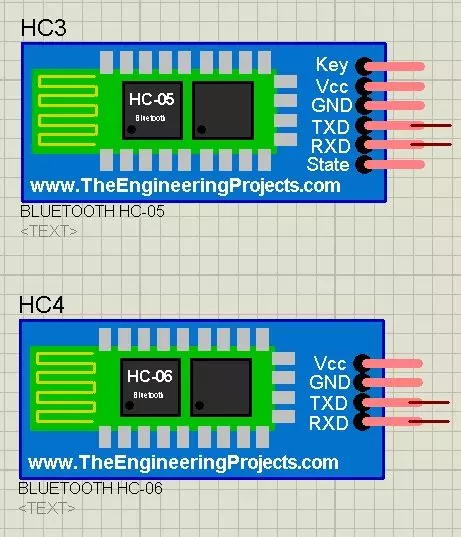
Hello friends, hope you all are fine. Today, I am going to share a new Bluetooth Library for Proteus. Using this Library, now you can quite easily use Bluetooth modules in Proteus ISIS. I have designed two Bluetooth modules which are HC-05 and HC-06. We all know about these modules. We use these modules for sending data through Bluetooth. Till now, there's no such Bluetooth Library designed for Proteus and we are the first developers of this awesome Bluetooth Library for Proteus. I hope you guys are gonna like it. I have also posted a tutorial in which I have done Arduino Bluetooth Communication using HC05 in hardware. I hope that one will also be interesting to read, if you have planned to start working on Bluetooth Module. Updates Bluetooth Library for Proteus Latest version: V1.0 (March ...
Hello friends, hope you all are fine and having fun with your lives. Today, I am going to share a new project in which we are gonna do Arduino Bluetooth communication. The Bluetooth module I have used for this project is HC-05, which is a serial Bluetooth module. We can quite easily perform the Bluetooth communication with this module using Arduino board. I have worked on many projects in which I have to send the data from sensors to my computer via Bluetooth. So, in such projects I normally use this Bluetooth module which is connected with the sensors and then Arduino gets the data from these sensors and then send this data to computer via Bluetooth module. In this project, I have used Arduino board but you can use PIC Microcontroller or 8051 Microcontroller as well. Because they both hav ...
Hello friends! In this guide, we will learn how to use Proteus ISIS and ARES, starting with a simple circuit and gradually moving toward microcontroller simulations and PCB design. I have kept the original tutorial collection so that you can follow a lesson in detail whenever you reach that stage. Our goal is to understand the complete development process. We will draw a circuit, calculate what it should do, simulate its behavior, examine signals with instruments and then prepare a physical board layout. Each stage answers a different question, so a successful simulation is one step in the process rather than the final proof of a finished product. If you are new to Proteus, follow the sections in order. If you already use it, choose the topic you need from the linked lessons. Some screensh ...
Hello friends! In this tutorial, we will learn how to program a PIC microcontroller with code compiled in mikroC PRO for PIC, using a PICkit 3 programmer. The useful idea is simple: mikroC builds the firmware, and Microchip's programming software loads the resulting HEX file into the selected device. The original project behind this lesson required mikroC, while the available programmer was a USB-connected PICkit 3. Moving from a serial-port programmer to PICkit 3 made the laptop connection easier, but the compiler and programmer still needed a common file format. The HEX file provides that connection without requiring us to compile the project again in another C compiler. We will preserve the original MPLAB IDE screenshot sequence, explain what each step does, and cover the important chec ...
Hello friends, I hope you are doing well. In the previous tutorial, we studied the working principle of a relay . Today, we will connect a 12 V relay to a PIC18F4550 microcontroller through a ULN2003A driver. A relay coil needs more voltage and current than a microcontroller pin should provide. It is also an inductive load, so it produces a voltage transient when switched off. The ULN2003A solves these interface problems by providing seven low-side Darlington drivers and seven internal clamp diodes in one package. The key point is that the ULN2003A does not convert a 5 V logic signal into a 12 V output. The 12 V energy comes from a separate 12 V supply. A logic high merely turns on one internal driver, which connects the low side of the relay coil to ground. We will examine that current pa ...
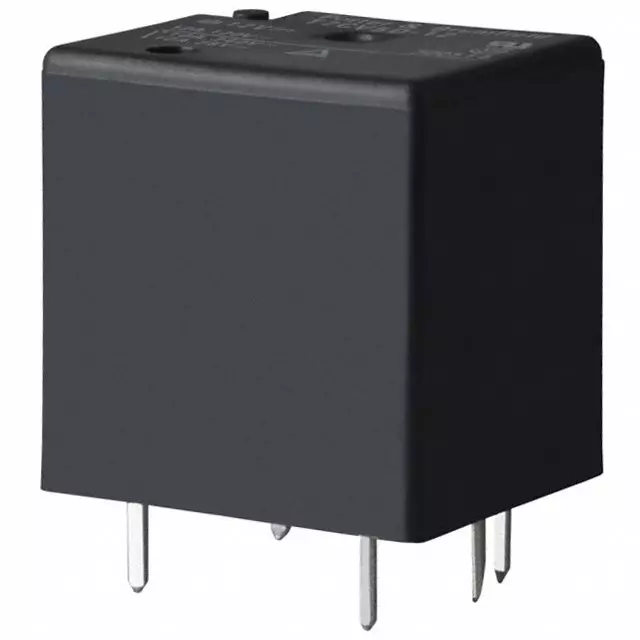
Hello everyone! I hope you are doing well. In this tutorial, we will study the relay from its basic construction to practical selection and control. A relay allows one electrical circuit to operate contacts in another circuit. This makes it useful when a low-power controller must switch a different voltage, a larger load or an electrically isolated circuit. Libraries Relay Simulation Libraries Latest library: Relay Module Library for Proteus V1.0 (October 2026) Other motor drivers: L298 · L9110S · TB6612FNG · BTS7960 · A4988 / DRV8825 · 28BYJ-48 + ULN2003 · PCA9685 Servo Helping Tools Serial Monitor Advance : a serial terminal window for the UART of your board Serial Monitor Expert : the serial monitor with extra debugging tools LCD Library for Proteus V3.0 : 16x2, 20x4 and I2C LCDs to sho ...
Hello friends! In this tutorial, we will design an LED blinking project using the PIC16F877A microcontroller. It is a simple project, but it introduces several ideas that appear in almost every embedded system: configuring an I/O port, choosing an oscillator, building a reset circuit, calculating LED resistors, generating a time delay, compiling a program, and loading the resulting HEX file into Proteus. We will connect eight LEDs to PORTB and switch the complete port between logic low and logic high. Once this basic version works, you can change the output patterns and timing to create a running light, binary counter, or status display. The important objective is to understand why every connection and every program statement is present. Figure: The original simulation shows the PORTB LED ...