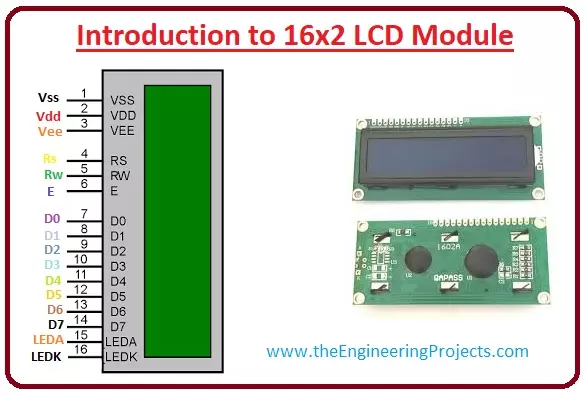
Hello friends, I hope you all are doing great. In today’s tutorial, we will have a look at Introduction to 16x2 LCD Module. LCD stands for liquid crystal display it is mostly used in different electronic projects and devices to display different values. LCD uses liquid crystals for the generation of visible images. 16 x 2 liquid crystal display is a basic LCD module used in DIY electronic projects and circuits. In this LCD module, there are two rows every row consists of sixteen numbers. Libraries LCD 16x2 Simulation Libraries Latest library: LCD 16x2 Library for Proteus V3.0 (October 2026) Other LCDs: LCD 20x4 · I2C LCD 16x2 · I2C LCD 20x4 All four LCDs in one package: LCD Library for Proteus V3.0 Helping Tools Serial Monitor Advance : a serial terminal window for the UART of your board S ...
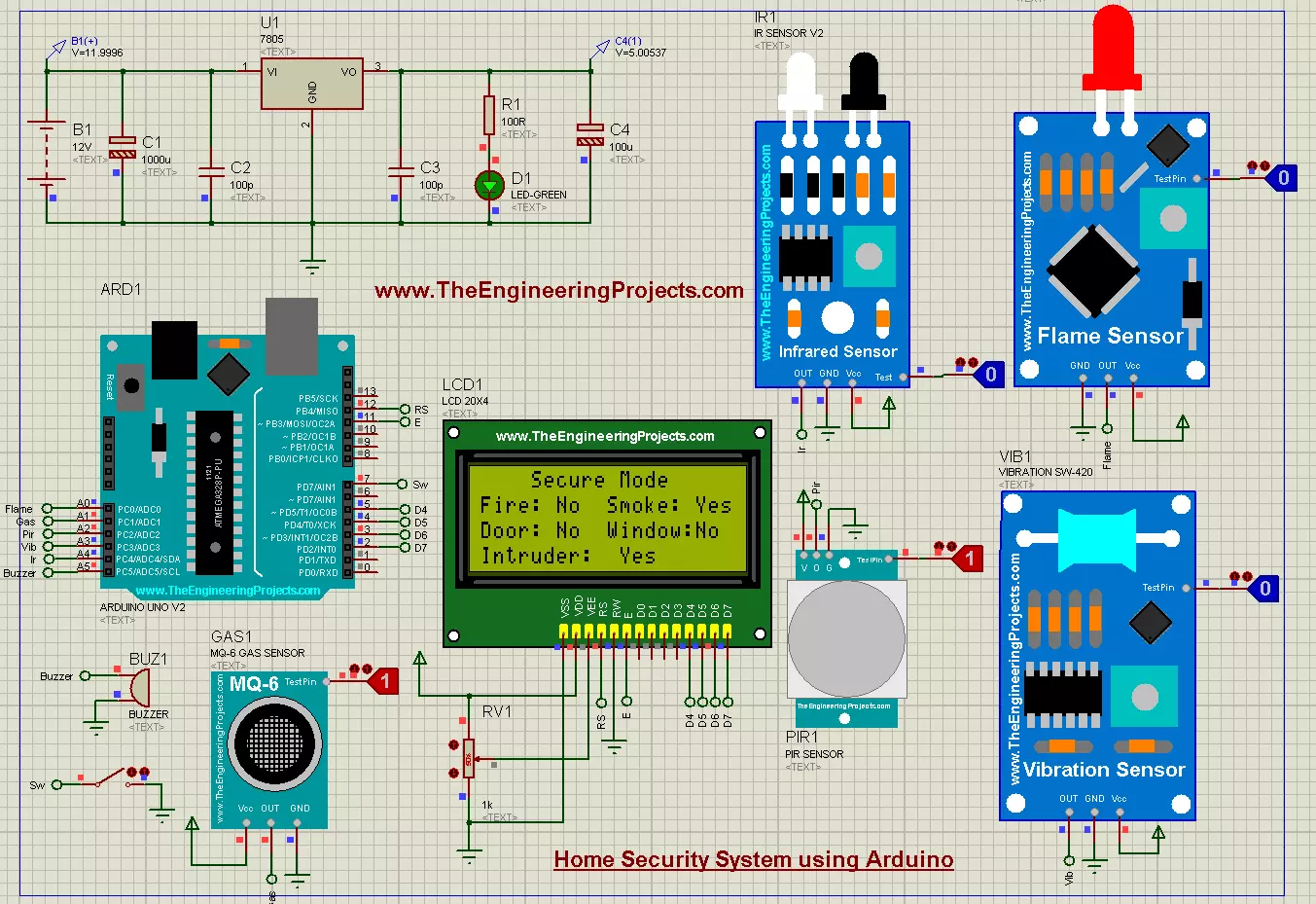
Hello friends, I hope you all are doing well. In today's tutorial, we are going to design a Home Security System using Arduino UNO in Proteus software. It's the most commonly designed engineering project, especially in electrical, electronics and mechatronics engineering. Normally engineering students design it as a semester project during their engineering course. So, today we will design a home security system from scratch in Proteus software. I have given the complete project below to download but I would suggest you to design it on your own so that you could understand it better. So, let's get started: Libraries Libraries used in this project Arduino Library for Proteus: V2.0 (2021, used in this project) · latest version: V4.0 (October 2026) Flame Sensor Library for Proteus: V1.0 (2016 ...
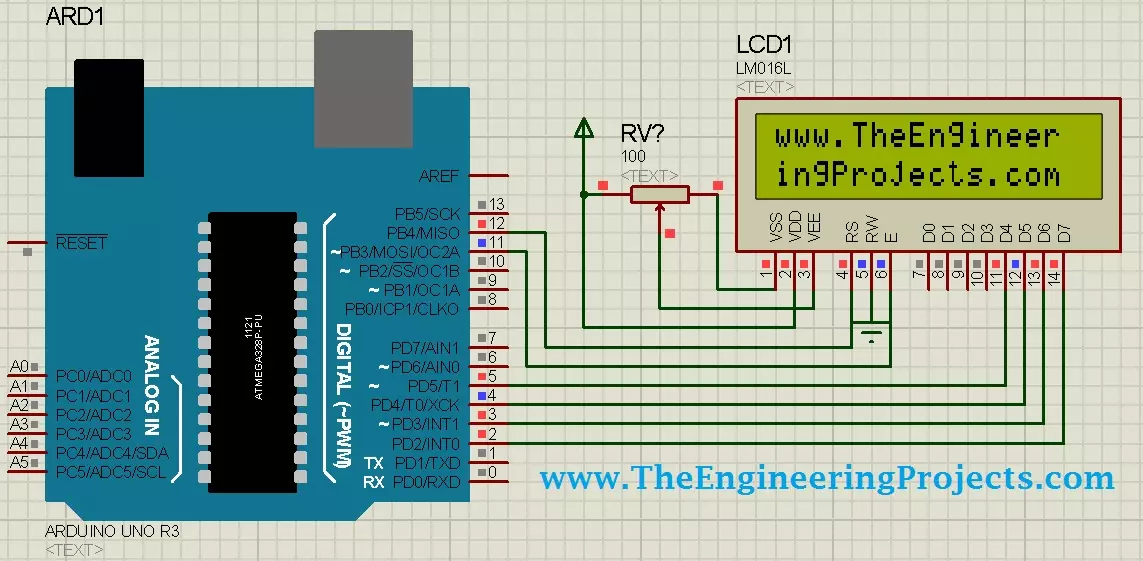
Hello friends! Today, we will design a circuit containing an Arduino UNO and a 16 × 2 character LCD in Proteus ISIS. We will connect the display, write a small Arduino sketch, compile it and load the resulting program into the simulated UNO. Our first result will be the website name displayed across two rows. Libraries LCD Simulation Libraries Latest library: LCD Library for Proteus V3.0 (October 2026): LCD 16x2, LCD 20x4 and both I2C LCDs in one library, with our own HD44780 model and an Arduino demo One LCD only? LCD 16x2 · LCD 20x4 · I2C LCD 16x2 · I2C LCD 20x4 Helping Tools Serial Monitor Advance : a serial terminal window for the UART of your board Serial Monitor Expert : the serial monitor with extra debugging tools This is a useful beginner project because the visible result is simp ...
Hello friends, I hope you all are doing great. Today, I am going to share the Cashless NFC Vending Machine on Raspberry Pi 5 in Proteus Simulation , the fifty-eighth project of our IoT Projects series. If you have searched for a Raspberry Pi vending machine, a PN532 NFC project with the Raspberry Pi, or a Proteus simulation of cashless payment with MIFARE cards, here is a complete one. The money is kept on the card itself, as on campus, canteen and transport cards: the Raspberry Pi 5 reads the credit from the card with a PN532 reader, takes the price off and writes it back, turns a spiral exactly one turn with an encoder gear motor, and checks with an infrared beam that the item really fell, giving the money back if it did not. A 20x4 LCD guides the customer, and a dashboard on a laptop or ...
Hello friends, I hope you all are doing great. Today, I am going to share the new I2C LCD 16x2 Library for Proteus V1.0 . The I2C LCD 16x2 is the same blue or yellow-green 1602 character LCD you know, with a small black I2C backpack soldered to its back. Instead of six or more wires, it needs only four: GND, VCC, SDA and SCL. That is why it is the LCD most of us use with an Arduino today. With this I2C LCD 16x2 Library for Proteus , your sketch talks to an LCD that behaves like the real module: the I2C address, the contrast trimmer on the backpack, the backlight jumper, and the real HD44780 behind it. Updates I2C LCD 16x2 Library for Proteus Latest version: V1.0 (October 2026, this tutorial) Other LCDs: LCD 16x2 · LCD 20x4 · I2C LCD 20x4 All four LCDs in one package: LCD Library for Proteu ...
Hello friends, hope you all are fine and having fun with your lives. Today, I am going to share a new project which is Password Protection using PIC Microcontroller. In this project I am going to use keypad and LCD and will be designing a system in which I am gonna drive a motor if the correct password is supplied. If you entered the wrong password then the motor will not move and you will get another chance to enter the correct password. I hope you guys are gonna enjoy this one. Libraries Libraries used in this tutorial LCD Library for Proteus: V1.0 (2016, used in this tutorial) · latest version: V3.0 (October 2026) Helping Tools Serial Monitor Advance : a serial terminal window for the UART of your board Serial Monitor Expert : the serial monitor with extra debugging tools I have used Ke ...
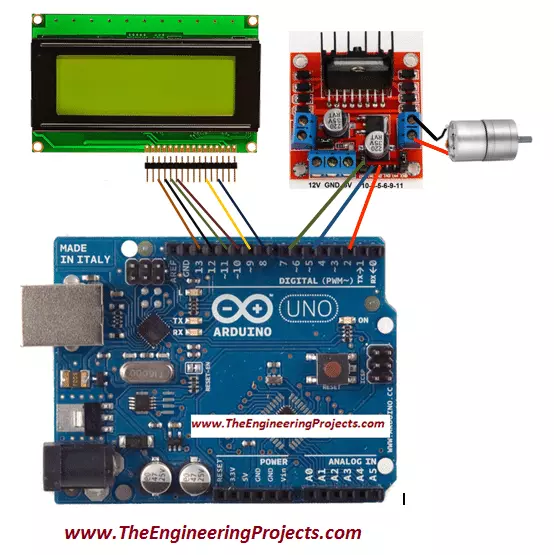
Hello friends! I hope you all will be absolutely fine and having fun. Today, I am going to share my knowledge with all of you about how to make a simple program for DC Motor Direction Control using Arduino. The word DC is basically an abbreviation of Direct current . So, a direct current motor is commonly used motor having two input terminals, one is positive and the other one is negative. If we connect these terminals with the voltage supply the motor will rotate. If you change the polarity then motor will rotate in opposite direction. You should also have a look at Difference between DC & AC Motors to get a better idea about these motors. DC motor has a lot of applications. You can use it in automation projects, for controlling static as well as mobile robots, in transport system, in pum ...
Hello friends, I hope you all are doing great. Today, I am going to share the new LCD 16x2 Library for Proteus V3.0 . The 16x2 character LCD, the blue or yellow-green "1602" display with 16 pins, is the first display most of us connect to an Arduino. It shows two lines of 16 characters and is driven by the famous HD44780 controller. With this LCD 16x2 Library for Proteus , your sketch writes to an LCD that behaves like the real one: the real timing, the contrast pot, the backlight, your own characters, and even the row of blocks you see when the LCD is not initialised. Updates LCD 16x2 Library for Proteus Latest version: V3.0 (October 2026, this tutorial) Earlier versions: V2.0 (2023) · V1.0 (2016) Other LCDs: LCD 20x4 · I2C LCD 16x2 · I2C LCD 20x4 All four LCDs in one package: LCD Library ...
Hi readers! I hope you are doing great. Today, I am going to share the second version of the top embedded libraries designed for the proteus. Before this, we shared the first version of many libraries that engineering students are using in their projects. The interest of the students in these libraries has motivated us to design even better versions of them. These versions have a more realistic design and error-free working and are ideal for engineering students to use in their simulation in Proteus. Updates Proteus Libraries for Engineering Students Latest list: 30 New Proteus Libraries for Engineering Students (October 2026): GSM, GPS, Wi-Fi, Bluetooth, RF, LoRa, RFID and I2C sensor libraries with Arduino examples Earlier lists: Top Embedded V2.0 (2023, this list) · Top Embedded V1.0 (20 ...
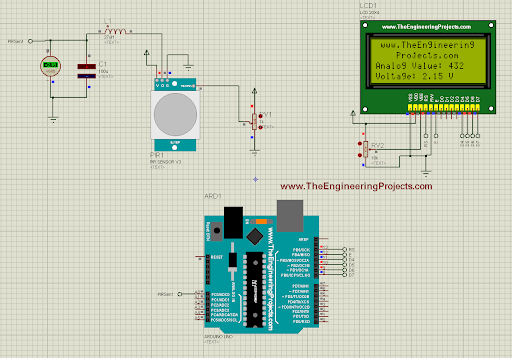
Hi learner! I hope you are doing great. Today, I am sharing version 3.0 of the PIR sensor library for Proteus. We have already shared V1.0 and V2.0 of the PIR Sensor Library. PIR Sensor V1.0 Library for Proteus adds a digital PIR Sensor in Proteus, while the PIR Sensor V2.0 Library adds an analog PIR Sensor to simulate. These libraries were loved by the users and this motivated us to work more on it. Updates PIR Sensor Library for Proteus Latest version: PIR Sensor Library for Proteus V4.0 (October 2026): HC-SR501 with time delay, the H / L jumper, warm-up, Simple and Advance devices and an Arduino demo Earlier versions: V3.0 (2023, this tutorial) · V2.0 (2020) · V1.0 (2016) Other distance and motion sensors: Ultrasonic HC-SR04 · JSN-SR04T · Sharp IR · TF-Luna LiDAR · VL53L0X · RCWL-0516 · ...