Hello friends! I hope you are doing great. Today, we are discussing the latest version of the Arduino Mega 1280 library for Proteus. This can be used in both versions (Proteus 7 and Proteus. We have shared the previous versions, which are the Arduino Mega 1280 library for Proteus and the Arduino Mega 1280 library for Proteus V2.0 with you. With the advancement in the version, these microcontrollers have a better structure and the design is closer to the real microcontrollers. Updates Arduino Mega 1280 Library for Proteus Latest version: Arduino Mega 1280 Library for Proteus V4.0 (October 2026), with working LEDs, a RESET button and a built-in serial monitor Earlier versions: V3.0 (2023, this tutorial) · V2.0 (2021) · V1.0 (2020) Other boards: UNO · Mega 2560 · Nano · Pro Mini · Mini (V4.0) ...
Hello friends, I hope you all are doing great. Today, I am going to share the IoT Smart Weighing Scale with ESP32 - Proteus Simulation , the eleventh project of our IoT Projects series. If you have searched for a Proteus simulation of a digital weighing scale with an ESP32, here is a complete one. An ESP32 reads a 5 kg load cell through an HX711 24-bit ADC, takes the price per kg from a 4x4 keypad, works out the price of each item like a shop's price-computing scale, adds the items to a bill, shows everything on a 20x4 LCD and serves a live web dashboard for your laptop and your phone. Every grocery shop, bakery and post office has one of these scales, and the same parts sit inside kitchen scales, luggage scales and industrial weighing systems. In this tutorial, we will go through the circ ...
Hi Friends! Hope you’re well today. Happy to see you around. In this post today, I’ll walk you through Latest Proteus Libraries for Engineering Students V2.0. Updates Proteus Libraries for Engineering Students Latest list: 30 New Proteus Libraries for Engineering Students (October 2026): GSM, GPS, Wi-Fi, Bluetooth, RF, LoRa, RFID and I2C sensor libraries with Arduino examples Earlier lists: Top Embedded V2.0 (2023) · Top Embedded V1.0 (2023) · Libraries V2.0 (2021, this list) · New Libraries (2016) Lists by family: 35 Sensor Libraries · Wireless Modules · Microcontroller Boards · Must-Have Libraries Helping Tools Serial Monitor Advance : a serial terminal window for the UART of your board Serial Monitor Expert : the serial monitor with extra debugging tools LCD Library for Proteus V3.0 : 1 ...
Hello friends, I hope you all are doing great. Today, I am going to share the new LCD Keypad Shield Library for Proteus V1.0 . The LCD keypad shield is one of the most popular first boards for the Arduino UNO: a 16x2 LCD, five buttons and a contrast trimmer on one board that simply plugs onto the UNO. No wiring, no breadboard, and your project has a display and a small keyboard. With this LCD Keypad Shield Library for Proteus , you get the same shield in your simulation: the LCD shows what your sketch prints, and you press the buttons with the mouse. Updates LCD Keypad Shield Library for Proteus Latest version: V1.0 (October 2026, this tutorial) Other LCDs: LCD 16x2 · LCD 20x4 · I2C LCD 16x2 · I2C LCD 20x4 All four LCDs in one package: LCD Library for Proteus V3.0 Helping Tools Serial Moni ...
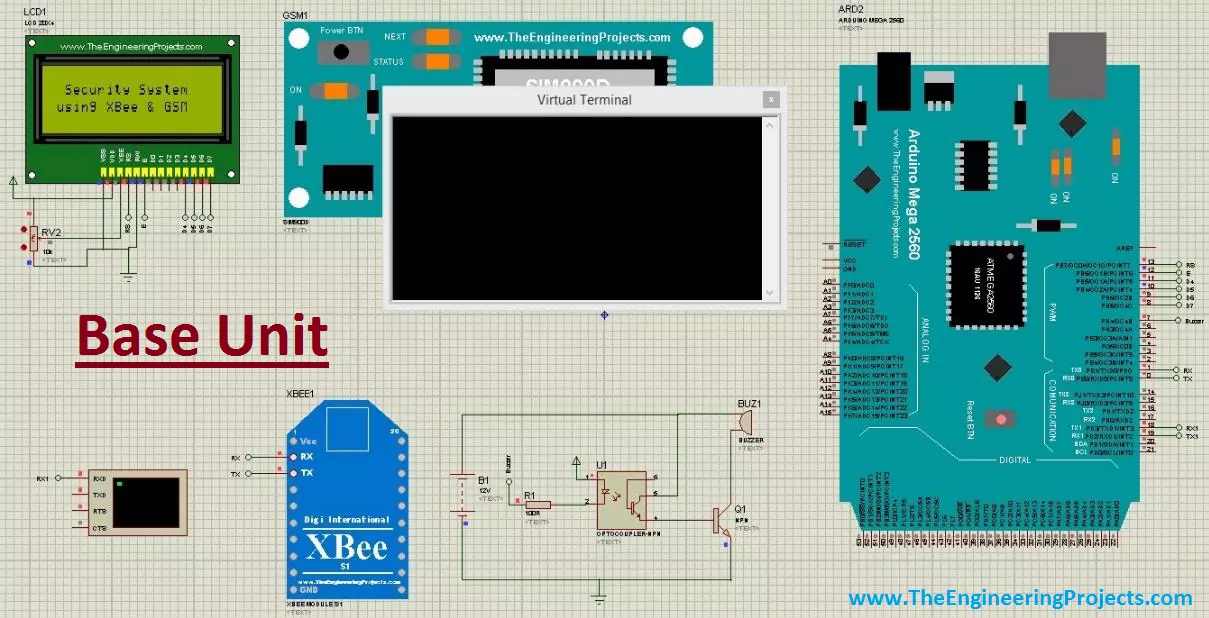
Hello everyone, I hope you all are doing great. In today's post, I am going to share a Final Year Project in detail, named as Real Time Security Control System using XBee and GSM . I will give you all the details so that you can easily design it on your own. I've given the Proteus Simulation to download below. In that zip file, you will get both the Arduino codes and Proteus Simulations. Libraries Libraries used in this project Arduino Library for Proteus: V1.0 (2015, used in this project) · latest version: V4.0 (October 2026) Flame Sensor Library for Proteus: V1.0 (2016, used in this project) · latest version: V2.0 (October 2026) Gas Sensor Library for Proteus: V1.0 (2016, used in this project) · latest version: V2.0 (October 2026) XBee Library for Proteus: V1.0 (2016, used in this projec ...
Hello friends, I hope you all are doing great. Today, I am going to share the new OLED SSD1306 Library for Proteus V1.0 . The small 0.96" OLED display is everywhere in Arduino projects: 128 x 64 sharp, bright pixels, no backlight, and only four wires, GND, VCC, SCL and SDA. It shows text, numbers, graphs, icons and little animations, so it is the display to pick when a character LCD is not enough. With this OLED SSD1306 Library for Proteus , your sketch draws on an OLED that behaves like the real module, pixel by pixel. Updates OLED SSD1306 Library for Proteus Latest version: V1.0 (October 2026, this tutorial) Other OLEDs: 128x32 0.91 inch · SH1106 1.3 inch All three OLEDs in one package: OLED Library for Proteus V1.0 Helping Tools Serial Monitor Advance : a serial terminal window for the ...
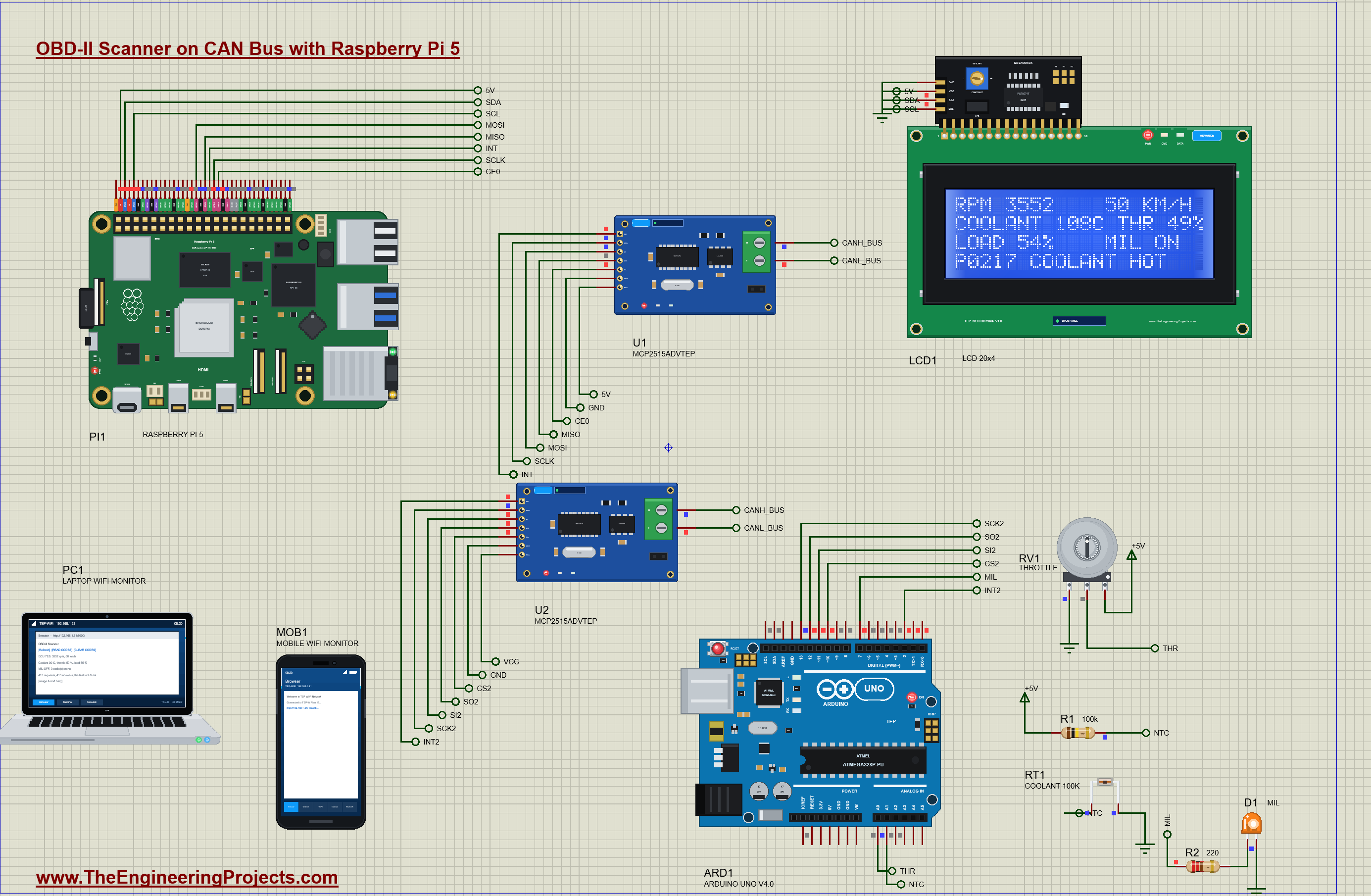
Hello friends, I hope you all are doing great. Today, I am going to share the OBD-II Scanner on CAN Bus with Raspberry Pi 5 in Proteus Simulation , the sixty-second project of our IoT Projects series. If you have searched for a Raspberry Pi OBD-II reader, a CAN bus project with the MCP2515, or a Proteus simulation of car diagnostics, here is a complete one. Every car built in the last twenty-five years has a diagnostic port under the dashboard, and behind it a CAN bus where the engine's control unit answers questions: how fast the engine turns, how hot the coolant is, whether the check engine lamp is on and why. Here a Raspberry Pi 5 is the scan tool, and an Arduino UNO plays the engine's control unit, with a throttle knob and a real coolant temperature sensor. In this tutorial, we will go ...