


INMP441 Microphone Library for Proteus Simulation


Hello friends, I hope you all are doing great. Today, I am going to share the new INMP441 Microphone Library for Proteus Simulation. The INMP441 is the tiny round board you find in almost every ESP32 voice project: a MEMS microphone with its own ADC and filter inside, which sends the sound as 24-bit digital samples over I2S - no amplifier, no analog noise on long wires, no ADC to calibrate. With this library you can run a full Proteus simulation of that I2S microphone: the bit clock, the word select, the 24-bit samples with the right one-clock delay, the left and right channels and even its start-up time, so that your code that reads and decodes the samples is right before you solder anything.
INMP441 Microphone Library for Proteus
Latest version: V1.0 (November 2026, this tutorial)
Helping Tools
- Serial Monitor Advance: a serial terminal window for the UART of your board
- Serial Monitor Expert: the serial monitor with extra debugging tools
- LCD Library for Proteus V3.0: 16x2, 20x4 and I2C LCDs to show your readings
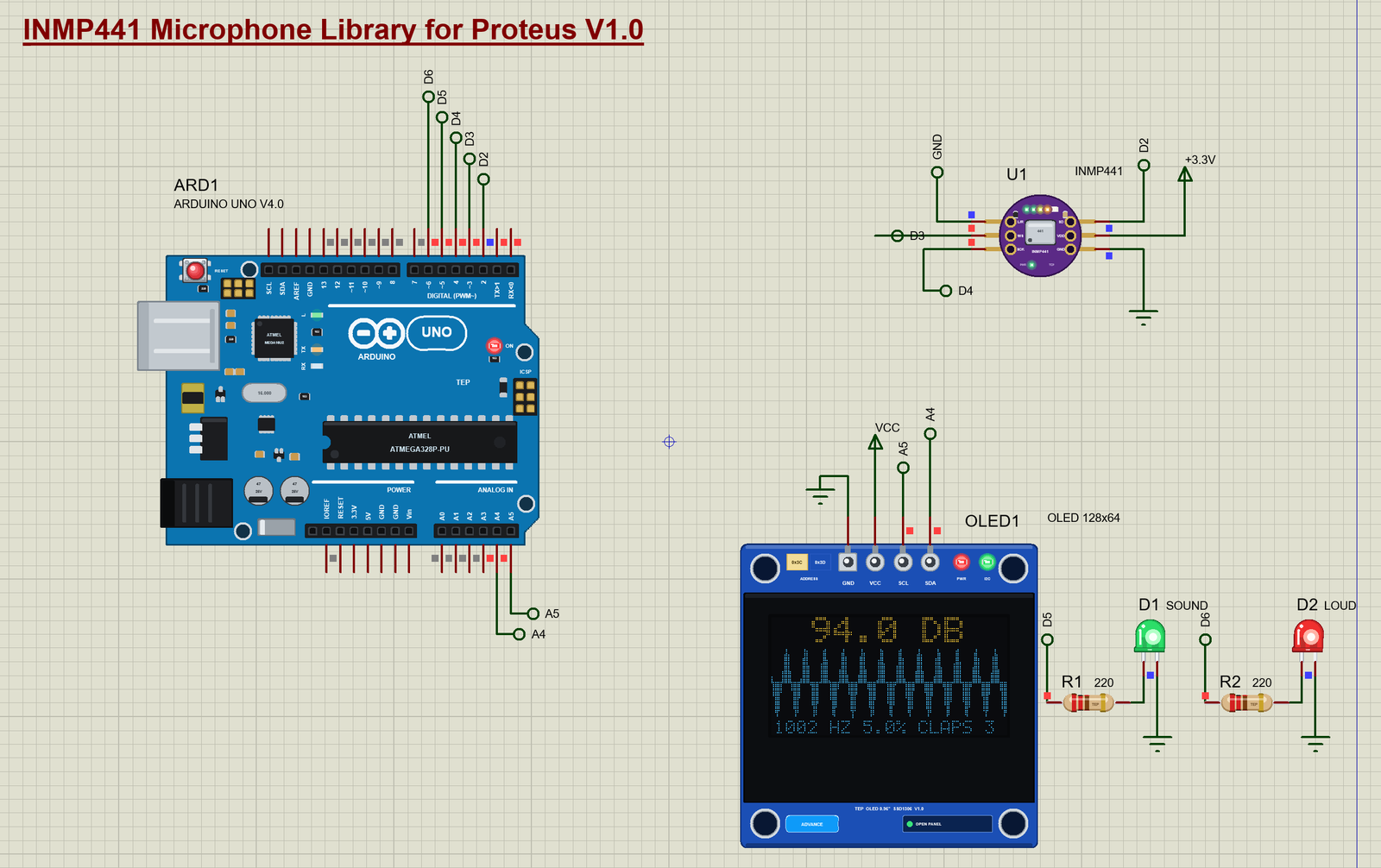
The module comes alive at run time: five level LEDs on the board climb with the sound while the host is reading it. The demo is a sound level meter: an Arduino clocks the microphone in software, works out the level in dB SPL, the peak and a frequency, counts claps, and draws it all - with the waveform itself - on an OLED, while a SOUND and a LOUD LED sit beside it.
NOTICE: Our team has put a lot of effort into these small parts: the bodies, the animation and the pop-ups are all our own design, and you get them free. Your feedback is the fuel that keeps us going, so please tell us what you think in the comments below or in the sound sensor board of our forum. And if our free libraries help you, you can buy us a coffee. So, let's get started with the INMP441 Microphone Library for Proteus Simulation:
How Does a MEMS Microphone with I2S Work?
A MEMS microphone is a microscopic drum. A thin silicon membrane sits a few micrometres in front of a rigid back plate, and the two form a tiny capacitor. Sound pressure pushes the membrane back and forth, the capacitance follows, and a little amplifier turns that into a voltage. In an analog MEMS microphone that voltage is the output. The INMP441 goes further: the same package holds a sigma-delta ADC and a decimation filter, so what comes out is already a stream of numbers - one 24-bit sample of the sound pressure per frame - on a standard I2S serial port.
| INMP441 MEMS microphone (TDK InvenSense) | |
|---|---|
| Package | 4.72 x 3.76 x 1 mm, bottom port; on a round 14 mm module |
| Output | I2S: 24-bit two's complement samples, MSB first |
| Clock | SCK 0.5 - 3.2 MHz from the host; WS = SCK / 64 (7.8 - 50 kHz) |
| Sensitivity | -26 dBFS at 94 dB SPL; full scale at 120 dB SPL |
| Noise | SNR 61 dBA (about 33 dBA of self-noise) |
| Supply | 1.62 - 3.63 V, about 1.4 mA |
| Pins | SCK, WS, SD, L/R, VDD, GND |
| Uses | voice capture, sound level meters, speech recognition, noise monitoring |
The I2S Frame
I2S is a three-wire bus for audio. The host (the master) drives SCK, the bit clock, and WS, the word select. One frame is 64 SCK periods: 32 with WS low for the left channel and 32 with WS high for the right. The microphone changes its SD line just after each falling edge of SCK, and the host reads it on the rising edge. Like every I2S device, it waits one clock period after WS changes before it sends the most significant bit; then follow the other 23 bits, and for the rest of its half SD floats. The L/R pin picks the half: low for the left, high for the right. That is how two INMP441s can share the same three wires as a stereo pair.
dB SPL and dBFS
Sound levels are measured in dB SPL: 20 log10 of the pressure over 20 micropascals, the faintest sound a young ear can hear. A quiet room is about 35 dB, speech about 60 dB, loud music 80 - 90 dB and 94 dB is exactly 1 pascal - the level of the calibrators that sound engineers use. A digital microphone speaks in dBFS instead: decibels below its full-scale number. The INMP441 maps 94 dB SPL to -26 dBFS, so its full scale, 8,388,607, is 120 dB SPL, and the conversion back is simple: dB SPL = 94 + 20 log10(rms / 297,286), where 297,286 is the rms value of a 94 dB tone in counts.
A Microphone That Has to Wake Up
The INMP441 has no reset pin and no registers. It runs from SCK: when the clock starts after power-up, it needs 2^18 cycles - 85 ms at 3.072 MHz - before its filter has settled and its samples are valid. Until then it sends zeros. The model counts those cycles too, and the demo clocks the microphone through them before it trusts a single sample.
Features of the INMP441 Microphone Library for Proteus Simulation
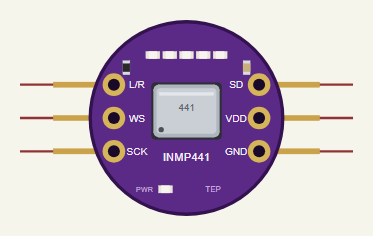
- A real-looking module: the round 14 mm purple board at its real size, the microphone's metal lid, the decoupling capacitor, the SD pull-down and the six pins in two columns.
- Animated: a PWR LED and five level LEDs on the board that follow the sound while the host reads it (both our additions).
- A real I2S slave: 64-SCK frames, the one-clock delay after WS, 24 bits MSB first, the L/R half, a floating SD (read low through the pull-down) in the other half.
- Real levels: -26 dBFS at 94 dB SPL, clipping above 120 dB SPL, a 33 dBA noise floor, no DC - and the 2^18-cycle start-up.
- A scene: a quiet room, a voice, three claps, music and the 94 dB calibrator, plus chips for each sound and a 125 dB overload.
- A pop-up: the sound and its level on a 30 - 120 dB scale, the last 256 samples as a waveform, eight live tiles, graphs, an event log and a check page.
- A complete package: about 2.3 MB with the library, our OLED, 5 mm LED and resistor libraries, our Arduino UNO V4.0 and the demo, without the source code of the model.
The INMP441 in Proteus
The device is INMP441TEP in TEPINMP441.LIB, under Sensors > Sound, with the prefix U and the model TEPINMP441.DLL. Search INMP441 or microphone in Pick Devices. Six pins: L/R, WS and SCK on the left, SD, VDD and GND on the right. Its properties: PROFILE (DEMO or STEADY) and LEVEL (dB SPL of a 1 kHz tone, for STEADY).
Download INMP441 Microphone Library for Proteus Simulation
Click the button below to download INMP441-Microphone-Library-for-Proteus-v1.0.zip (about 2.3 MB, without the source code of the models):
INMP441 Microphone Library for Proteus V1.0- README.txt: installation, the demo, the wiring, troubleshooting and the limits of the simulation.
- Proteus Library Files:
TEPINMP441.LIB,TEPOLED12864.LIB,TEPLED5MM.LIB,TEPRESISTOR.LIBandArduinoV4TEP.LIB. - Proteus Model Files:
TEPINMP441.DLL,TEPOLED.DLL,TEPLED5MM.DLL,TEPRESISTOR.DLLandTEPARDUINO.DLL. - Arduino Code: the demo sketch (no extra library).
- Proteus Simulation: the demo project, its HEX file and copies of the DLLs.
No Proteus yet? Read How to Download and Install Proteus 7 and 8. New to libraries? Follow How to Install a New Library in Proteus.
How to Install INMP441 Microphone Library for Proteus Simulation
- Close Proteus and extract the whole zip file, for example to your Desktop.
- Copy the files from Proteus Library Files into the LIBRARY folder of Proteus.
- Copy the files from Proteus Model Files into the MODELS folder.
- Delete
TEPINMP441.IDXfrom the LIBRARY folder if it is there. - Start Proteus, press P and search for INMP441.
Proteus Simulation of a Sound Level Meter
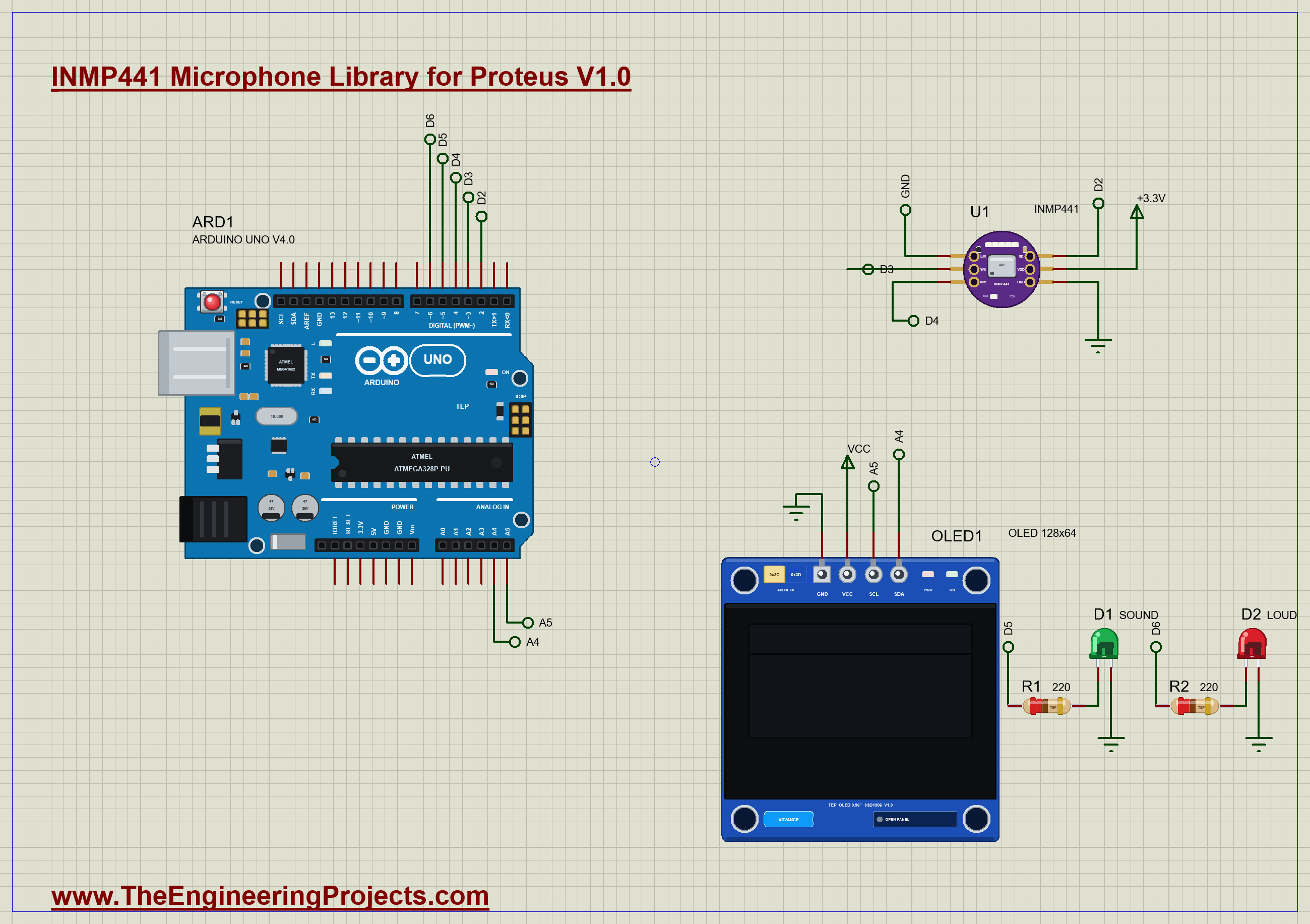
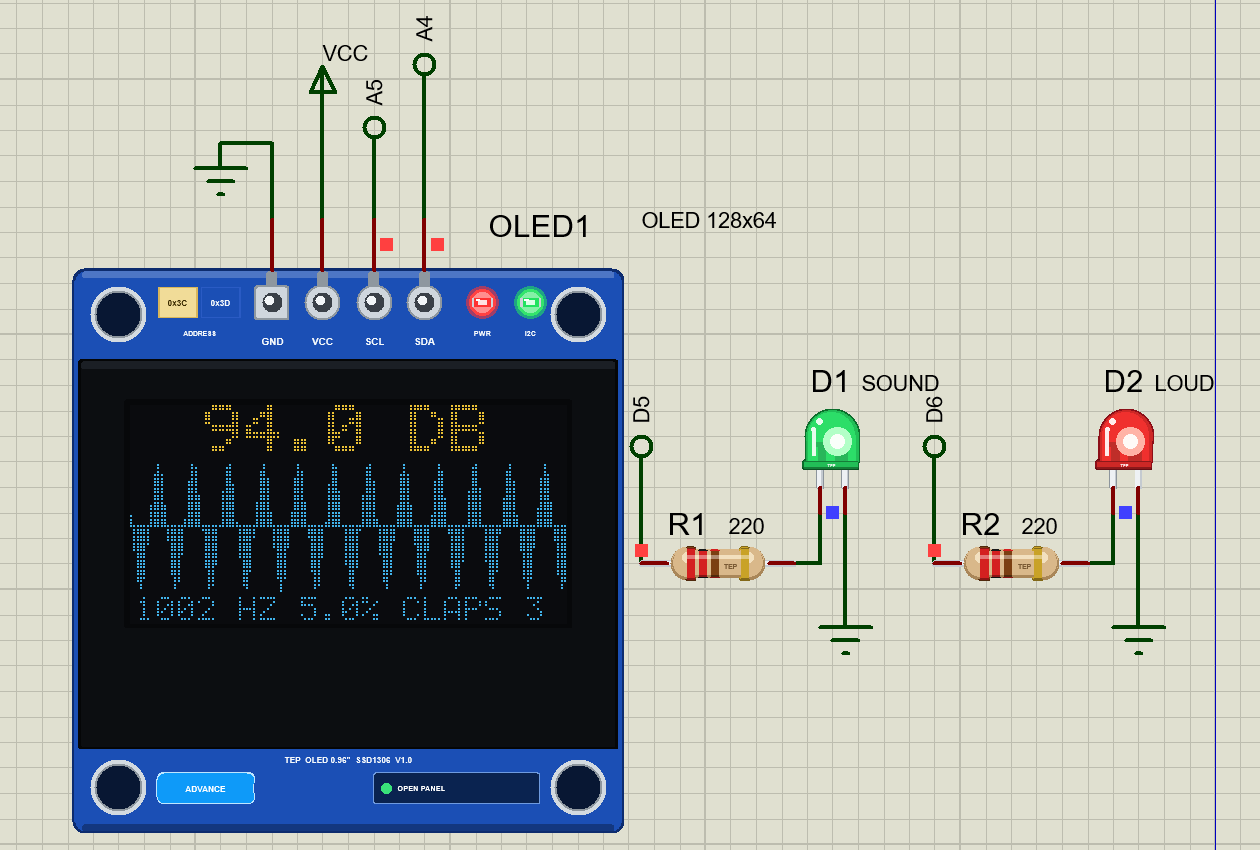
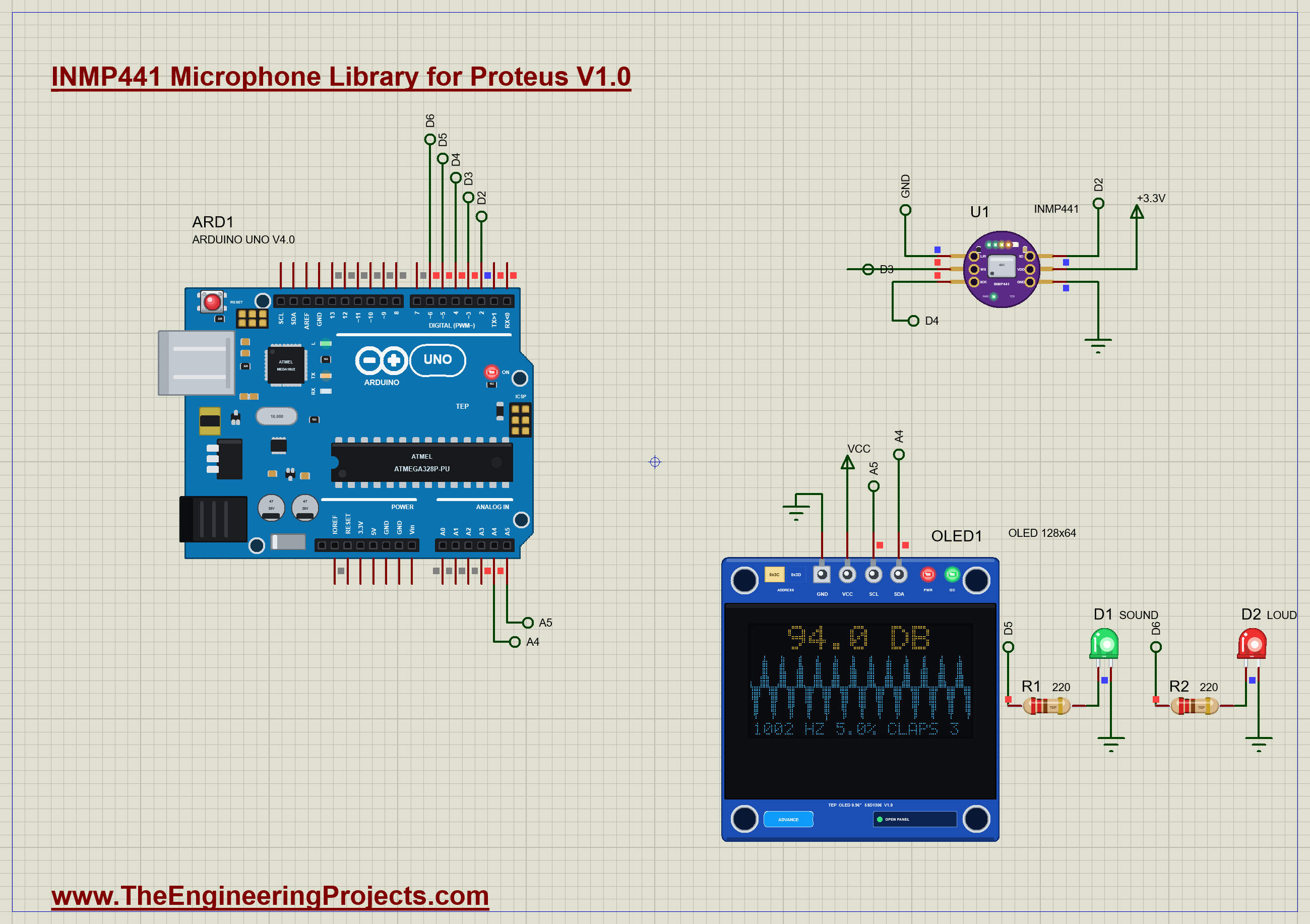
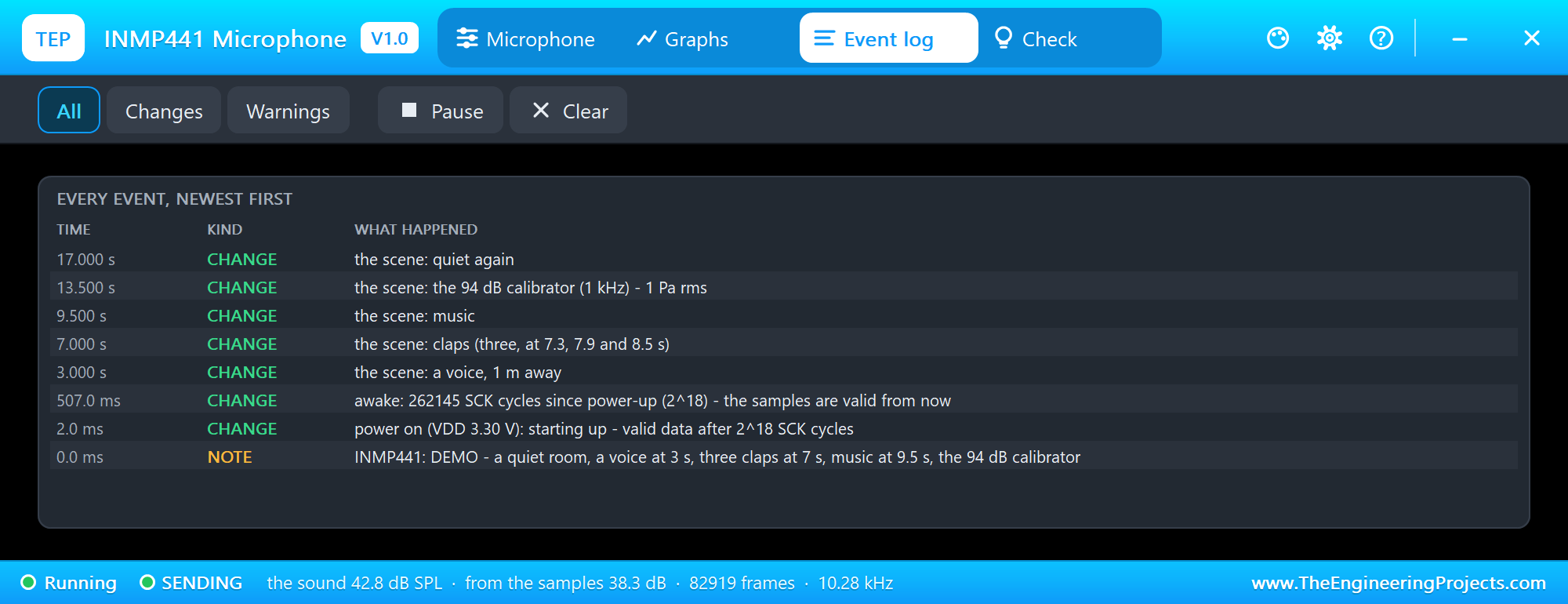
Our demo measures sound. U1 is the INMP441 with PROFILE DEMO: a quiet room, a voice from 3 seconds, three claps from 7, music from 9.5, the 94 dB calibrator from 13.5 and quiet again from 17 seconds. SCK goes to D4 of our Arduino UNO Library for Proteus V4.0, WS to D3, SD to D2, L/R to ground (the left channel) and VDD to a +3.3V terminal - the UNO's 3.3 V pin on a real board. Our OLED SSD1306 Library for Proteus shows the level and the waveform, and two LEDs from our 5mm LED Library for Proteus sit beside it: SOUND (green, D5) above 50 dB and LOUD (red, D6) above 85 dB, each through 220 ohm. The Arduino's built-in monitor is the same window as our TEP Serial Monitor Advance for Proteus. Open INMP441-SoundMeter-ArduinoUnoV4.pdsprj.
The Sketch
An UNO has no I2S port, so the sketch makes the clock itself, with fast port writes instead of digitalWrite. Each frame starts by pulling WS low - the left half, where our microphone talks:
*ws &= ~wsBit; // WS low: the left half begins (the MSB comes one SCK later)Then 32 clock periods: SCK falls and the microphone puts its next bit on SD, SCK rises and the sketch reads it:
    *sck &= nsb;                                            // SCK falls: the microphone puts its next bit on SD
    *sck |= sb;                                             // SCK rises: read it
    w = (w << 1) | ((*sd & db) ? 1 : 0);
The first bit read is the delay slot, then come the 24 data bits and seven floating ones. One shift drops the delay slot and an arithmetic shift brings the sign down - a 24-bit sample in a long:
return (long)(w << 1) >> 8; // drop the delay slot: the 24 data bits with their signBefore anything else, setup() clocks the microphone through its start-up:
for (int i = 0; i < 4200; i++) readFrame(); // 4200 frames x 64 = 268,800 SCK cycles: past its start-upThe sketch reads blocks of 128 frames - the OLED's 128 columns - and turns the rms of each block into dB SPL with the maker's sensitivity:
spl = 94.0 + 20.0 * log10(max(rms, 1.0) / CNT_94DB); // the level in dB SPLA clap starts as a sudden jump: louder than 80 dB and more than 20 dB above the slowly-moving background level:
} else if (spl > 80 && spl - avgSpl > 20 && now - lastClap > 250) { // a sudden jump: maybe a clapBut music and voices jump too. What makes a clap a clap is that it is over almost at once, so the sketch only counts it if the level falls back within a fifth of a second:
if (spl < clapBase + 10) { // back down within 0.2 s: it was a clapIt also counts the zero crossings of each block for a frequency, and draws the OLED one page per pass, so the microphone is read again every few milliseconds.
INMP441 Simulation Results
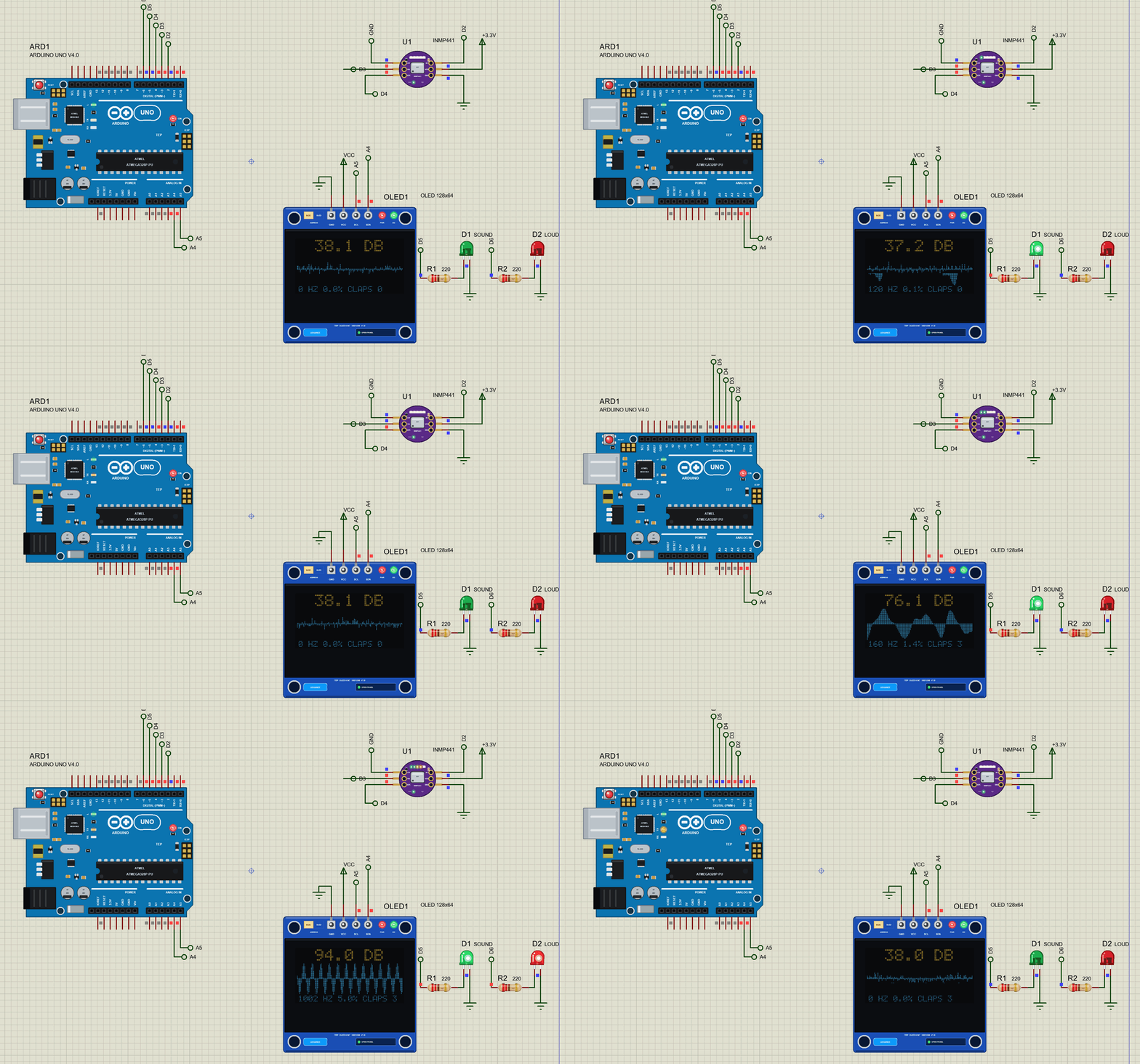
Open the project and press Run. The demo runs 18.5 simulated seconds and took about 3 minutes on our PC with the pop-up open and the pictures being taken. Click the microphone for its pop-up. Every number below comes from one simulation run, the demo exactly as it ships.
Start-Up and a Quiet Room
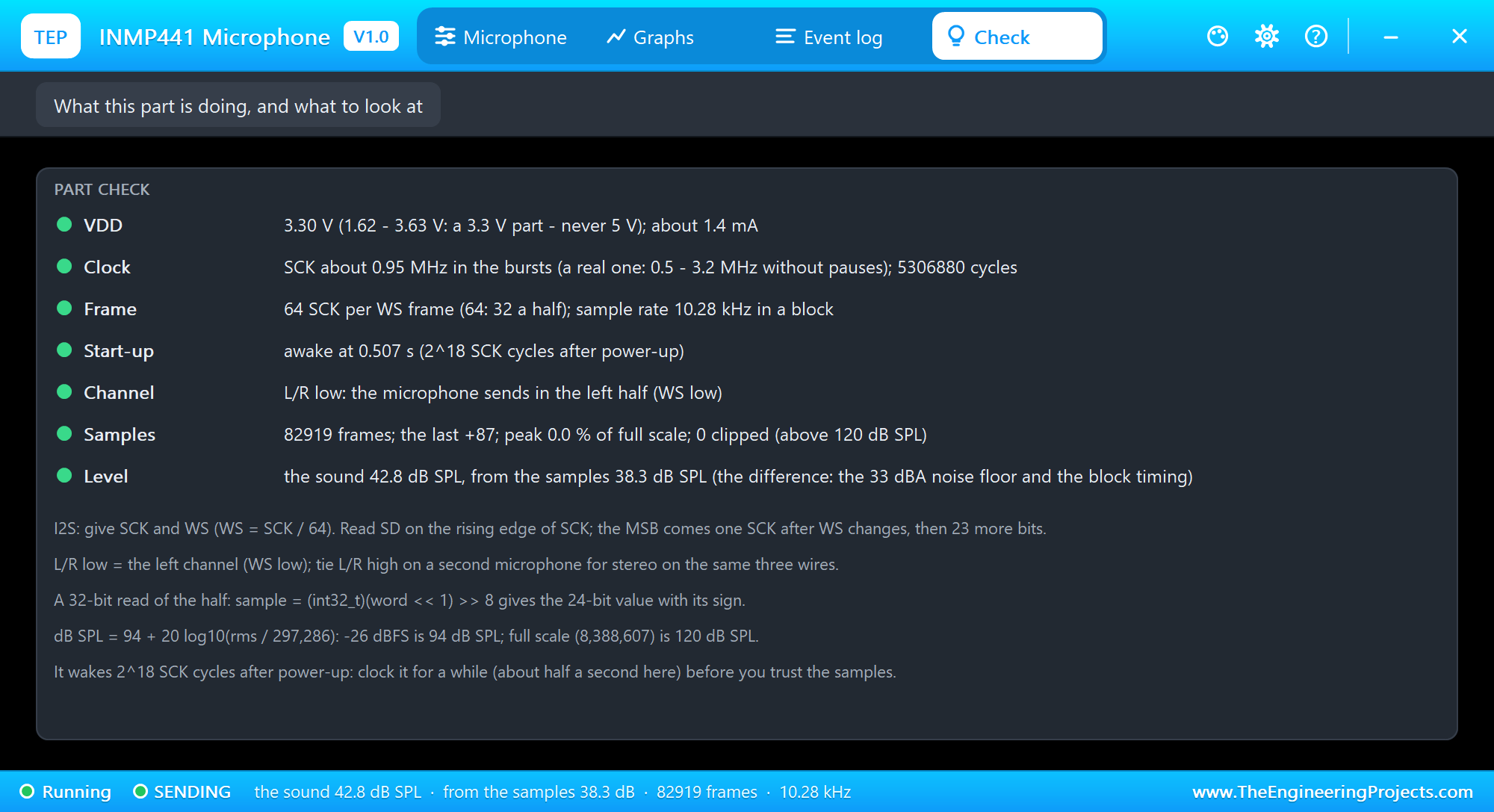
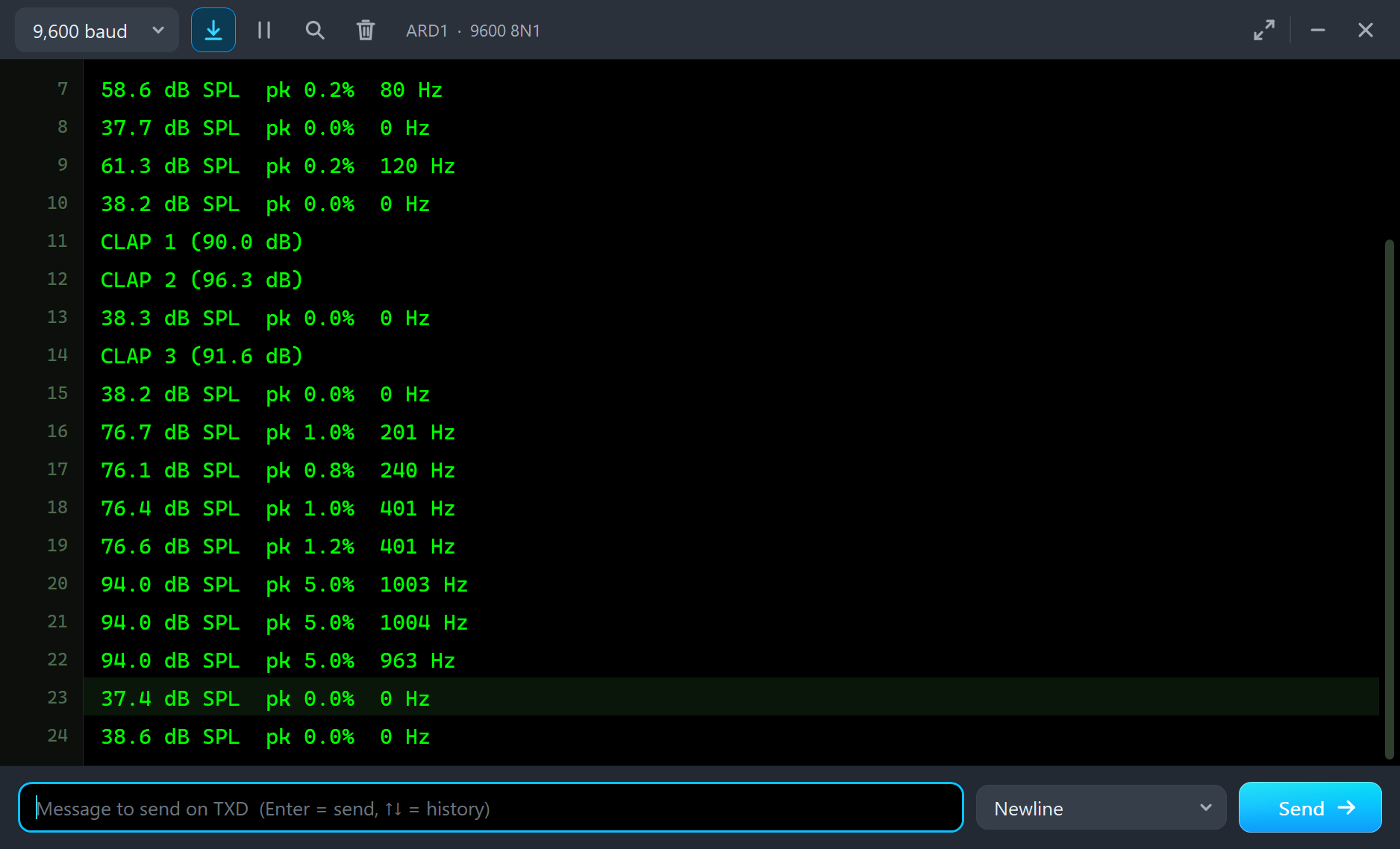
Before anything else the sketch clocks the microphone through its start-up. The pop-up counts along - STARTING UP and the share of the 2^18 cycles done - and the INMP441 woke at 0.507 seconds, after 262,144 clock cycles; only from then on are its samples real. The sketch's software clock ran at about 0.95 MHz inside each burst and gave 10.28 kHz of samples within a block of 128, and the Check page confirms 64 SCK periods per WS frame. In the quiet room the true sound is 36.0 dB SPL; the samples gave 38.5 dB - the room plus the microphone's own 33 dBA of noise - and the monitor printed 37.7 to 38.2 dB SPL with 0 Hz, since there is nothing tonal to count.
A Voice
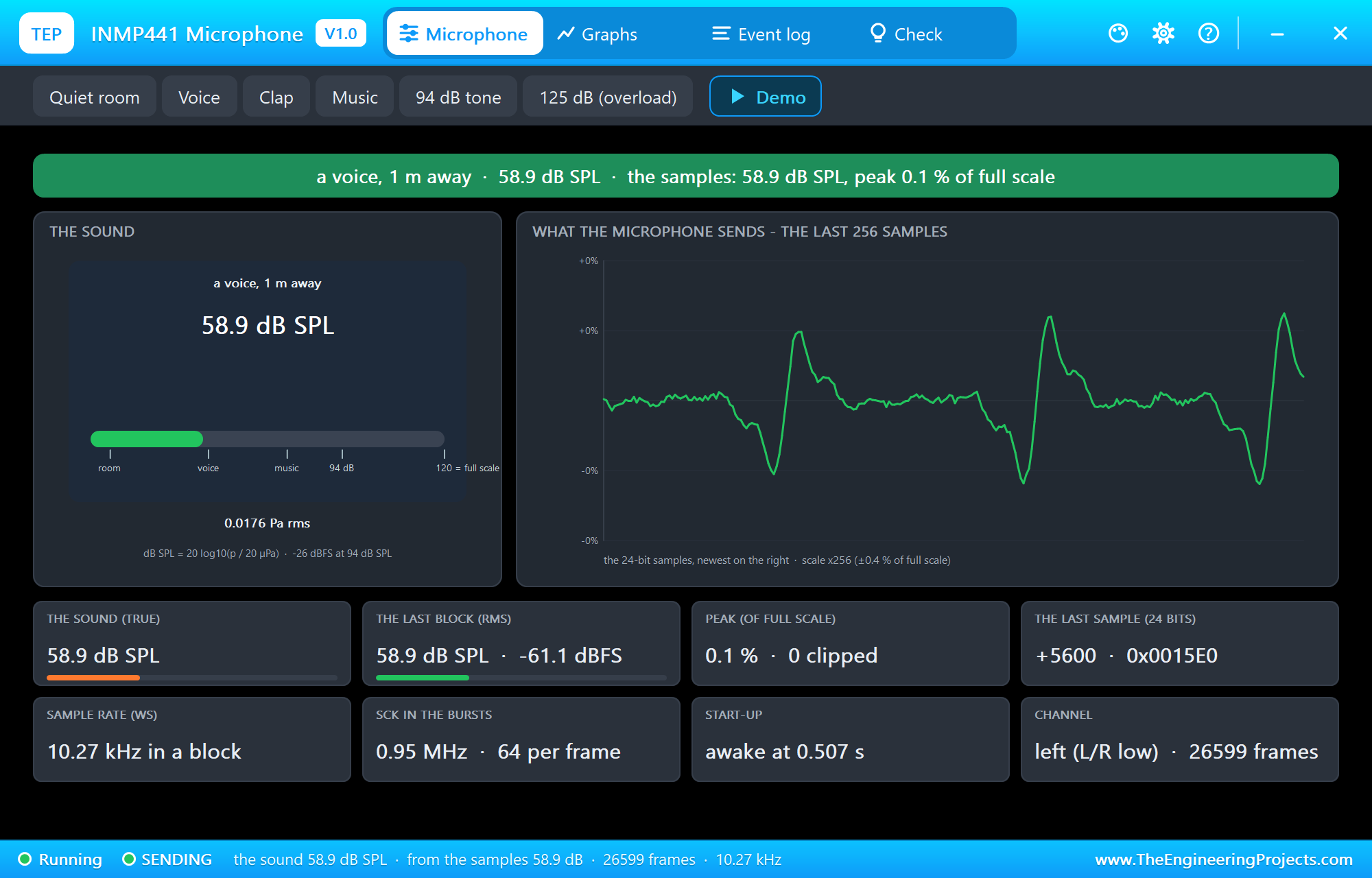
At 3 seconds a voice starts, about a metre away, in syllables. When the run paused on a syllable at 5.6 seconds, the sound was 58.5 dB SPL and the last block of samples gave 58.9 dB: the sketch and the maker's -26 dBFS sensitivity agree to half a decibel. The waveform in the pop-up shows the voiced sound - a fundamental near 130 Hz with its harmonics - and the peak was only 0.1 % of full scale, because a voice is quiet for a microphone that clips at 120 dB. The monitor printed 58.6 and 61.3 dB SPL, with 80 and 120 Hz from the zero crossings (harmonics confuse a simple counter), and the green SOUND LED lit above 50 dB.
Three Claps
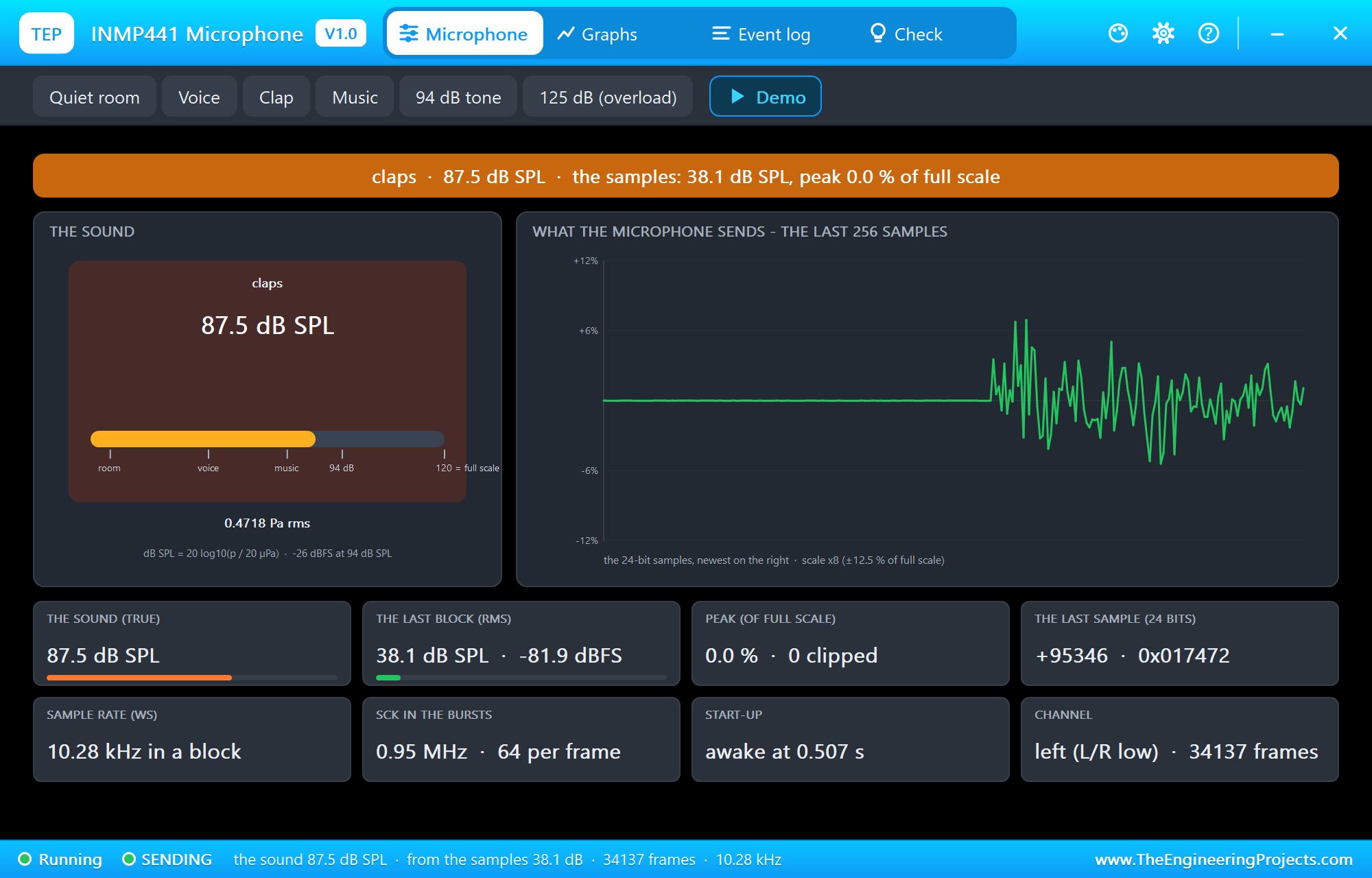
From 7.3 seconds come three claps, 0.6 seconds apart. At 7.32 seconds, 20 milliseconds after the first one, the pop-up's sound level - Fast weighted, like a sound level meter - stood at 87.5 dB, and the waveform shows the clap's burst arriving at the right of the last 256 samples. The sketch counted exactly three: CLAP 1 (90.0 dB), CLAP 2 (96.3 dB) and CLAP 3 (91.6 dB); each value depends on where in the clap its block fell. The simulation also showed why the second check is needed: without the "back down within 0.2 s" rule, the drum beats at the start of the music counted as two more claps.
Music
From 9.5 seconds music plays: chords with a kick drum on every beat. At 11.5 seconds the sound was 75.6 dB SPL, the last block 73.2 dB and the peak 1.1 % of full scale. The monitor showed 76.1 to 76.7 dB SPL and frequencies from 201 to 401 Hz, as the zero crossings followed the chord notes and their harmonics. No clap was counted - the music stays loud.
The 94 dB Calibrator
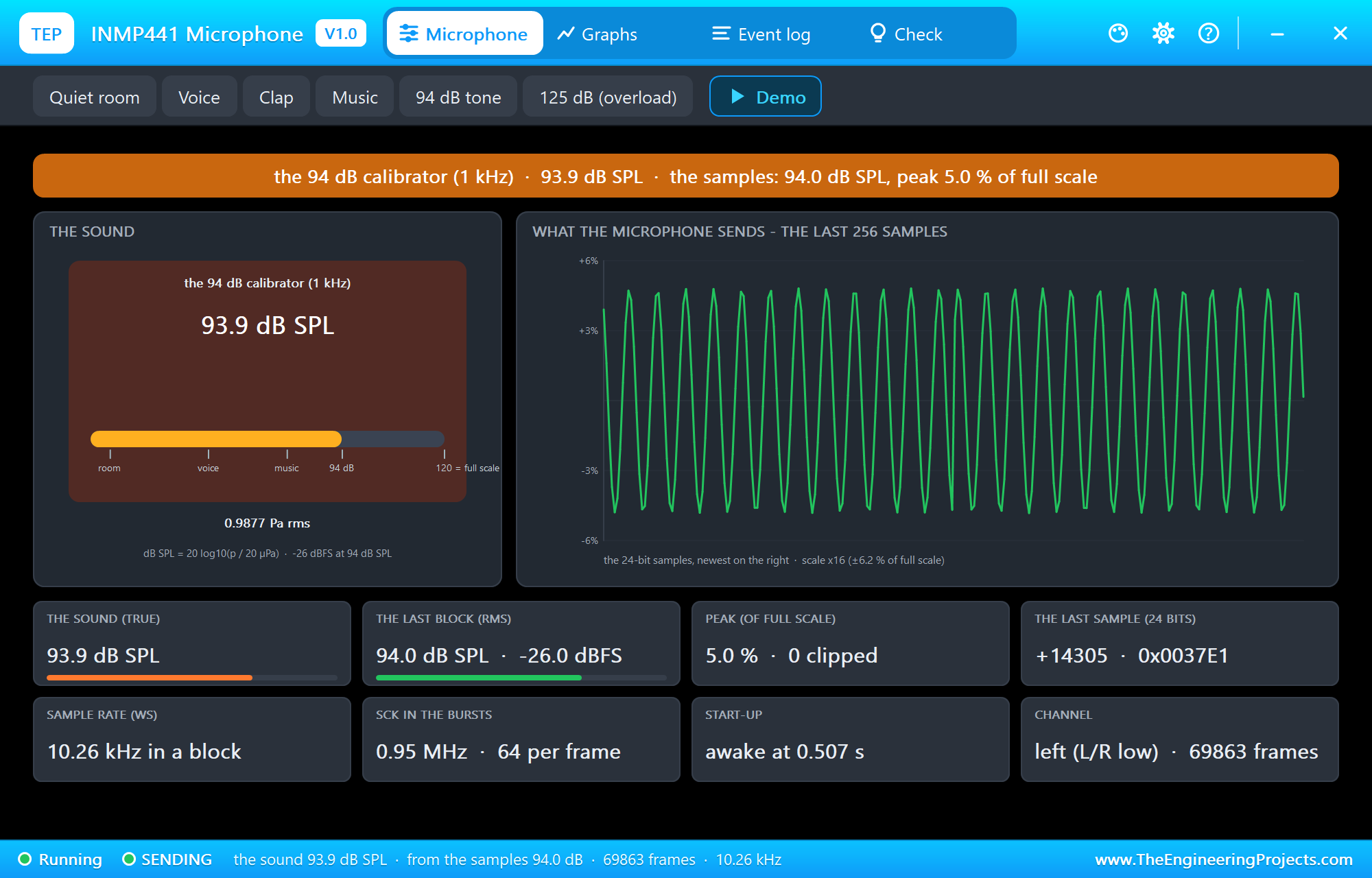
From 13.5 seconds comes the calibrator: a 1 kHz tone at exactly 94 dB SPL, one pascal. This is the test of the whole chain - the bit clock, the decoding, the sign and the dB maths. At 15.5 seconds the pop-up showed 93.9 dB SPL for the sound and 94.0 dB from the samples, with a peak of 5.0 % of full scale - exactly -26 dBFS. The OLED read 94.0 DB with a clean sine across its 128 columns, 1002 HZ, 5.0 % and CLAPS 3, with both LEDs lit, and the monitor printed 94.0 dB SPL three times at 1003 and 1004 Hz.
Quiet Again
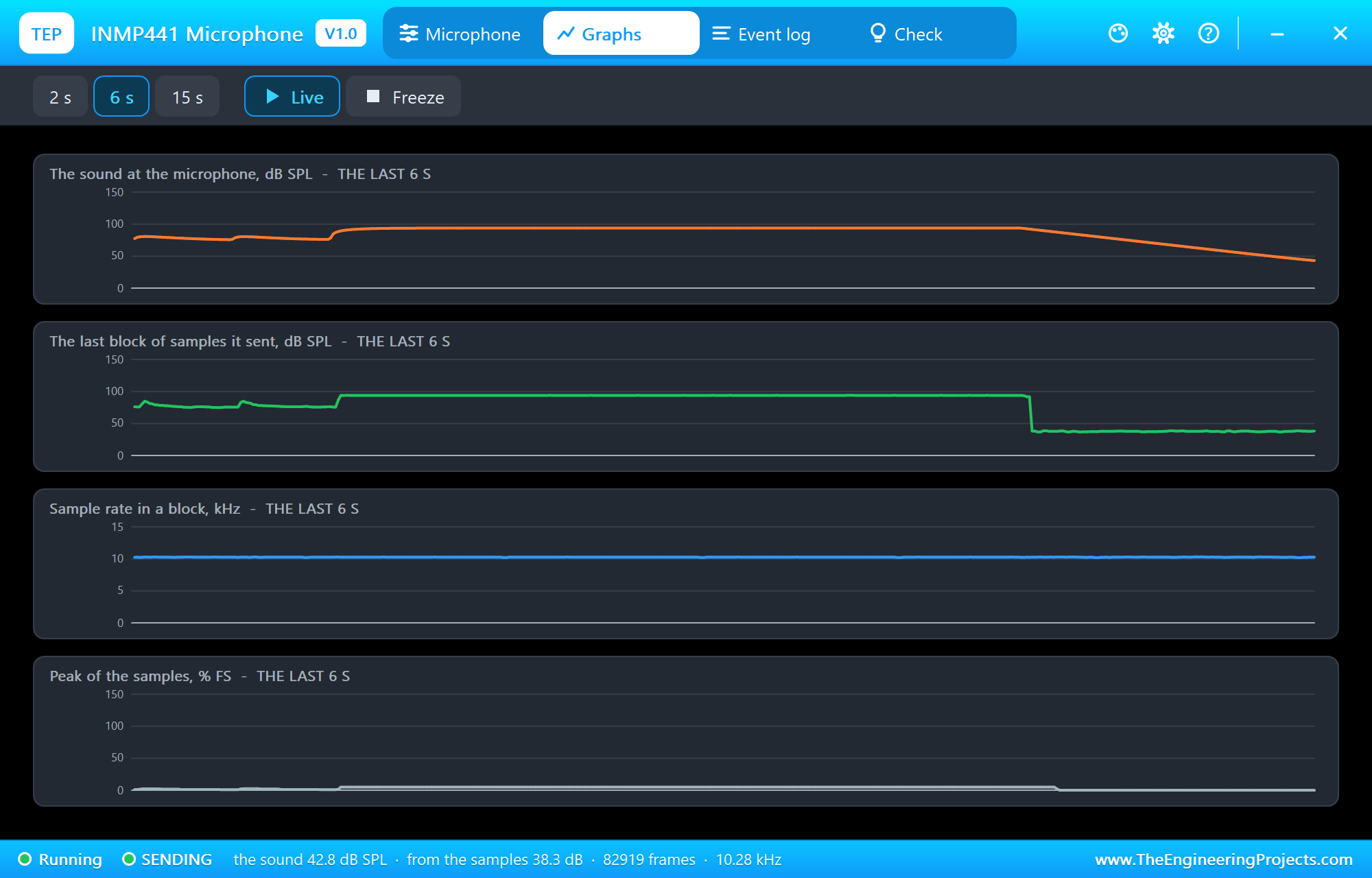
At 17 seconds the tone stops and the room is quiet again: 38.3 dB from the samples at 18.5 seconds, while the Fast-weighted true level was still settling at 43.0 dB, and 37.4 to 38.6 dB SPL on the monitor. Both LEDs went dark. Over the run the microphone sent 82,919 frames, none of them clipped.
The Graphs, the Event Log and the Check Page
The Graphs page plots the sound, the level from the samples, the sample rate and the peak. The Event log keeps the start-up and each change of the scene. The Check page sums up the run: VDD at 3.30 V (a 3.3 V part, about 1.4 mA), SCK about 0.95 MHz in the bursts, 64 SCK per frame and 10.28 kHz in a block, awake at 0.507 s, L/R low (the left half), 82,919 frames with none clipped, and the two levels - every row green.
The monitor shows the sketch's side: the start-up, the level once a second and each clap.
An I2S Microphone or an Analog Sound Sensor?
Our Sound Sensor Library for Proteus V3.0 simulates the KY-038: an electret capsule, an amplifier and a comparator. It is the right part when you only need "was there a loud noise?" on a digital pin, or a rough level on an analog input. The INMP441 is the right part when the sound itself matters - a level meter in real dB, voice recording, speech recognition, frequency analysis. Its numbers are calibrated by the maker, its noise floor is low, and nothing analog travels on the wires.
Try It Yourself
- Click 94 dB tone: the OLED should settle at 94 dB and 1000 Hz - your decoder and the maker's sensitivity agree.
- Click 125 dB (overload): the peak reaches 100 % and the waveform flattens - the samples clip above 120 dB SPL.
- Tie L/R to VDD in the circuit: the microphone moves to the right half and the sketch reads zeros. Read the WS-high half instead.
- Remove the start-up loop in setup(): the first blocks are all zeros until 2^18 clock cycles have passed.
- Change the shift to
(long)w >> 8: the delay slot stays in, the values halve and every negative sample turns into a big positive one - a classic I2S mistake.
Ideas to Extend the Demo
- A noise alarm for a classroom or a server room that logs every minute above 70 dB.
- A clap switch: two claps toggle a relay.
- A stereo pair: two microphones on one bus, L/R low and high, and a "which side is louder" pointer.
Your Own Sketches
The demo sketch is in the zip file, and you can change it in the Arduino IDE. New to Arduino? Start with our Arduino Tutorial for Beginners. Export the compiled binary, and set the UNO's PROGRAM property to the new file. Our guide on How to get the HEX file from Arduino shows you where the file ends up.
Things to Know Before Using a Real INMP441
- 3.3 V only: VDD 1.62 - 3.63 V, and never 5 V on SCK or WS - from a 5 V board, use a level shifter.
- A real clock: it wants a steady SCK of 0.5 - 3.2 MHz. That is a job for an I2S port - an ESP32, a Raspberry Pi, an STM32. An UNO can clock it only in software, slowly and in bursts: fine in the simulation, too slow and uneven for real audio.
- Start-up: 2^18 clock cycles after power-up before the samples are valid.
- The sound port: it is on the back of the round board - keep it open to the air, away from fans and vibration.
- Short wires: SCK runs at megahertz; keep the I2S lines short.
Troubleshooting
- All samples are zero: the start-up is not over yet, L/R picks the other half, or VDD is missing.
- The values are nonsense: SD read on the wrong edge of SCK, or the delay slot after WS not skipped.
- The level reads 3 dB off: the rms compared with the full-scale peak instead of the rms of a full-scale sine (297,286 counts rms = 94 dB).
- Positive and negative look swapped: the 24-bit value was not sign-extended.
- The part is not simulated:
TEPINMP441.DLLis missing from MODELS and from the project folder.
Limitations of the Simulation
- The I2S frame, the one-clock delay, the 24 bits, the L/R half, the start-up, the sensitivity, the full scale and the noise floor follow the maker's datasheet; the module is our own drawing.
- Our own choices: the sounds of the scene, each sample taken from the sound pressure at the moment its half begins, any SCK rate accepted, ideal logic levels and the LEDs.
- Not modelled: the microphone's frequency response and its filter's delay, the acoustic port and CHIPEN (tied to VDD on the module).
- Arduino is a name of Arduino; this library is not made or endorsed by Arduino, Labcenter or TDK InvenSense.
- Tested in Proteus 8.5 in November 2026 (the demo as shipped). Proteus 7 is not supported.
So, that was all about the INMP441 Microphone Library for Proteus Simulation. I hope it helps you get your I2S decoding, your dB maths and your clap detector right before the first board arrives - and shows that a microphone can be as digital as any other sensor. If you have any questions, ask in the comments and I will help you out. Till the next tutorial, take care and have fun!

Comments
0