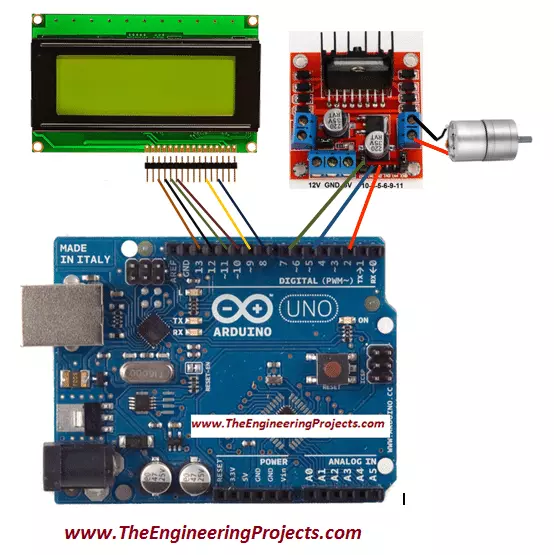
Hello friends! I hope you all will be absolutely fine and having fun. Today, I am going to share my knowledge about how can you make a simple program for DC Motor Speed Control using Arduino UNO. In my previous tutorial, DC Motor Direction Control using Arduino , I have just controlled the DC motor in both directions at constant speed using Arduino. I have also performed the DC Motor Direction Control in Matlab by sending different commands through serial port from Matlab and LabVIEW to the Arduino and then controlled the direction of rotation of DC motor. But in this tutorial I will rotate the same DC motor at variable speed in both clockwise and anti clockwise directions. In my previous tutorial, we have seen that input pins In1 & In2 of motor control driver L298 (H-Bridge) are useful to ...
Hello friends! I hope you all will be absolutely fine and having fun. Today, I am going to share my knowledge with all of you about how to make a simple program for DC Motor Direction Control using Arduino. The word DC is basically an abbreviation of Direct current . So, a direct current motor is commonly used motor having two input terminals, one is positive and the other one is negative. If we connect these terminals with the voltage supply the motor will rotate. If you change the polarity then motor will rotate in opposite direction. You should also have a look at Difference between DC & AC Motors to get a better idea about these motors. DC motor has a lot of applications. You can use it in automation projects, for controlling static as well as mobile robots, in transport system, in pum ...
Hello friends, I hope you all are doing great and having fun with your lives. In today's tutorial, I am going to share How to interface Arduino with GLCD. I am gonna design a Proteus Simulation in which I will interface Arduino GLCD together. GLCD is also called Graphical LCD so today we are gonna do some designing on the LCD. The GLCD I am going to use is ks0108 and its model in Proteus is LGM12641BS1R and I have shared the complete Simulation along with Arduino Code below for download. But I would suggest you to design it on your own so that you could get the most out of it. If you haven't worked on the LCD before then I would suggest you to read How to Interface Simple LCD with Arduino . Libraries Libraries used in this tutorial Arduino Library for Proteus: V1.0 (2015, used in this tuto ...
Hello friends, I hope you all are doing great. In today's tutorial, I am going to show you How to use Arduino PWM Pins . It's the next tutorial in our new Arduino Tutorial for Beginners series. We will design a small code in which we will be controlling a dc motor's speed using the Arduino PWM Pins but before going into the details, let me first give you an introduction to Arduino PWM Pins because without understanding the PWM, which is the abbreviation of Pulse Width Modulation , you won't be able to understand How to use Arduino PWM Pins. In our previous tutorial, we have seen How to use analogWrite in Arduino and I have told you in that tutorial that we use this command for PWM as well. So, today we will have a look at How to do that. Libraries Libraries used in this tutorial Arduino Li ...
Hello friends, I hope you all are fine and having fun with your lives. Today, I am going to share a complete Arduino Tutorial for Beginners because I was having a lot of requests about it. Reader were asking the same question that they are new to Arduino and how should they start so if you are beginner to Arduino and you don't have any idea How to learn it then you should read the below tutorials. Libraries Arduino Simulation Libraries Arduino boards: UNO · Mega 2560 · Mega 1280 · Nano · Pro Mini · Mini (V4.0) All six V4.0 boards in one package: Arduino Library for Proteus V4.0 Helping Tools Serial Monitor Advance : a serial terminal window for the UART of your board Serial Monitor Expert : the serial monitor with extra debugging tools LCD Library for Proteus V3.0 : 16x2, 20x4 and I2C LCDs ...
Hello everyone, I hope you all are fine and having fun with your lives. In today's post, I am going to share all about Arduino Data Types. Arduino Data Types play an important role in Arduino Programming and I have discussed them a little in my tutorial on How to do Arduino Programming. But today, we are gonna discuss it in more detail. I hope you guys are gonna enjoy from them and are gonna get benefit using them. Before going any further I think you must have a llok at Arduino Basic Tutorials in which I have explained everything in a very easy way. Anyways, Till now I hopeo that you have the basic know how of Arduino Programming and you ahave also worked on Arduino LED Example. So, let's get started with Arduino Data Types: What are Data Types ?? If you recall your basic mathematics in w ...
Hello everyone, I hope you all are fine and having fun. In today's tutorial, I am going to show you How to write Arduino code. In the previous tutorial, we have seen the Simple Arduino LED Example so if you haven't read that tutorial then I must suggest you to read it first because I am gonna use the same simulation with some advancements in it. Moreover, you should also have a look at How to do Arduino Serial Communication because we are also gonna use Serial Port in today's tutorial and one more tutorial which you must read is How to use digitalRead in Arduino because we are dealing with digital pins here. So, I hope that you have read those tutorial and are ready to learn How to write Arduino code. So, let's have a look at How to write Arduino Code: How to write Arduino code ? In the pr ...
Hello friends, I hope all are fine and having fun with your projects. We have covered enough Arduino commands in this Arduino Tutorial for Beginners series and now we are ready to create a simple project by interfacing an LED (Light Emitting Diode) . Today, I am going to share a very Simple Arduino LED Example in Proteus ISIS. First I will blink single LED using Arduino UNO and then I will blink multiple LEDs in Proteus. When you start working on Arduino then Arduino LED example is the first example which you must try because its the easiest one. Moreover, we all know that we have a small LED connected to pin # 13 on each Arduino so you can also check your Arduino as well that whether its working or not. So, let's get started with Simple Arduino LED Example in Proteus ISIS: A Simple Arduin ...
Hello everyone, I hope you all are fine and having fun with your lives. In today's tutorial, I am going to share How to do Arduino Serial Communication in detail. Recently, I have shared a lot of tutorial on Arduino Serial Communication which contains everything you need for Arduino Serial Communication. So, in today's tutorial, I am actually gonna combine them all and give you a whole picture of How you can easily do the Arduino Serial Communication . I hope you guys are gonna enjoy this. You should also have a look at DC Motor Speed Control using Arduino in which I have controlled the DC Motor via Arduino Serial Communication. I will also share some more tutorials on Arduino Serial Communication in the near future so I will also add their links in today's tutorial. If you guys have any q ...
Hello friends, I hope you all are fine and having fun. In today's tutorial, I am going to show you How to use Arduino Software Serial . In my previous tutorial, we have had a look at How to use Arduino Serial Write and How to use Arduino Serial Read . In both of these tutorials, we have done the hardware Serial Communication. But we all know that Arduino has just one Serial Port placed at pins 0 and 1. Libraries Libraries used in this tutorial Arduino Library for Proteus: V1.0 (2015, used in this tutorial) · latest version: V4.0 (October 2026) Helping Tools Serial Monitor Advance : a serial terminal window for the UART of your board Serial Monitor Expert : the serial monitor with extra debugging tools LCD Library for Proteus V3.0 : 16x2, 20x4 and I2C LCDs to show your readings So, if you a ...