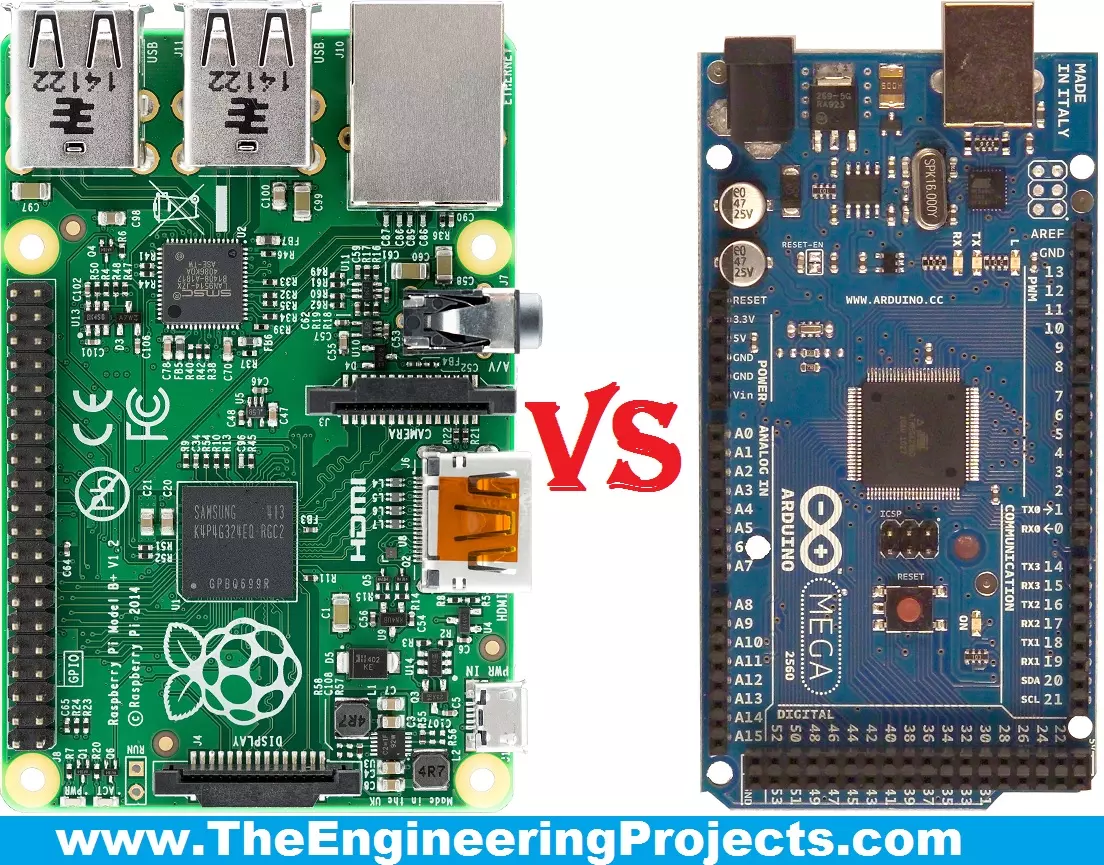
Hello friends, I hope you all are fine and enjoying your lives. Today, I am going to share a comparison titled Arduino Vs Raspberry Pi . Actually, I have been receiving a lot of emails and comments from new engineering students that "we are new in embedded and we want to start our project so please tell us which one is better Arduino or Raspberry Pi?" So, I thought to write a post on Arduino Vs Raspberry Pi and in this post, I am going to make a detailed comparison between the two and will let you know, which one you should use in your project and why? So, I hope that you are all aware of or at least have heard about these two boards, which are Arduino and Raspberry Pi. If you haven't heard yet then you must have a look at Arduino Official Site and Raspberry Pi Official Site . They will gi ...
Hello friends, hope you all are fine and having fun with your lives. Today, I am going to share on How to measure Frequency using Arduino board. Its quite a simple tutorial but is an essential one especially when you are working on some power related project. Because in Power projects, you have to measure the frequency of AC voltages. I was working on a project in which I have to do dimming of AC Lamp so in that project I have to measure the frequency of AC signal. I have designed this project using Arduino UNO and have simulated in the Proteus software, which you all know is my favorite simulating software. :) The code is also quite simple which I have given below for download. The simulation is also included in download package but again I suggest you to design it on your own. If you got ...
Hello Everyone, hope you all are fine and having fun with your lives. Today, I am going to interface GPS Module with Arduino in Proteus ISIS software. Recently, I have shared this amazing GPS Library for Proteus , using which you can quite easily simulate your GPS Module in Proteus software. Today, I am going to interface this GPS Module with the Arduino UNO board and will simulate the result in Proteus software. I am going to use TinyGPS Library and will get Longitude and Latitude out of this GPS Module. Libraries Libraries used in this tutorial GPS Library for Proteus: V1.0 (2015, used in this tutorial) Newer GPS modules: NEO-6M · NEO-7M · NEO-M8N · SIM808 Helping Tools Serial Monitor Advance : a serial terminal window for the UART of your board Serial Monitor Expert : the serial monitor ...
Hello everyone, today I am going to share a complete project which is DS1307 Arduino based digital Clock in Proteus ISIS. In this project, I have designed a digital clock using Arduino UNO and DS1307 RTC Module. So, first of all, if you haven't yet installed then, you should install Arduino Library for Proteus using which you will be able to easily simulate Arduino baords in Proteus. Along with Arduino Library you will also need to install DS1307 Library for Proteus , which I have shared in my previous post as we are gonna use this RTC Module DS1307 for designing our digital clock. Libraries Libraries used in this project Arduino Library for Proteus: V1.0 (2015, used in this project) · latest version: V4.0 (October 2026) DS1307 Library for Proteus: V1.0 (2016, used in this project) Newer c ...
Hello everyone, hope you all are fine and having fun with your lives. Today, I am going to share a new project named as Interfacing of Multiple Temperature sensors DS18B20 arduino. I have already shared a tutorial on Interfacing of Temperature Senor 18B20 with Arduino but in that tutorial, we have seen how to connect one temperature sensor DS18B20 arduino. But today, I am gonna interface multiple temperature sensors DS18B20 Arduino. For this project I have used two sensors but you can use more if you want. Temperature sensor DS18B20 is a one wire temperature sensor means we can get its data through a single wire and we can connect as many as we want temperature sensors with this single wire and can call them through their addressing. Each temperature sensor is allotted an address and when ...
Hello friends, hope you all are fine and having fun with your lives. Today, I am going to share a tutorial on DC Motor Speed Control using Arduino in Proteus ISIS. In my previous post, we have seen How to design a DC Motor Direction Control Project using Arduino in Proteus ISIS and if you haven't checked it out then I would recommend you to have a look at it first. Because, in today's tutorial, I am gonna extend that tutorial and will add the DC Motor Speed Control in it. So, today, we will control both the direction as well as speed of the DC Motor. Moreover, you should also have a look at How to use Arduino PWM Pins if you are not much familiar with PWM control. In the previous tutorial, we have seen How to control the direction of a DC Motor, which is important when you are working on s ...
Hello friends, hope you all are fine and having fun with life. Today, I am going to share DC Motor Direction Control with Arduino. I have designed a complete simulation in Proteus, which will help you in understanding the controlling of DC motor. I would recommend you to first read How to Control relay in Proteus ISIS which will help you in understanding the functionality of relays because in today's tutorial, I have used relays to do the DC Motor Direction Control. I have already posted a tutorial on DC Motor Drive Circuit in Proteus ISIS . Libraries Libraries used in this tutorial Arduino Library for Proteus: V1.0 (2015, used in this tutorial) · latest version: V4.0 (October 2026) Helping Tools Serial Monitor Advance : a serial terminal window for the UART of your board Serial Monitor Ex ...
Hello friends, hope you all are fine and having fun with your lives. Today, I am going to share a new project in which we are gonna do Arduino Bluetooth communication. The Bluetooth module I have used for this project is HC-05, which is a serial Bluetooth module. We can quite easily perform the Bluetooth communication with this module using Arduino board. I have worked on many projects in which I have to send the data from sensors to my computer via Bluetooth. So, in such projects I normally use this Bluetooth module which is connected with the sensors and then Arduino gets the data from these sensors and then send this data to computer via Bluetooth module. In this project, I have used Arduino board but you can use PIC Microcontroller or 8051 Microcontroller as well. Because they both hav ...
Hello friends! In this tutorial, we will configure an Arduino Yún to connect to a known Wi-Fi network and understand how it should recover when that network temporarily disappears. We will separate one-time configuration from ordinary connection monitoring so that the board does not repeatedly restart its own network. The original Yún combines an ATmega32U4 with an Atheros AR9331 running a Linux-based system. The Linux side manages Wi-Fi, while an Arduino sketch can communicate with it through the Bridge library. That arrangement is different from an ordinary sketch controlling a Wi-Fi shield directly. We will first save the intended network profile, then inspect connection status from the Arduino side. Along the way, we will correct several misunderstandings in the earlier example, includ ...
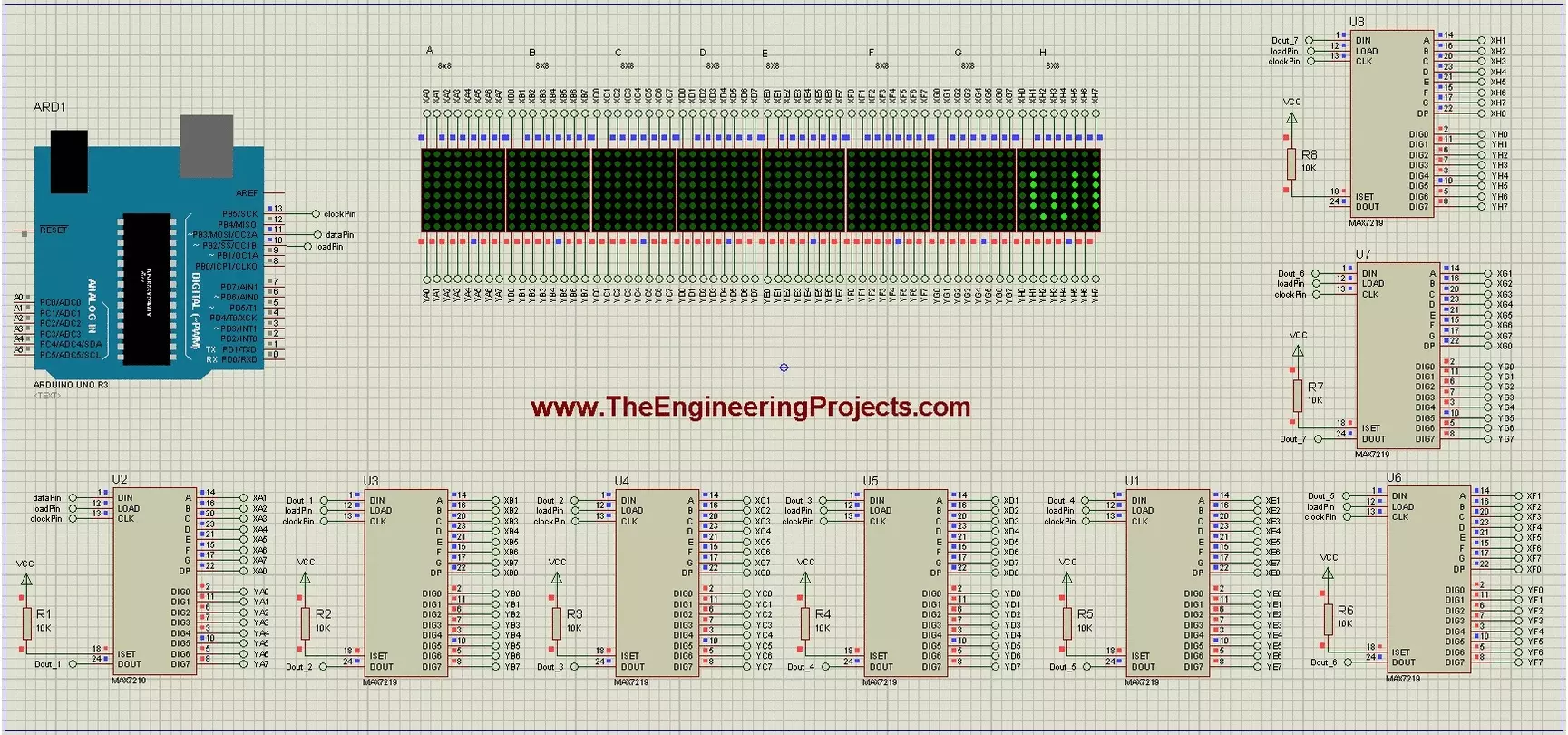
Hello friends! Today we will build a scrolling-text display using Arduino and eight 8x8 LED matrices. Each matrix has its own MAX7219 driver, and the drivers share a serial connection so Arduino can control the complete display through three signal lines. The original project demonstrates the text in Proteus and includes a useful circuit drawing and animation. We will retain those illustrations while explaining the driver correctly, checking the matrix orientation and using a current text-animation library interface. Our display is eight pixels high and sixty-four pixels wide. We will first understand one module, then connect the chain, display a short message and adjust the scroll timing. Power distribution and hardware mapping matter just as much as the sketch when moving from a simulato ...