Hello friends, hope you all are fine and having fun with your lives. Today I am going to share a problem and also its solution with you guys. A few days ago, I bought new NRF24L01 modules as they were needed for a project. So, today when I started working on them, I encountered a very strange problem. When I interfaced my NRF24L01 with Arduino and uploaded the transmitting and receving codes in them, I couldn't get anything on my serial terminal as I explained in my previous post Interfacing of NRF24L01 with Arduino. That was quite strange for me as I have worked on this module many times and it never troubled me before. So I keep on working on it but no luck. I even changed my RF modules as I thought may be they are faulty modules but still no lu ...
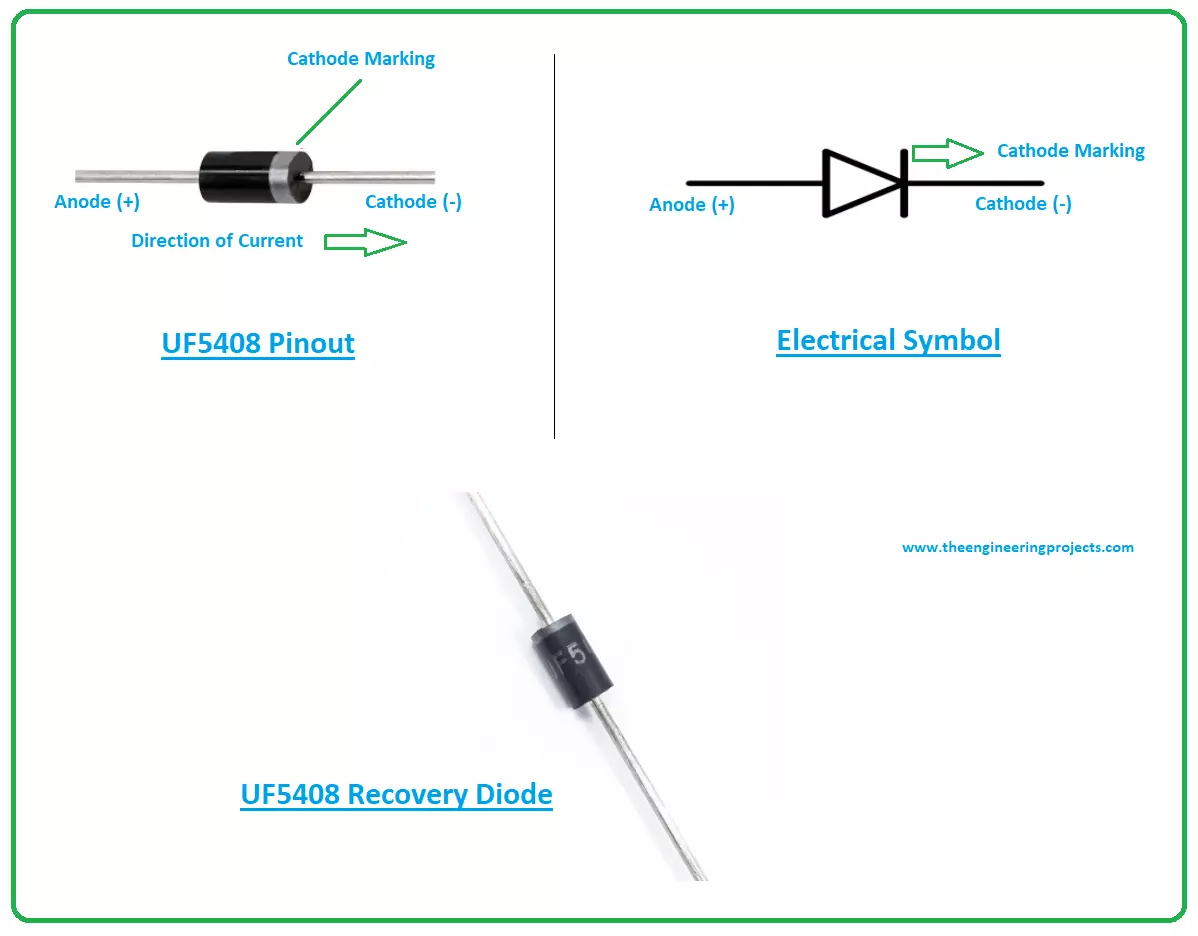
Hi Guys! Hope you’re well today. I welcome you on board. Thank you for clicking this read. In this post today, I’ll detail the Introduction to UF5408.
The UF5408 is an ultra-fast recovery diode that comes with quick recovery time. It is mainly used to rectify the sine waves. Upon rectifying the signal it converts the AC signal into a DC signal. This diode provides the DC signal to the electronic device since most of the electronic devices operate on the DC signal.
Just stay with me for a little while as I’ll discuss the complete Introduction to UF5408 covering datasheet, pinout, features, and applications of this component UF5408.
Let’s get started.
Introduction to UF5408
The UF5408 is a recovery diode that carries quick recovery time and is ...
Hey Guys! Welcome you onboard. Today, I'll discuss the details on the Introduction to IRF4905. It is a P-Channel HEXFET Power MOSFET available in a TO-220AB package and is based on Advanced Process Technology. It is mainly used for fast switching purpose, capable of providing ultra-low on-resistance.
This tiny device comes with three terminals called gate, drain and source where the gate terminal is used to control the current on remaining two terminals. The area between source and drain is known as a channel that is widely dependent on the voltage applied to the gate terminal.
In this post, I'll cover each and everything related to this P channel MOSFET, its main features, working, pinout and applications. Let's jump right in and explore everyt ...
Hello friends, I hope you all are doing great. In today's tutorial, we are gonna have a look at a detailed Introduction to MSP430. MSP430 is a microcontroller portfolio that offers different varieties of sixteen-bit Microcontrollers. These microcontrollers are integrated with ultra-low power and digital and analog peripherals devices for sensing and measurement applications. MSP430 microcontrollers with non-volatile FRAM (ferroelectric random access memory) provide the lowest stand-by power (350nA with RTC), 100 µA/MHz active power and have the capability to recover system state after sudden power failures.
MSP430 is used in different applications such as sensor systems which receive analog signals and convert them into digital values and after processing send these values to host syst ...
Internet of Things is a system of multiple inter-related computing devices. The factor ‘thing’ in IoT is designated to an entity capable of communicating data over a network (IOT), which can be a digital machine, sensor, human being, animals etc. Each component that is included in IoT network is assigned with an unique identity called UID and the ability to communicate data over IoT network without any external human or computer intervention.
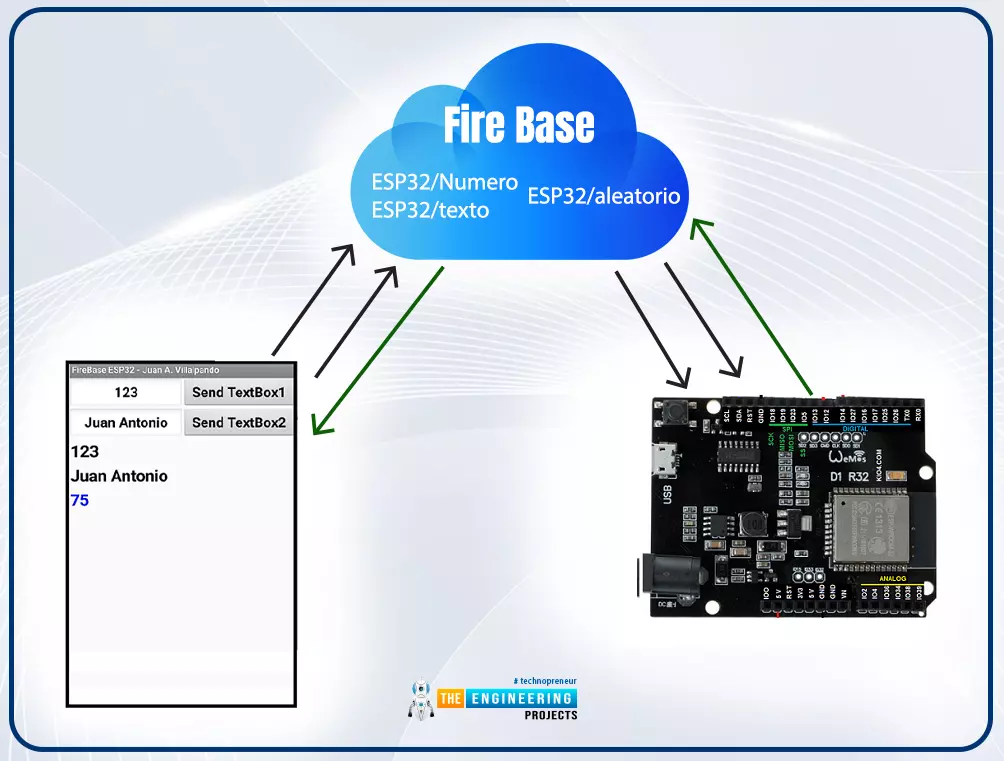
Hello readers, I hope you all are doing great. In our previous tutorial, we discussed how to upload data to Firebase Real-time Database using ESP32. In this tutorial, we will learn how to read the data stored on the Firebase Database with ESP32.
We can access the data stored in Firebase database from anywhere in the world, which makes this preferable ...
Hello Folks! Hope you’re well today. Happy to see you around. In this post today, I’ll walk you through the Introduction to IRF2807.
The IRF2807 is an N-channel MOSFET made up using advanced process technology to obtain extremely low on-resistance. This device is fully avalanche and is mainly used in fast switching applications. It comes in TO-package which is universally accepted for commercial-industrial applications.
I suggest you buckle up as I’ll detail the complete Introduction to IRF2807 covering datasheet, pinout, features, and applications.
Let’s dive in.
Introduction to IRF2807
The IRF2807 is an N-channel MOSFET that comes with a power dissipation of around 200W.
This device is mainly used for fast switching applications and low thermal resistance and low packag ...
Hello everyone, I hope you all are fine. In today's tutorial, we are going to share a new Lipo Battery Library for Proteus. Proteus has a 12V battery module in it but they are quite simple in looks, so we have simply designed a stylish looking lipo battery, I hope you will find it useful for a better project presentation.
This Proteus Library has two Lipo Batteries in it, one is of 3.7V and the second one is of 11.1V, these are normally available Lipo models in the market. Although, you can change the voltage level of these batteries from their properties panel. Let's first have a look at the brief introduction of Lipo Baterry:
What is Lipo Battery???
Lipo is an abbreviation of lithium polymer battery, designed using lithium-ion technology and ...
Hello friends, I hope you all are doing great. In today's tutorial, we are gonna have a look at detailed Introduction to A1015. A1015 is a part of transmissive light sensing sequence which has a high competence GaAs Infrared light discharging diode which actions as the light stemming component, extremely sensitive phototransistor is used as the light sensing element. These two apparatuses are established so as in the opposite of each other, any materials fleeting among them are effortlessly sensed.
The A1015 is made in casing of TO-92. By seeing at its smooth side we can comprehend the three terminals impending out, these three terminals from left to right are emitter, collector and base. In today’s post, we will have a look at its fortification, ...
Hello friends, I hope you are all fine and will be doing something special in your life. In today's post, we are gonna have a look at a detailed Introduction to MPU6050. MPU6050 is a sensor for motion processing devices. It is the world's first six-dimension motion tracking device. It was designed for low-cost and high-performance smartphones, tablets and wearable sensors. It is capable of processing nine-axis algorithms, it captures motion in X, Y and Z axis at the same time.
MPU6050 is used in different industrial projects and electronic devices to control and detect the 3-D motion of different objects. In today's post, we will have a look at its working, pinout, protocol, it's interfacing with Arduino, features, applications, etc. I will also share some links of projects wh ...
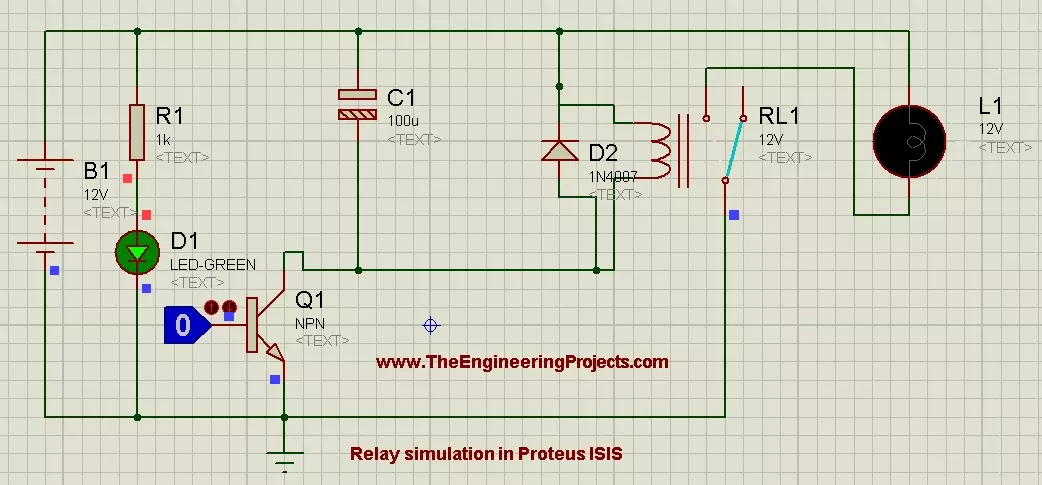
Hello friends, hope you all are fine and having fun. In the previous posts, we have discussed DC motor Control in Proteus ISIS and after that we have discussed the Stepper Motor Control in Proteus ISIS and finally we had a look at Servo Motor Control in Proteus ISIS. Now when you talk about motors control then first thing came in mind is Relay, because relay is the best way of controlling any motor. In today's post, we are gonna have a look at How to Control Relay in Proteus ISIS. Relay is a key components of any electronics or electrical circuit and is usually a problem for the engineers and students. Although, its not as difficult as it seems so I thought to post about it.
In today's post, we will first simulate the Relay in a simple circuit in ...