3D printing is one of the most promising technologies in recent breakthroughs. One of the most inherent benefits of 3D printing is additive innovation; it opens up an entirely new way of creating products and provides numerous benefits over traditional fabrication techniques.
Nowadays, more businesses across many industrial sectors adopt 3D printing as a viable alternative to subtractive manufacturing (acquiring machined parts online) and injection molding. We'll look at the benefits of 3D printing and how you can use this production method to benefit your company. Is it worthwhile to use 3D printing for your project?
Affordability
One of the best aspects of 3d printing is the reduced labor costs. Operating costs heavily influence the quantity of ...
Hello everyone! I hope you all will be absolutely fine and having fun. Today, I am going to share my knowledge about Introduction to TL072. TL 072 is basically a high speed Junction Field Effect Transistor (JFET). It is also known as the dual operational amplifier. It has a bipolar transistor and high voltage JFET in its case. TL-072's important features include low offset current, high slew rates, low input voltage, low offset temperature coefficient etc.
Some of the major features may include low power consumption, low noise, common mode input voltage range includes Vcc, latch-up free operation etc. TL 072 has a very wide range of applications including oscilloscope, solar inverters, AC inverters and VF drives, audio mixers, Un-interruptable Pow ...
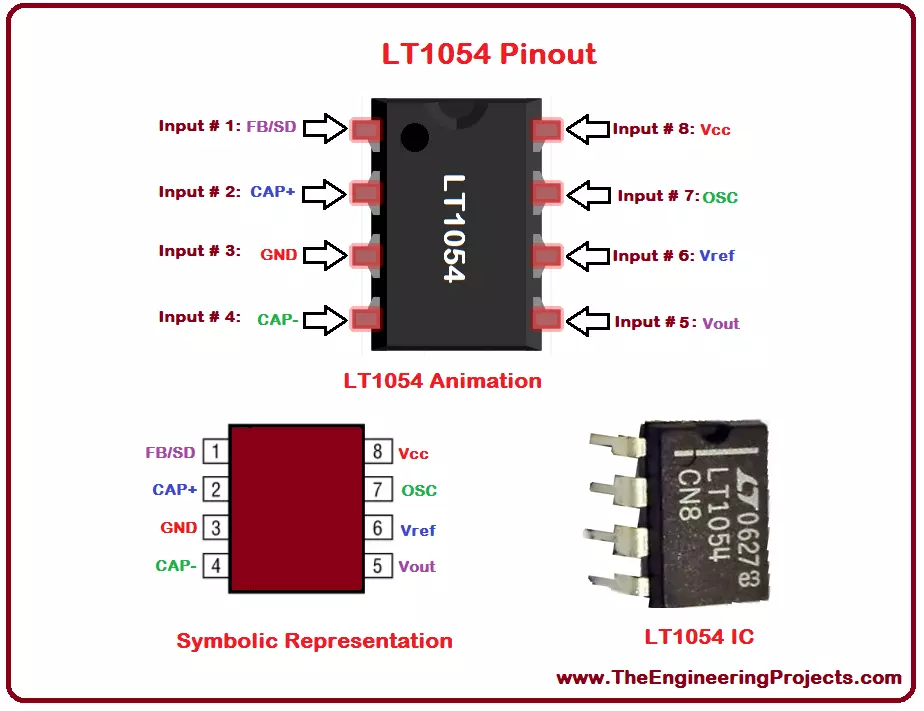
Hello everyone! I hope you all will be absolutely fine and having fun. I am going to elaborate you on Introduction to LT1054. It is a monolithic device. LT-1054 is also known as voltage regulator and bipolar capacitive voltage converter. Its mean feature is that it provides very low voltage losses as compared to the other common converters. LT 1054 also provides large output currents in comparison to general converters. It provides a voltage drop of around 1.1V while operating at 100mA.
LT 1054 provides us with a feature of regulation. This feature was not available in earlier voltage converters. We can get a regulated output just by inserting an external resistance. We can shut down LT-1054, if we ground its feedback terminal. Its internal osci ...
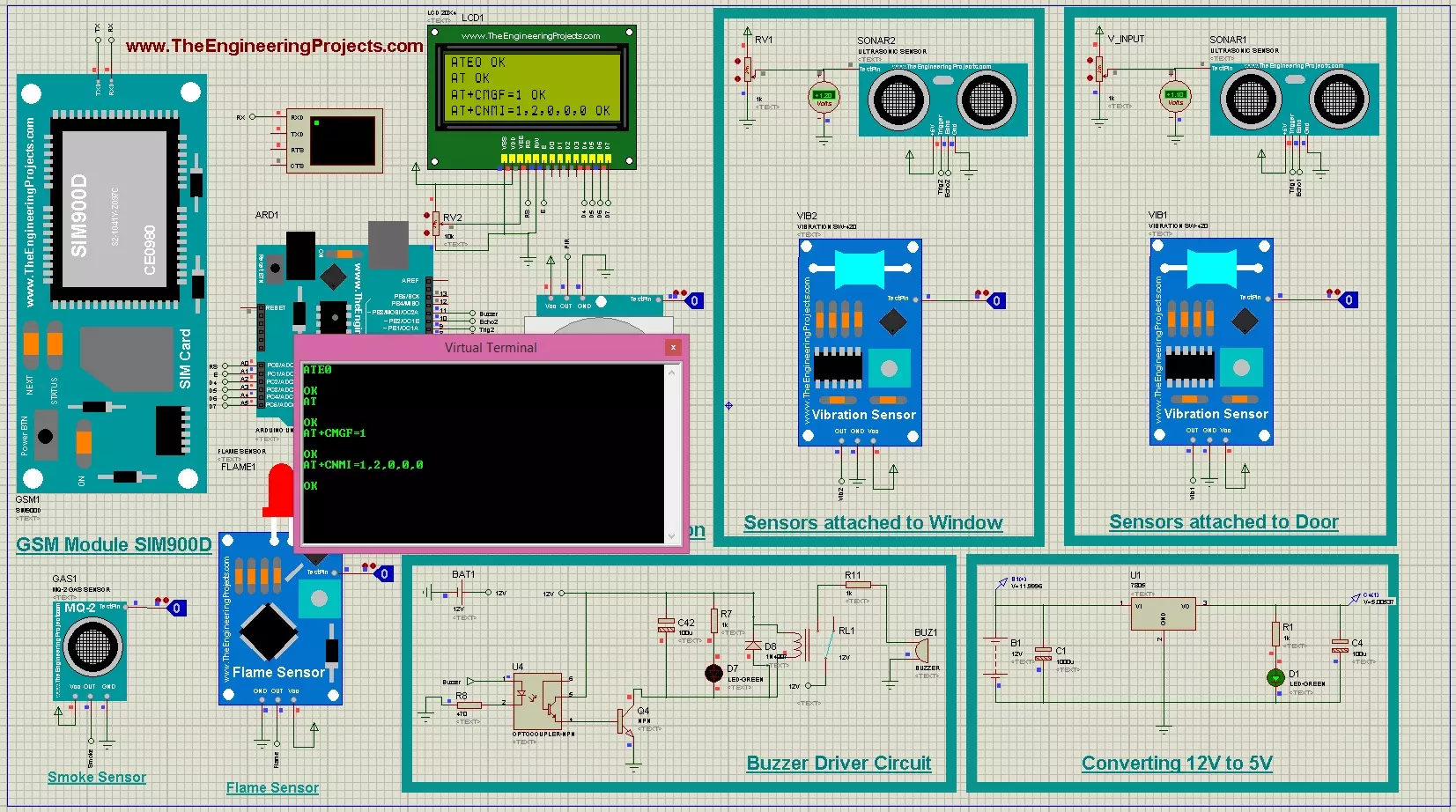
Hello friends, I hope you all are fine and having fun with your lives. Today, I am going to share a complete project named as GSM Based Home Security System. I have designed its complete working simulation in Proteus and have used different libraries which you can also download from our blog. In the previous post, I have posted Home Automation Project using XBee & Arduino and today we are gonna work on Home Security System.
We have designed this simulation after a lot of efforts that's why we have placed a very small amount of $50 on it so that engineering students can download it and get knowledge from it. Moreover, as its a complex project so when you buy it then there's a chance that you can't run it by yourself so we also offer a free serv ...
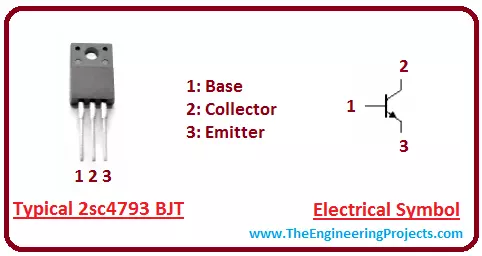
Hey Guys! I aspire you a very happy and promising life. My job is to give you daily dose of information so you can stand out of the party. Today, I am going to uncover the details on the Introduction to 2sc4793. It is an NPN (Negative-positive-negative) bipolar junction transistor (BJT) which is mainly used for amplification and switching purpose. I'll give you a brief details about this transistor and try to cover as many aspects as possible related to this transistor. Let's hop on the board and explore what kind of transistor is this and what are its main applications? Let's get started.
Introduction to 2sc4793
2sc4793 is an NPN bipolar junction transistor where P-doped layer is sandwiched between the two N-doped layer.
It is mainly three t ...
Hello friends, I hope you all are doing great. In today’s tutorial, we will have a look at Introduction to PT2272. It is a CMOS (complementary metal-oxide-semiconductor) that use to design simple wireless controlling of instruments installed at some distance. This module is normally used for controlling the circuits of garage door, speed control of the fan, robots and for monitoring the alarm connected at different places for security purposes.
This integrated circuitry uses non-variable code address and no built-in encryption due to these parameters it not used for such circuits where high security is need but uses only for small or less cost security circuits such as used in home security alarms etc. In today's post, we will have a look at its w ...
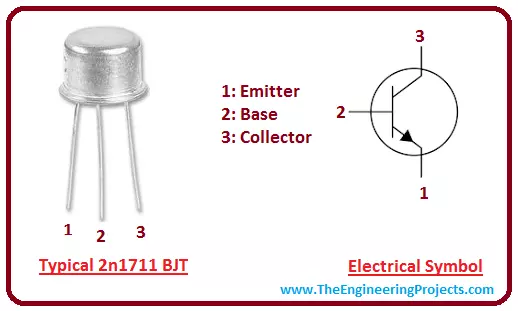
Hey Everyone! I hope you are doing great. We always come with some awesome topics related to engineering so you can excel and progress in your relevant field. Today, I am going to give you a brief details on the Introduction to 2n1711. It is an NPN (Negative-positive-Negative) bipolar junction transistor (BJT) which is mainly used for amplification and switching purpose. It encompasses low leakage current, high break down voltage, and low capacity which makes it useful over widely current range. I'll try to touch every aspect related to this transistor so you can get an idea what it does and what are its main applications? Let's get started.
Introduction to 2n1711
2n1711 is an NPN bipolar junction transistor which is mainly used for switching a ...
Hello friends, I hope you all are doing great. In today's tutorial, we are going to design a Proteus Simulation for Automatic Plant Watering System using Arduino. We have designed this project for engineering students as it's a common semester project, especially in electrical, electronics and mechatronics engineering.
The two most significant hazards to the agriculture industry are the need for extensive labor and a scarcity of water. According to the World Wildlife Fund (WWF) organization, water shortages might affect two-thirds of the world's population by 2025, putting both the ecosystem and human health at risk. The use of automatic plant watering systems eliminates both of these problems by watering plants at specified times and amounts whil ...
Hello everyone, I hope you all are fine and having fun with your lives. Today, I am going to share the next tutorial in this series of basic Arduino tutorials and it's named How to use Arduino Serial Write. In this tutorial, I have given an overview of How to use the Arduino Serial Write Command. In the previous tutorial, we have seen How to use Arduino Serial Read? in which we have read the data coming from the serial port.
While today we will have a look at how to send the data through a serial port in Arduino and for that, I am going to use the Arduino Serial Write command. It's also going to be a very simple and basic Arduino tutorial but if you are new to Arduino then you must read it completely as it will gonna help you out. I have also desig ...
Hi Everyone! I welcome you on board. Thank you for clicking this read. In this post today, I’ll walk you through the Introduction to LM2576.LM2576 is a step-down voltage regulator, also known as a buck converter, mainly employed as a pre-regulator in linear regulators. The customized output version of this buck converter gives you the ability to set the output voltage as you like better. It is available with a remarkably good load and line regulation. Moreover, it is used to drive load under 1A and is available in fixed output voltages with 3.3V, 5V, 12V, and 15V.
I suggest you buckle up and read this post all the way through, as in this post I’ll detail the Introduction to LM2576 covering the datasheet, pinout, features, and applications. Let’s jump right in.
Introduction to LM2576
...