Hello friends, I hope you all are fine and having fun with your lives. Today, I am going to share a complete Arduino Tutorial for Beginners because I was having a lot of requests about it. Reader were asking the same question that they are new to Arduino and how should they start so if you are beginner to Arduino and you don't have any idea How to learn it then you should read the below tutorials.
I have posted all the basic Arduino Tutorial for Beginners already so in today's tutorial I am just gonna arrange them and must ask you to read them one by one from top to bottom and at then end you will really be able to design any kind of project on Arduino. So, let's get started with Arduino Tutorial for Beginners:
Arduino Tutorial for Beginners
Befor ...
Hello friends, today's post as the name suggests is about how to send SMS with Arduino UNO and SIM900D using AT Commands. There are different types of SIM900D modules available in the market, so it doesn't matter which module you are using. All SIM900D modules work at AT commands basically so today I am going to show you how to send an SMS via AT commands without using any Arduino library. You should first read the AT commands manual which will give you an idea about AT commands. AT commands are special sets of commands which are used for communicating with SIM900 module. Using these AT commands we let our GSM work for us. Like if you want to send SMS then there's a specific AT command for sending the SMS similarly if you want to change the PIN co ...
Hello friends, I hope you all are doing great. In today's tutorial, we are gonna have a look at a detailed Introduction to MSP430. MSP430 is a microcontroller portfolio that offers different varieties of sixteen-bit Microcontrollers. These microcontrollers are integrated with ultra-low power and digital and analog peripherals devices for sensing and measurement applications. MSP430 microcontrollers with non-volatile FRAM (ferroelectric random access memory) provide the lowest stand-by power (350nA with RTC), 100 µA/MHz active power and have the capability to recover system state after sudden power failures.
MSP430 is used in different applications such as sensor systems which receive analog signals and convert them into digital values and after processing send these values to host syst ...
Hello friends, hope you all are fine and having fun with life. Today, I am going to share DC Motor Direction Control with Arduino. I have designed a complete simulation in Proteus, which will help you in understanding the controlling of DC motor. I would recommend you to first read How to Control relay in Proteus ISIS which will help you in understanding the functionality of relays because in today's tutorial, I have used relays to do the DC Motor Direction Control. I have already posted a tutorial on DC Motor Drive Circuit in Proteus ISIS.
So, for DC Motor Direction Control, I have used Arduino UNO baord, so you should also download this Arduino Library for Proteus so that you can use Arduino boards in Proteus software. I have also provide the si ...
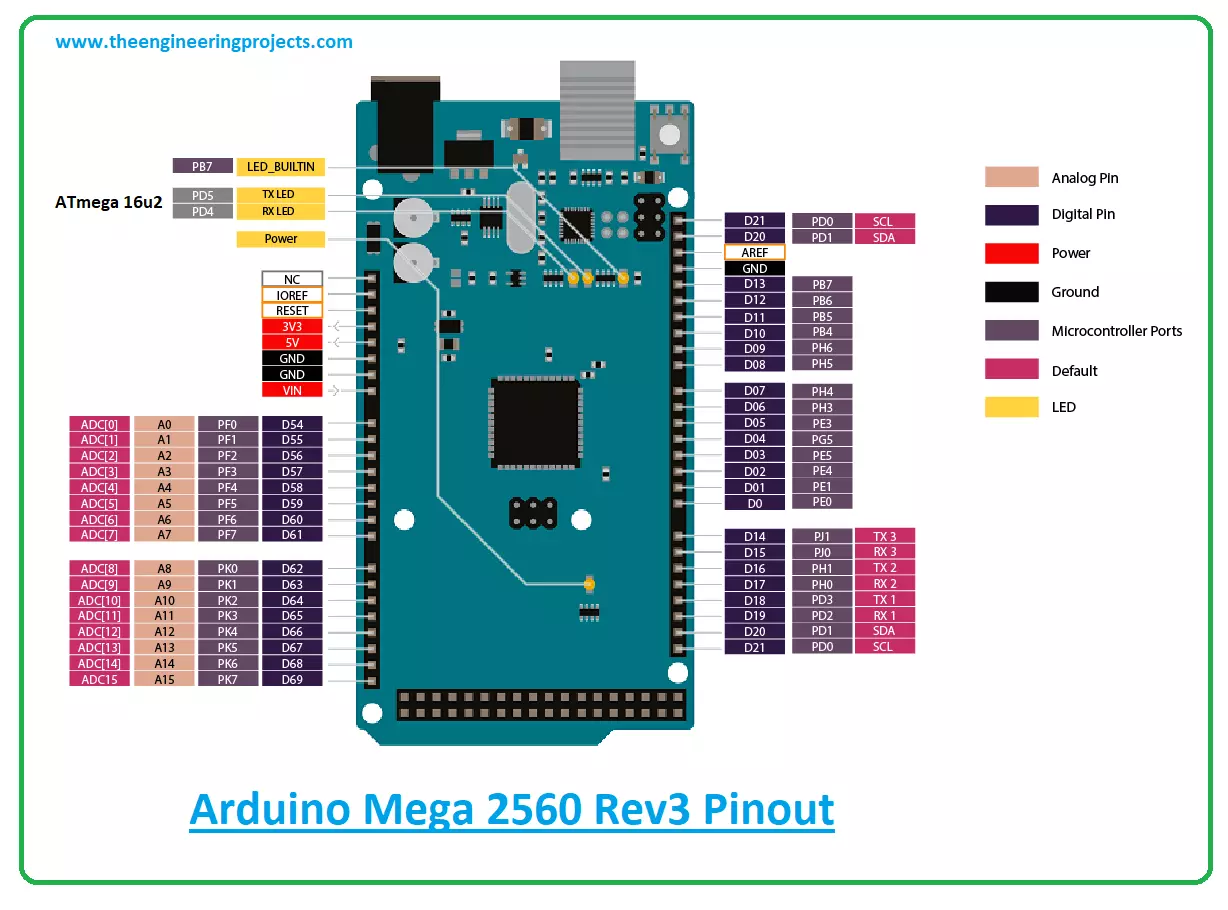
Hi Friends! Hope you’re well today. In this post today, I’ll walk you through the detailed Introduction to Arduino Mega 2560 Rev3.The Arduino Mega 2560 Rev3 is a microcontroller board that is based on the ATmega2560 microcontroller.
The Arduino boards are widely used in the automation industry and embedded projects. Other boards like Arduino Uno, Arduino Nano, Arduino Every, Arduino Beetle all seem a good pick for the projects that require little memory to store the program. However, when the nature of projects becomes complex, requiring more memory and a rich set of I/O interfaces, the Arduino Mega 2560 Rev3 comes into play. In order to power up these Arduino boards, we need to use a Power supply for electronics or we can also use the USB port on ...
[vc_row][vc_column][vc_column_text]
In the previous tutorial, we have seen how to Get Started with Pixy Camera, which was quite a basic tutorial and we have covered just the basic cables required to set up pixy camera. Now along with cables we are also gonna need software for training our Pixy Camera. So in this tutorial we are gonna see how to install Pixy Camera Software which is named as PixyMon. As I explained earlier in previous post that first of all, we need to connect our Pixy Camera with Computer or laptop and then using its software PixyMon we need to train our Pixy Camera so that it can recognize objects present in front of it.
PixyMon is quite a simple software and quite easy to use. In this post, we are not gonna check How to use PixyM ...
Hello Everyone! Hope you’re well today. Happy to see you around. In this post today, I’ll walk you through the Introduction to Arduino Uno WiFi Rev 2.
Arduino Uno WiFi Rev 2 is a microcontroller board based on ATmega4809 and carries an ECC608 crypto chip to ensure a secure and safe WiFi connection. The board contains 14 digital I/O pins, 5 PWM pins, 6 analog pins, one SPI protocol, one I2C, and one UART communication protocol.
I suggest you read this entire post till the end as I’ll detail the complete Introduction to Arduino Uno WiFi Rev2 covering pinout, pin description, features, programming, and applications.
Let’s jump right in.
Introduction to Arduino Uno WiFi Rev 2
The Arduino Uno WiFi Rev 2 is a microcontroller board that is mainly ...
In today's post we are gonna see how to connect Arduino YUN with Putty and access the files on Linux OS in Arduino YUN. In my last post Getting Started With Arduino YUN, I have explained in detail about basics of Arduino YUN. I am recall few important things here. Arduino YUN is a very powerful board with two processors on it. One is Arduino microcontroller used to control the output / input pins. The other processor is named as Atheros and it has Linus operating system on it, so one can easily run python scripts on it and can do any server or client side coding in it.
So, today we are gonna see ow to access this Linux operating system of Arduino YUN using Putty software in Windows. Putty is a third party software used for accessing serial termina ...
Hello friends, hope you all are fine and having fun with your lives. Today's post is about getting started with pixy camera. Now, the first thing comes in mind is what is Pixy Camera so let's first have a little introduction about Pixy Camera on which I recently worked. Pixy Camera is a small camera board which uses NXP microcontroller. Its a very powerful board and can get easily interfaced with simple Arduino UNO board. So, now we can do image processing even on Arduino UNO. Image Processing needs a powerful board that's why we can't interface simple webcam with Arduino UNO or mega etc. Before using pixy camera, when I need to do on board image processing I always used either Arduino YUN, Raspberry Pi or Arduino USB host shield but still it was ...
In today's post, I am gonna share a new Arduino Library for Seven Segment Display. In my recent project, I got a chance to work on seven segment displays, I have worked on them using PIC microcontroller but haven't got a chance to use them with Arduino. So, now as usual when I started working on them, I started searching for Arduino Library but I kind of got disappointed after getting quite heavy libraries for seven segments, and after a lot of search I thought of designing my own Arduino library for seven segment display, which I am gonna share in this post. :)
It's not very advanced library as we know seven segment displays are not too complex, so its quite simple and using it you can quite easily display any numerical digit on the seven segment ...