Hello everyone! I hope you all will be absolutely fine and having fun. Today, I am going to provide a detailed discussion on Introduction to LM258. LM-258 has two internal Operational Amplifiers (Op-amps) which are frequency compensated internally. They are specially designed to perform their tasks from a single power supply source using a wide range of voltages. They can also perform different operations using split power supply. LM-258 low power supply current drain does not depend upon the magnitude of the power supply source.
LM 258 has a lot of features including high DC voltage gain, large bandwidth, different input voltage equal to power supply, large output voltage swing, common mode input voltages include ground. These were the few of m ...
Hey Mentees! Welcome from the team of The Engineering Projects. We hope You are having a reproductive day. To add more reproduction, let's learn another Logical Circuit from scratch.
In this Tutorial, we'll grasp the following topics:
What are D-Type Flip Flop?
Which is the IC of D Flip Flop in Proteus ISIS?
How is the working of D Flip Flop?
How can we design the Truth Table of D Flip Flop?
How can we Perform the formation of D Flip Flops in Proteus ISIS?
Moreover, we'll have small chunks of information in DID YOU KNOW Sections. At this instance, Let's start the learning.
D-Type Flip Flops
D-Type Flip Flops are important Logical Circuits and we Introduce it as:
"The D-Type Flip Flop is a type of Flip Flop that captures the value of D ...
Hello everyone, I hope you all are fine. In today's tutorial, we are going to share a new Lipo Battery Library for Proteus. Proteus has a 12V battery module in it but they are quite simple in looks, so we have simply designed a stylish looking lipo battery, I hope you will find it useful for a better project presentation.
This Proteus Library has two Lipo Batteries in it, one is of 3.7V and the second one is of 11.1V, these are normally available Lipo models in the market. Although, you can change the voltage level of these batteries from their properties panel. Let's first have a look at the brief introduction of Lipo Baterry:
What is Lipo Battery???
Lipo is an abbreviation of lithium polymer battery, designed using lithium-ion technology and ...
Hello friends! I hope you are doing great. Today, we are discussing the latest version of the Arduino Mega 1280 library for Proteus. This can be used in both versions (Proteus 7 and Proteus. We have shared the previous versions, which are the Arduino Mega 1280 library for Proteus and the Arduino Mega 1280 library for Proteus V2.0 with you. With the advancement in the version, these microcontrollers have a better structure and the design is closer to the real microcontrollers.
In this article, I will discuss the introduction of the Arduino Mega 1280 in detail. Here, you will learn the features and functions of this microcontroller. Then, we’ll see how to download and install this library in Proteus. In the end, we’ll see a mini project using the Arduino Mega 1280 V3.0. Let’s move towards ...
Hello friends, today's post is, as the name suggests, about the Voice Recognition using EasyVR Shield. Voice recognition is quite a difficult task and usually done on software like MATLAB, but what if someone needs a stand alone project, a kind of autonomous voice recognition project, which doesn't use computer.
EasyVR is the solution for such projects. I recently did one project on this module named as Voice Recognition using EasyVR Shield and it worked really cool so I thought to share this new technology with you guys. I couldn't write the next part of Proteus tutorial, actually firstly I was busy in this project and then I thought to share this one as its quite exciting one. After completing this project, I will come back to Proteus tutorial.
...
Hello friends, hope you all are fine and having fun. Today I am going to share my new tutorial which is Sequential LED Blinking Using 555 Timer in Proteus ISIS. If you recall our one of previous tutorials, which was ‘Multiple LED Flashing Project Using 555 Timer in Proteus ISIS’, but in today’s tutorial we are going to take the same concept to a next level and we are going to make the LEDs blink in either ascending or descending order.
It is a very simple tutorial like the previous one, but the only change is, in this project we have added a Shift Register (4017) next to 555 Timer. 4017 is a Serial IN Parallel OUT Shift Register, which means, at input port it takes data in Serial manner and at output port it will give data in Parallel manner. All ...
Hello friends, today I am going to post the next lecture of Proteus Tutorial. I am receiving quite a positive response about this Proteus tutorial. In the previous post, we have seen How to use Virtual Terminal in Proteus and today I am going to explain How to use Oscilloscope in Proteus ISIS. This oscilloscope is just the same which you have seen in your electronic or electrical labs. Oscilloscope is basically used to monitor signals or waveforms. Particularly when you are not much aware of the circuit and you need a little debugging then you use oscilloscope.
In oscilloscopes, we can visualize the electrical properties of waveforms, like we can check whats the frequency of electrical signal, what's its voltage or current. Digital oscillosco ...
Hi Friends! We always feel happy when you come over to watch useful information that resonates with your needs and expectations. I am back to give you a daily dose of information so you can excel and grow in your relevant field. Today, I am going to unlock the details on the Introduction to 2n5088. It is an NPN (negative-positive-negative) bipolar junction silicon transistor which is specially designed for small signal, high speed, general purpose switching applications. I'll discuss each and everything related to this transistor so you don't need to go anywhere and find all information in one place. Let's hop on the board and explore what is it about and what are its main applications?
Introduction to 2n5088
2n5088 is an NPN bipolar junction ...
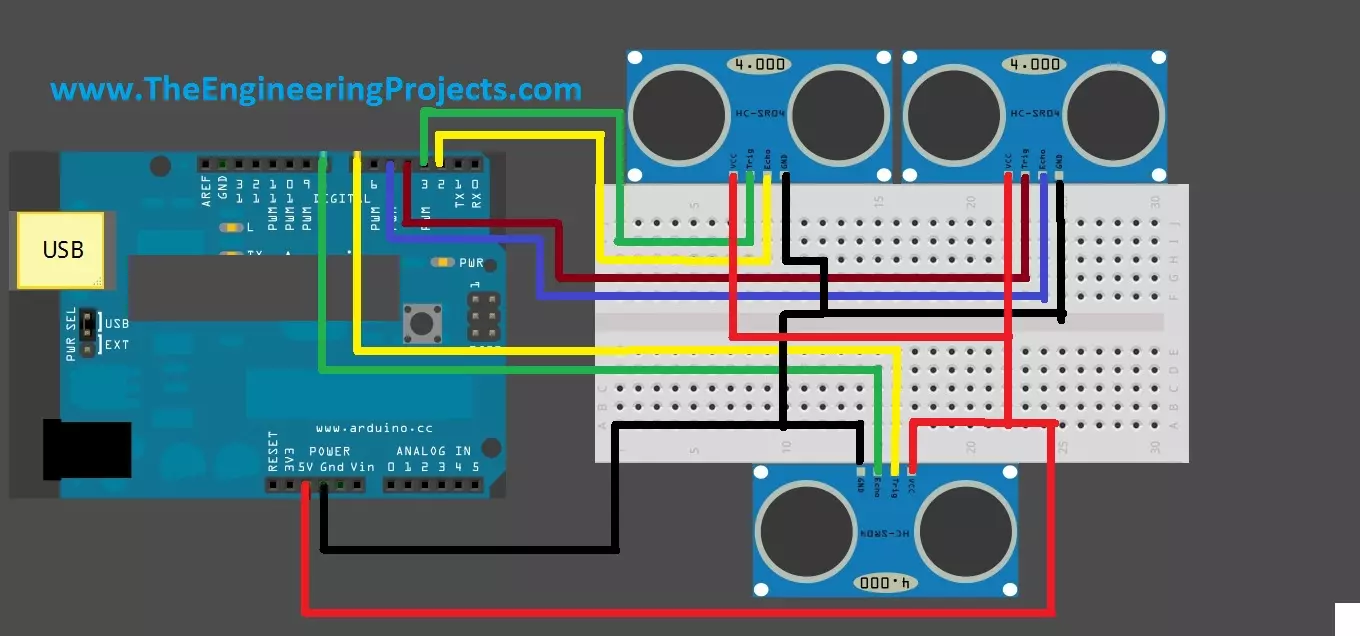
Hello friends, hope you are having fun and enjoying life. Today, I am gonna post about interfacing of multiple Ultrasonic sensor with Arduino. In the previous post, we have seen Interfacing of Ultrasonic Sensor With Arduino and in this post I have interfaced single ultrasonic sensor but in projects especially related to robotics, we have to interface multiple ultrasonic sensors. For example you have an obstacle detection robot, now in order to detect obstacle in front of robot you have to place once sensor on the front side but now you can't detect any object present on left or right side of your robot, so you have to place two sensors one on the left side of robot and one on the right side so in this project you need to use total three ultrasonic ...
Hello readers, I hope you all are doing great. In our previous tutorial, we learnt how to make HTTP POST from ESP32 to the IFTTT server.
In this tutorial, we will learn about another application of the ESP32 module in the field of IoT (Internet of Things). We can publish multiple sensor readings from ESP32 to Google sheets via the IFTTT web service.
IFTTT is used as a third-party web service to integrate Google sheets with ESP32.
Fig. 1
Creating an IFTTT Account for Integrating ESP32 with Google Sheets
We are going to create an applet (on the IFTTT server) that is responsible to integrate the Webhooks and Google Sheets services.
While operating with the IFTTT server there are some services/utilities that we are going to deal with like Applets an ...