Hello friends, I hope you all are doing great. Today, I am going to share the new Arduino UNO Library for Proteus V4.0 . The Arduino UNO is the board most of us learned with, and it is the heart of most of our Proteus simulations. With this Arduino UNO Library for Proteus , the UNO on your Proteus sheet behaves much more like the one on your desk: its LEDs work , the RESET button runs the bootloader, the 5V and 3.3V pins really power your parts, and a serial monitor is built into the board , so you no longer have to wire a Virtual Terminal to see what your sketch prints. Updates Arduino UNO Library for Proteus Latest version: V4.0 (October 2026, this tutorial) Earlier versions: V3.0 (2023) · V2.0 (2021) · V1.0 (2015) Other boards: Mega 2560 · Mega 1280 · Nano · Pro Mini · Mini (V4.0) All s ...
Hi Friends! Hope you are doing great. Today, I am going to give you a detailed Introduction to Arduino Uno . It is a microcontroller board developed by Arduino.cc and is based on Atmega328 Microcontroller . The first Arduino project was started in Interaction Design Institute Ivrea in 2003 by David Cuartielles and Massimo Banzi with the intention of providing a cheap and flexible way for students and professionals to learn embedded programming. Libraries Arduino UNO Simulation Libraries Latest library: Arduino UNO Library for Proteus V4.0 (October 2026): working LEDs, a RESET button and a built-in serial monitor Other Arduino boards: Mega 2560 · Mega 1280 · Nano · Pro Mini · Mini (V4.0) All six V4.0 boards in one package: Arduino Library for Proteus V4.0 With Wi-Fi and an LED matrix: Ardui ...
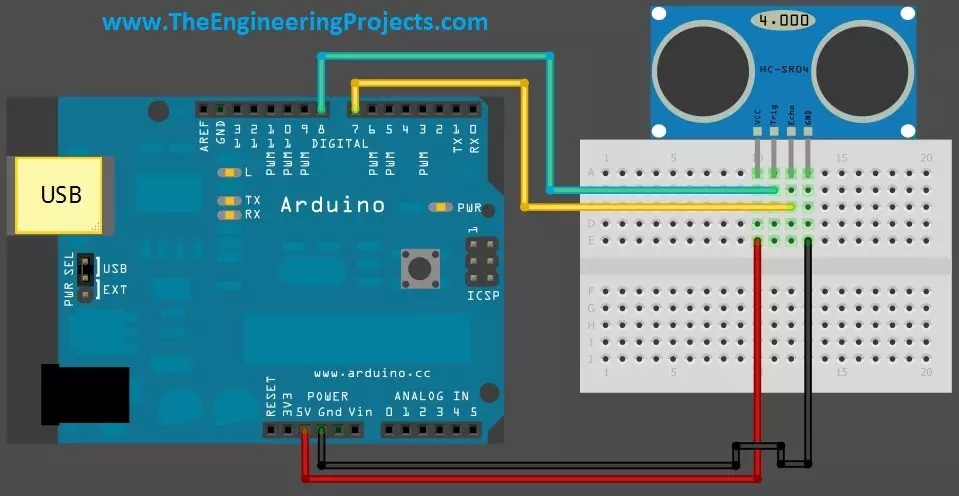
Hello friends! Today we will connect a real HC-SR04 ultrasonic sensor to an Arduino Uno and display distance on the Serial Monitor. Our earlier Proteus library tutorial introduced the simulated sensor, and the simulation examples explored different input conditions. This article moves to the four-pin physical module and the practical details of a measurement. Libraries HC-SR04 Simulation Libraries Latest library: Ultrasonic Sensor Library for Proteus V2.0 (October 2026): HC-SR04 with real TRIG and ECHO timing, Simple and Advance devices, test tools and an Arduino demo Other distance and motion sensors: JSN-SR04T · Sharp IR · TF-Luna LiDAR · VL53L0X · PIR HC-SR501 · RCWL-0516 · IR Obstacle FC-51 Helping Tools Serial Monitor Advance : a serial terminal window for the UART of your board Seria ...
Hello friends! Today, we will send an SMS with an Arduino UNO and a SIM900D GSM module using AT commands. We will start with the connections, check that the modem can communicate with the mobile network, and then let the Arduino submit one message. You will also learn how to tell the difference between a successful command and a message that has actually reached its recipient. Libraries SIM900 Simulation Libraries Latest library: SIM900A Library for Proteus V1.1 (October 2026) Other GSM modules: SIM800L · SIM800C · SIM808 Helping Tools Serial Monitor Advance : a serial terminal window for the UART of your board Serial Monitor Expert : the serial monitor with extra debugging tools LCD Library for Proteus V3.0 : 16x2, 20x4 and I2C LCDs to show your readings The SIM900D handles the radio conn ...
Hello friends! We have prepared our spoken commands in EasyVR Commander , and now we will interface the EasyVR Shield with Arduino Uno. In this tutorial, we will read the recognized command, display its result in Serial Monitor, and select an indicator output for FORWARD, REVERSE, LEFT, RIGHT, or STOP. This is the controller stage of our voice-recognition project . We will preserve the original command order and character codes, while making the program easier to follow and correcting two important problems: listening to the wrong group at startup and leaving previous direction outputs active after a new command. Begin with LEDs or Serial Monitor. The output pins in this example are indicators, not a complete motor-control circuit. Once you can explain every recognized number and output tr ...
Hello friends! In the previous tutorial, we introduced voice recognition using the EasyVR Shield . Now we will prepare the words that our project needs to recognize. We will use EasyVR Commander to connect to the shield, create a command group, train its entries, and test the results before writing the Arduino application. Our example is the same five-command project: FORWARD, REVERSE, LEFT, RIGHT, and STOP. Training these words is only part of the job. We also need to record their group number and individual indexes, because those numbers are what the controller will use to select an action. A well-trained vocabulary with an incorrect software mapping still produces the wrong behavior. The screenshots below come from the original EasyVR setup, so the appearance of a newer Commander releas ...
Hello friends! In this tutorial, we will look at voice recognition using the EasyVR Shield and plan a small Arduino project that responds to spoken commands. The idea is straightforward: we say a command such as FORWARD, the speech module identifies it, and our program decides what should happen next. Before connecting a robot, however, we need to understand what the module actually returns and how those results become reliable control decisions. This article introduces the voice-controlled robot project that started this series. We will keep its five commands, explain the hardware and training workflow, and build a clear plan for testing. The detailed training procedure is covered in Getting Started with EasyVR Commander , followed by the practical program in Interfacing of EasyVR with Ar ...
Hello friends! We have already covered the Introduction to XBee Module and Interfacing of XBee with Computer . In this tutorial, we will connect our configured radios to two Arduino UNO Rev3 boards and use a pushbutton on one board to control the built-in LED on the other. Libraries XBee Simulation Libraries Latest library: XBee Library for Proteus V1.0 (January 2016) Other RF modules: nRF24L01 · nRF24L01 PA LNA · CC1101 · RFM69HCW · HC-12 · 433MHz RF Helping Tools Serial Monitor Advance : a serial terminal window for the UART of your board Serial Monitor Expert : the serial monitor with extra debugging tools LCD Library for Proteus V3.0 : 16x2, 20x4 and I2C LCDs to show your readings We will build the project in stages. First, we will establish the power and serial connections. Next, we w ...