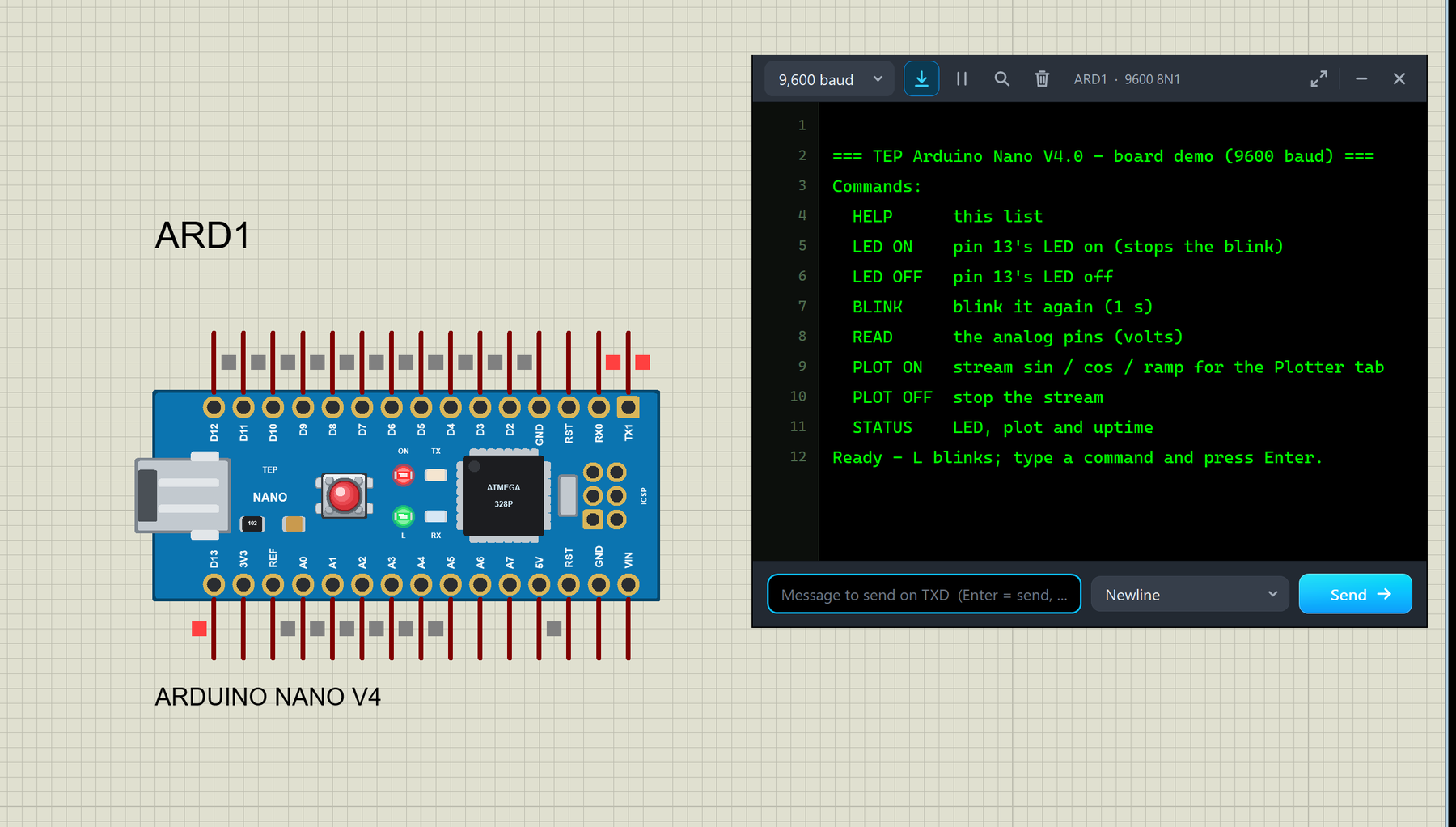
Hello friends, I hope you all are doing great. Today, I am going to share the new Arduino Nano Library for Proteus V4.0 . The Arduino Nano is the small, breadboard-friendly Arduino: the same ATmega328P microcontroller as the Arduino UNO on a board of only about 18 x 45 mm, with a mini-USB socket and two rows of pins. With this Arduino Nano Library for Proteus V4.0 , the Nano in your Proteus simulation looks like the real blue board and behaves like one: its ON, L, TX and RX LEDs work , the RESET button works with the bootloader, the 5V and 3V3 pins really supply power, and a serial monitor is built into the board , so you do not need to wire a Virtual Terminal any more. This is the next version of our Arduino libraries for Proteus: we shared V1.0 back in 2015, then V2.0 and V3.0 (2023), an ...
Hello friends, I hope you all are doing great. Today, I am going to share the new Arduino Mega 2560 Library for Proteus V4.0 . The Arduino Mega 2560 is the big brother of the Arduino UNO: the same 5 V, 16 MHz AVR family, but with the ATmega2560, 54 digital pins, 16 analog inputs and four hardware serial ports. With this Arduino Mega 2560 Library for Proteus , you place a Mega 2560 that looks like the real board, load your sketch's HEX file and press Run: the ON LED lights up, L blinks on pin 13, TX and RX flash with the serial traffic, and a serial monitor opens on its own. Version 4.0 is the next version of our Arduino libraries for Proteus; the earlier versions go back to 2015, and V3.0 came in 2023. The chip inside is still Proteus's own AVR model, so your sketches run as before. What i ...
Hello friends, I hope you all are doing great. Today, I am going to share the new Arduino UNO Library for Proteus V4.0 . The Arduino UNO is the board most of us learned with, and it is the heart of most of our Proteus simulations. With this Arduino UNO Library for Proteus , the UNO on your Proteus sheet behaves much more like the one on your desk: its LEDs work , the RESET button runs the bootloader, the 5V and 3.3V pins really power your parts, and a serial monitor is built into the board , so you no longer have to wire a Virtual Terminal to see what your sketch prints. Version 4.0 is the next version of our Arduino library for Proteus, after V1.0 (2015), V2.0 and V3.0 (2023). The UNO shares one library file with five more boards: the Mega 2560, Mega 1280, Nano, Pro Mini and Mini. If you ...
Hello friends, I hope you all are doing great. Today, I am going to share our new Arduino Library for Proteus V4.0 . It brings six Arduino boards to Proteus 8 in one library: the Arduino UNO , the Arduino Mega 2560 , the Arduino Mega 1280 , the Arduino Nano , the Arduino Pro Mini and the Arduino Mini . Every board is drawn as the real one, and its LEDs work like the real ones: ON lights with power, L follows pin 13, TX and RX flash with the serial traffic, and the RESET button really holds the chip in reset and then runs the bootloader. This is the fourth version of our Arduino library for Proteus, after V1.0 (2015), V2.0 and V3.0 (2023). The microcontroller is still Proteus's own AVR model, so your sketch, the HEX upload and Proteus's AVR debug windows work as before. What is new is every ...
Hello friends, I hope you all are doing great. Today, I am going to share a list of Must-Have Proteus Libraries for Arduino Simulation . Whatever your project is, a GSM alarm, a weather station or a line follower, its Proteus simulation always needs the same basic things: an Arduino board, a way to see what the code is printing, a display, maybe a real-time clock, a driver for motors and something to power the circuit. These are the libraries you will install once and use in almost every project. Proteus does have some of these parts in its own library, but often in a very basic form. Our versions look like the real boards and modules, which makes your circuit diagrams and project reports much clearer, and our new TEP Serial Monitor replaces the small Proteus Virtual Terminal with a modern ...
Hello friends, I hope you all are doing great. Today, I am going to share a list of Microcontroller Board Libraries for Proteus . Every embedded project starts with a microcontroller board, and for most students that board is an Arduino. Proteus can simulate the bare ATmega chips, but a bare chip doesn't look like the board on your desk, and it makes your circuit diagram harder to follow. That's why the Arduino Library for Proteus was the very first library our team ever designed, back in 2015. Since then, we have designed four generations of Arduino boards for Proteus, plus libraries for the Raspberry Pi family, the ESP32 and the NodeMCU. The newest one, the Arduino Library for Proteus V4.0 from October 2026, has boards whose LEDs work like the real ones and a serial monitor built into ev ...