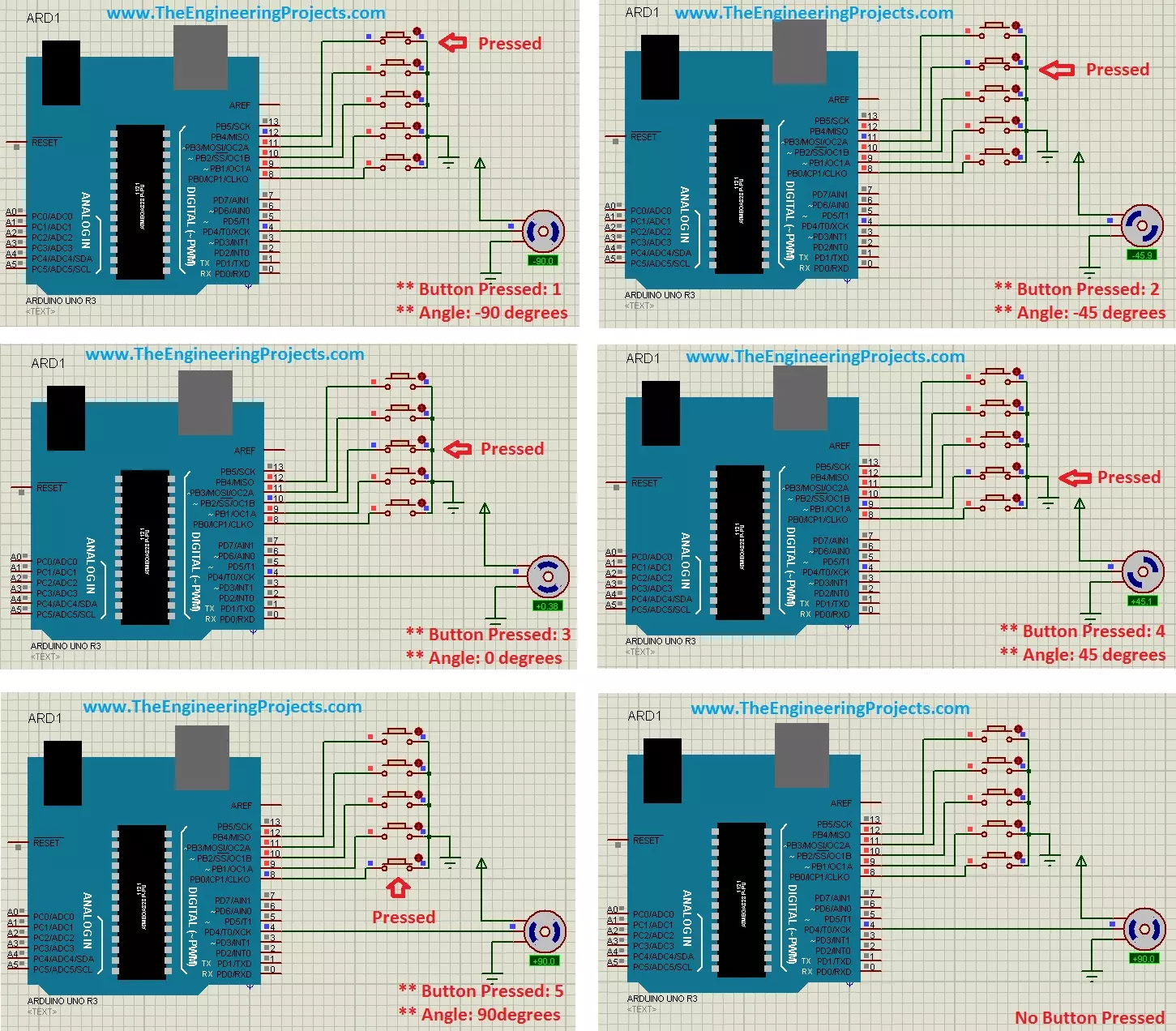
Hello friends, hope you all are fine and having fun with your lives. Today's post is about the Controlling of Servo Motor with Arduino in Proteus ISIS. Servo Motor is a common motor used in engineering projects for precise circular motion. We can move the servo motor at any desired angle, which is not possible in the case of other motors i.e. Stepper or DC.
For example, suppose I want to move an antenna at a precise angle of 47.5 degrees then if I use DC Motor, I have to use an encoder. So, in such cases instead of using a DC motor, I will prefer Servo Motor.
I have already posted Angle Control of Servo Motor using 555 Timer in which I have controlled servo motor using 555 timer and another tutorial about Controlling of Servo Motor using PIC Micro ...
Hello everyone, I hope you all are fine and having fun. In today's tutorial, I am going to show you How to write Arduino code. In the previous tutorial, we have seen the Simple Arduino LED Example so if you haven't read that tutorial then I must suggest you to read it first because I am gonna use the same simulation with some advancements in it.
Moreover, you should also have a look at How to do Arduino Serial Communication because we are also gonna use Serial Port in today's tutorial and one more tutorial which you must read is How to use digitalRead in Arduino because we are dealing with digital pins here. So, I hope that you have read those tutorial and are ready to learn How to write Arduino code. So, let's have a look at How to write Arduino ...
Hi Geeks, welcome to our new project. Our new project is one of the most common issues you’ve seen in your cities. In this project, we are going to make a car parking system with automatic billing. In the entire world, there are an estimated 1.4 billion cars on the road, which is absolutely great news if we are considering the development of the Automobile industry. But the most serious issue is that the number of cars exceeds the number of available parking places, resulting in traffic congestion. Damaged cars due to this lack of space, fewer parking locations, lack of parking signage, informal parking, and overcharging for parking are just a few of the issues.
People are still choosing manual parking methods, which have a number of drawbacks, suc ...
Hello friends, hope you all are fine and enjoying life. Today's post is about removing a small error named as Recognition Failed in EasyVR, which I encountered while working with EasyVR shield with Arduino UNO. I have posted a complete project on EasyVR shield around a year ago in which I haven't mentioned this error because at that time I didn't encountered it. But today while working with EasyVR shield, I encountered this problem so I thought to share it with you guys.
EasyVR shield is a voice recognition module which is used for recognizing voices and operating accordingly. Using this module, one ca quite easily control anything using voice. In the previous project, I have controlled a robot using voice commands like when I say Forward then it ...
Hello everyone, today I am going to share a complete project which is DS1307 Arduino based digital Clock in Proteus ISIS. In this project, I have designed a digital clock using Arduino UNO and DS1307 RTC Module. So, first of all, if you haven't yet installed then, you should install Arduino Library for Proteus using which you will be able to easily simulate Arduino baords in Proteus. Along with Arduino Library you will also need to install DS1307 Library for Proteus, which I have shared in my previous post as we are gonna use this RTC Module DS1307 for designing our digital clock.
So, now I hope that you have installed both these libraries successfully and are ready to design this DS1307 Arduino based Digital Clock. I have given the Simulation and ...
Hello friends, I hope you all are fine and having fun with your lives. In today's post we are gonna see Interfacing of EasyVR with Arduino UNO. In the previous post, we have seen Getting Started with EasyVR Commander. It was quite simple and if you follow the steps carefully you wont stuck anywhere but still if you into some trouble i am here.
Now this tutorial is quite a quick and important one as it contains the real code using which we will control our robot. After adding the voice commands, now close the EasyVR Commander and open the Arduino Software. Connect the arduino board with computer and double check that your jumper J12 in on position SW. You should also read Training Error: Recognition Failed in EasyVR, if you got such error while ...
Hello friends, hope you all are fine and having fun with your lives. Today's post, as the name suggests, is about Arduino UNO PCB Design in Proteus ARES. I have already posted Arduino Library for Proteus on my blog using which one can quite easily run Arduino simulation in Proteus.but what if you wanna do the Arduino UNO PCB design in Proteus, then you are lucky that you are reading this post. :)
In one of my projects, I have to design the PCB for Arduino in Proteus so I thought to also post it here so that others can download it as well. Normally PCB design is not required for Arduino and I usually get Atmega328 out of Arduino and use it separately but sometimes, depending on the requirements of your project, you may also need to place Arduino it ...
Hello geeks, Welcome to our new project. As most readers have already seen the coffee vending machine or maybe you are drinking coffee while reading this article and if you are a tinker or a geek, it must have come to your mind how to make a coffee vending machine on your own. In today's tutorial, we are going to learn how to make a Smart Coffee Vending Machine using Arduino with Proteus Simulation for the same.
We can use this project for an engineering project’s showcase for electronics, electrical engineering students, and can be used in offices as well.
Coffee is the second most popular drink in the world and it is one of the oldest beverages of the world. According to Wikipedia, more than 2 billion cups of coffee are consumed every day in the ...
Buy This Project
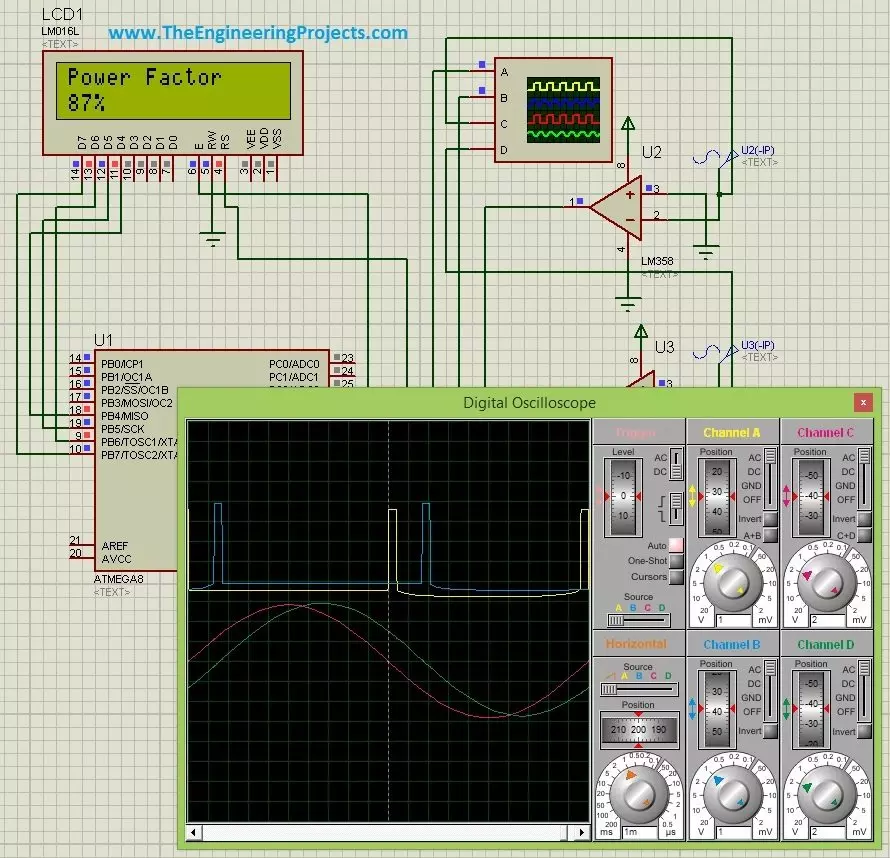
Hello friends, hope you all are fine and having fun. Today's post is about Power Factor Measurement using Microcontroller in Proteus ISIS. As usual, I have this project simulation in which I have to simulate a power factor measuring project using atmega microcontroller. So, I use atmega8 microcontroller and the used Proteus ISIS as the simulating software. Power Factor Measurement isn't that difficult but its a quite tricky and in today's post we are gonna cover it in full detail.
There are many ways for power factor measurement and today's the method we are gonna use is called zero crossing detection. We will first detect the zero crossing of our signal and then we are gonna do the power factor measurement based on the detectio ...
Hello friends, today's post is, as the name suggests, about the Voice Recognition using EasyVR Shield. Voice recognition is quite a difficult task and usually done on software like MATLAB, but what if someone needs a stand alone project, a kind of autonomous voice recognition project, which doesn't use computer.
EasyVR is the solution for such projects. I recently did one project on this module named as Voice Recognition using EasyVR Shield and it worked really cool so I thought to share this new technology with you guys. I couldn't write the next part of Proteus tutorial, actually firstly I was busy in this project and then I thought to share this one as its quite exciting one. After completing this project, I will come back to Proteus tutorial.
...