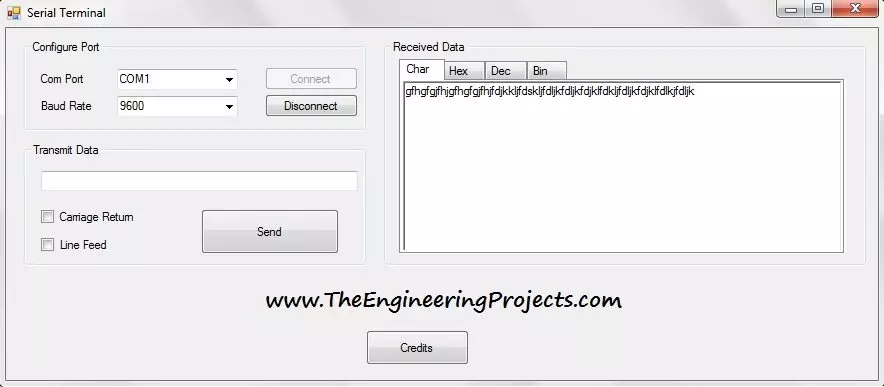
Hello everyone! Today I am sharing the Serial Terminal software developed in Visual Basic 2010. It provides a simple window for opening a COM port, sending text, and viewing received data in character, hexadecimal, decimal, and binary forms. We will download the original package and work through a practical communication session. The earlier Visual Basic serial-port tutorial introduced basic transmission and reception. This terminal adds convenient display tabs and optional carriage-return and line-feed characters. Those small features are useful when a microcontroller appears to receive your command but does not respond as expected. We will explain the original interface as it is shown, then cover connection settings, line endings, data representation, and troubleshooting. The download re ...
Hello friends! Today we will add a delay to a Visual Basic application in Visual Studio 2010. The short answer is System.Threading.Thread.Sleep(1000) for a one-second pause, but choosing where to put that statement is just as important as choosing the number. I originally needed this while spacing readings in a database project. That is a useful example because a program often needs to wait between operations while its window remains responsive. We will begin with the simple pause, then build a timer-based Windows Forms example that allows the user to cancel while waiting. The examples retain the Visual Studio 2010 and Visual Basic context. We will distinguish features available in a typical .NET Framework 4 project from later asynchronous programming features, and explain why a fixed dela ...
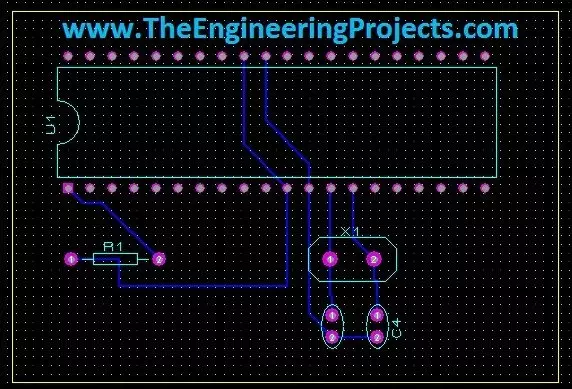
Hello friends! Today we will move from a circuit diagram to a printed circuit board using Proteus ARES. We will use a small PIC16F877A circuit so that placement, connectivity, and routing remain easy to follow. The same sequence of decisions applies when you later design a larger board. Proteus schematic capture describes which component pins belong to each electrical net. PCB layout turns those connections into physical pads and copper tracks. A completed route is useful only when the footprint, pin mapping, power connections, and manufacturing rules are also correct. We will follow the original illustrated workflow: prepare the schematic, transfer its connectivity, define the board edge, place components, and route the board. We will then add the checks needed before sending a design for ...
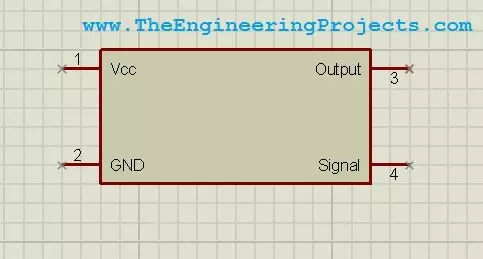
Hello friends! Today we will design a custom component in Proteus ISIS. This is useful when you need to document a circuit but cannot find the exact module, connector, or device in your installed library. We will draw a simple four-pin symbol, define its connections, and save it so that it can be placed like other library parts. The original purpose of this tutorial is schematic presentation, and we will keep that approach. A clear custom symbol helps another person understand how your project is connected. We will also discuss the extra information required before the same part can be used for PCB layout or electrical simulation. Our example is a fictional device named Test Device with VCC, GND, OUTPUT, and SIGNAL connections. These names let us practise the workflow without claiming to r ...
Hello friends! Today we will control a servo motor with the PIC16F877A and observe its movement in Proteus ISIS. We will begin with the three servo connections, understand the command waveform, and then write a small program that selects positions using two pushbuttons. In the previous tutorials, we explored DC motor direction control and stepper motor sequencing . A positional hobby servo is different because the motor, gearbox, position sensor, and controller are already assembled together. Our PIC requests a position rather than switching the motor windings itself. We will keep the original PIC and button arrangement, but use a repeated control pulse with a sensible frame period. Along the way, we will separate what the simulated angle display tells us from what a physical servo must be ...
Hello friends! In the previous tutorial, we controlled the direction of a DC motor in Proteus . Now we will work with a stepper motor, where rotation depends on applying an ordered sequence to the windings. We will begin with the original six-wire simulation, inspect the sequence manually, and then explain how a microcontroller and driver can generate it. The original screenshots use Logic State sources to make individual winding states visible. They are useful for understanding the sequence, but they are not a physical driver circuit. We will preserve the images and add the missing distinction between simulated logic sources, microcontroller outputs, and the winding-current path. By the end, you should understand unipolar and bipolar wiring, wave drive and half stepping, direction reversa ...
Hello friends! In this tutorial, we will design a DC motor control demonstration in Proteus ISIS and then connect its control logic to a PIC16F877A. We will begin by observing how voltage polarity changes the direction of a simulated motor, then explain the driver stage needed between a microcontroller and a physical motor. The original article used Logic State sources and a simplified direct connection to illustrate direction changes. We will preserve those screenshots, but label their purpose clearly. Logic sources and PIC output pins are not substitutes for a motor power driver. The updated practical interface uses an L293D bridge example, with separate logic and motor supplies. We will also correct the relationship between the original schematic and code, add explicit stopping behavior ...
Hello friends! In this tutorial, we will learn how to use the oscilloscope in Proteus ISIS to inspect waveforms, measure voltage and timing, and compare signals at different points in a circuit. In the previous article, we used Virtual Terminal to read serial characters. The oscilloscope lets us examine the electrical waveform behind a signal instead of only its decoded text. We will retain the original inverter demonstration and its screenshots, but begin with the measurement principles needed to interpret them correctly. A waveform that looks smooth is not automatically a verified pure sine wave, and two traces connected to opposite sides of a load do not automatically display the voltage difference across that load. By the end, you should be able to choose a suitable volts-per-division ...
Hello friends! In this tutorial, we will learn how to use Virtual Terminal in Proteus ISIS to inspect serial data and send simple commands to a simulated circuit. It is particularly useful when working with microcontrollers, GSM modules, GPS receivers, and other devices whose behavior can be understood through a serial interface. We will begin with the simplest arrangement: a simulated microcontroller communicating directly with Virtual Terminal. Then we will return to the original article's COMPIM example, which connects a simulation to a real computer serial port. Keeping those two arrangements separate will help you choose the correct components and avoid unnecessary COM-port problems. The aim is to make serial communication visible before building a larger application around it. We wil ...
Hello friends! In this tutorial, we will explore the components and instruments available in Proteus ISIS and learn how to choose the right item for a circuit. Finding a familiar part name is only the beginning. We also need to know whether it has a simulation model, which properties must be configured, and whether the item belongs to the schematic, the measurement setup, or a later PCB design. This article continues our practical Proteus series after designing an LCD circuit with a PIC microcontroller . We will cover ordinary components, displays, motors, serial tools, and shift registers, then connect each topic to the more detailed tutorials already available in the series. My aim is to help you build a sensible test circuit instead of placing unfamiliar parts and hoping that the simula ...