… range of applications. This board can be used in the following projects. Windows PC lock/unlock application USB Trackpad USB Joystick Water Level Meter Electric Bike Creating a wireless keyboard Automatic Pill Dispenser That’s all for today. I hope you’ve got …
… It's working voltage should be between 2.5 to 3.6 VDC. Libraries Touch and Keypad Simulation Libraries Input modules: Joystick · Rotary Encoder · Membrane Keypad · TTP229 Keypad · TTP223 Touch · IR Remote · Fingerprint R307 Helping Tools Serial Monitor Advance …
… as the Raspberry Pi, its analog pins, or to give an Arduino more of them. Students meet it in sensor labs, data loggers, joystick and potentiometer projects, and in every course that teaches how SPI works. Updates MCP3008 8-Channel ADC Library for Proteus …
… milling pirouettes onto the stage. It invites you to envision turbine blades sculpted with aerodynamic grace or an ergonomic joystick that fits into hands as naturally as pebbles on a beach. Image Source: Pixabay Turning Turning—the spinning dance between …
… is used for a range of applications. Following are some major applications of this device. Automatic Pill Dispenser USB Joystick USB Trackpad Creating a wireless keyboard Water Level Meter Electric Bike That’s all for today. I hope you’ve enjoyed reading this …
… pins along the right edge of the board. To communicate with peripherals such as LEDs and buttons to temperature sensors, joysticks, and pulse rate monitors, the Raspberry Pi includes a function known as GPIO (general-purpose input/output). Raspberry Pi’s …
We learned in the previous tutorial how to connect a joystick to a Raspberry Pi 4 using an mcp3008 and an op-amp IC, the LM324A. For each of the interface methods we studied, we created a python script allowing us to interact with the circuit. This tutorial …
… 3 V they stop. Make the sweep 5 ms a degree: watch the servo fall further behind its target. Ideas to Extend the Demo Read a joystick on two analog pins and steer the camera with it. Scan in a pattern, left to right, row by row, like a security camera. Clamp …
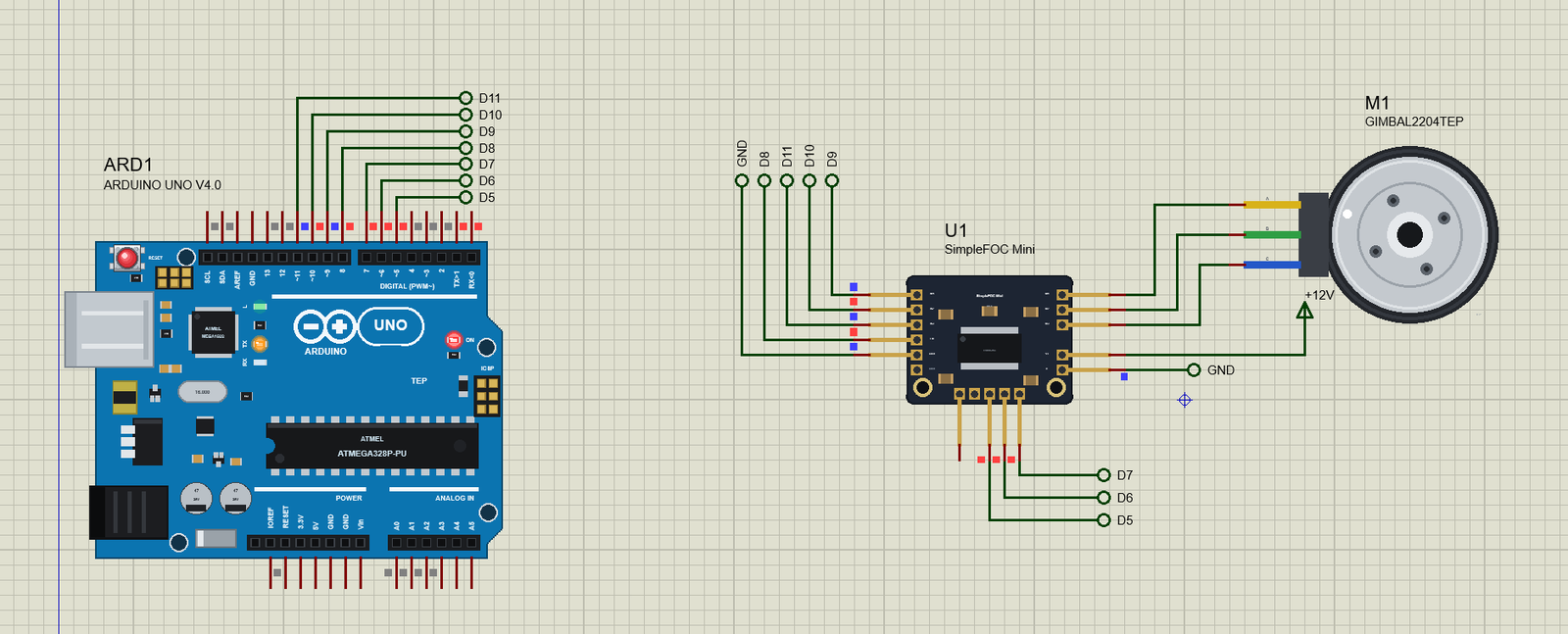
… magnetic encoder on the motor's hollow shaft and close the loop: keep the vector 90 degrees ahead of the rotor (FOC). Read a joystick on A0 and steer the gimbal with it. Watch nFT in the sketch and stop the program on a fault, then reset the driver with nRT. …