… I will interface a 20x4 LCD with the Arduino Mega 1280 board. To interface this LCD, design the circuit as shown below: Pins 8,9,10 & 11 of Arduino Mega 1280 are attached with the data pins of LCD, while Enable & Reset of LCD are connected to Pin 12 & 13 of …
… a 20x4 LCD. Design the circuit given below to interface LCD with the Arduino Mega 2560 board: Data pins of LCD are connected with 8,9,10 & 11 pins of Arduino Mega 2560, while Pins 12 & 13 of Arduino board are connected to Enable & Reset of LCD. To upload the …
… Arduino circuit and interfacing project collection. Circuit Designing of LCD With Arduino in Proteus. Interfacing of Keypad with Arduino in Proteus ISIS. Display ADC value on LCD using Arduino in Proteus . Ultrasonic Sensor with Arduino Simulation in Proteus. …
… LCD string. Once that behavior is correct, add the next peripheral. A large program attached to a large untested schematic creates too many possible causes for the first failure. Choose the Right Display A parallel 16×2 character LCD, a graphical LCD, and a …
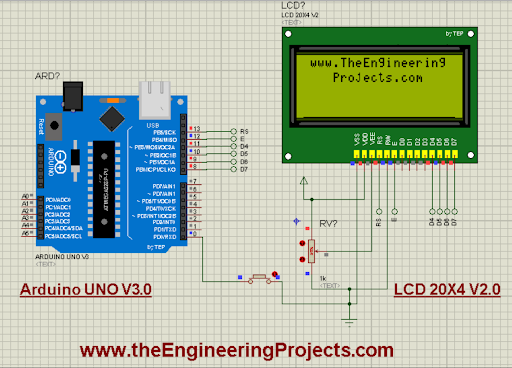
… & obviously will learn better. Now, I will interface a 20x4 LCD with the Arduino Uno board. To interface this LCD display, design the circuit as shown below: I’ve connected the data pins of LCD with 8,9,10 & 11 pins of Arduino Uno, while Enable & Reset are …
… easily. Note - Change the Address of the LCD Screen while you run the code in Proteus, change it to 0x20 instead of 0x27 or anyone else. In the real experiment, we can alter the address of the LCD by changing the configurations of A0, A1 and A2 pins of the …
… lcd(13, 12, 11, 10, 9, 8); int Gas = 7; void setup() { // set up the LCD's number of columns and rows: lcd.begin(20, 4); // Print a message to the LCD. lcd.setCursor(0,0); lcd.print("Gas Detected :"); lcd.setCursor(1,2); lcd.print("www.TheEngineering"); lcd.se …
… lcd(13, 12, 11, 10, 9, 8); void setup() { // set up the LCD's number of columns and rows: lcd.begin(20, 4); // Print a message to the LCD. lcd.setCursor(1,0); lcd.print("www.TheEngineering"); lcd.setCursor(4,1); lcd.print("Projects.com"); lcd.setCursor(1,0); …