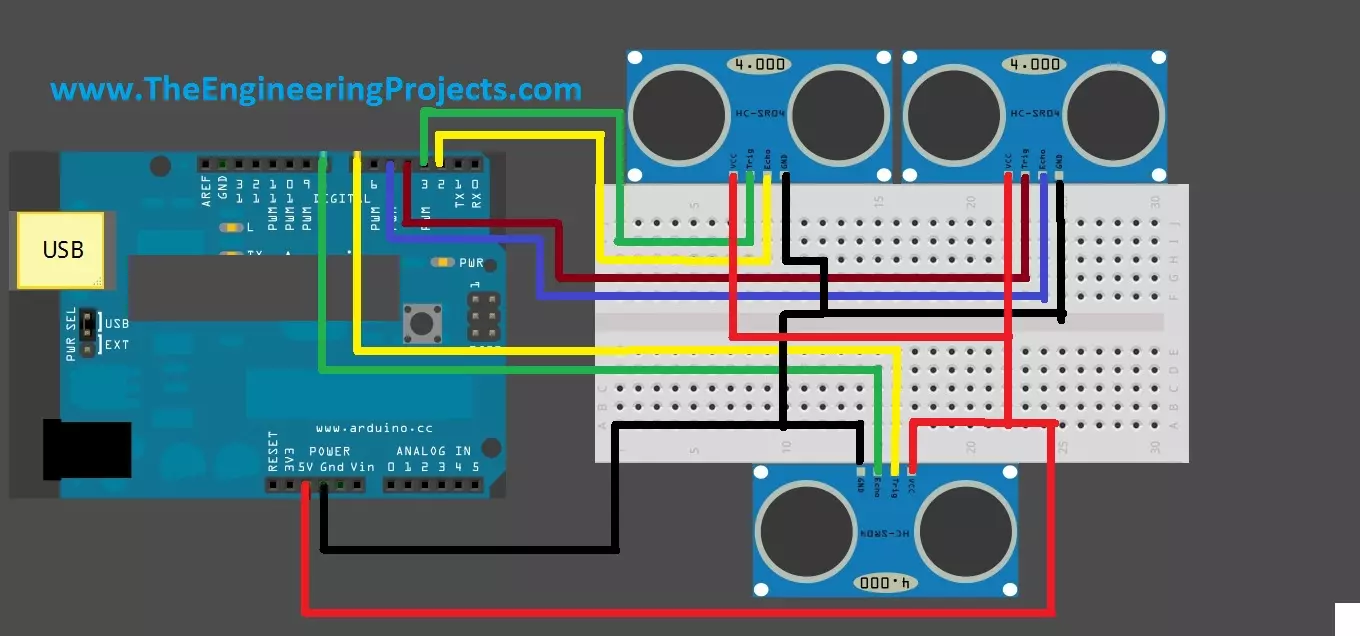
Hello friends! Today we will connect three HC-SR04 ultrasonic sensors to an Arduino Uno. A single forward-facing sensor is useful for a basic distance demonstration, but a robot may also need information from its left and right sides. The original project used this arrangement to discuss obstacle detection and movement between two walls. If you have not yet obtained stable readings from one module, begin with Interfacing an Ultrasonic Sensor with Arduino . Here we will build on that measurement function while addressing the main new issue: several sensors can hear one another. Adding more input pins does not automatically create independent acoustic measurements. We will preserve the original right, left and front pin assignments, trigger the sensors sequentially and report whether each re ...
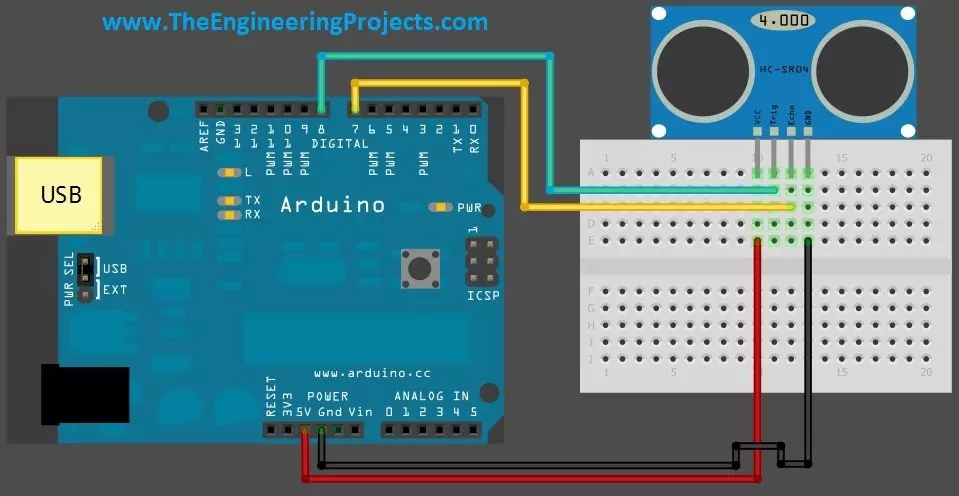
Hello friends! Today we will connect a real HC-SR04 ultrasonic sensor to an Arduino Uno and display distance on the Serial Monitor. Our earlier Proteus library tutorial introduced the simulated sensor, and the simulation examples explored different input conditions. This article moves to the four-pin physical module and the practical details of a measurement. Libraries HC-SR04 Simulation Libraries Latest library: Ultrasonic Sensor Library for Proteus V2.0 (October 2026): HC-SR04 with real TRIG and ECHO timing, Simple and Advance devices, test tools and an Arduino demo Other distance and motion sensors: JSN-SR04T · Sharp IR · TF-Luna LiDAR · VL53L0X · PIR HC-SR501 · RCWL-0516 · IR Obstacle FC-51 Helping Tools Serial Monitor Advance : a serial terminal window for the UART of your board Seria ...
Hello friends! Today we will receive SMS messages with a SIM900 modem and an Arduino. In the earlier SMS sending tutorial , Arduino initiated a command and supplied message text. Receiving is different because a message can arrive at any time, including while the program is handling another modem response. Libraries SIM900 Simulation Libraries Latest library: SIM900A Library for Proteus V1.1 (October 2026) Other GSM modules: SIM800L · SIM800C · SIM808 Helping Tools Serial Monitor Advance : a serial terminal window for the UART of your board Serial Monitor Expert : the serial monitor with extra debugging tools LCD Library for Proteus V3.0 : 16x2, 20x4 and I2C LCDs to show your readings We will begin by checking the serial connection, configure text-mode notifications and inspect the sender ...
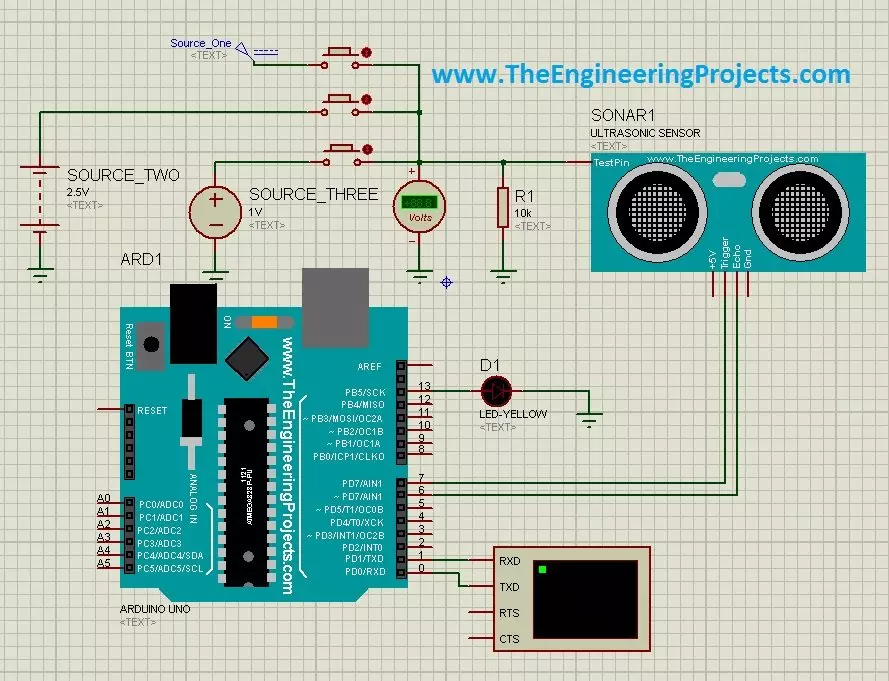
Hello friends! In the Ultrasonic Sensor Library for Proteus tutorial, we installed the model and printed distance readings with an Arduino Uno. Now we will use that same interface in three practical simulations: selecting test distances with buttons, producing a proximity indication, and stepping through test conditions with a switch. Libraries Libraries used in this tutorial Ultrasonic Sensor Library for Proteus: V1.0 (2015, used in this tutorial) · latest version: V2.0 (October 2026) Helping Tools Serial Monitor Advance : a serial terminal window for the UART of your board Serial Monitor Expert : the serial monitor with extra debugging tools LCD Library for Proteus V3.0 : 16x2, 20x4 and I2C LCDs to show your readings The central idea is simple. Our legacy sensor model has an additional a ...
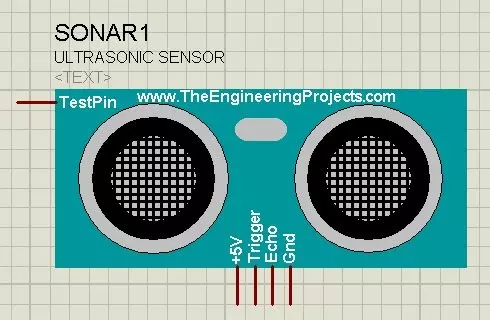
Hello friends! Today I will show you how to install our Ultrasonic Sensor Library for Proteus and use it with an Arduino Uno. We will begin with the library files, place the sensor on a schematic, connect its simulation input and then read the distance through the Virtual Terminal. This is the original HC-SR04-style library introduced in this tutorial. Updates Ultrasonic Sensor Library for Proteus Latest version: Ultrasonic Sensor Library for Proteus V2.0 (October 2026): HC-SR04 with real TRIG and ECHO timing, Simple and Advance devices, test tools and an Arduino demo Earlier versions: V1.0 (2015, this tutorial) Other distance and motion sensors: JSN-SR04T · Sharp IR · TF-Luna LiDAR · VL53L0X · PIR HC-SR501 · RCWL-0516 · IR Obstacle FC-51 Helping Tools Serial Monitor Advance : a serial ter ...
Hello friends! In our previous tutorial, we installed the Arduino LilyPad library for Proteus . Now we will use that board in a small circuit with three LEDs and a pushbutton, then extend the same project to an analog level indicator. Libraries Libraries used in this tutorial Arduino Lilypad Library for Proteus: V1.0 (2014, used in this tutorial) Newer Arduino boards: UNO · Mega 2560 · Mega 1280 · Nano · Pro Mini · Mini (V4.0) Helping Tools Serial Monitor Advance : a serial terminal window for the UART of your board Serial Monitor Expert : the serial monitor with extra debugging tools LCD Library for Proteus V3.0 : 16x2, 20x4 and I2C LCDs to show your readings The basic behaviour is easy to observe: when the button is released, all three LEDs are on; when it is pressed, they turn off. This ...
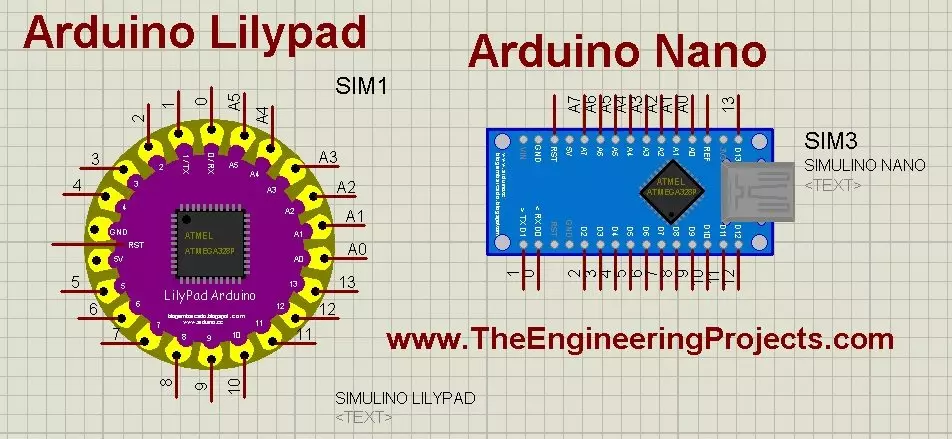
Hello friends! Today, we will install the Arduino LilyPad library for Proteus and prepare a small simulation to check the installation. This article continues our earlier Arduino library tutorial , with particular attention to the LilyPad and Nano parts included in this older library package. Updates Arduino Lilypad Library for Proteus Latest version: V1.0 (December 2014, this tutorial) Other Arduino boards: UNO · Mega 2560 · Mega 1280 · Nano · Pro Mini · Mini (V4.0) All six V4.0 boards in one package: Arduino Library for Proteus V4.0 Helping Tools Serial Monitor Advance : a serial terminal window for the UART of your board Serial Monitor Expert : the serial monitor with extra debugging tools LCD Library for Proteus V3.0 : 16x2, 20x4 and I2C LCDs to show your readings We will start by iden ...
Hello friends! In this tutorial, we will learn how to get data from a web server using an Arduino UNO and the original Arduino WiFi Shield. We will use that data to switch two LEDs, so you can see how a command stored on a server becomes an action on a microcontroller. There are two parts to this project: a web page that changes a command file, and an Arduino client that reads the file periodically. We will discuss both parts in the same order as the original project, with clearer wiring, a defined response format and checks that prevent an incomplete response from becoming an LED command. This is a legacy-shield tutorial. The WiFi library and pin assignments described here belong to the original shield, not every board with WiFi in its name. We will first run the demonstration on a truste ...
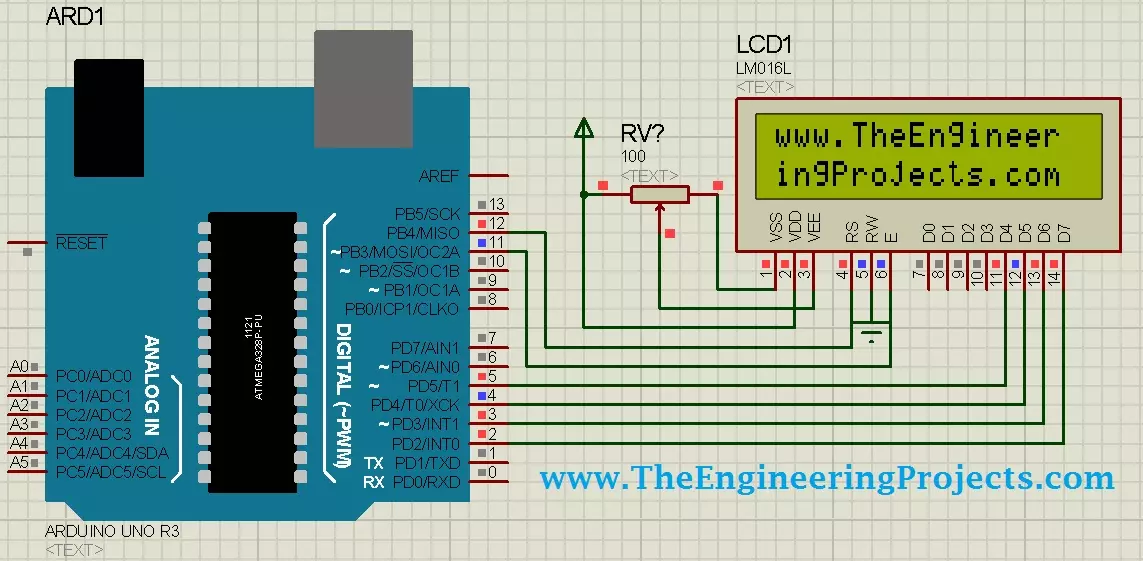
Hello friends! Today, we will design a circuit containing an Arduino UNO and a 16 × 2 character LCD in Proteus ISIS. We will connect the display, write a small Arduino sketch, compile it and load the resulting program into the simulated UNO. Our first result will be the website name displayed across two rows. Libraries LCD Simulation Libraries Latest library: LCD Library for Proteus V3.0 (October 2026): LCD 16x2, LCD 20x4 and both I2C LCDs in one library, with our own HD44780 model and an Arduino demo One LCD only? LCD 16x2 · LCD 20x4 · I2C LCD 16x2 · I2C LCD 20x4 Helping Tools Serial Monitor Advance : a serial terminal window for the UART of your board Serial Monitor Expert : the serial monitor with extra debugging tools This is a useful beginner project because the visible result is simp ...
Hello friends! Today, we will work through the EasyVR message Training Error: Recognition Failed . I originally encountered this error while training voice commands for an Arduino UNO project. Commander connected to the board, but the training attempt failed when I spoke the first command. Repeating the same attempt did not solve it. In my original setup, loading an appropriate EasyVR example and changing the shield's J12 connection from PC to SW allowed training to continue. That observation is useful, but it needs an important explanation: the correct jumper position depends on the shield revision and the communication path being used. SW is not a universal cure for every recognition error. We will separate communication problems from training and microphone problems, then return to the ...