Hello friends! Today, we will compare three useful C compiler choices for PIC microcontrollers: Microchip's MPLAB XC tools, mikroC PRO for PIC and CCS C. Choosing a compiler affects how you configure peripherals, reuse libraries, debug the circuit and maintain the project later. The original article introduced MPLAB C18 alongside mikroC and CCS. That historical context still helps when opening older tutorials, but C18 is not the starting recommendation for a new 8-bit PIC project. We will explain the current XC8 path, preserve the older learning links and identify the settings that matter whichever compiler you choose. Our aim is to select a tool for a particular microcontroller and project, not declare a universal winner. We will start with the difference between an IDE and a compiler, co ...
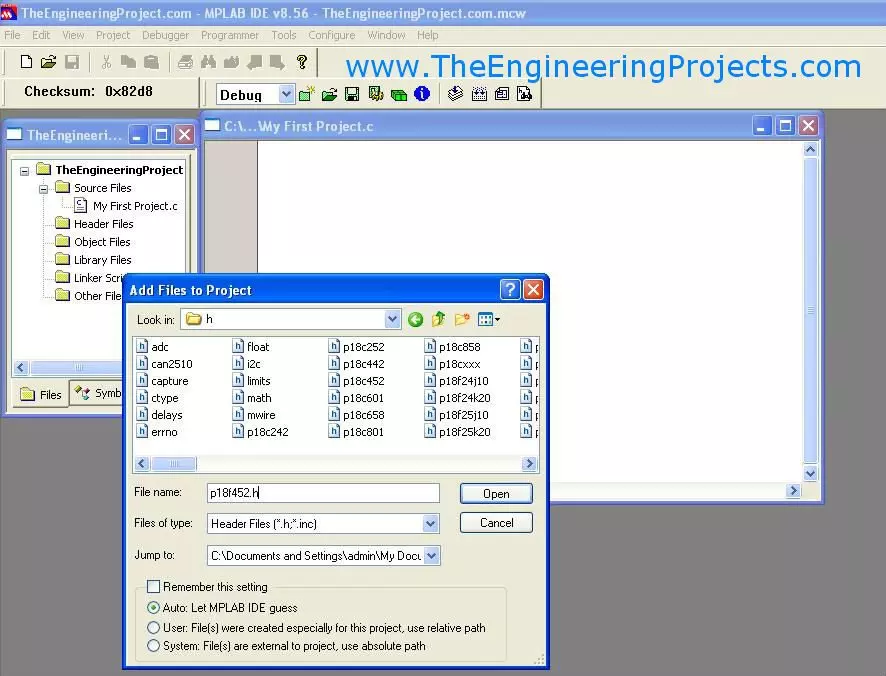
Hello friends! Today, we will create a PIC project in MPLAB and understand the files and settings needed before writing the main application. We have already covered installing MPLAB and installing the C compiler . Now we will bring those tools together in one project. The title of this older lesson refers to an MPLAB compiler, but the IDE and compiler have separate jobs. The IDE manages the project and invokes the selected language tools. The compiler and linker produce the firmware image. Understanding that distinction makes missing-file and build errors much easier to diagnose. The original screenshots show legacy MPLAB IDE with C18. We will retain that sequence for readers maintaining an older PIC18F452 project, while also explaining the corresponding decisions in MPLAB X with XC8. Do ...
Hello friends! Today, we will install a C compiler for MPLAB and make sure that a PIC project actually uses it. In the previous lesson, we covered installing the MPLAB development environment . The next step is to connect that environment to the language tools that translate our C source. The original article used MPLAB C18 and shows its historical Windows installer. Those screenshots remain useful for maintaining an older PIC18 project. For a new compatible 8-bit PIC project, MPLAB XC8 is the relevant Microchip compiler family to investigate. We will keep the two workflows distinct. By the end, you should know which compiler your project requires, how to install and select it, and how to separate an installation problem from a source-code or linker problem. We will use PIC18F452 as the ex ...
Hello friends! Today, we will install MPLAB software in Windows and prepare it for a PIC development project. In the previous lesson, we studied the PIC18F452 ports and peripherals . We now need a development environment in which to organize the source, select the device and build its firmware. The original screenshots in this article show MPLAB IDE 8.56. That is a legacy environment, while MPLAB X IDE has a different interface and installation workflow. We will explain both contexts clearly so you can reproduce an old project without mistaking its screenshots for a current installation guide. For a new setup, choose an MPLAB X release compatible with your Windows version, PIC device and programming tool. Install a suitable C compiler separately. The IDE provides the workspace, but it does ...
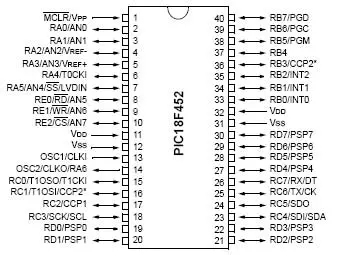
Hello friends! In the previous tutorial, we discussed getting started with PIC microcontrollers and the minimum circuit needed to run a PIC18F452. Today, we will examine its ports, timers, communication interfaces and other useful hardware functions. We will refer to the 40-pin PDIP package throughout this lesson. The signal names are more important than the physical pin numbers, because other packages can place those signals differently. Always match the package drawing to the component you actually have. The main goal is to help you allocate pins and select peripherals for a project. We will also work through timer, ADC, PWM and baud-rate calculations so the datasheet values become practical design tools rather than a list of unfamiliar abbreviations. Figure: PIC18F452 reference for port ...
Hello friends! In the previous lesson, we discussed microcontroller basics . Today, we will apply those ideas to a PIC18F452 and identify everything needed to make a simple program run on real hardware. We will use the 40-pin PDIP version of the PIC18F452, matching the original circuit in this tutorial. Our first output is an LED on RD0. Before writing the application, we will work through power, reset, the external clock, programming connections and the distinction between the IDE and compiler. The original lesson used older MPLAB tools and a socket-style programming workflow. Those are useful historical references, but a supported in-circuit programmer can program the PIC while it remains in the target circuit. The exact combination of device, programmer and software must be checked befo ...
Hello friends! Today, we are starting our microcontroller tutorial series from the basics. Before connecting a PIC, installing a compiler or writing an LED-blinking program, we need to understand what a microcontroller does and how its software interacts with an electrical circuit. Think of a project that reads a push button, changes a pattern of lights and reports its operating state. A microcontroller can coordinate those actions by repeatedly reading inputs, applying programmed rules and updating outputs. The same basic idea appears in sensor loggers, small robots, appliance controls and many other embedded systems. In this series, our detailed hardware example will be the PIC18F452. We will first learn the general ideas, then study that device's connections and development tools. You d ...
Hello friends! In this tutorial, we will design an LED blinking project using the PIC16F877A microcontroller. It is a simple project, but it introduces several ideas that appear in almost every embedded system: configuring an I/O port, choosing an oscillator, building a reset circuit, calculating LED resistors, generating a time delay, compiling a program, and loading the resulting HEX file into Proteus. We will connect eight LEDs to PORTB and switch the complete port between logic low and logic high. Once this basic version works, you can change the output patterns and timing to create a running light, binary counter, or status display. The important objective is to understand why every connection and every program statement is present. Figure: The original simulation shows the PORTB LED ...