Hello friends, I hope you all are doing great. Today, I am going to share the new TFT ILI9341 Library for Proteus V1.0 . The red 2.4" and 2.8" TFT with touch is the colour screen that turns an Arduino project into a real device: 240 x 320 pixels, 65,536 colours, a bright backlight and a resistive touch screen you can press, all on a few SPI wires. Buttons, sliders, menus and drawing pads become possible. With this TFT ILI9341 Library for Proteus , your sketch draws on a TFT that behaves like the real one, and you touch it with the mouse: click and drag on the glass, and the touch controller reports the point, just as a finger would. Updates ILI9341 TFT LCD Library for Proteus Latest version: V1.0 (October 2026, this tutorial) Other displays: OLED · Nokia 5110 · LCD 128x64 · ST7735 · ST7789 ...
Hello friends, I hope you all are doing great. Today, I am going to share the new TM1637 7-Segment Display Library for Proteus V1.0 . The small blue board with a red "88:88" display is the cheapest way to put a clock, a timer or a counter on an Arduino: four digits, a colon, only two wires and one line of code with the TM1637Display library. Now this TM1637 4-digit display module is ready for your Proteus simulations too, every segment glowing as on the real board. Updates TM1637 7-Segment Display Library for Proteus Latest version: V1.0 (October 2026, this tutorial) Other LED displays: MAX7219 Matrix · MAX7219 7-Segment · TM1638 · WS2812B NeoPixel Helping Tools Serial Monitor Advance : a serial terminal window for the UART of your board Serial Monitor Expert : the serial monitor with extr ...
Hello friends, I hope you all are doing great. Today, I am going to share the new LCD 12864 Library for Proteus V1.0 . The 12864 is the big graphic LCD of the Arduino world: 128 x 64 dots on a 93 x 70 mm board, white dots on a blue glass or dark dots on a yellow-green one, with the ST7920 controller behind it. It is the screen of many 3D printer controllers, and the natural next step when a 16 x 2 character LCD is too small for your menus, graphs and icons. With this LCD 12864 Library for Proteus , your sketch draws on a 12864 that behaves like the real one, including its famous puzzles: the PSB pin, the G bit and the folded memory. Updates LCD 128x64 Library for Proteus Latest version: V1.0 (October 2026, this tutorial) Other displays: OLED · Nokia 5110 · ST7735 · ST7789 · ILI9341 · TFT S ...
Hello friends, I hope you all are doing great. Today, I am going to share the new MAX7219 7-Segment Display Library for Proteus V1.0 . The long blue board with eight red digits is the quickest way to give an Arduino a real display: a counter, a clock, a voltmeter reading, a score. One MAX7219 on the back does all the multiplexing, the Arduino needs only three pins, and with the LedControl library a number is one line of code. Now this 8-digit 7-segment module is ready for your Proteus simulations too, every segment glowing as on the real board. Updates MAX7219 7-Segment Display Library for Proteus Latest version: V1.0 (October 2026, this tutorial) Other LED displays: MAX7219 Matrix · TM1637 · TM1638 · WS2812B NeoPixel Helping Tools Serial Monitor Advance : a serial terminal window for the ...
Hello friends, I hope you all are doing great. Today, I am going to share the new MAX7219 LED Matrix Library for Proteus V1.0 . The red 8x8 LED dot matrix with a MAX7219 behind it is the display that turns any Arduino project into a sign: scrolling names, clocks, counters, little animations. It comes as a single 8x8 module and as the long 4-in-1 FC-16 board with 32 x 8 LEDs, and both are now ready for your Proteus simulations, glowing LED by LED as the real ones do. Updates MAX7219 LED Matrix Library for Proteus Latest version: V1.0 (October 2026, this tutorial) Other LED displays: MAX7219 7-Segment · TM1637 · TM1638 · WS2812B NeoPixel Helping Tools Serial Monitor Advance : a serial terminal window for the UART of your board Serial Monitor Expert : the serial monitor with extra debugging t ...
Hello friends, I hope you all are doing great. Today, I am going to share the new ST7789 TFT LCD Library for Proteus V1.0 . If you have bought a tiny colour screen for an Arduino project lately, there is a good chance it was one of the small blue 1.3" or 1.54" IPS TFT modules: a square 240 x 240 picture, sharp from any angle, driven over SPI by the ST7789 controller. They are cheap, bright and perfect for watches, gauges and little dashboards, and now you can design for them in Proteus before you solder a single wire. Updates ST7789 TFT LCD Library for Proteus Latest version: V1.0 (October 2026, this tutorial) Other displays: OLED · Nokia 5110 · LCD 128x64 · ST7735 · ILI9341 · TFT Shield 2.4 inch · TFT Shield 3.5 inch · E-Paper Helping Tools Serial Monitor Advance : a serial terminal windo ...
Hello friends, I hope you all are doing great. Today, I am going to share the new TFT ST7735 Library for Proteus V1.0 . The 1.8" TFT is the little colour screen you find in so many Arduino kits: 128 x 160 pixels, 65,536 colours, a bright backlight and just a few SPI wires. It is the next step after a character LCD or a small OLED, when your project needs colours, graphs and icons. With this TFT ST7735 Library for Proteus , your sketch draws on a 1.8" TFT that behaves like the real one, including its two famous puzzles: the white screen and the wrong tab. Updates TFT ST7735 Library for Proteus Latest version: V1.0 (October 2026, this tutorial) Other displays: OLED · Nokia 5110 · LCD 128x64 · ST7789 · ILI9341 · TFT Shield 2.4 inch · TFT Shield 3.5 inch · E-Paper Helping Tools Serial Monitor ...
Hello friends, I hope you all are doing great. Today, I am going to share the new 3.5" TFT LCD Shield Library for Proteus V1.0 . When the 2.4" screen gets too small for your menus, meters and buttons, the next step on an Arduino UNO is the red 3.5 inch TFT LCD shield : 480 x 320 pixels, twice the pixels of the 2.4" shield, the same 65,536 colours and the same resistive touch screen , and it still plugs straight on the UNO. With this 3.5" TFT LCD Shield Library for Proteus , you can design a full-size touch interface, test it in the simulation and see exactly what the real shield would show, pressing the glass with your mouse. Updates 3.5 inch TFT LCD Shield Library for Proteus Latest version: V1.0 (October 2026, this tutorial) Other displays: OLED · Nokia 5110 · LCD 128x64 · ST7735 · ST778 ...
Hello friends, I hope you all are doing great. Today, I am going to share the new OLED Library for Proteus V1.0 . It brings all our OLED displays together in one library: the popular 0.96" OLED with its SSD1306 controller, the long and thin 0.91" 128x32 OLED , and the bigger 1.3" OLED with its SH1106 controller. You get one LIB file with 14 parts , one model file that runs them all, and a new demo in which a single Arduino UNO drives all three OLEDs at the same time. Updates OLED Library for Proteus Latest version: V1.0 (October 2026, this tutorial) One OLED only? SSD1306 0.96 inch · 128x32 0.91 inch · SH1106 1.3 inch Other displays: Nokia 5110 · LCD 128x64 · ST7735 · ST7789 · ILI9341 · TFT Shield 2.4 inch · TFT Shield 3.5 inch · E-Paper Helping Tools Serial Monitor Advance : a serial term ...
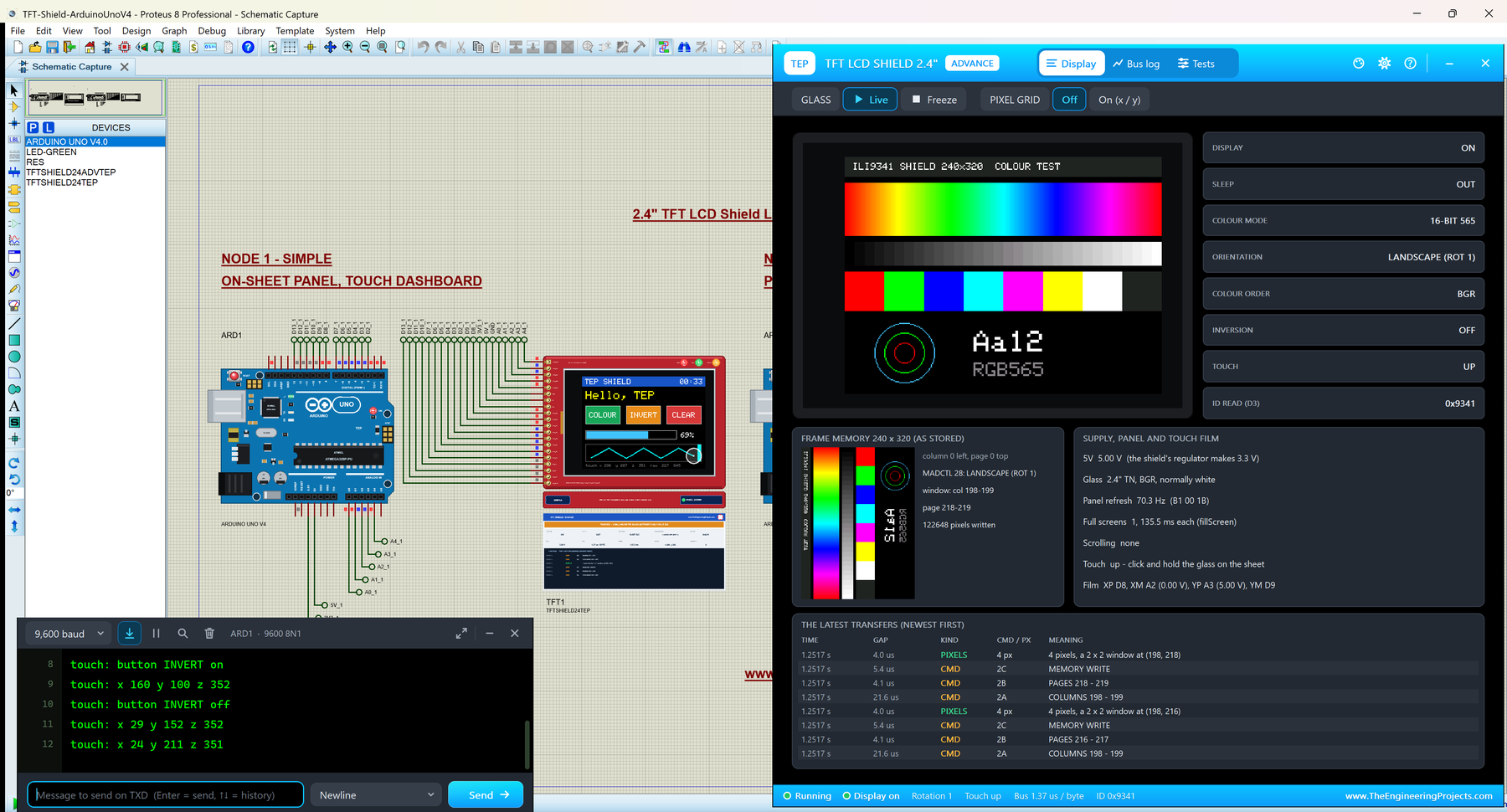
Hello friends, I hope you all are doing great. Today, I am going to share the new TFT LCD Shield Library for Proteus V1.0 . The red 2.4" TFT LCD shield is the easiest colour touch screen for an Arduino UNO: it plugs straight on the board, with no wires at all, and gives you 240 x 320 pixels, 65,536 colours and a resistive touch screen . It is the shield of countless Arduino projects: menus, games, meters, paint programs, home controls. With this TFT LCD Shield Library for Proteus , your sketch draws on a shield that behaves like the real one, and you touch it with the mouse: click and drag on the glass, and the sketch reads the point with analogRead() , exactly as on the real board. Updates TFT LCD Shield Library for Proteus Latest version: V1.0 (October 2026, this tutorial) Other displays ...