Hello friends! This page brings together our electronics projects using Arduino, PIC microcontrollers, 8051 devices and the 555 timer. You can use it as a learning path: begin with a simple input or output, understand the circuit, then combine those building blocks into a more complete application. Many linked tutorials include Proteus simulations, source code or other supporting files. Read each project for its exact requirements and download details. I encourage you to rebuild the circuit yourself before studying the supplied solution, because identifying a wrong connection or timing assumption teaches skills that copying a finished schematic cannot provide. We will keep the original project links grouped by platform, explain what each group teaches and add a practical method for choosin ...
Hello friends! This page brings our 8051 microcontroller projects together in a learning sequence. We will begin with an LED and a serial connection, then move through displays, keypads, timers and complete applications. Each linked tutorial provides the details for its own circuit and program. The purpose of this collection is to help you choose a useful next project, rather than download several unrelated simulations without understanding them. A small circuit that you can explain, modify and troubleshoot teaches more than a large circuit that only works with an unchanged HEX file. We will also discuss the practical decisions behind these projects: selecting the exact processor, matching its clock, allocating pins and checking timing. Those details determine whether examples can be combi ...
Hello friends! Today, we will interface a seven-segment display with the 8051 microcontroller and use it to show the digits zero through nine. This is a useful first display project because you can trace every visible segment back to one output bit in your program. We will use the AT89C51 and examine the original Proteus circuit with its 74LS245 buffer. Before writing the code, we will identify the display type, build a digit table and calculate the timing. We will also correct an important issue in the historical schematic: LED segments need individual current-limiting resistors. The original screenshots and project download remain available below. They are useful references for the simulation, but some details need care when moving to hardware. In particular, the displayed circuit and ac ...
Hello friends! In this tutorial, we will study an electronic quiz project with the 8051 microcontroller. The project combines a keypad, a character LCD and serial communication to create a small question-and-answer game. You can play alone or compete with a second player who enters answers through a computer terminal. We will begin with the game rules, because the circuit only becomes useful when its behavior is clearly defined. Then we will follow the connections, organize the firmware and examine question selection, scoring and input handling. These are useful skills for menu systems, classroom projects and other embedded applications that accept input from more than one source. The original project used an AT89C51, a 20x4 LCD and a 4x4 keypad in Proteus. Its screenshots and demonstratio ...
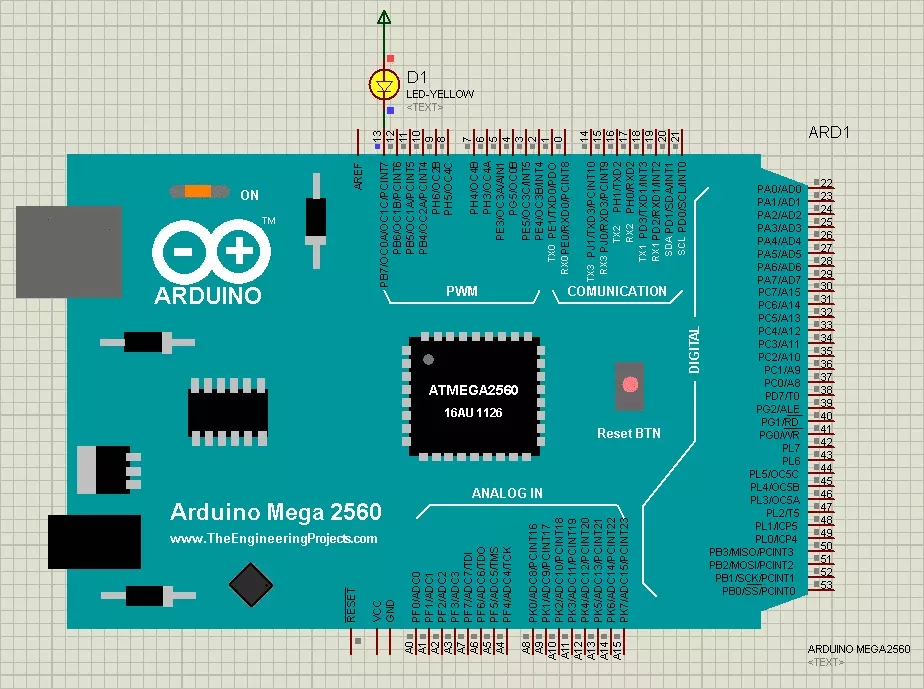
Hello friends! Today, we are going to install the original Arduino Mega 2560 Library for Proteus and run an Arduino sketch on its simulated board. We will begin with the library files, place the Mega in a schematic, load its compiled firmware and test a simple external LED circuit. Updates Arduino Mega 2560 Library for Proteus Latest version: Arduino Mega 2560 Library for Proteus V4.0 (October 2026), with working LEDs, a RESET button and a built-in serial monitor Earlier versions: V3.0 (2023) · V2.0 (2021) · V1.0 (2015, this tutorial) Other boards: UNO · Mega 1280 · Nano · Pro Mini · Mini (V4.0) All six V4.0 boards in one package: Arduino Library for Proteus V4.0 Helping Tools Serial Monitor Advance : a serial terminal window for the UART of your board Serial Monitor Expert : the serial mo ...
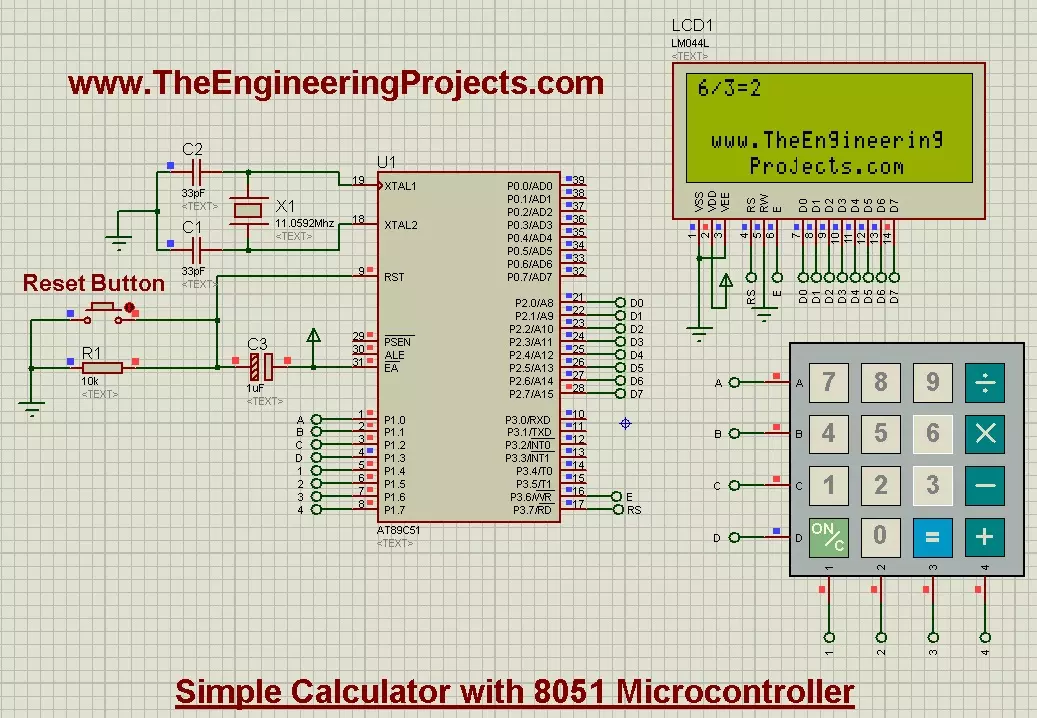
Hello friends! Today, we are going to design a simple calculator with an 8051 microcontroller in Proteus. We will combine a 4×4 keypad, a 20×4 LCD and an AT89C51 so that you can enter an arithmetic operation and see its result on the display. We have already covered LCD interfacing and keypad interfacing with the 8051 . Those lessons provide the input and output functions. Here, we will add the application logic that decides which key is valid and when a calculation should take place. This remains a single-digit calculator, like the original project. It accepts two operands from zero through nine and supports addition, subtraction, multiplication and integer division. We will also handle negative results, invalid input and division by zero explicitly. Figure: Original 8051 calculator showi ...
Hello friends! Today, we are going to interface a 4×4 keypad with an 8051 microcontroller in Proteus. We will read the pressed key through the AT89C51 and display its character on a 20×4 LCD, so we can see exactly what the program receives. This project builds on our LCD interfacing tutorial . The display remains our output device, while the keypad becomes an input device. Together, they form the basic user interface for a calculator, menu, password entry system or small control panel. I will explain the keypad matrix before discussing the program. We will then add debouncing, prevent one held button from producing repeated characters and keep typed text within the upper two LCD rows. The original simulation, images and download are preserved for reference. Figure: Original keypad characte ...
Hello friends! Today, we are going to interface a character LCD with an 8051 microcontroller in Proteus. We will use an AT89C51 to send commands and text to the display, then explain how the LCD decides where each character should appear. This is the next step after our 8051 serial communication tutorial . A serial terminal is useful during development, while an LCD lets a project present information directly to its user. Both are valuable when we need to observe values inside an embedded program. The original project actually uses an LM044L-style 20×4 display, so we will follow that arrangement throughout this lesson. A 20×4 LCD has twenty character positions on each of four rows. The same interface principles apply to many 16×2 modules, but their visible layout and row handling are diffe ...
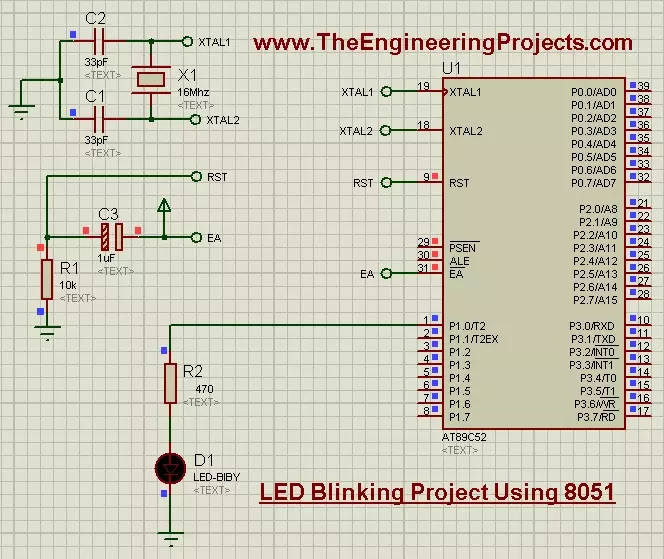
Hello friends! Today, we are going to build an LED blinking project using an 8051 microcontroller in Proteus. This is a useful first exercise because it connects a short C program with something we can immediately observe: an output pin repeatedly switching an LED on and off. We will use the AT89C52, which belongs to the 8051 family, and keep the original project's 16 MHz clock and P1.0 LED connection. I will explain the supporting circuit first, then show how to create the program in Keil, generate a HEX file and load it into the simulation. The original simulation and download remain available below. The updated example uses Timer0 for an understandable delay instead of relying on an empty software loop. That gives us a practical introduction to both digital outputs and the relationship ...
Hello friends! In this tutorial, we will interface a matrix keypad with Arduino Uno and show each pressed key on a 20x4 LCD in Proteus. We will begin with the keypad's internal connections, then build the circuit and write a sketch that keeps the displayed text within a defined area. A keypad is useful when a project needs several related buttons, such as digits for a calculator or commands for a menu. A matrix arrangement reduces the number of controller connections compared with giving every button its own dedicated input. Our example uses twelve keys arranged in four rows and three columns. We will preserve the original circuit's pin assignments, explain how the Keypad library scans them, and check common mistakes such as reversed connector order, repeated characters and LCD overflow. F ...