Hello friends! In this tutorial, we will install the Arduino Pro Mini Library for Proteus and build a simple blinking-LED simulation. We will start with the library files, prepare a program for the correct board variant and then load its HEX file into the simulated microcontroller. Updates Arduino Pro Mini Library for Proteus Latest version: Arduino Pro Mini Library for Proteus V4.0 (October 2026), with working PWR and 13 LEDs, a RESET button and a built-in serial monitor Earlier versions: V3.0 (2023) · V2.0 (2021) · V1.0 (2015, this tutorial) Other boards: UNO · Mega 2560 · Mega 1280 · Nano · Mini (V4.0) All six V4.0 boards in one package: Arduino Library for Proteus V4.0 Helping Tools Serial Monitor Advance : a serial terminal window for the UART of your board Serial Monitor Expert : the ...
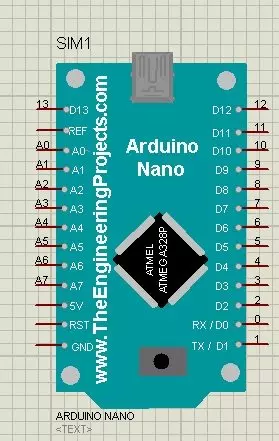
Hello friends! In this tutorial, we will install the Arduino Nano Library for Proteus, load a compiled Arduino program and run an LED-blinking simulation. We will follow the same sequence you would use for a larger project: identify the board, install its model, check the basic circuit and then add your application. Updates Arduino Nano Library for Proteus Latest version: Arduino Nano Library for Proteus V4.0 (October 2026), with working LEDs, a RESET button and a built-in serial monitor Earlier versions: V3.0 (2023) · V2.0 (2021) · V1.0 (2015, this tutorial) Other boards: UNO · Mega 2560 · Mega 1280 · Pro Mini · Mini (V4.0) All six V4.0 boards in one package: Arduino Library for Proteus V4.0 Helping Tools Serial Monitor Advance : a serial terminal window for the UART of your board Serial ...
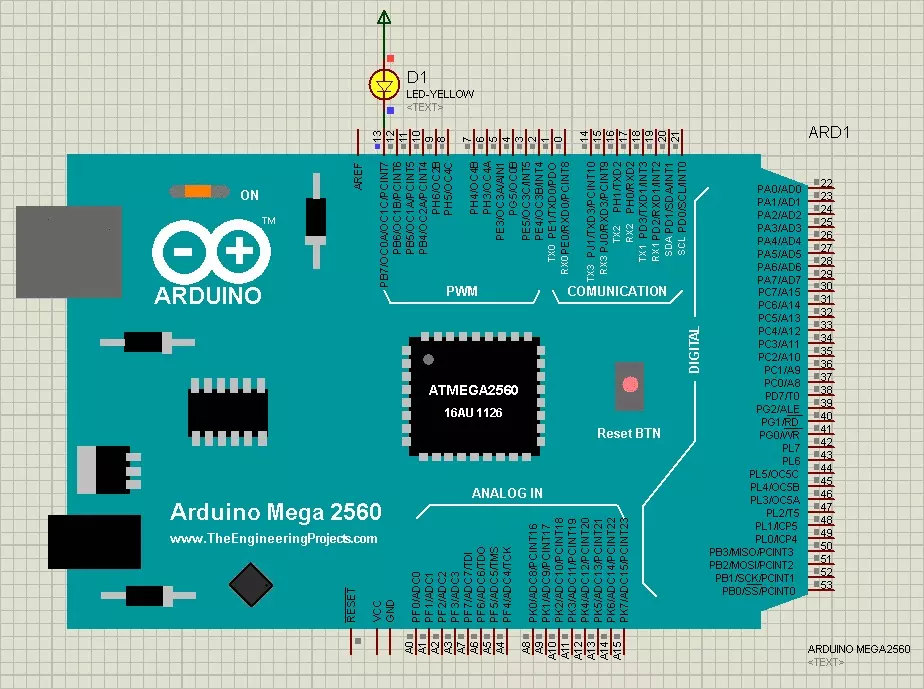
Hello friends! Today, we are going to install the original Arduino Mega 2560 Library for Proteus and run an Arduino sketch on its simulated board. We will begin with the library files, place the Mega in a schematic, load its compiled firmware and test a simple external LED circuit. Updates Arduino Mega 2560 Library for Proteus Latest version: Arduino Mega 2560 Library for Proteus V4.0 (October 2026), with working LEDs, a RESET button and a built-in serial monitor Earlier versions: V3.0 (2023) · V2.0 (2021) · V1.0 (2015, this tutorial) Other boards: UNO · Mega 1280 · Nano · Pro Mini · Mini (V4.0) All six V4.0 boards in one package: Arduino Library for Proteus V4.0 Helping Tools Serial Monitor Advance : a serial terminal window for the UART of your board Serial Monitor Expert : the serial mo ...
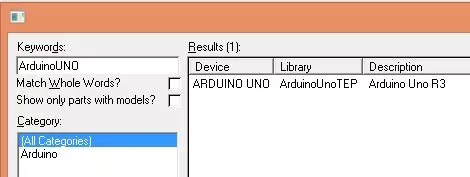
Hello friends! Today, I am sharing the original Arduino UNO Library for Proteus and explaining how to install it, load a compiled Arduino program and run a simple LED simulation. This library gives us a recognizable UNO board inside the schematic, making it easier to connect circuits using the board's familiar pin labels. Updates Arduino UNO Library for Proteus Latest version: Arduino UNO Library for Proteus V4.0 (October 2026), with working LEDs, a RESET button and a built-in serial monitor Earlier versions: V3.0 (2023) · V2.0 (2021) · V1.0 (2015, this tutorial) Other boards: Mega 2560 · Mega 1280 · Nano · Pro Mini · Mini (V4.0) All six V4.0 boards in one package: Arduino Library for Proteus V4.0 Helping Tools Serial Monitor Advance : a serial terminal window for the UART of your board Se ...
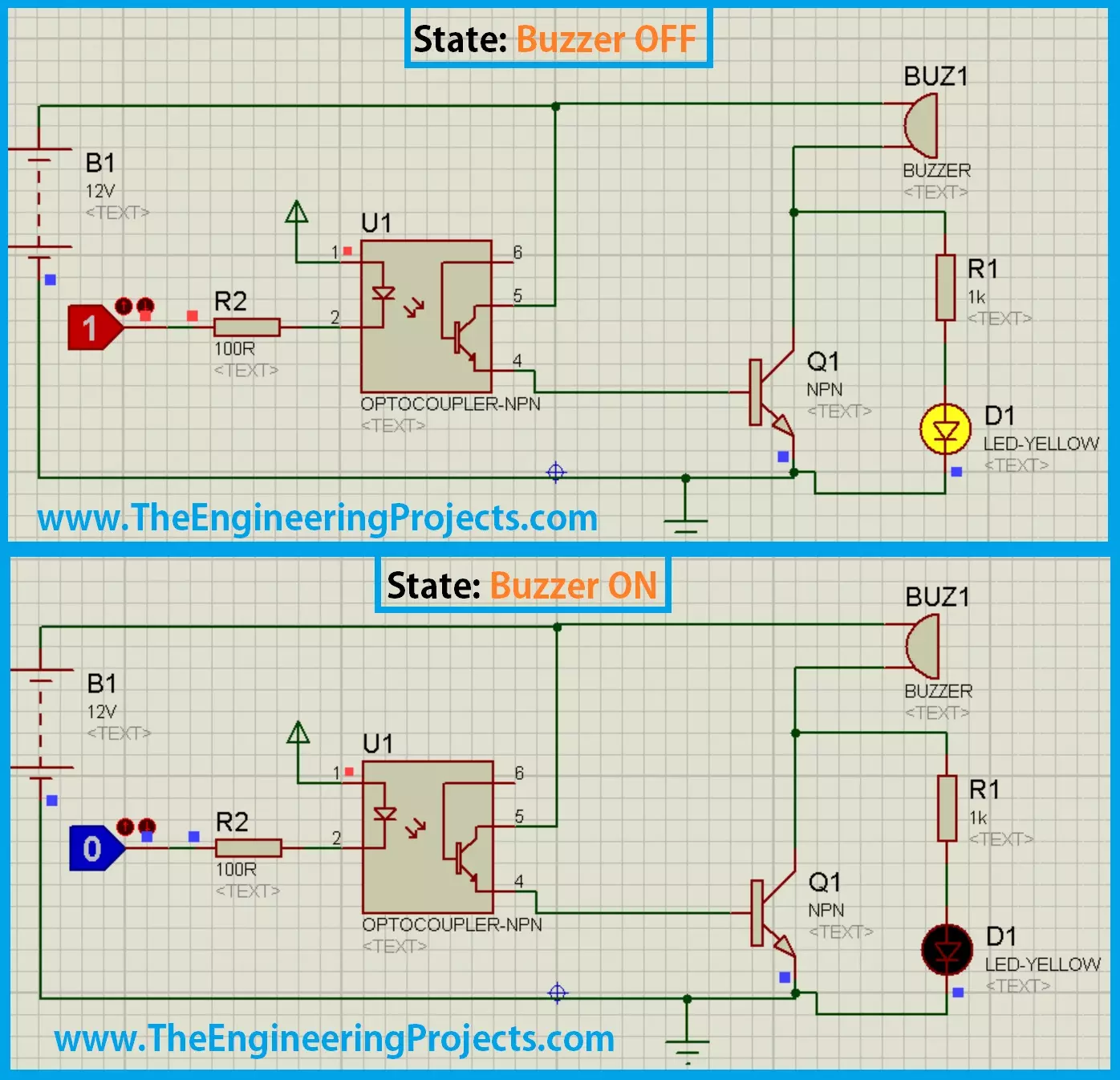
Hello friends! Today we will design and examine a buzzer circuit in Proteus ISIS. We will use a logic input, an optocoupler and a transistor to control a powered buzzer, then look at the changes needed before using the idea in hardware. A buzzer is useful for indicating a timer event, a button press or a fault. The first design decision is whether the selected sounder contains its own oscillator or requires an alternating drive signal. Applying DC works for an active buzzer, but does not produce a continuous tone from every passive transducer. The original simulation images remain in this tutorial. We will explain their active-low behavior while correcting several details that a simulation alone can hide, including LED current, transistor bias and optocoupler pin mapping. Figure: Historica ...
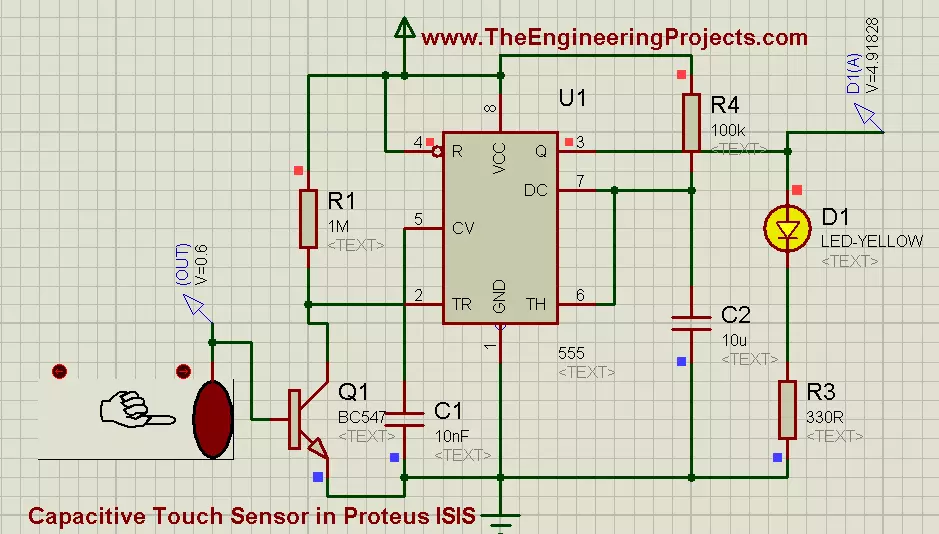
Hello friends! Today we will explore a capacitive-touch demonstration in Proteus and use its output to trigger a 555 timer. The timer will drive an LED, allowing us to follow the signal from the interactive sensor model through a transistor interface to a visible response. We will also separate the simulated touch control from the physics of a real electrode. A real capacitive sensor measures a change in capacitance; a finger does not simply generate a universal 0.6 V signal. The model's output is a convenient representation of detection behavior. The original circuit, images, video and download remain below. We will correct the 555 threshold explanation, add a base-current limiter to the transistor interface, and explain why a timed output can remain active after the touch input changes. ...
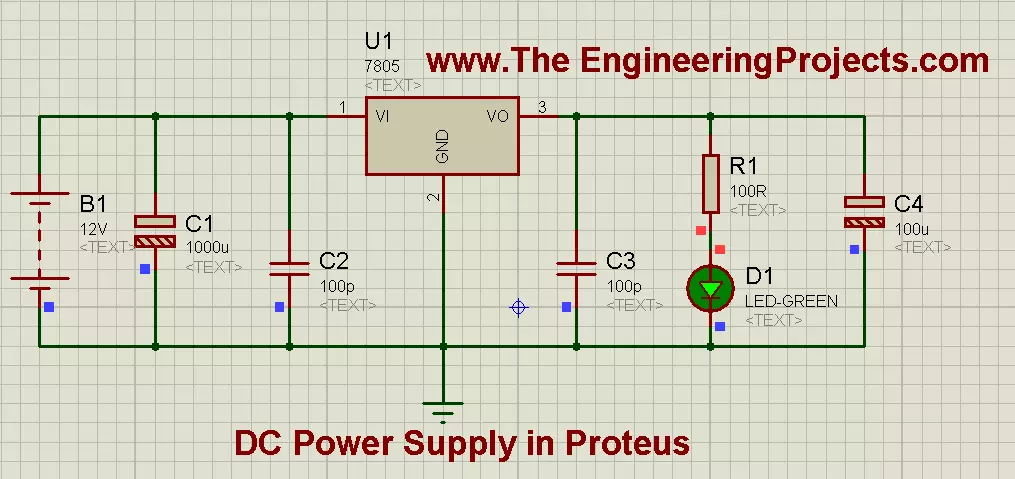
Hello friends! Today we will design a regulated 5 V DC supply in Proteus using a 7805 regulator. We will connect the input, bypass capacitors, indicator and load, then calculate the current and heat so that the simulation becomes a useful starting point for hardware. A regulated supply is often the first circuit a project needs, but the required voltage depends on the actual components. Some circuits use 5 V, others 3.3 V or different rails. Batteries also come in many voltages; the original article's statements that all batteries are 12 V and all electronics operate at 5 V were incorrect. For this exercise, we will deliberately choose a suitable 12 V DC source and a modest 5 V load. The original diagrams and download remain below, with corrections to capacitor values and LED current limit ...
Hello friends! Today we will build an adjustable DC supply using an LM317 voltage regulator in Proteus. We will calculate the output-setting resistors, check the available voltage range, and see why load current and temperature matter as much as the potentiometer setting. Our earlier 5 V supply using a 7805 provides a fixed output. The LM317 uses an external resistor network to set its output, making it useful when a project needs a different low-voltage supply. It does not, however, provide every voltage from zero to the input voltage. The original motor demonstration, images, video and download remain in this tutorial. We will explain the historical readings while correcting its missing LED current limiter, capacitor choices and assumptions about the maximum output. Start with a resistiv ...
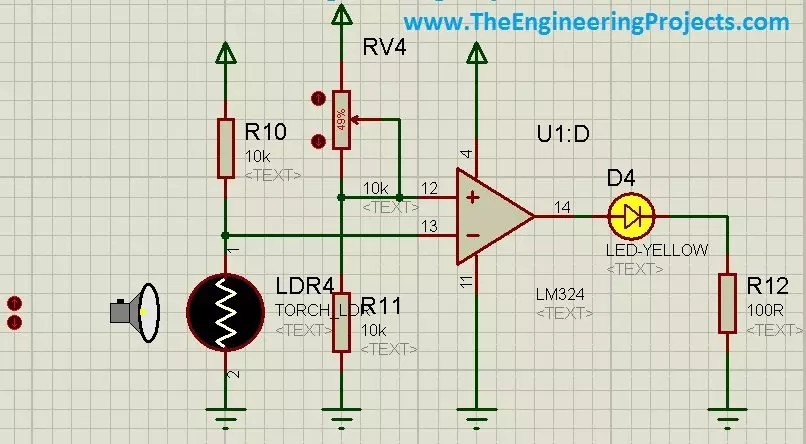
Hello friends! Today we will use an LDR sensor in Proteus to make a light-controlled LED circuit. We will begin with the photoresistor itself, convert its changing resistance into a voltage, and then compare that voltage with a reference to decide when the LED should illuminate. The original project demonstrates both a numeric light control and an animated torch control in Proteus. We will retain those illustrations and the project download while explaining what the circuit actually measures. A simulator control value is not automatically a measured voltage, and a photoresistor does not directly produce a calibrated lux reading. If you are new to the schematic editor, our Proteus ISIS and ARES tutorial collection covers the basic workflow. Here we will concentrate on the sensor, threshold ...
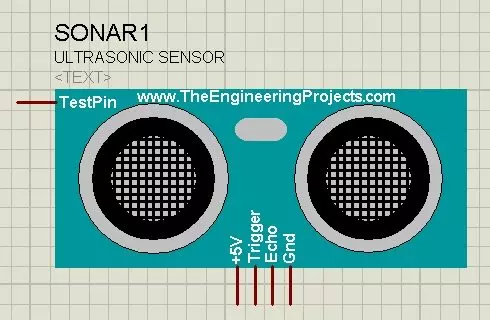
Hello friends! Today I will show you how to install our Ultrasonic Sensor Library for Proteus and use it with an Arduino Uno. We will begin with the library files, place the sensor on a schematic, connect its simulation input and then read the distance through the Virtual Terminal. This is the original HC-SR04-style library introduced in this tutorial. Updates Ultrasonic Sensor Library for Proteus Latest version: Ultrasonic Sensor Library for Proteus V2.0 (October 2026): HC-SR04 with real TRIG and ECHO timing, Simple and Advance devices, test tools and an Arduino demo Earlier versions: V1.0 (2015, this tutorial) Other distance and motion sensors: JSN-SR04T · Sharp IR · TF-Luna LiDAR · VL53L0X · PIR HC-SR501 · RCWL-0516 · IR Obstacle FC-51 Helping Tools Serial Monitor Advance : a serial ter ...