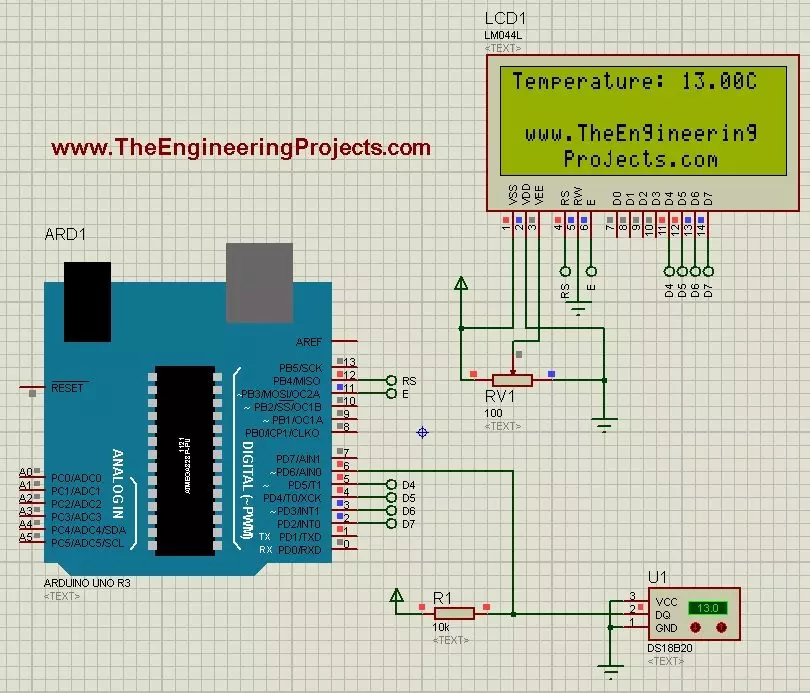
Hello friends! Today we will use the DS18B20 temperature sensor with Arduino Uno in Proteus and display its reading on a character LCD. The sensor is sometimes shortened to 18B20 in project descriptions, but DS18B20 is the part name we will use when selecting the device and checking its specifications. We will begin with the sensor connections, add a 20-column by 4-row LCD, and write a sketch that requests a temperature conversion before displaying the result. We will also handle a missing sensor explicitly instead of presenting an error value as though it were a real temperature. The Proteus model lets us change the simulated temperature using its controls. It does not measure the room around your computer. This makes it useful for checking the program and display workflow before building ...
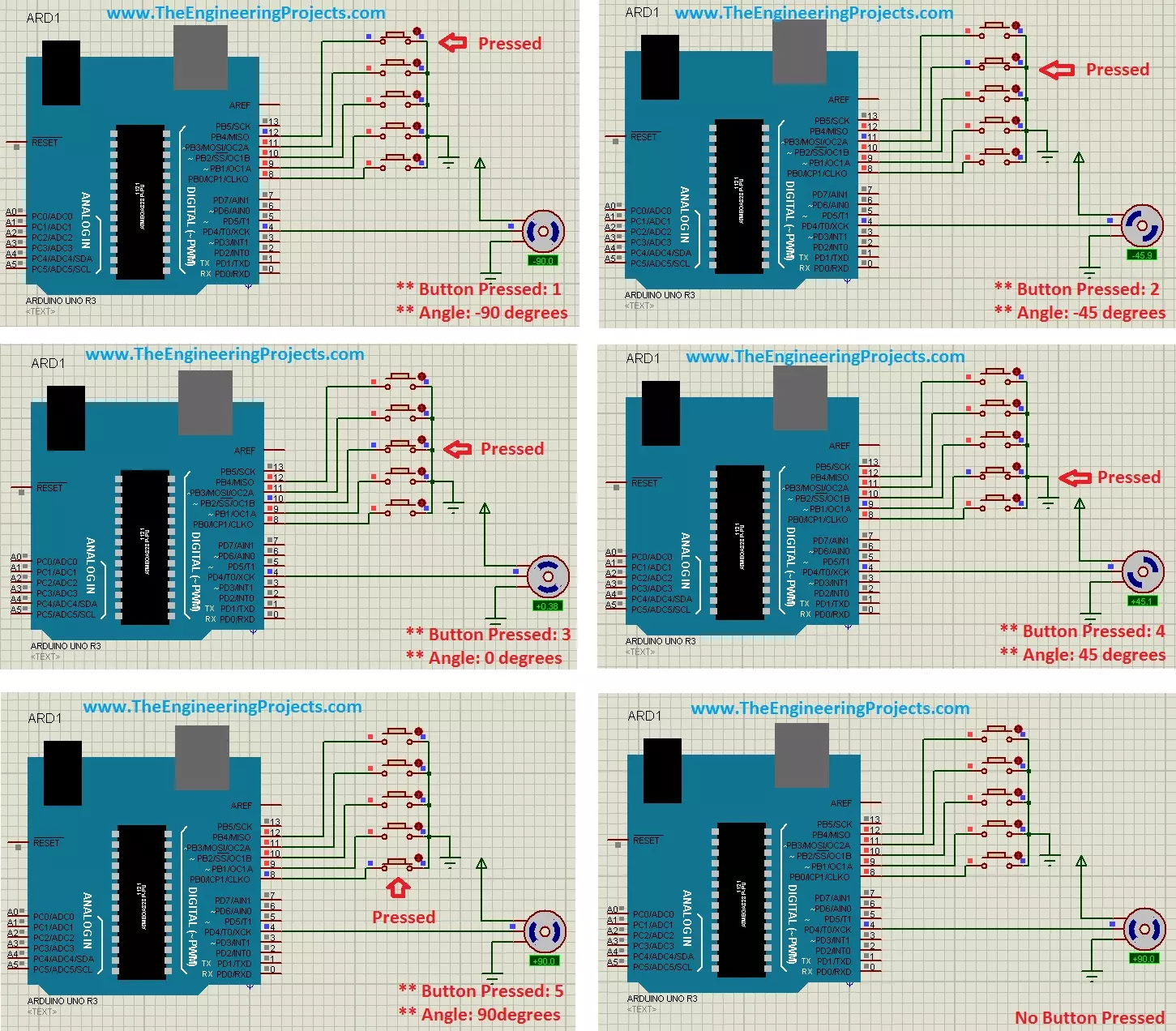
Hello friends! In this tutorial, we will control a servo motor with Arduino in Proteus. We will begin with a simple sweep, understand the signal that commands the position, and then add five push buttons so we can select individual positions. Libraries Libraries used in this tutorial Arduino UNO Library for Proteus: V1.0 (2015, used in this tutorial) · latest version: V4.0 (October 2026) Helping Tools Serial Monitor Advance : a serial terminal window for the UART of your board Serial Monitor Expert : the serial monitor with extra debugging tools LCD Library for Proteus V3.0 : 16x2, 20x4 and I2C LCDs to show your readings A positional hobby servo is convenient because its motor, gearbox and position controller are assembled in one unit. Arduino supplies a command signal while the servo's in ...
Hello friends! Today we will learn how to restart an Arduino program deliberately and, more importantly, distinguish a real microcontroller reset from simply starting our application logic again. These operations can look similar on the Serial Monitor while leaving the hardware in different states. For the main example, we will use a classic Arduino Uno with an ATmega328P and its watchdog timer. We will also revisit the two approaches in the original tutorial: connecting an output pin to RESET and calling a function pointer at address zero. Both need important qualifications before they are used in a project. The original wiring image is retained below for reference, but the recommended example does not need that jumper. Remove any output-to-RESET connection before following the watchdog p ...
Hello friends! Today we will install the Arduino bootloader on an ATmega328P using a second Arduino Uno as the programmer. This is useful when replacing the socketed processor on a classic Uno or restoring a compatible target whose serial bootloader has been erased. We will follow the original two-board arrangement: board B is the working programmer, and board A contains the target processor. Giving the boards separate roles helps prevent a common mistake, which is changing settings for one board while accidentally programming the other. The title uses the familiar ATmega328 family name, but the standard classic Uno configuration targets the ATmega328P. Read the marking on your chip before starting. An ATmega328, ATmega328P and ATmega328PB are different device selections; a similar name is ...
Hello friends! Today we will use an Arduino Uno footprint in Proteus ARES and turn it into a reusable package for our own PCB projects. This is useful when you want a removable Uno to plug into a larger board containing sensors, connectors or interface circuits. Libraries Arduino UNO Simulation Libraries Latest library: Arduino UNO Library for Proteus V4.0 (October 2026): working LEDs, a RESET button and a built-in serial monitor Other Arduino boards: Mega 2560 · Mega 1280 · Nano · Pro Mini · Mini (V4.0) All six V4.0 boards in one package: Arduino Library for Proteus V4.0 Helping Tools Serial Monitor Advance : a serial terminal window for the UART of your board Serial Monitor Expert : the serial monitor with extra debugging tools LCD Library for Proteus V3.0 : 16x2, 20x4 and I2C LCDs to sh ...
Hello friends! Today we will connect an Android phone to an Arduino through USB and exchange commands in both directions. This is useful when you want a wired control panel, a portable instrument display or a direct connection without configuring Bluetooth or Wi-Fi. We will start with one classic Arduino Uno and a small LED-control sketch. After that, we will revisit the original two-Arduino arrangement, which lets a computer monitor the bytes travelling through the phone connection. The second board is a debugging aid, not a requirement for Android communication. The important details are the phone's USB host support, the board's USB interface, permission to open the device and a clearly defined message format. Once these are understood, we can build a useful connection without treating U ...
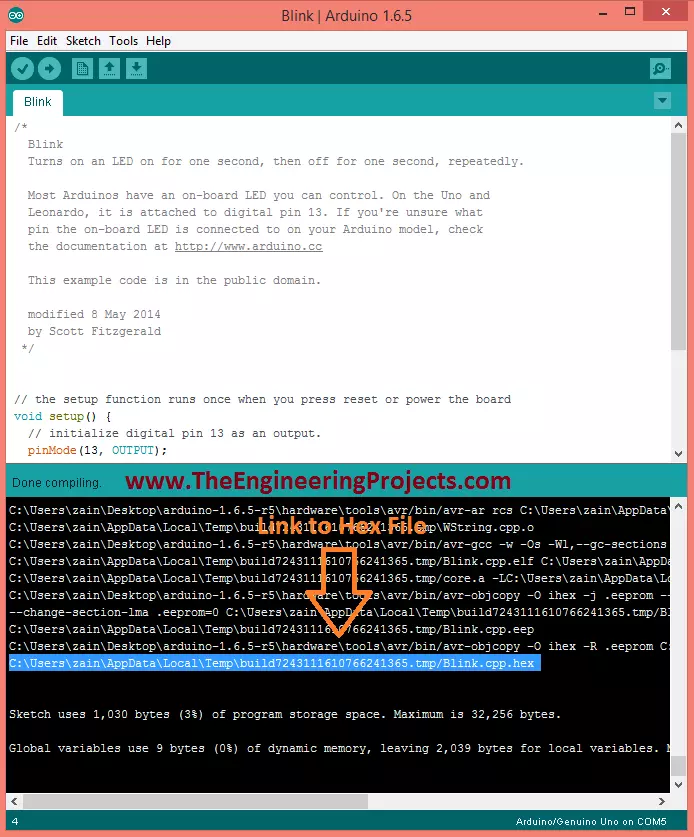
Hello friends! Today we will learn how to get the compiled HEX file from an Arduino sketch. This is useful when you want to load firmware into a Proteus model, program a compatible AVR microcontroller or keep a specific compiled version of a project. Libraries Libraries used in this tutorial Arduino Library for Proteus: V1.0 (2015, used in this tutorial) · latest version: V4.0 (October 2026) Arduino UNO Library for Proteus: V1.0 (2015, used in this tutorial) · latest version: V4.0 (October 2026) Helping Tools Serial Monitor Advance : a serial terminal window for the UART of your board Serial Monitor Expert : the serial monitor with extra debugging tools LCD Library for Proteus V3.0 : 16x2, 20x4 and I2C LCDs to show your readings Arduino does generate compiled firmware during its normal bui ...
Hello friends! Today we will build an intelligent energy-saving demonstration using an Arduino Uno, two doorway sensors, an LCD and controlled loads. The idea is to count completed entries and exits, then switch the model room's loads according to that count. The interesting part is not simply turning a relay on. We need to recognize direction, handle an interrupted crossing, avoid counting the same person repeatedly and decide what to do when the count becomes uncertain. We will develop those rules before looking at the complete program. This is a controlled educational demonstration. Two narrow beams cannot reliably count a crowd or guarantee that a real room is empty. We will use low-voltage demonstration loads and make the limitations visible rather than treating an imperfect counter a ...
Hello friends! Today we will troubleshoot the “Failed, response timed out” message that can appear while using an nRF24L01 or nRF24L01+ radio with Arduino. We will work through the local SPI connection, radio settings, power supply and the reply expected by the example program. The original experiment on this page improved after adding a 100-microfarad capacitor across the radio supply. That is useful experience to retain, but it is not a universal diagnosis. A timeout reports a missing event; it does not identify the reason that event was missing. If you are wiring the radios for the first time, begin with our nRF24L01 and Arduino interfacing tutorial . Here, we will concentrate on finding faults systematically rather than changing several settings until the link happens to work. Figure: ...
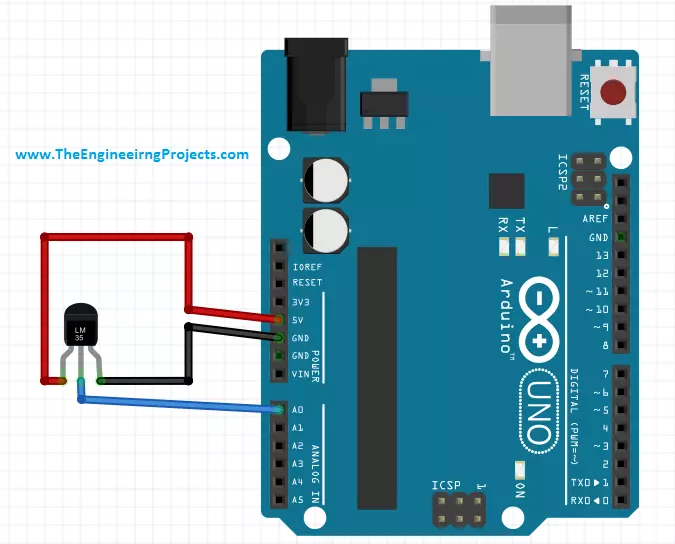
Hello friends! Today we will connect an LM35 temperature sensor to an Arduino Uno and reproduce the measurement in Proteus ISIS. We will start with the sensor's analog output, convert that voltage into temperature, and display Celsius and Fahrenheit readings on a serial terminal. Libraries Libraries used in this tutorial Arduino Library for Proteus: V2.0 (2021, used in this tutorial) · latest version: V4.0 (October 2026) Helping Tools Serial Monitor Advance : a serial terminal window for the UART of your board Serial Monitor Expert : the serial monitor with extra debugging tools LCD Library for Proteus V3.0 : 16x2, 20x4 and I2C LCDs to show your readings The circuit is small, but it teaches several important measurement concepts: ADC resolution, reference voltage, sensor accuracy and the d ...