Hello friends! Today, we will work through the EasyVR message Training Error: Recognition Failed . I originally encountered this error while training voice commands for an Arduino UNO project. Commander connected to the board, but the training attempt failed when I spoke the first command. Repeating the same attempt did not solve it. In my original setup, loading an appropriate EasyVR example and changing the shield's J12 connection from PC to SW allowed training to continue. That observation is useful, but it needs an important explanation: the correct jumper position depends on the shield revision and the communication path being used. SW is not a universal cure for every recognition error. We will separate communication problems from training and microphone problems, then return to the ...
Hello friends! Today, we will send an SMS with an Arduino UNO and a SIM900D GSM module using AT commands. We will start with the connections, check that the modem can communicate with the mobile network, and then let the Arduino submit one message. You will also learn how to tell the difference between a successful command and a message that has actually reached its recipient. Libraries SIM900 Simulation Libraries Latest library: SIM900A Library for Proteus V1.1 (October 2026) Other GSM modules: SIM800L · SIM800C · SIM808 Helping Tools Serial Monitor Advance : a serial terminal window for the UART of your board Serial Monitor Expert : the serial monitor with extra debugging tools LCD Library for Proteus V3.0 : 16x2, 20x4 and I2C LCDs to show your readings The SIM900D handles the radio conn ...
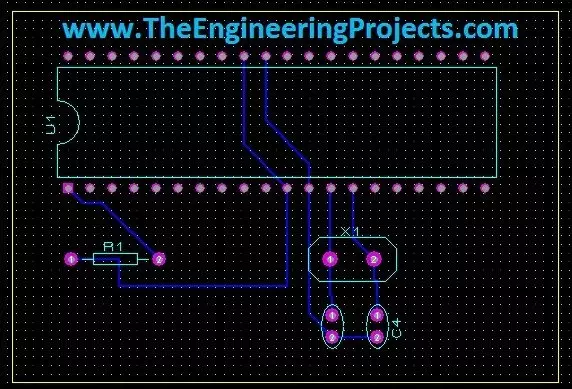
Hello friends! Today we will move from a circuit diagram to a printed circuit board using Proteus ARES. We will use a small PIC16F877A circuit so that placement, connectivity, and routing remain easy to follow. The same sequence of decisions applies when you later design a larger board. Proteus schematic capture describes which component pins belong to each electrical net. PCB layout turns those connections into physical pads and copper tracks. A completed route is useful only when the footprint, pin mapping, power connections, and manufacturing rules are also correct. We will follow the original illustrated workflow: prepare the schematic, transfer its connectivity, define the board edge, place components, and route the board. We will then add the checks needed before sending a design for ...
Hello friends! We have prepared our spoken commands in EasyVR Commander , and now we will interface the EasyVR Shield with Arduino Uno. In this tutorial, we will read the recognized command, display its result in Serial Monitor, and select an indicator output for FORWARD, REVERSE, LEFT, RIGHT, or STOP. This is the controller stage of our voice-recognition project . We will preserve the original command order and character codes, while making the program easier to follow and correcting two important problems: listening to the wrong group at startup and leaving previous direction outputs active after a new command. Begin with LEDs or Serial Monitor. The output pins in this example are indicators, not a complete motor-control circuit. Once you can explain every recognized number and output tr ...
Hello friends! In the previous tutorial, we introduced voice recognition using the EasyVR Shield . Now we will prepare the words that our project needs to recognize. We will use EasyVR Commander to connect to the shield, create a command group, train its entries, and test the results before writing the Arduino application. Our example is the same five-command project: FORWARD, REVERSE, LEFT, RIGHT, and STOP. Training these words is only part of the job. We also need to record their group number and individual indexes, because those numbers are what the controller will use to select an action. A well-trained vocabulary with an incorrect software mapping still produces the wrong behavior. The screenshots below come from the original EasyVR setup, so the appearance of a newer Commander releas ...
Hello friends! In this tutorial, we will look at voice recognition using the EasyVR Shield and plan a small Arduino project that responds to spoken commands. The idea is straightforward: we say a command such as FORWARD, the speech module identifies it, and our program decides what should happen next. Before connecting a robot, however, we need to understand what the module actually returns and how those results become reliable control decisions. This article introduces the voice-controlled robot project that started this series. We will keep its five commands, explain the hardware and training workflow, and build a clear plan for testing. The detailed training procedure is covered in Getting Started with EasyVR Commander , followed by the practical program in Interfacing of EasyVR with Ar ...
Hello friends! In this guide, we will learn how to use Proteus ISIS and ARES, starting with a simple circuit and gradually moving toward microcontroller simulations and PCB design. I have kept the original tutorial collection so that you can follow a lesson in detail whenever you reach that stage. Our goal is to understand the complete development process. We will draw a circuit, calculate what it should do, simulate its behavior, examine signals with instruments and then prepare a physical board layout. Each stage answers a different question, so a successful simulation is one step in the process rather than the final proof of a finished product. If you are new to Proteus, follow the sections in order. If you already use it, choose the topic you need from the linked lessons. Some screensh ...
Hello friends! We have already covered the Introduction to XBee Module and Interfacing of XBee with Computer . In this tutorial, we will connect our configured radios to two Arduino UNO Rev3 boards and use a pushbutton on one board to control the built-in LED on the other. Libraries XBee Simulation Libraries Latest library: XBee Library for Proteus V1.0 (January 2016) Other RF modules: nRF24L01 · nRF24L01 PA LNA · CC1101 · RFM69HCW · HC-12 · 433MHz RF Helping Tools Serial Monitor Advance : a serial terminal window for the UART of your board Serial Monitor Expert : the serial monitor with extra debugging tools LCD Library for Proteus V3.0 : 16x2, 20x4 and I2C LCDs to show your readings We will build the project in stages. First, we will establish the power and serial connections. Next, we w ...
Hello friends! In this tutorial, we will learn how an XBee module carries data between electronic devices without a signal cable. We will begin with a simple wireless sensor example, identify the hardware and communication settings involved, and then work through the calculations that help us choose a power supply and estimate data capacity. Libraries XBee Simulation Libraries Latest library: XBee Library for Proteus V1.0 (January 2016) Other RF modules: nRF24L01 · nRF24L01 PA LNA · CC1101 · RFM69HCW · HC-12 · 433MHz RF Helping Tools Serial Monitor Advance : a serial terminal window for the UART of your board Serial Monitor Expert : the serial monitor with extra debugging tools LCD Library for Proteus V3.0 : 16x2, 20x4 and I2C LCDs to show your readings This is the first lesson in our XBee ...