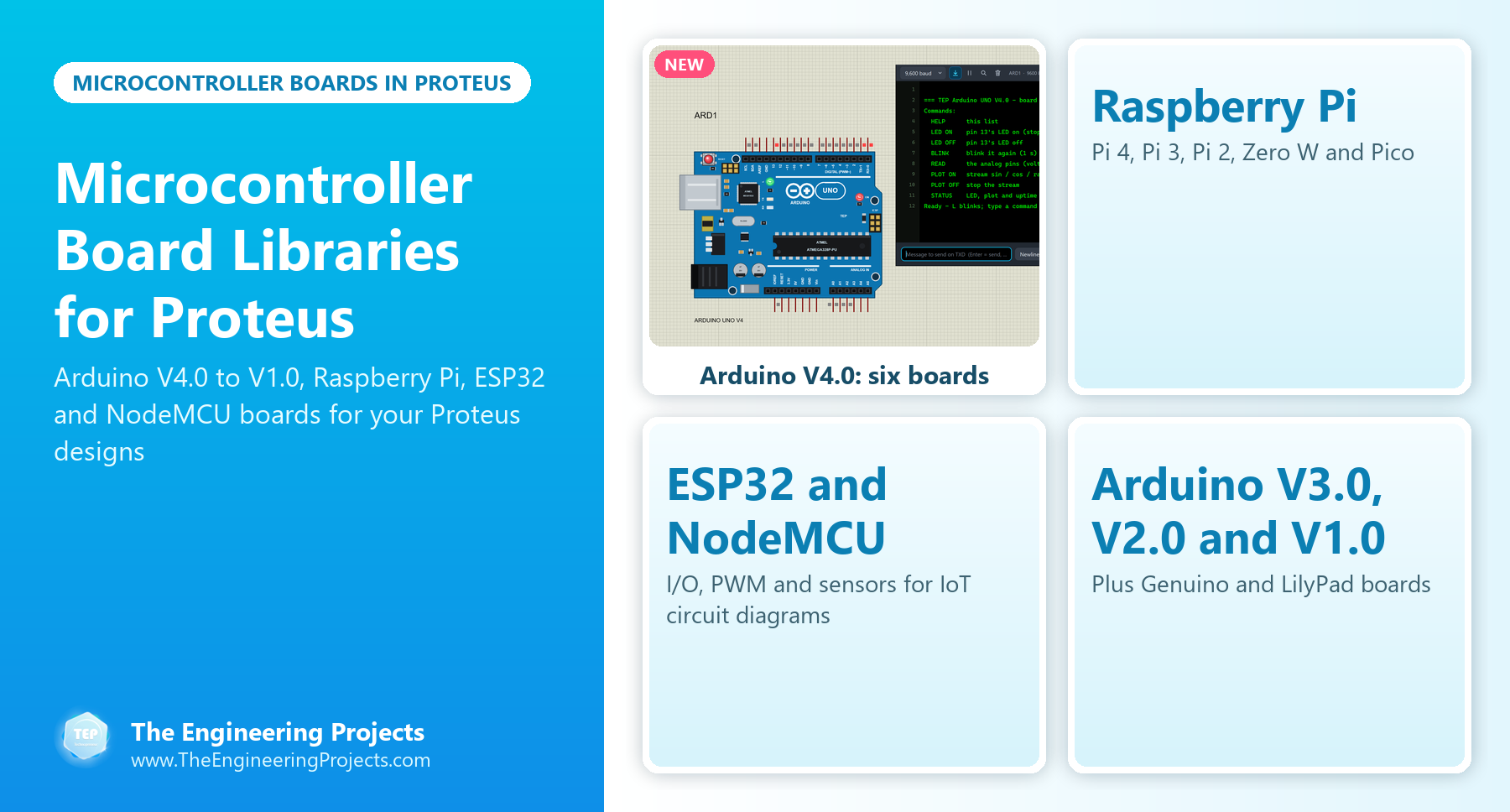
Hello friends, I hope you all are doing great. Today, I am going to share a list of Microcontroller Board Libraries for Proteus . Every embedded project starts with a microcontroller board, and for most students that board is an Arduino. Proteus can simulate the bare ATmega chips, but a bare chip doesn't look like the board on your desk, and it makes your circuit diagram harder to follow. That's why the Arduino Library for Proteus was the very first library our team ever designed, back in 2015. Updates Microcontroller Board Libraries for Proteus Latest list: October 2026 (this list) Arduino boards: UNO · Mega 2560 · Mega 1280 · Nano · Pro Mini · Mini (V4.0) ESP32 boards: ESP32 DevKit V1 · ESP32-DevKitC V4 · ESP32-S3 DevKitC-1 · ESP32-C3 SuperMini · TTGO T-Display ESP8266 modules: ESP-01 · ...
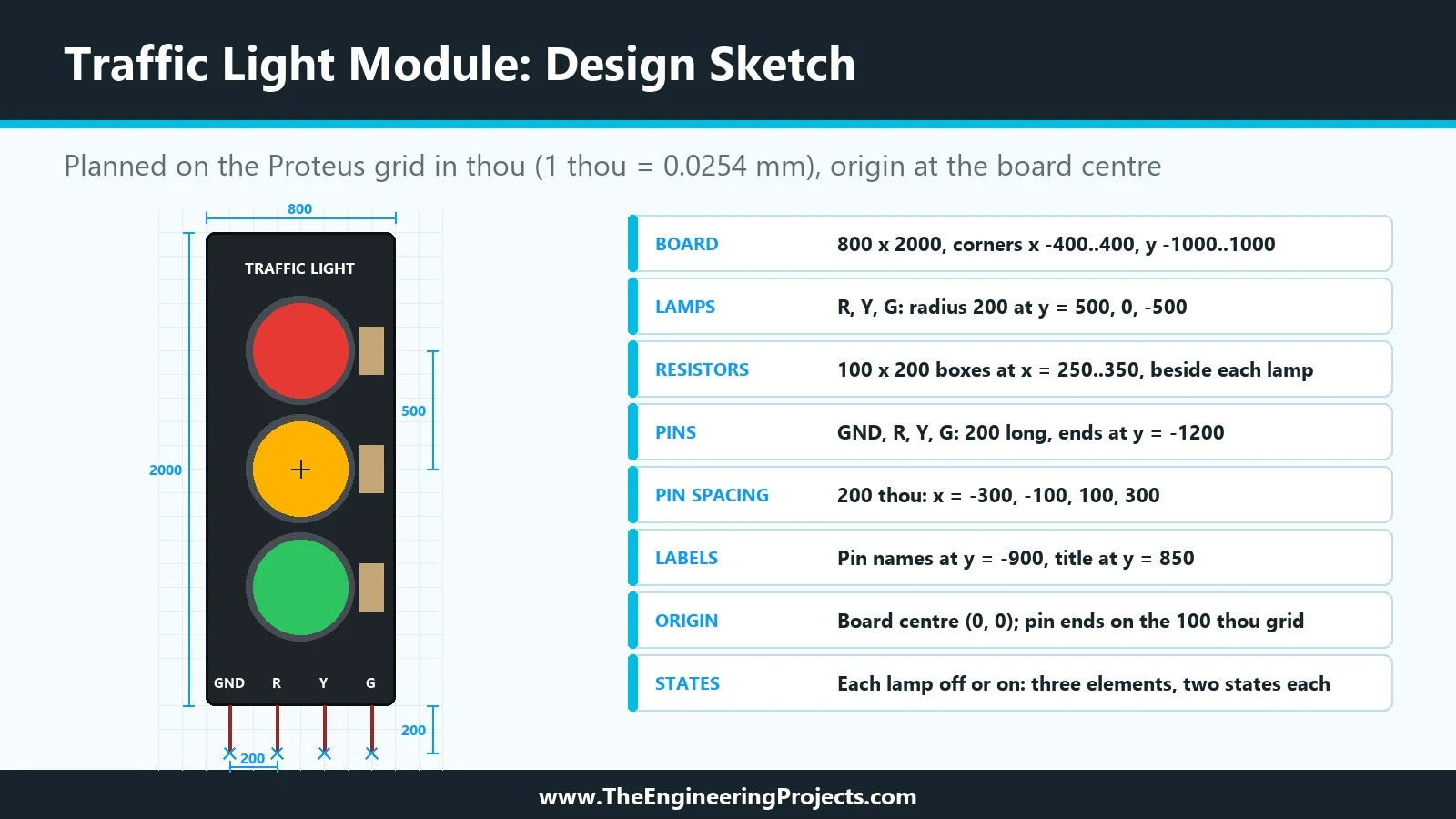
Hello friends, I hope you are doing well. This is the third tutorial in our series on how to create a Proteus library. In the previous tutorial, How to Design a New Component in Proteus , we planned our Traffic Light Module on paper: an 800 by 2000 thou black board, three lamps in rings, three resistors, a title, four pin names and four pins, every shape with its exact coordinates. Today, we open Proteus and turn that plan into a real drawing. Our topic is how to draw a component symbol in Proteus with 2D graphics . Updates Proteus Component Designing This course: Part 3 of 20, Designing a Proteus Component Previous part: Designing a New Component Next part: Colours and Graphic Styles Course start: How a Proteus Library Works Add libraries to Proteus: How to Add a New Library in Proteus Li ...
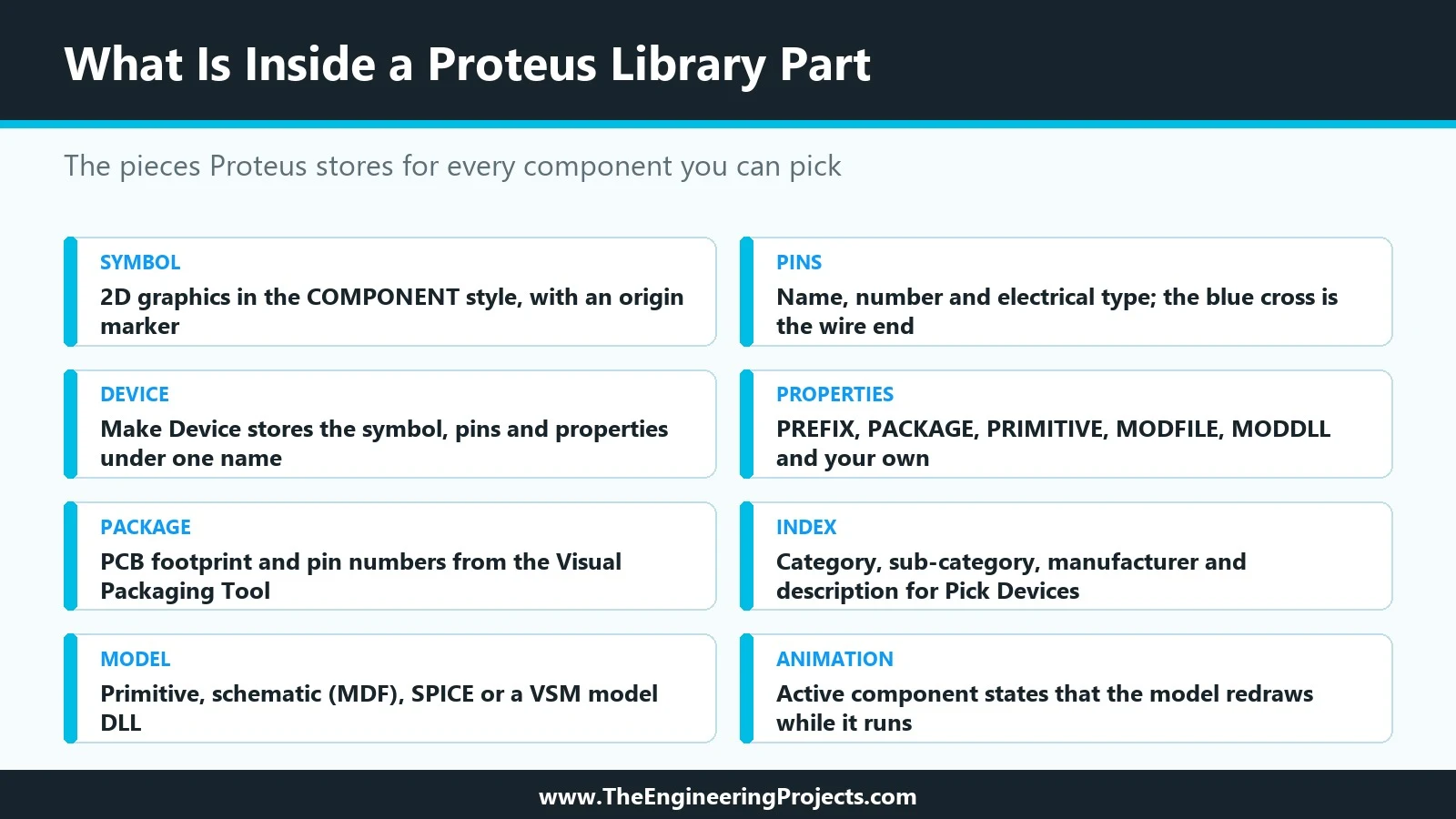
Hello friends, I hope you are doing well. This is the second tutorial in our series on how to create a Proteus library. In the previous tutorial, How to Create a Proteus Library: How It Works Behind the Scenes , we looked at what a library part is made of: the symbol, the pins, the properties, the package, the index and the simulation model, and at what Proteus does with them when you press Run. Today, we start building our own part, and we start the way every good component starts: on paper, before the first line is drawn. Our topic is how to design a new component in Proteus . Updates Proteus Component Designing This course: Part 2 of 20, Designing a Proteus Component Previous part: How a Proteus Library Works Next part: Drawing the Component Symbol Add libraries to Proteus: How to Add a ...
Hello friends, I hope you all are doing great. Today, I am going to share a list of RFID and NFC Libraries for Proteus . RFID readers are everywhere in engineering projects: attendance systems, door locks, library management, parking gates, cashless canteens and inventory trackers. NFC, its close relative, is what your phone uses to read a tag or pay at a shop. If your project needs to know who is there or what is on the shelf, an RFID or NFC reader is the answer. Updates RFID and NFC Libraries for Proteus Latest list: October 2026 (this list) RFID / NFC readers: MFRC522 · PN532 NFC · EM18 Wireless lists: Wireless Modules · Wi-Fi & Bluetooth · LoRa & RF · RF Modules · GSM Modules · GPS Modules Helping Tools Serial Monitor Advance : a serial terminal window for the UART of your board Serial ...
Hello friends, I hope you are doing well. Today, we are starting a new tutorial series on how to create a Proteus library . Proteus comes with thousands of parts, yet sooner or later every student and engineer needs one that is not there: a new sensor, a wireless module or a board of their own. Over this series, we will design such a part from the very first line of its drawing to a finished library that other people can install. Our running example will be a simple animated component, a Traffic Light Module whose three lamps light up when an Arduino drives its R, Y and G pins. Updates Proteus Component Designing This course: Part 1 of 20, Designing a Proteus Component Next part: Designing a New Component Add libraries to Proteus: How to Add a New Library in Proteus Library lists: 30 New L ...
Hello friends, I hope you all are doing great. Today, I am going to share the new SIM808 Library for Proteus V1.1 . The SIM808 is SIMCom's popular module that puts a GSM / GPRS modem and a GPS receiver on one board, so a single Arduino serial port gives you SMS, calls and your position. That is why it is the favourite of GPS trackers, vehicle trackers and anti-theft projects. With this GSM GPS Library for Proteus , you can build and debug your tracker on your PC, before you buy a SIM card and a 2 A power supply, and before you walk outside for a satellite fix. Updates SIM808 Library for Proteus Latest version: V1.1 (October 2026, this tutorial) Other GSM modules: SIM800L · SIM800C · SIM900A Other GPS modules: NEO-6M · NEO-7M · NEO-M8N Helping Tools Serial Monitor Advance : a serial termina ...
Hello friends, I hope you all are doing great. Today, I am going to share the new nRF24L01+PA+LNA Library for Proteus V1.1 . The nRF24L01+PA+LNA is the long-range version of the popular nRF24L01: the same Nordic 2.4 GHz chip, plus a power amplifier , a low-noise amplifier and a rubber-duck antenna on an SMA connector . With this nRF24L01 PA LNA Library for Proteus , two Arduino boards exchange packets with the unmodified RF24 library, and one click moves the radios from 1 m to 2 km apart, so you can see where the link works, where it breaks and why. Updates NRF24L01 PA LNA Library for Proteus Latest version: V1.1 (September 2026, this tutorial) Other RF modules: nRF24L01 · CC1101 · RFM69HCW · HC-12 · 433MHz RF · XBee LoRa modules: SX1278 Ra-02 · RFM95W · SX1262 Helping Tools Serial Monitor ...
Hello friends, I hope you all are doing great. Today, I am going to share the new BME280 Sensor Library for Proteus V1.1 . The BME280 is Bosch's small environmental sensor: one chip measures the temperature , the humidity and the air pressure , and the purple GY-BME280 board has made it a favourite for Arduino weather stations. With this BME280 Sensor Library for Proteus , you set the weather with sliders or one-click presets, and your Arduino reads it over I2C (or SPI) with the same Adafruit BME280 library you use on real hardware. Updates BME280 Sensor Library for Proteus Latest version: V1.1 (September 2026, this tutorial) Other temperature and weather sensors: DHT11 / DHT22 · DS18B20 · BMP280 · SHT31 · AHT20 · BME680 · MLX90614 · MAX6675 Helping Tools Serial Monitor Advance : a serial ...
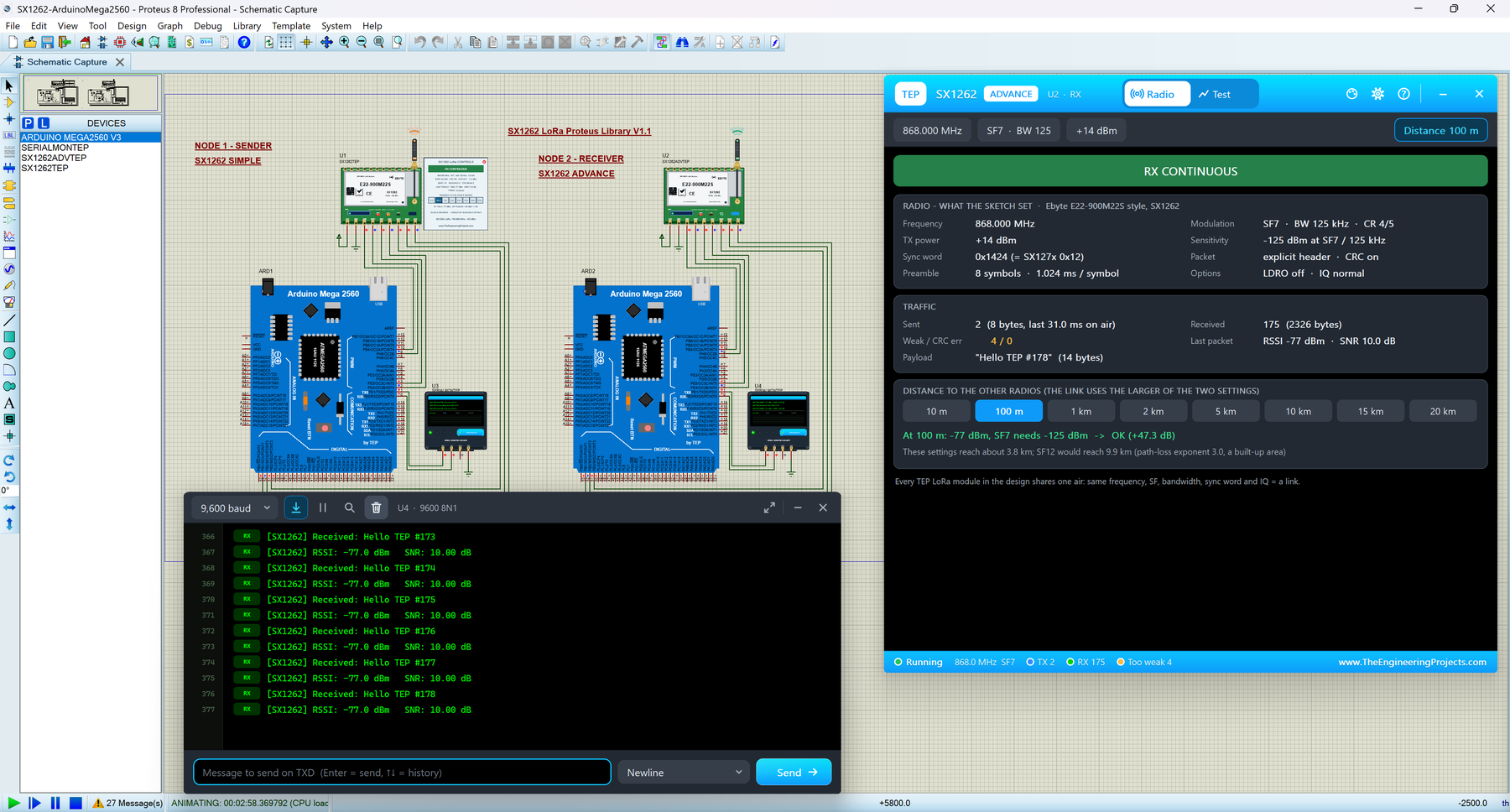
Hello friends, I hope you all are doing great. Today, I am going to share the new SX1262 LoRa Library for Proteus V1.1 . The SX1262 is Semtech's newer LoRa chip, and the green Ebyte E22-900M22S module with its rubber-duck antenna is a favourite for long-range sensors at 868 and 915 MHz. With this SX1262 LoRa Library for Proteus , two modules in one design talk over a simulated LoRa air, and your Arduino drives them over SPI with the same RadioLib library you use on real hardware. Updates SX1262 LoRa Library for Proteus Latest version: V1.1 (September 2026, this tutorial) Other LoRa modules: SX1278 Ra-02 · RFM95W RF modules: nRF24L01 · nRF24L01 PA LNA · CC1101 · RFM69HCW · HC-12 · 433MHz RF · XBee Helping Tools Serial Monitor Advance : a serial terminal window for the UART of your board Ser ...
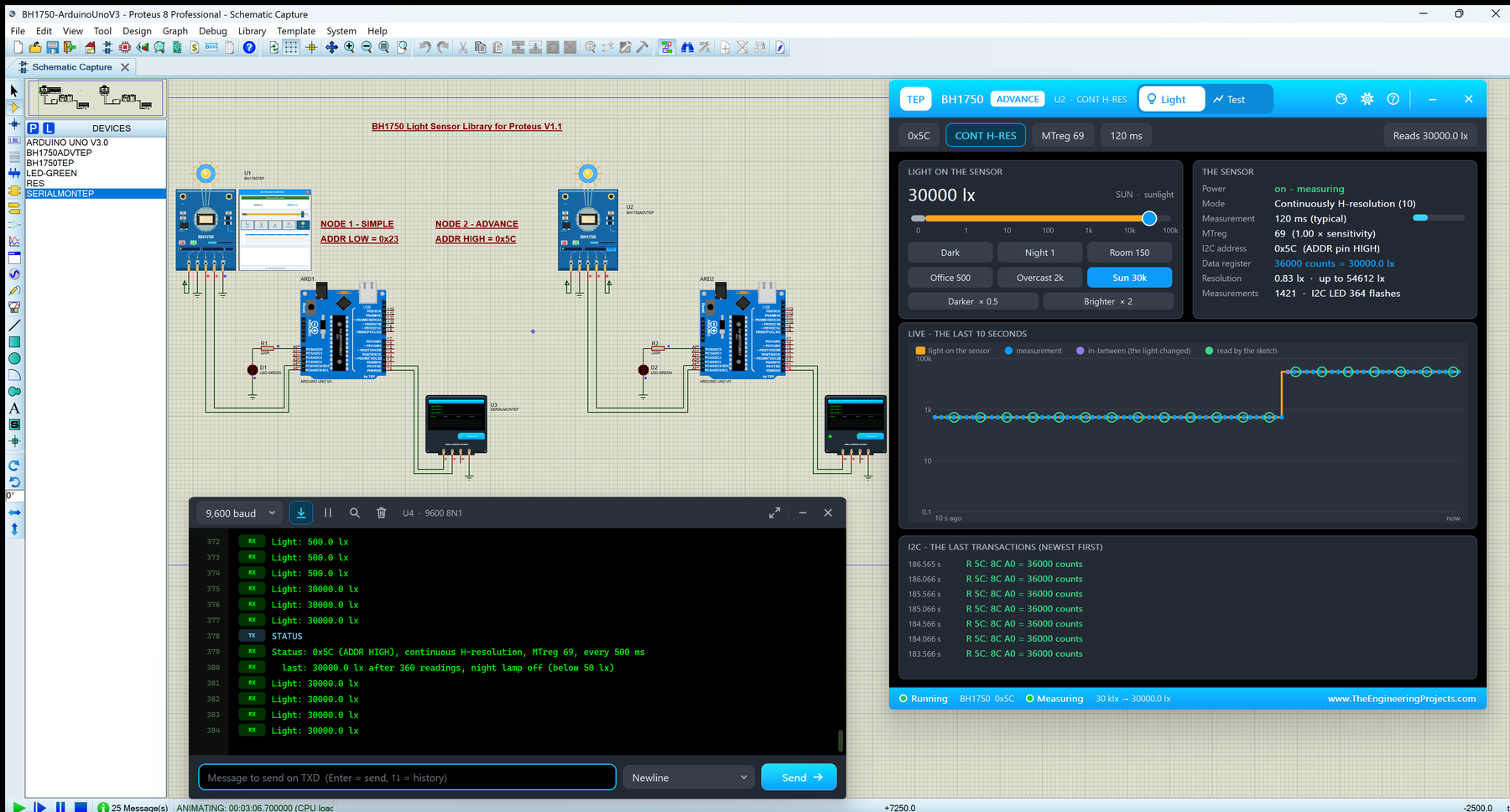
Hello friends, I hope you all are doing great. Today, I am going to share the new BH1750 Light Sensor Library for Proteus V1.1 . The BH1750 is ROHM's small digital light sensor, best known on the blue GY-302 module: it measures how much light falls on it and gives your Arduino the result in lux over I2C. With this BH1750 Light Sensor Library for Proteus , you set the light with a slider or a light scene, and your Arduino reads it with the same claws BH1750 library you use on real hardware. Updates BH1750 Light Sensor Library for Proteus Latest version: V1.1 (September 2026, this tutorial) Other light sensors: LDR · TCS34725 Helping Tools Serial Monitor Advance : a serial terminal window for the UART of your board Serial Monitor Expert : the serial monitor with extra debugging tools LCD Lib ...