


Speech Recognition in MATLAB using Correlation


Hello friends! In this tutorial, we will compare recorded spoken words using cross-correlation in MATLAB. We will load a test recording, compare it with five stored examples and inspect the similarity scores before choosing a result.
This is a small template-matching experiment, not a general speech-recognition system. It can demonstrate how similar waveforms align in time, but changes in speaker, pronunciation, speaking speed and background noise can reduce its reliability substantially.
The original audio package, result image and video remain included. We will update the deprecated audio-reading calls, normalize the comparison, use the file's actual sample rate and include an unknown result instead of forcing every recording into one of the five known words.
What the Original Project Contains
The original download contains nine WAV files: five reference recordings, two test recordings and two feedback sounds. The reference files are named one.wav through five.wav. The feedback files provide an audible indication of an accepted or rejected result.
Download FilePlace the reference recordings in the working folder or adapt the paths in the code. Keep test recordings separate from the reference files. Comparing a reference file with itself is useful for checking the calculation, but it is not evidence that a newly spoken word will be recognized.
The five stored waveforms act as templates. This method does not learn a model of language or convert arbitrary speech into text. It compares the incoming waveform with a small set of known waveforms under the conditions represented by those recordings.
Understand Cross-Correlation
Cross-correlation compares one sequence with shifted versions of another. At each lag, it combines products of overlapping samples. A larger positive value indicates stronger positive alignment under the chosen normalization.
One common real-signal convention can be written as r_xy[k] = sum x[n+k] y[n], with samples outside the finite recordings treated as zero. The sign of a reported lag depends on the argument order and convention, so use MATLAB's returned lag vector when plotting.
The MathWorks xcorr reference documents the correlation output and corresponding lags. It also explains the handling of unequal sequence lengths. We use the returned lags directly rather than constructing an axis from an assumed output length.
A correlation plot is a similarity-versus-lag plot. It is not a frequency spectrum. The horizontal axis represents sample displacement, or time displacement after division by the sample rate, rather than frequency in hertz.
Why raw peak values are misleading
If you multiply one recording's amplitude by two, its raw correlation values also scale. A louder recording can therefore obtain a larger peak without being a better word match. Recording duration and silence can also affect the comparison.
We will subtract each signal's mean and divide it by its Euclidean norm. For a nonzero signal, this produces unit energy. The correlation is then less sensitive to a simple overall gain change, although it remains sensitive to waveform shape and timing differences.
normalizedSignal = (signal - mean(signal)) / norm(signal - mean(signal))
This is whole-recording energy normalization. It is not a locally normalized sliding-window detector, and it is not a probability that a word was spoken. The distinction matters when a short matching sound is embedded inside a much longer recording.
Read Audio with Its Actual Sample Rate
Use audioread instead of the removed wavread interface. The audioread documentation shows that it returns both sample data and the file's sample rate. Keep those values together throughout processing and playback.
A one-second recording at 16 kHz contains 16,000 samples, while the same duration at 44.1 kHz contains 44,100. Comparing those arrays as if one sample represented the same time interval is incorrect. Either record all files at one sample rate or resample deliberately with an appropriate method.
The example below requires matching sample rates and reports a mismatch instead of silently changing the data. This makes the assumption visible. Resampling is a useful extension, but simply deleting samples or relabeling the sample rate is not an adequate substitute.
For stereo files, the example selects the first channel explicitly. Averaging channels is another possible policy, but opposite-polarity channels can cancel. Inspect your recordings and choose a channel policy that matches how they were acquired.
MATLAB Template-Matching Function
Save this function as speechrecognition.m. The threshold and score-margin arguments must be selected using separate validation recordings. The values shown in the example call later are only starting values for an experiment.
function [label, scores, lagSeconds] = ...
    speechrecognition(filename, threshold, margin)
validateattributes(threshold, {'numeric'}, ...
    {'scalar','real','finite','>=',0,'<=',1});
validateattributes(margin, {'numeric'}, ...
    {'scalar','real','finite','>=',0,'<=',1});

names = {'one','two','three','four','five'};
[audio, Fs] = audioread(filename);
x = prepareAudio(audio);
scores = zeros(1, numel(names));
lagSeconds = zeros(1, numel(names));
figure;

for k = 1:numel(names)
    [reference, referenceFs] = audioread([names{k} '.wav']);
    if referenceFs ~= Fs
        error('All files must use the same sample rate.');
    end
    y = prepareAudio(reference);
    [r, lags] = xcorr(x, y);
    [scores(k), peakIndex] = max(r);
    lagSeconds(k) = lags(peakIndex) / Fs;
    subplot(3,2,k);
    plot(lags / Fs, r);
    xlabel('Lag (seconds)');
    ylabel('Normalized correlation');
    title(names{k});
    grid on;
end

[ranked, order] = sort(scores, 'descend');
label = 'unknown';
if ranked(1) >= threshold && ranked(1)-ranked(2) >= margin
    label = names{order(1)};
end
fprintf('Result: %s; best score: %.3f; margin: %.3f\n', ...
    label, ranked(1), ranked(1)-ranked(2));
end

function x = prepareAudio(audio)
if isempty(audio)
    error('The recording is empty.');
end
x = double(audio(:,1));
if any(~isfinite(x))
    error('The recording contains nonfinite samples.');
end
x = x - mean(x);
energyNorm = norm(x);
if energyNorm <= 1e-12
    error('The recording has no usable varying signal.');
end
x = x / energyNorm;
end
For an initial experiment, call speechrecognition('test.wav', 0.4, 0.05) after replacing test.wav with an actual test filename. A best score of at least 0.4 and a lead of at least 0.05 over the second score are required by that illustrative call. They are not universal thresholds for speech.
The code obtains the winning index directly from the sorted score list. It does not use a chain of inconsistent greater-than and less-than tests. The original comparison logic treated the fifth template differently; the revised selection applies one rule to every template.
The function returns scores and peak lags as well as the label. Retaining those values helps you investigate an incorrect decision instead of seeing only a success sound. A rejected result can arise from a weak best match or from two nearly equal candidates.
Interpret the Correlation Graphs
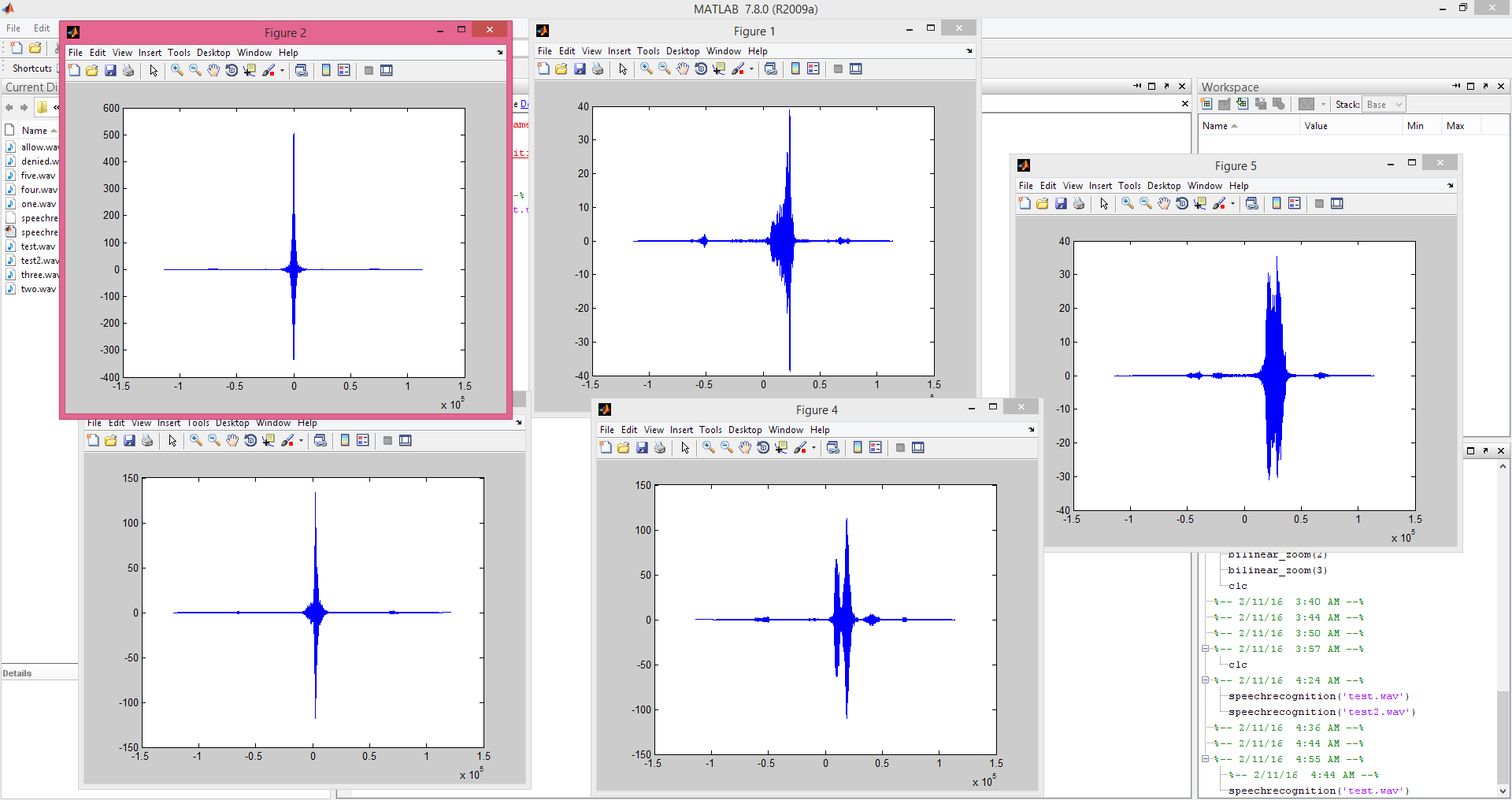
Each subplot compares the same test recording with one reference. The peak location indicates the lag of strongest positive alignment. Dividing lag in samples by Fs converts it into seconds.
For example, a 160-sample displacement at 16 kHz represents 160 / 16000 = 0.010 seconds, or 10 ms. That is a relative timing observation, not a recognition confidence or an estimate of how long the word takes to pronounce.
The archived figure shows the earlier project's correlation curves. Its raw peak heights should not be compared directly with the normalized scores from the revised function. The underlying lesson remains the same: inspect how the waveform similarity changes with lag.
A strong peak can occur because of a shared sound segment, recording artifact or similar background noise. Inspect the audio and the alignment before interpreting the largest value as a reliable word decision.
Prepare Reference and Test Recordings
Record references with a consistent microphone arrangement and a known sample rate. Leave enough headroom to avoid clipping. A clipped waveform has lost amplitude information, and normalization cannot restore the missing peaks.
Keep leading and trailing silence reasonably consistent. Cross-correlation can compensate for an overall time shift, but a long recording with only a short word can dilute the usefulness of whole-recording normalization. For a fair comparison, define a repeatable segmentation procedure.
A simple amplitude threshold can help locate a sound, but it is not a complete voice-activity detector. Background noise, quiet consonants and breaths can confuse it. If you trim recordings, inspect the retained segment and ensure that you are not removing meaningful parts of the word.
Do not normalize a silent recording and then interpret numerical noise as speech. The helper rejects effectively constant input. A practical detector should also include an application-appropriate minimum-energy check based on the recording conditions, rather than relying only on a tiny numerical threshold.
Separate references, validation and final tests
Use reference recordings as the templates. Use a different set of recordings to choose the acceptance threshold and margin. Then evaluate those choices on another set that was not used while adjusting the method.
If you repeatedly change thresholds until the two supplied test files pass, you have tuned the system to those examples. That does not establish performance on new recordings. Keep notes about the speaker, microphone, noise and recording session for each evaluation set.
Include words outside the five known classes and recordings containing only background sound. A system that always chooses one of the five labels can appear successful when tested only on known words, yet behave badly when an unexpected input arrives.
Measure Recognition Performance
Build a table whose rows represent the word actually spoken and whose columns represent the predicted result, including unknown. Count how often each combination occurs. This confusion matrix reveals which pairs of words are being mixed up.
Overall accuracy is correct predictions / total evaluated recordings, but report the evaluation conditions and number of recordings with it. A high percentage from a tiny collection of nearly identical files is not equivalent to the same percentage across many speakers and recording sessions.
Also count false acceptances of unknown words and false rejections of known words. Raising the threshold may reduce one type of error while increasing the other. The best operating point depends on the application, not on obtaining the largest possible number from one demonstration.
The margin rule adds another decision: even a reasonably high best score is rejected when another template is almost as good. This can reduce ambiguous choices, but it must be evaluated rather than assumed to improve every dataset.
Why Speaking Speed Causes Problems
Cross-correlation shifts an entire waveform in time. It does not stretch one syllable while compressing another. A person can pronounce the same word with different internal timing, causing the waveform samples to line up poorly even after the best overall shift.
Pitch and microphone response also change the sample-level waveform. Consequently, a newly recorded version of the same word may correlate less strongly than expected. This is a limitation of the representation, not necessarily a bug in xcorr.
A useful next step is to compare short-time spectral features rather than raw samples. Features such as mel-frequency cepstral coefficients summarize aspects of the sound over frames. Dynamic time warping can then compare sequences whose timing varies, while a trained classifier can model variation across several examples.
Those methods introduce their own parameters and evaluation requirements. Begin by understanding why the raw-template method fails on a particular example, then choose an extension that addresses that failure rather than adding complexity without a measurable goal.
Play Feedback at the Correct Rate
The original code played recordings at a hard-coded 50,000 Hz. Unless a file was recorded at exactly that rate, playback speed and pitch would change. Read the feedback file's own sample rate and use it for playback.
[feedback, feedbackFs] = audioread('allow.wav');
player = audioplayer(feedback, feedbackFs);
playblocking(player);
Use denied.wav for a rejected result if you want to retain the original audible feedback. Blocking playback is appropriate for a simple demonstration that must finish one sound before starting another. A responsive interface can use asynchronous playback with explicit management of the player object.
Do not treat the names allow and denied as evidence that this method is suitable for authentication. A recording can be replayed, and raw waveform matching is not a secure identity-verification system. This tutorial's purpose is to study signal comparison and a small command-label experiment.
Run a Controlled Comparison Experiment
Begin by comparing a reference recording with itself. After mean removal and unit-energy normalization, its zero-lag autocorrelation peak should be close to one within numerical precision. This checks the calculation and file handling; label it as a self-comparison rather than a recognition result.
Next, make a copy with a smaller overall amplitude, avoiding clipping. The normalized score should remain nearly unchanged because a simple gain factor is removed by normalization. If it changes substantially, check whether the files differ in another way or whether the preprocessing is applied consistently.
Then add silence at the beginning of a copy. Inspect how the peak lag changes and how the complete recording's preprocessing affects the score. This distinguishes alignment behavior from classification. The most useful observation is the relationship between the known shift and the returned lag, not simply whether the label stayed the same.
After those controlled cases, record the word again at a different speaking speed. This introduces genuine waveform variation that a single global shift cannot remove. Compare its score with the score from the exact copied recording. The difference illustrates why a successful self-test is much easier than recognizing an independently spoken example.
Keep preprocessing identical across the dataset
If references are trimmed tightly but test recordings contain long pauses, the comparison conditions are inconsistent. Define one preprocessing procedure and apply it to both sets. Document channel selection, sample rate, mean removal, segmentation and normalization in the order they occur.
Any filtering should also be applied consistently. A filter can introduce delay or change waveform shape, especially near boundaries. Filtering only the test recording can reduce similarity with otherwise suitable references. If you add a filter, evaluate its effect using a controlled pair before applying it to every file.
Keep unprocessed originals so that changes in preprocessing can be compared fairly. Saving a normalized or filtered file over its source makes later diagnosis difficult and can compound transformations when the same procedure is run again.
Report limits alongside results
A useful result states the number of templates, number of held-out recordings, speakers represented, recording conditions and chosen rejection settings. Include examples of failures as well as successes. An ambiguous pair of words can teach more about the method than several plots from nearly identical recordings.
When adding another template, repeat the evaluation. More templates increase the number of competing matches and can change the margin distribution. A threshold that worked for five words is not automatically suitable for twenty words, even if each new reference sounds clear to a human listener.
This disciplined comparison turns the tutorial into a reproducible signal-processing experiment. It also provides evidence for deciding whether a feature-based recognizer is worth implementing next.
Troubleshooting and Method Review
For a next experiment, the MathWorks MFCC reference explains extracting short-time spectral features. Compare a feature-based method with this waveform baseline using the same held-out recordings, so that any improvement reflects the method rather than an easier test set.
| Problem | Useful check |
|---|---|
| File cannot be read | Filename, folder and supported audio format |
| Sample-rate error | Record consistently or resample deliberately |
| Every input is unknown | Thresholds, segmentation and template variability |
| Wrong word repeatedly wins | Inspect scores, waveform alignment and recording conditions |
| Silent files produce errors | Expected rejection of unusable input |
| Playback sounds too fast | Use the sample rate returned with that file |
This method is valuable as a transparent first experiment: every score can be traced to a waveform comparison. Its limitations are substantial for general speech, so present measured results under clearly described conditions. Do not describe a few successful sample files as a universal recognition capability.
The original video is retained below. For more exercises, see our MATLAB project collection. The eye-detection tutorial explores a different pattern-recognition problem and should be evaluated with its own data and assumptions.
Frequently Asked Questions
Is the correlation score a probability?
No. It is a normalized waveform-similarity measure under this processing method. A score of 0.8 does not mean an 80% probability that the label is correct.
Can the code recognize a new speaker reliably?
That must be measured. Raw waveform templates are sensitive to speaker and recording differences, so reliable speaker-independent recognition should not be assumed.
Why include an unknown label?
It lets the method reject weak or ambiguous matches instead of forcing every sound into one of the known words.
Why use max(r) instead of max(abs(r))?
This example looks for positive waveform alignment. Taking the absolute value would also reward inverted alignment and would define a different scoring rule that needs separate evaluation.
Are the plots audio spectra?
No. They show correlation against time lag. A frequency spectrum requires a separate frequency-domain calculation.

Tags


It is showing "audioread returns empty waveforms, problem reading file"
What is the filename to be given in that function parameters
[email protected]
I got this error. Please help me in this matter.
Error in ==> speechrecognition at 5
voice=wavread(filename);
Dear sir i am getting problem in comping the speech recognition code kindly resolve it sir
??? Undefined function or variable 'x'.
??? Error using ==> run at 56
Input argument "filename" is undefined.
I also got this error. Please help me in this matter.
Error in ==> speechrecognition at 5
voice=wavread(filename);
how to rectify this
Thank you for sharing the code.
I would like to add some extra features
Can you suggest some ideas?
1 reply
did the code work for you?
The denied code is not working. When I give a file not part of test file, the denied line 88, getting 'too many output arguments' as error. Can you please explain that part?
1 reply
You need to change the waveread function to audioread
soundsc(wavread('denied.wav'),50000)
i want to know that what is 50000 ????? if it is sample rate then how it is same?? plz help men i am working on speech to text recognition anybody wants to help me?
sir i can get documentation of this project?
Dear sir,i got an error regarding speech recognition using correlation.Would you please help me out?
Error in ==> speechrecognition at 5
voice=wavread(filename)
Sir, how to upload the files to check ? Can u plz tel sir.
1 reply
Just click on "speechrecognition.m" file
And obviously an installed MATLAB is required as well
error is like Undefined function or variable 'speechrecognition'.
how it is to be solved?? plz suggest me..
Sir I'm doing a project on audio encoder and decoder.
I need a program two compare the quality (in terms of error or similarity or difference) of wav files before and after encoding.
Please help...
Thank You.... Waiting for your reply
Hello. I receive an error in line 5.
" >> speechrecognition
Not enough input arguments.
Error in speechrecognition (line 5)
voice=audioread(filename); "
Could anyone help?
1 reply
I think problem is with your MATLAB version. I have tested it on MATLAB 2009 and it worked fine.
2 replies
can u tell me how to input arguments in line 5
i have the latest version and it is not working. Having same error in line 5
Good afternoon sir,
My research is in speech enhancement. Can you suggest me how the noisy speech can be enhanced using DNN in matlab. Do u have any sample code for this speech enhancement using DNN?
Dear Sir,
Can you please reply me why did you do the following
x=x';
x=x(1,:);
x=x';
in line 4,5,6 respectively.
Thanks in advance
1 reply
what is the explanation ? did u get any reply from them ? can u please explain those three lines?
HELLO SIR I HAVE ONE ERROR LIKE THAT
Error using speechrecognition (line 5)
Not enough input arguments.
Dear Sir,
Can you please reply me why did you do the following
x=x’;
x=x(1,:);
x=x’;
in line 4,5,6 respectively.
Hello
For every voice signal, you used transpose and I didn't understand why it is necessary. After the transpose you took the one channel of the signal, then took the transpose again. I didn't understand these lines of this code and I tried to uploud my voice which is saved as .m4a , but I got an error. Please, can you explain for me how can I uploud my voice and what does these lines used for?
Can you answer urgently, i have an assignment.
Thankss
hi sir
do you have any code for speech recognition? only for one person?
it mean's that's work for one person
for high security
Not enough input arguments.
Error in speechrecognition
voice=wavread(filename);
How to fix this error?
Hi
Please can you tell me how can I use this code to be able to do the speech recognition using real-time audio?
I have tried so many, and I did a lot of changes still cannot figure it out. I added fft(x), fft(y1), ... etc. still did not work, it takes any audio and detects it as the same word such as three all the time. I have added abs(x), abs(y1) to the xcorr but still not luck.
Any help regarding this it will be really appreciated since I have a university project and I need to do speech recognition.
you can send me your reply on my email: [email protected]
thanks in advance!
Comments
39