Hello friends, I hope you all are doing great. Today, I am going to share the LilyGO T-Echo Library for Proteus, so you can run a LoRa, GPS and e-paper simulation of LilyGO's T-Echo. The T-Echo is a pocket-sized handheld with an nRF52840 for Bluetooth, a Semtech SX1262 LoRa radio, an L76K GPS and a 1.54" e-paper screen that keeps its picture without power - a favourite device for off-grid messaging. Our part has its real size and a working e-paper, and it runs your Arduino sketch in Proteus 8.5.
LilyGO T-Echo Library for Proteus
Latest version: V1.0 (November 2026, this tutorial)
Other new Arduino boards: UNO R4 WiFi · Nano ESP32 · UNO WiFi Rev2 · Nano 33 IoT · UNO Q · UNO R4 Minima · Nano Every · MKR WiFi 1010 · Nano RP2040 Connect · STM32 Black Pill · Nucleo-F401RE · STM32 Blue Pill · Teensy 4.1 · Arduino Due · Arduino Leonardo · Arduino Micro · BBC micro:bit V2 · GIGA R1 WiFi · MKR WAN 1310 · Nano 33 BLE Sense · XIAO nRF52840 Sense · RAK4631 WisBlock · Nano Matter · nRF52840 DK · nRF5340 DK · nRF9151 DK · nRF7002 DK · Nordic Thingy:53 · xG24 Dev Kit · xG24 Explorer Kit · Thunderboard BG22 · SiWx917 Dev Kit · B-L475E-IOT01A · NUCLEO-WB55RG · NUCLEO-WL55JC1 · NUCLEO-H743ZI2 · SAM R21 Xplained Pro · FRDM-MCXN947 · Portenta H7 · LP-CC2652R7 · PSoC 6 WiFi-BT · Feather nRF52840 · Thingy:91 X · xG26 Dev Kit · nRF52 DK · nRF52833 DK · nRF52840 Dongle · nRF5340 Audio DK · nRF54H20 DK · nRF54LM20 DK · nRF9160 DK · nRF9161 DK · nRF21540 DK · Thingy:52 · Thingy:91 · ItsyBitsy nRF52840 · SparkFun Pro nRF52840 Mini · Adafruit CLUE · XIAO nRF54L15 · Heltec T114 · nRF9160 Feather · Circuit Playground Bluefruit
RF modules: nRF24L01 · nRF24L01 PA LNA · CC1101 · RFM69HCW · HC-12 · 433MHz RF · XBee
Temperature and weather sensors: DHT11 / DHT22 · DS18B20 · BME280 · BMP280 · SHT31 · AHT20 · BME680 · MLX90614 · MAX6675
Helping Tools
- Laptop WiFi Monitor: a laptop on the Wi-Fi of your design: a browser, a TCP / UDP terminal and ping
- Mobile WiFi Monitor: a smartphone that opens the pages of your board and sends it commands
- Serial Monitor Advance: a serial terminal window for the UART of your board
For the demo we built a LoRa friend finder with two T-Echos: each one reads its GPS and sends its position by LoRa, and the other one shows on its e-paper how far away its friend is and in which direction - no phone network needed.
NOTICE: Proteus has no nRF52840, SX1262 or e-paper model, so our team has put a lot of effort into building this board ourselves: the e-paper, the LoRa radio, the GPS, the LEDs and the keys are all our own model, and your sketch compiles with our free TEP Boards for Proteus add-on. Your feedback is the fuel that keeps us going, so please tell us what you think in the comments below. And if our free libraries help you, you can buy us a coffee. So, let's get started with the LilyGO T-Echo Library for Proteus:
What is the LilyGO T-Echo?
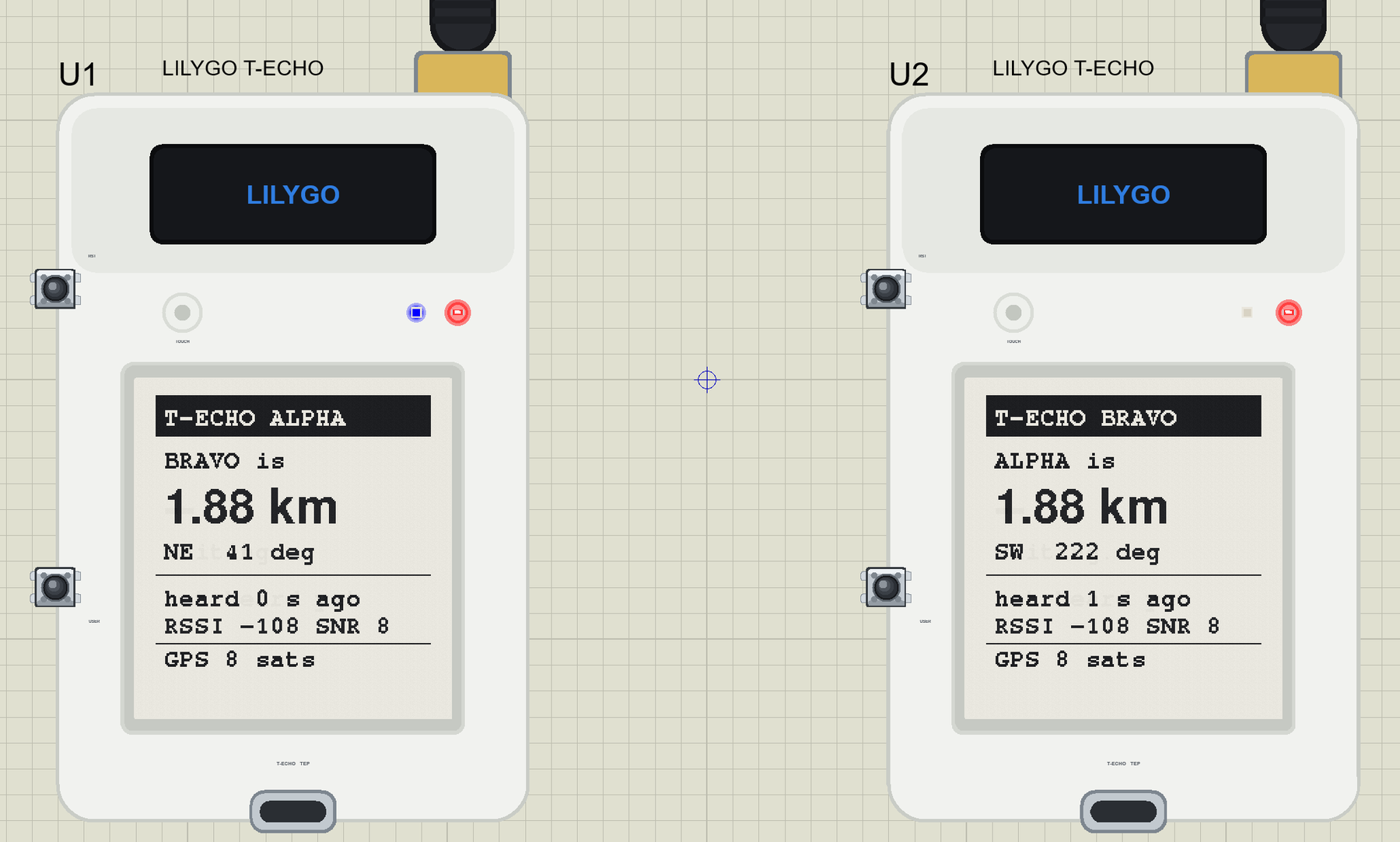
The T-Echo is LilyGO's compact LoRa device in a white case. Inside are Nordic's nRF52840 (an Arm Cortex-M4F with Bluetooth LE), Semtech's SX1262 LoRa transceiver, a Quectel L76K GPS, a PCF8563 real-time clock and an 850 mAh battery; on the front sits a 1.54" 200 x 200 black and white e-paper. It is very popular as a Meshtastic node and with SoftRF, and LilyGO also sells it for 433 / 470 MHz and 868 / 915 MHz.
| Part | The real T-Echo | In the library |
|---|---|---|
| Processor | nRF52840, Bluetooth LE 5 | your Arduino sketch, ArduinoBLE |
| Radio | SX1262 LoRa, up to 22 dBm | LoRa between TEP boards (SX126x-Arduino) |
| GPS | Quectel L76K on Serial1 | NMEA on SerialGPS from the GPSLAT / GPSLON properties |
| Display | 1.54" 200 x 200 e-paper GDEH0154D67 (SSD1681) | GxEPD2_154_D67, full and partial updates |
| Keys and LEDs | RST, the user button, a touch key, a tricolour LED | all of them; the LED lit when LOW |
| Others | PCF8563 RTC, NFC antenna, 2 MB flash, battery | drawn or not modelled |
E-paper in a Few Words
An e-paper (electronic paper) holds tiny charged black and white particles. A voltage moves them, and once moved they stay - so the screen keeps its picture with no power at all and is easy to read in sunlight. The price is speed: a full update takes about two seconds and flashes the screen, and a partial update changes only the pixels that differ in a fraction of a second.
LoRa and GPS Together
LoRa sends small packets a long way on very little power, and a GPS knows where the device is. Together they make the classic off-grid tracker: every device broadcasts its position, and every other one can work out the distance and direction. That is the idea behind Meshtastic's position sharing, and the idea of our demo.
A simulation lets you try the whole thing before two devices are on your desk: the GPS sentences, the LoRa packets and the e-paper drawing. When the sketch works in the Proteus simulation, the real T-Echos only have to confirm it.
Features of the LilyGO T-Echo Library for Proteus
- The T-Echo at real size: the white case, the e-paper, the LILYGO window, the antenna, RST and the user button on the side, the touch key, the tricolour and charge LEDs and the USB-C, with our small TEP signature.
- A real e-paper: GxEPD2 draws on the part with full updates (the flashing waveform) and partial updates, BUSY while it works, and the picture stays when the simulation stops.
- LoRa: SX126x-Arduino packets between all TEP LoRa boards in a design, with RSSI and SNR from the LORADIST property.
- A GPS: NMEA sentences on Serial1 from the GPSLAT / GPSLON properties - a moving position too.
- A complete package: about 3.5 MB with the part, the add-on and the two-board demo, without the source code of the models.
The T-Echo in Proteus Simulation
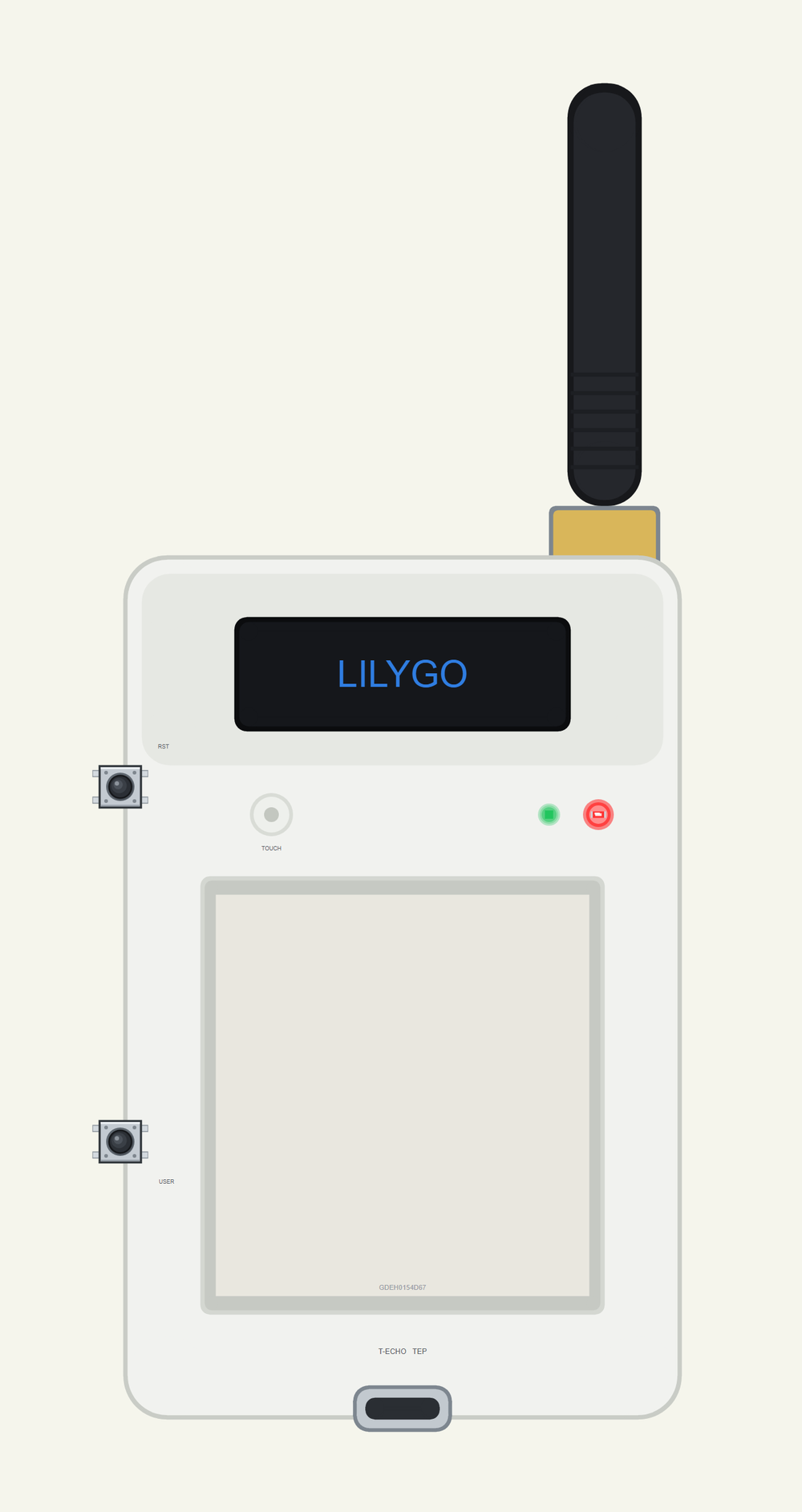
Search T-ECHO in Pick Devices; the device LILYGO T-ECHO is in TEPTECHO.LIB (Microprocessor ICs, LoRa Boards), with the prefix U. The USB-C opens the serial monitor. The T-Echo has no pins on its case: the e-paper, the radio and the GPS are all inside.
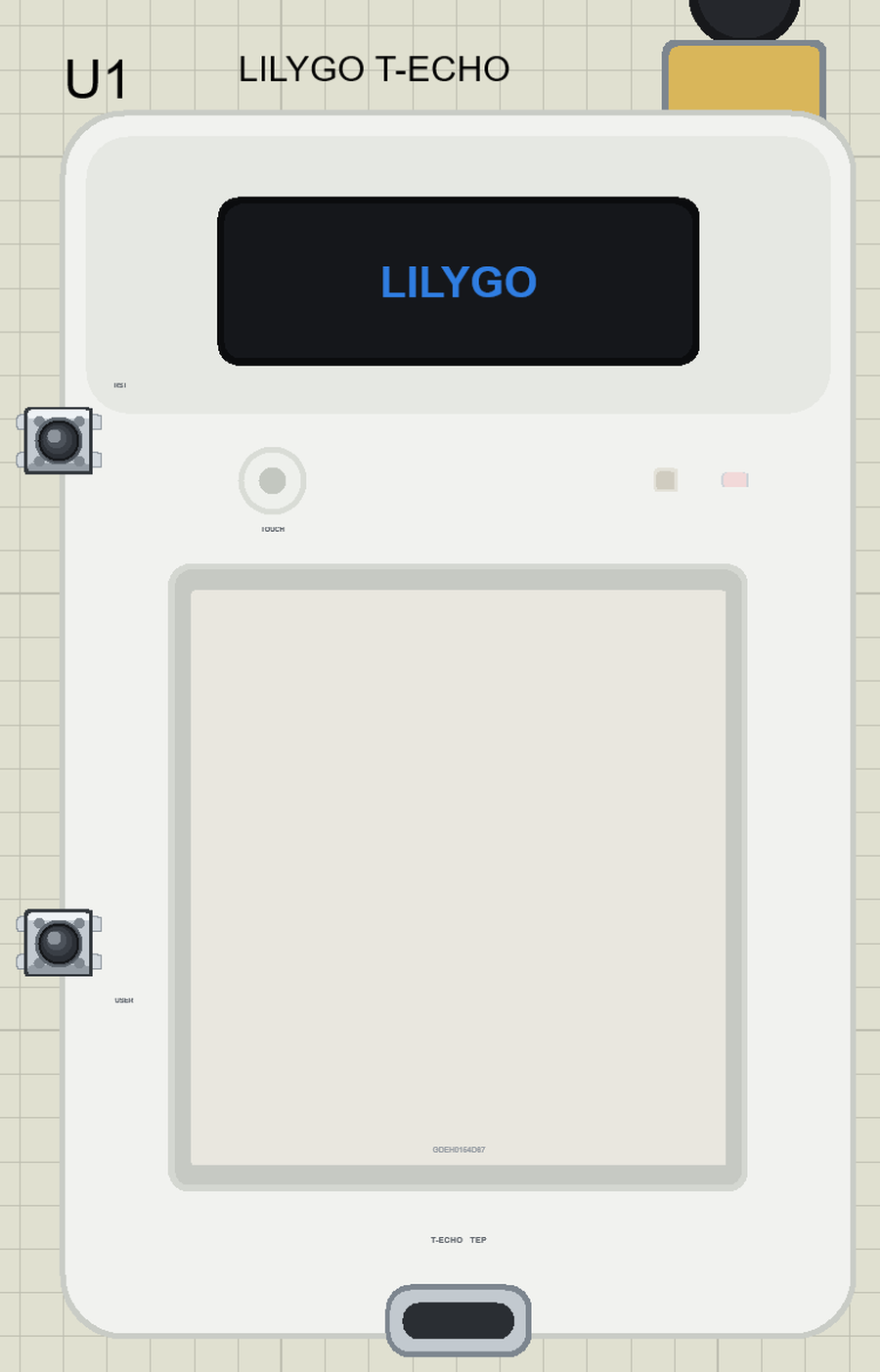
The Lines Inside
| Part | Pins (the nRF52840 GPIO numbers) |
|---|---|
| the e-paper | SCK 31, MOSI 29, CS 30, DC 28, RST 2, BUSY 3 |
| the SX1262 | NSS 24, RESET 25, BUSY 17, DIO1 20 |
| the GPS | Serial1 = SerialGPS, RX 41 / TX 40, 9600 baud |
| the LEDs | red 35, green 33, blue 14 - lit when LOW |
| the keys | user button 42 (LOW when pressed), touch key 11 (HIGH when touched), RST |
Download LilyGO T-Echo Library for Proteus
Click the button below to download LilyGO-T-Echo-Library-for-Proteus-v1.0.zip (about 3.5 MB, without the source code of the models):
LilyGO T-Echo Library for Proteus V1.0- README.txt: installation, the demo, the lines, the properties, troubleshooting and the limits.
- Proteus Library Files:
TEPTECHO.LIBand the phone and laptop libraries. - Proteus Model Files:
TEPNET.DLL. - Arduino Code: both demo sketches and the TEP Boards for Proteus add-on 1.99.0.
- Proteus Simulation: the demo project, its two HEX files and a copy of the DLL.
No Proteus yet? Read How to Download and Install Proteus 7 and 8. New to libraries? Follow How to Install a New Library in Proteus.
How to Install LilyGO T-Echo Library for Proteus
- Close Proteus and extract the whole zip file, for example to your Desktop.
- Copy the files from Proteus Library Files into the LIBRARY folder of Proteus.
- Copy
TEPNET.DLLfrom Proteus Model Files into the MODELS folder, replacing an older one. - Delete
TEPTECHO.IDXfrom the LIBRARY folder if it is there. - For your own sketches, copy Arduino Code\TEP Boards for Proteus\hardware into your Arduino sketchbook (Documents\Arduino), install GxEPD2 and Adafruit GFX Library from the Library Manager and restart the Arduino IDE; the board is LilyGO T-Echo (TEP Proteus).
- Start Proteus, press P and search for T-ECHO.
Demo: a LoRa Friend Finder in Simulation
Hikers, cyclists and search teams often split up where phones have no signal. With two LoRa devices and GPS each one can still see where the other is - how far away and in which direction - and walk towards it. Our demo does exactly that with two T-Echos.
Open T-Echo-LoRa-Friend-Finder.pdsprj. U1, "ALPHA", runs TEcho_Finder_Alpha.hex; U2, "BRAVO", runs TEcho_Finder_Bravo.hex. Their GPSLAT / GPSLON properties put BRAVO about 1.4 km north and 1.3 km east of ALPHA, and LORADIST is 2 km. There is no wire between them - only LoRa.
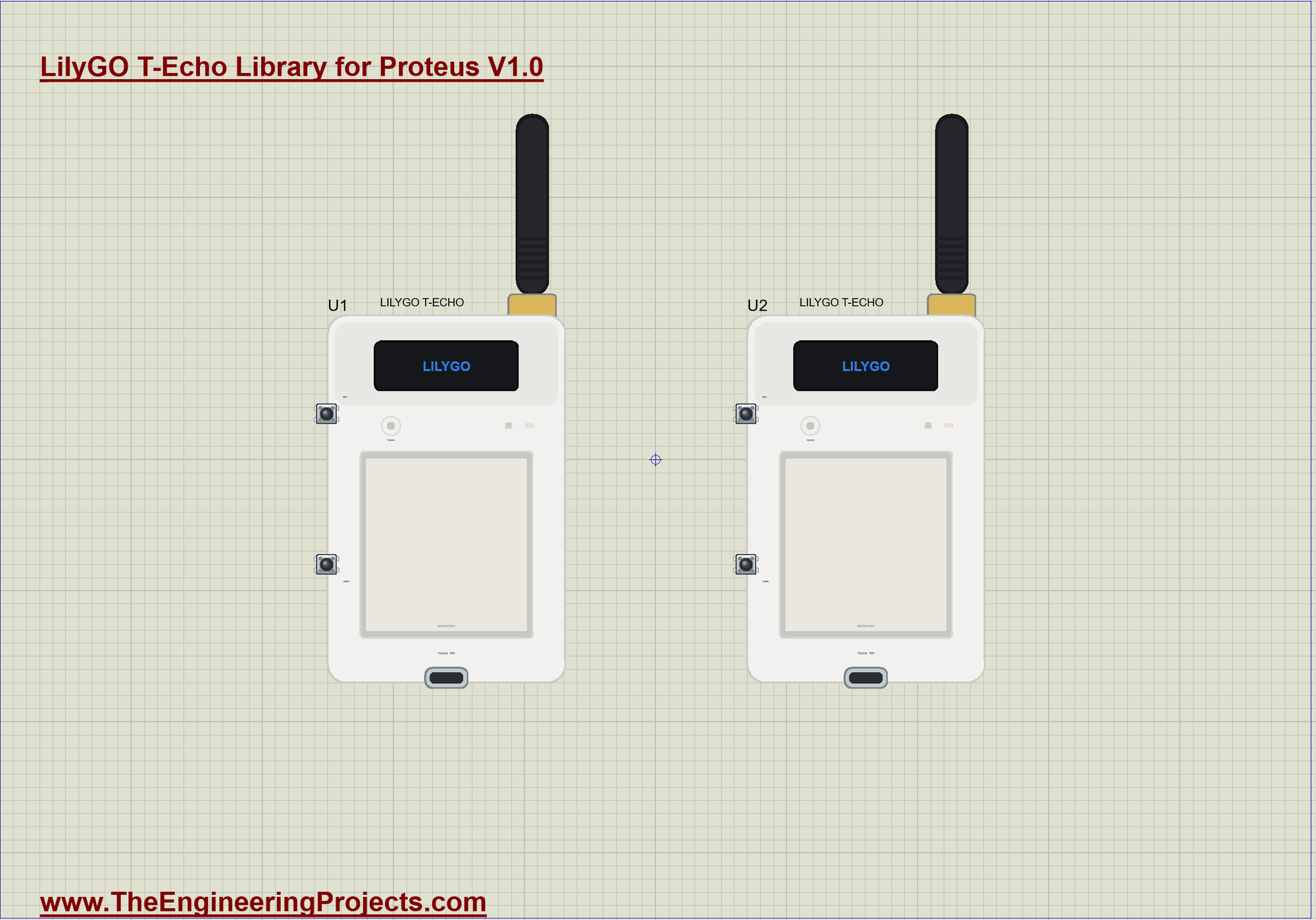
| What | What the T-Echo does |
|---|---|
| every 10 s | sends "A,lat,lon,sats" by LoRa (the two nodes 5 s apart) |
| a packet from the friend | the distance, the direction, the time since it was heard and the signal on the e-paper |
| the touch key | the positions page, and back |
| the user button | its position at once |
| the tricolour LED | blue = a packet sent, green = a packet heard |
| every 8th update | a full update of the e-paper (it flashes) to clear any ghosting |
Reading the GPS
The GPS sends NMEA sentences at 9600 baud. gpsLine() takes $GPGGA, the fix sentence: the fix quality, the number of satellites and the position in degrees and minutes. The first fix also sets the time of the first LoRa packet, so the two nodes never transmit at the same moment:
void gpsLine(const char *s) {
  if (strncmp(s, "$GPGGA", 6) && strncmp(s, "$GNGGA", 6)) return;
  const bool fix = field(s, 6).toInt() > 0;
  mySats = field(s, 7).toInt();
  if (!fix) return;
  myLat = nmeaDeg(field(s, 2), field(s, 3));
  myLon = nmeaDeg(field(s, 4), field(s, 5));
  if (!myFix) {
    myFix = true;
    nextSend = millis() + FIRST_SEND_MS;                    // (counted from the fix: the two nodes never send at the same moment)
    Serial.print(F(">> ")); Serial.print(ME_NAME); Serial.print(F(": GPS fix ")); Serial.print(myLat, 5); Serial.print(F(", "));
    Serial.print(myLon, 5); Serial.print(F(", ")); Serial.print(mySats); Serial.println(F(" satellites"));
    needDraw = true;
  }
}
How Far Is the Friend?
distanceM() uses the haversine formula, which measures the distance along the curve of the Earth between two latitudes and longitudes:
float distanceM() {                                         // the haversine formula on a 6371 km Earth
  const float r = 6371000.0, k = PI / 180.0;
  const float dLat = (frLat - myLat) * k, dLon = (frLon - myLon) * k;
  const float a = sin(dLat / 2) * sin(dLat / 2) + cos(myLat * k) * cos(frLat * k) * sin(dLon / 2) * sin(dLon / 2);
  return 2 * r * atan2(sqrt(a), sqrt(1 - a));
}
In Which Direction?
bearingDeg() gives the initial direction from this node to the friend, 0 degrees for north and turning clockwise; compass() turns it into one of the eight compass points:
int bearingDeg() {                                          // the direction to the friend, 0 = north, clockwise
  const float k = PI / 180.0;
  const float y = sin((frLon - myLon) * k) * cos(frLat * k);
  const float x = cos(myLat * k) * sin(frLat * k) - sin(myLat * k) * cos(frLat * k) * cos((frLon - myLon) * k);
  return ((int)(atan2(y, x) / k) + 360) % 360;
}
Sending the Position
The position goes out as a short text packet; the blue LED flashes, and the radio's TxDone callback frees it again:
void sendPosition() {
  if (txBusy || !myFix) return;
  char lat[12], lon[12], msg[40];
  dtostrf(myLat, 0, 5, lat); dtostrf(myLon, 0, 5, lon);
  snprintf(msg, sizeof msg, "%c,%s,%s,%u", ME, lat, lon, mySats);
  txBusy = true;
  Radio.Send((uint8_t *)msg, strlen(msg));
  led(LED_BLUE);
  Serial.print(F(">> ")); Serial.print(ME_NAME); Serial.print(F(": sent ")); Serial.println(msg);
}
A Packet from the Friend
handlePacket() checks that the packet comes from the friend, reads its position, flashes the green LED, works out the distance and asks for a new screen:
void handlePacket() {                                       // "B,31.53300,74.37200,8" from the friend
  rxNew = false;
  if (rxBuf[0] != FRIEND || rxBuf[1] != ',') return;
  char *p = rxBuf + 2;
  frLat = atof(p); p = strchr(p, ','); if (!p) return;
  frLon = atof(++p); p = strchr(p, ','); if (p) frSats = atoi(++p);
  frKnown = true; frHeardAt = millis();
  led(LED_GREEN);
  char d[16]; distanceText(d);
  Serial.print(F("<< ")); Serial.print(ME_NAME); Serial.print(F(": ")); Serial.print(FRIEND_NAME); Serial.print(F(" at ")); Serial.print(d);
  Serial.print(' '); Serial.print(compass(bearingDeg())); Serial.print(F(" (RSSI ")); Serial.print(frRssi); Serial.print(F(", SNR "));
  Serial.print(frSnr); Serial.println(F(")"));
  needDraw = true;
}
Updating the E-paper
GxEPD2 draws the screen in pages of 32 rows, so it needs only 800 bytes of RAM. updateScreen() makes a partial update - no flashing - and a full one every 8th time, which clears the faint traces partial updates leave behind:
void updateScreen() {                                       // a partial update, or a full one every FULL_EVERY
  if (frKnown) { itoa((int)((millis() - frHeardAt) / 1000), shownAge, 10); strcat(shownAge, " s ago"); }
  const bool full = updates % FULL_EVERY == 0;
  if (full) display.setFullWindow(); else display.setPartialWindow(0, 0, 200, 200);
  display.firstPage();
  do { drawScreen(); } while (display.nextPage());
  updates++;
  lastDraw = millis(); needDraw = false;
  Serial.print(F("   ")); Serial.print(ME_NAME); Serial.println(full ? F(": the e-paper - a full update") : F(": the e-paper - a partial update"));
}
The Keys
An e-paper update keeps the sketch busy for a moment, so the keys use interrupts: a press is never lost, and the loop acts on it when it is free:
volatile bool userHit = false, touchHit = false;
void onUser() { userHit = true; }                           // USER: LOW when pressed (a falling edge)
void onTouch() { touchHit = true; }                         // TOUCH: HIGH when touched (a rising edge)
Run the Simulation
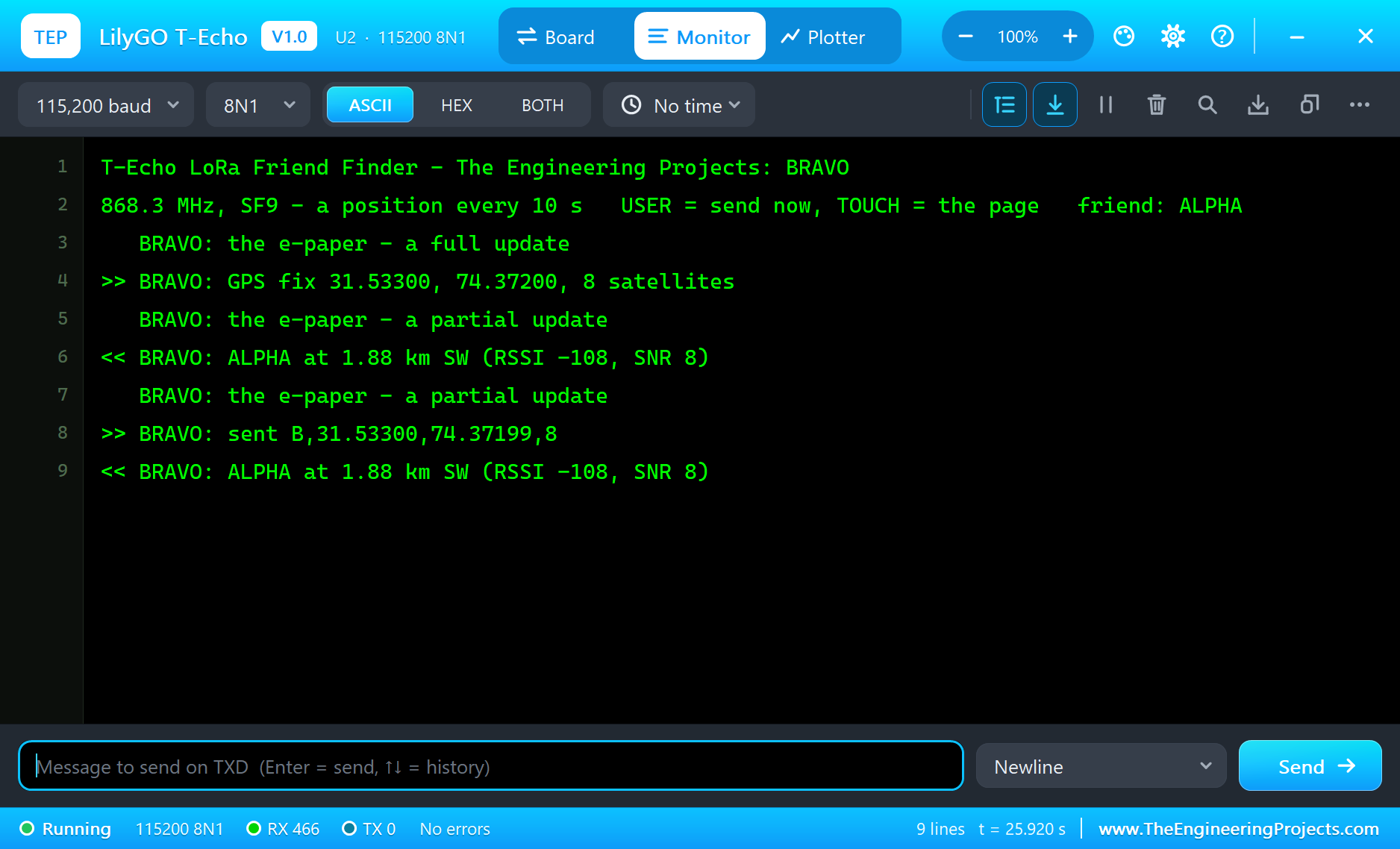
Press Run. Both T-Echos start with a full update of the e-paper, get their GPS fix and begin to send. The serial monitors - the same window as our TEP Serial Monitor Advance for Proteus - show both nodes:
T-Echo LoRa Friend Finder - The Engineering Projects: ALPHA
T-Echo LoRa Friend Finder - The Engineering Projects: BRAVO
   ALPHA: the e-paper - a full update
   BRAVO: the e-paper - a full update
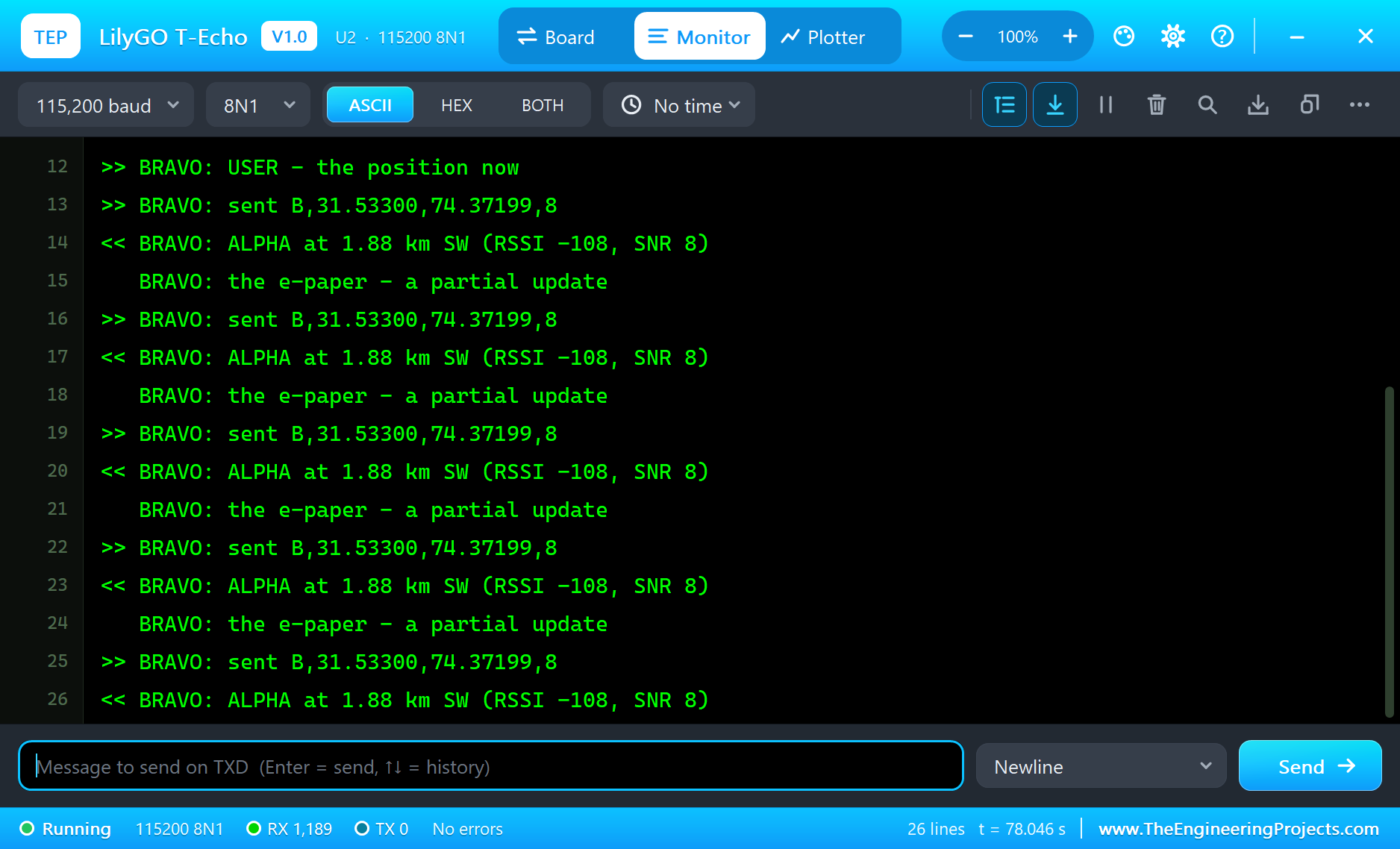
>> ALPHA: GPS fix 31.52040, 74.35870, 8 satellites
>> BRAVO: GPS fix 31.53300, 74.37200, 8 satellites
>> ALPHA: sent A,31.52040,74.35870,8
<< BRAVO: ALPHA at 1.88 km SW (RSSI -108, SNR 8)
>> BRAVO: sent B,31.53300,74.37199,8
<< ALPHA: BRAVO at 1.88 km NE (RSSI -108, SNR 8)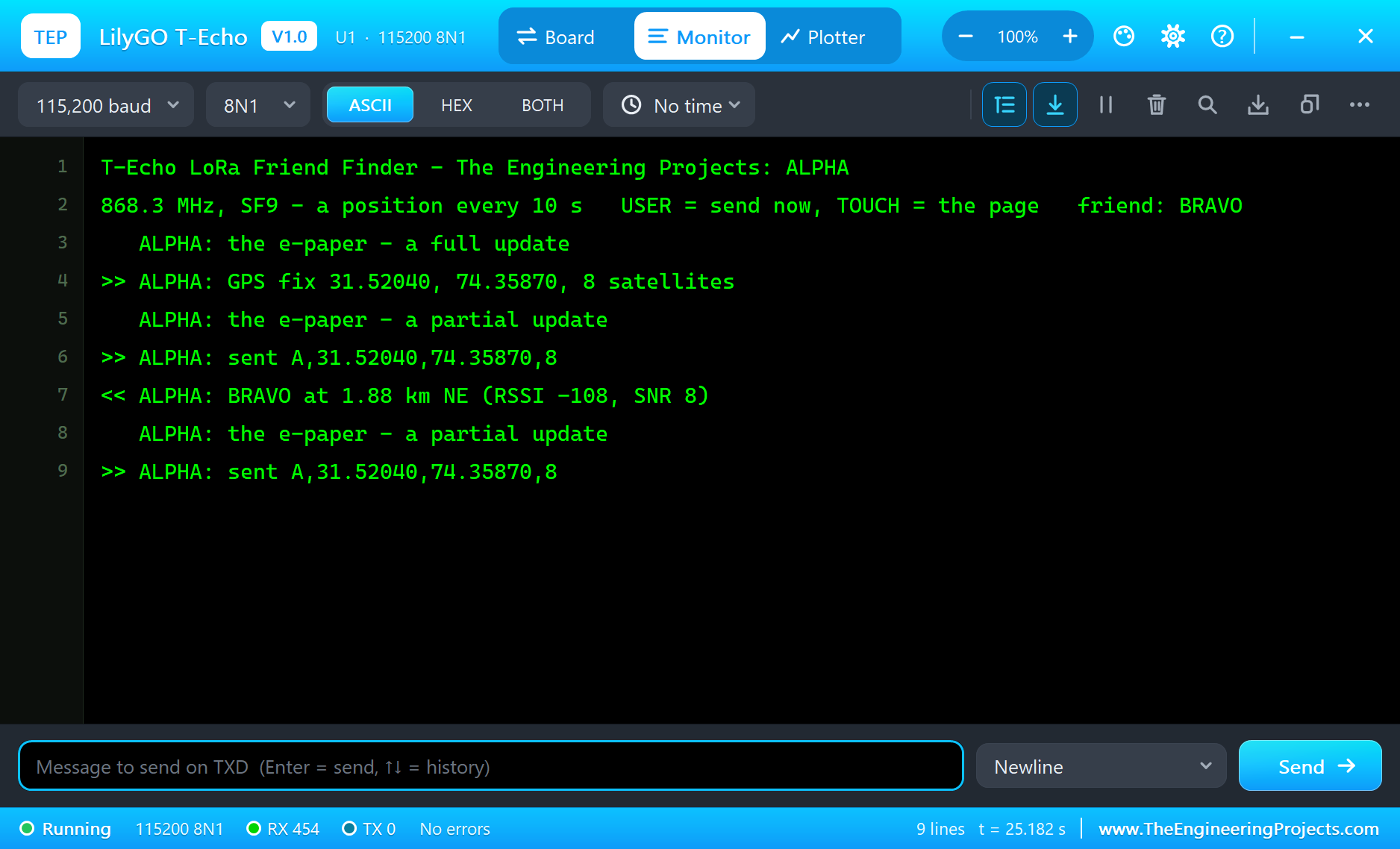
Two Friends on the Map
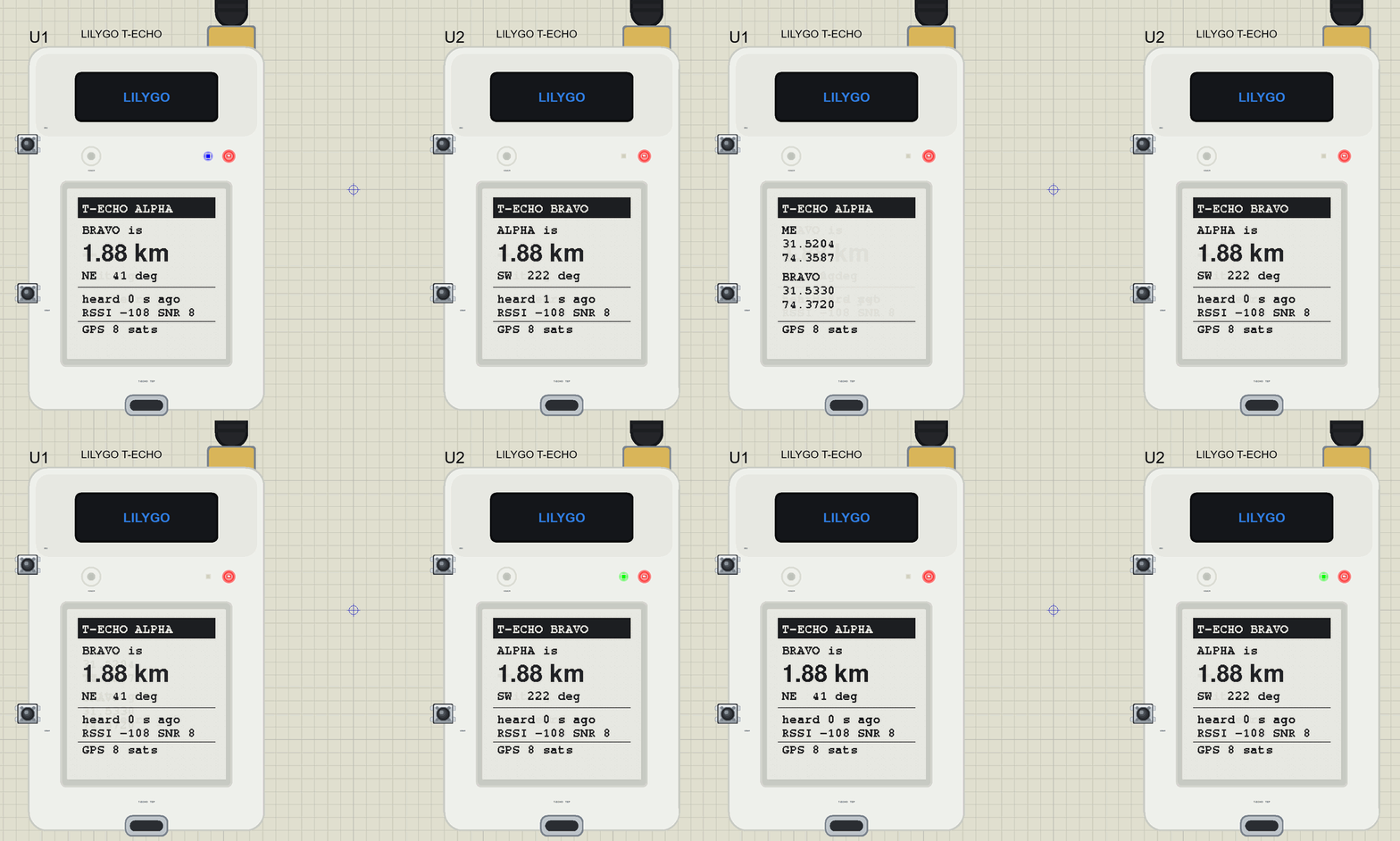
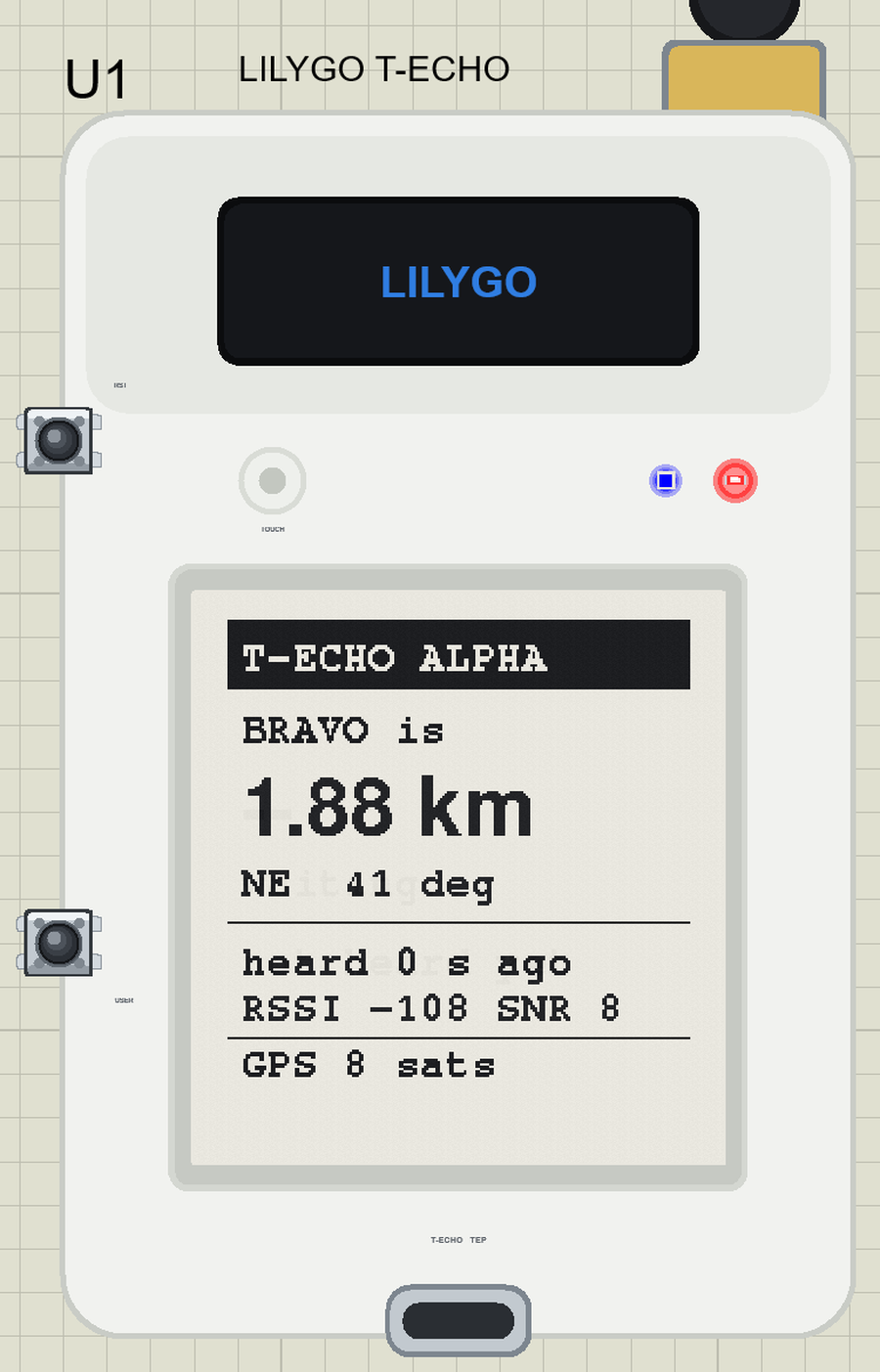
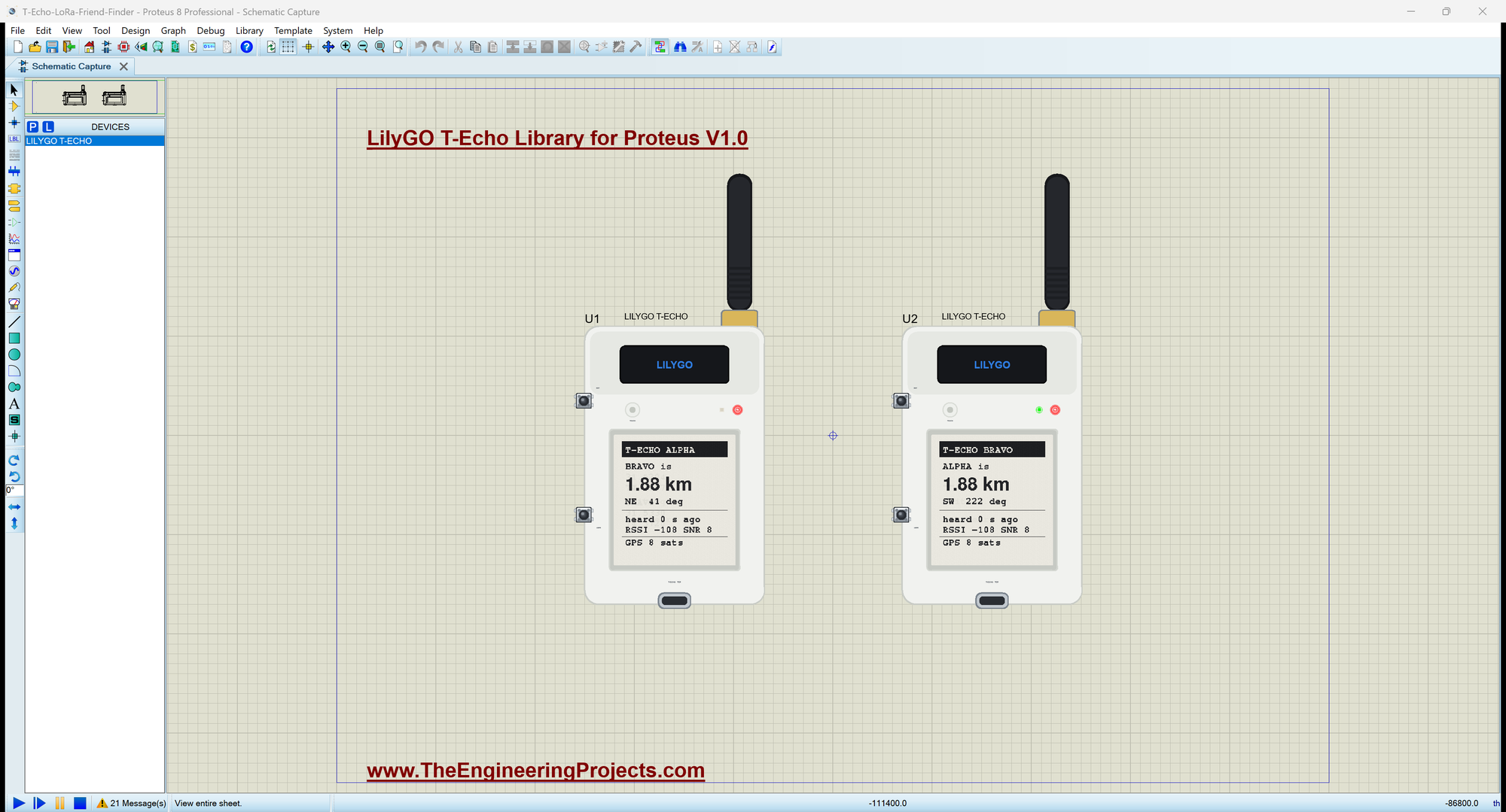
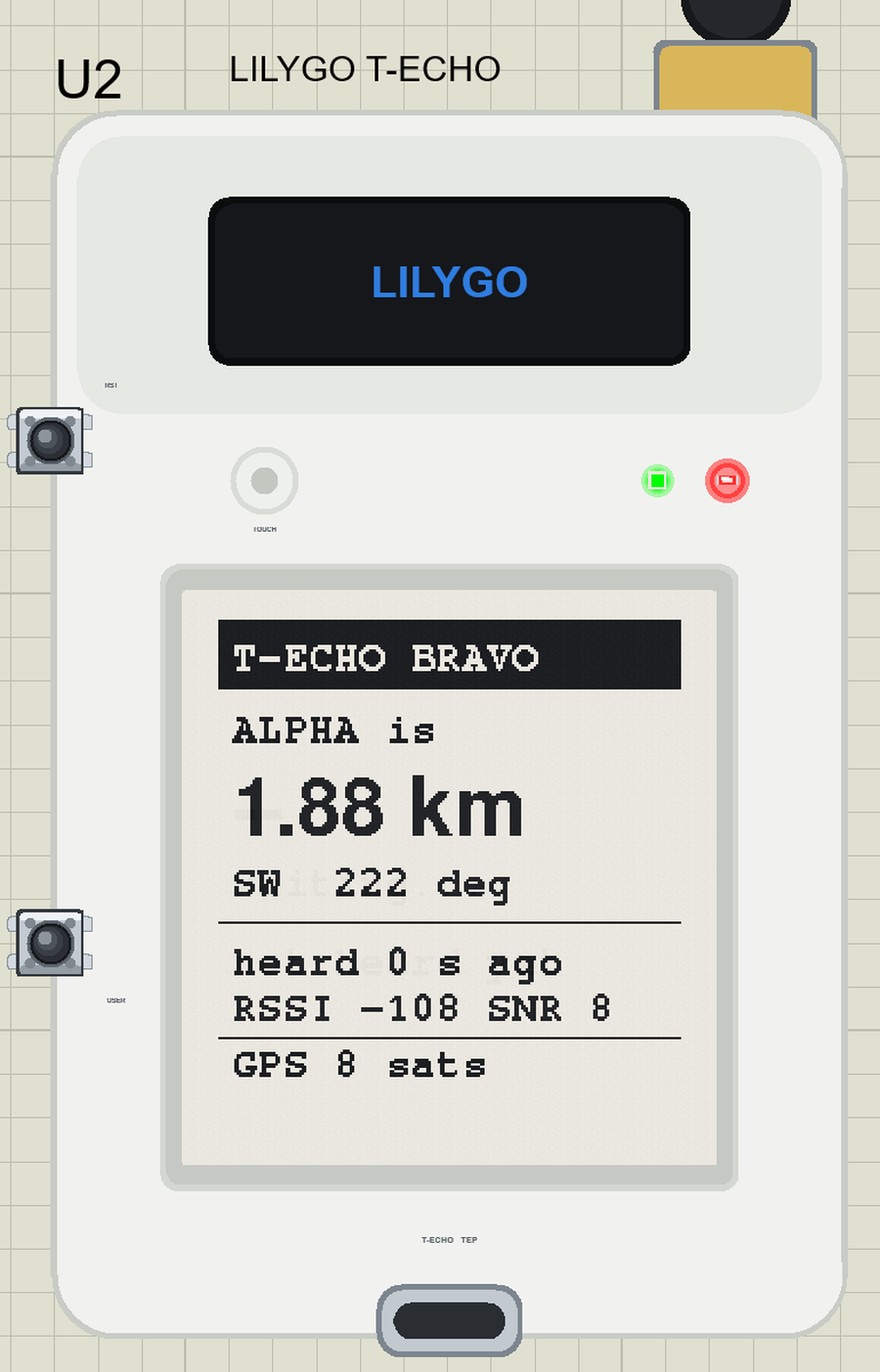
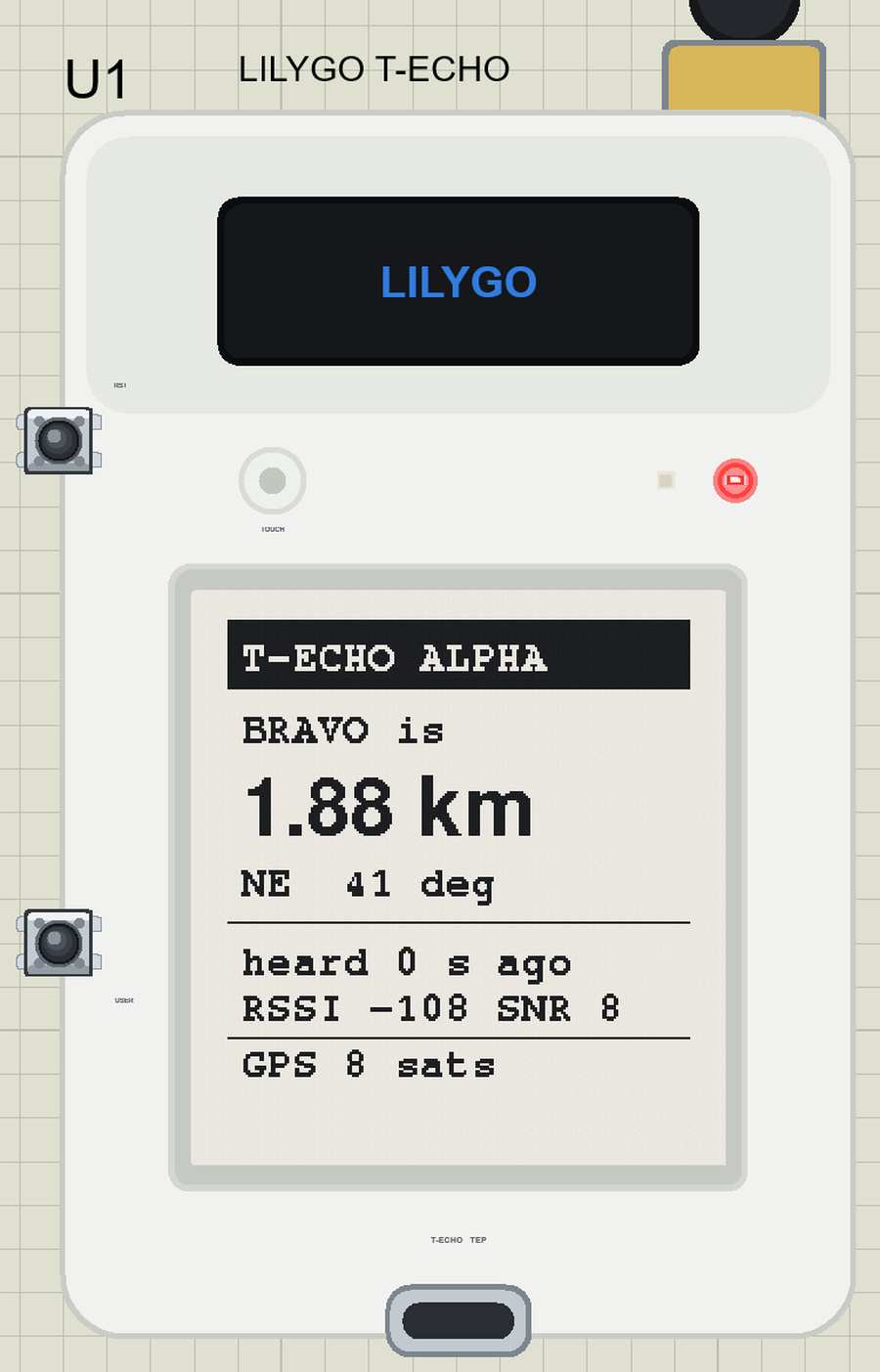
A few seconds later each e-paper shows the other node: 1.88 km, north-east for ALPHA and south-west for BRAVO, with the time since the last packet and its signal:
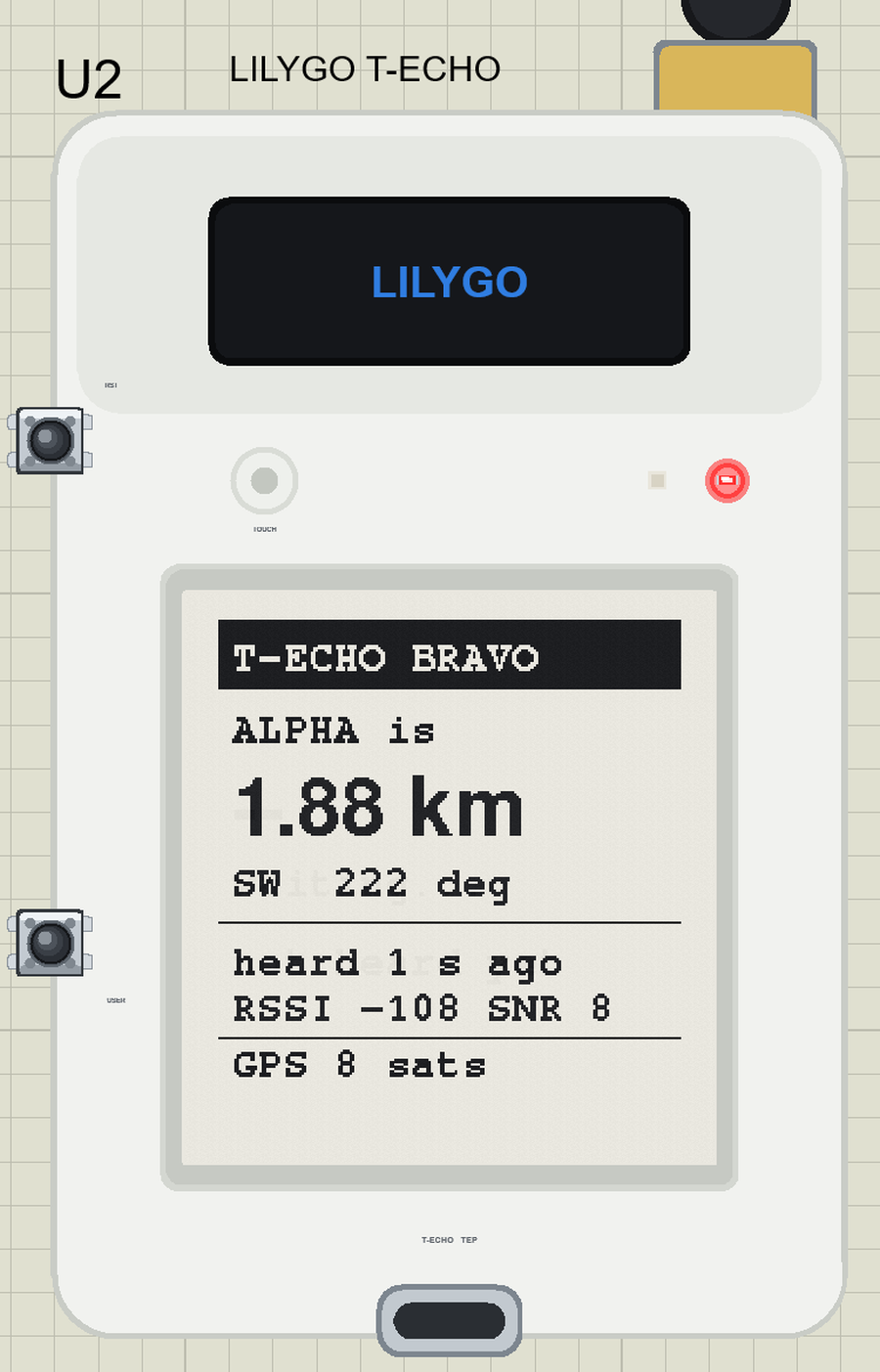
The Positions Page
Touch ALPHA's touch key: the e-paper changes to both positions, in a partial update without flashing:
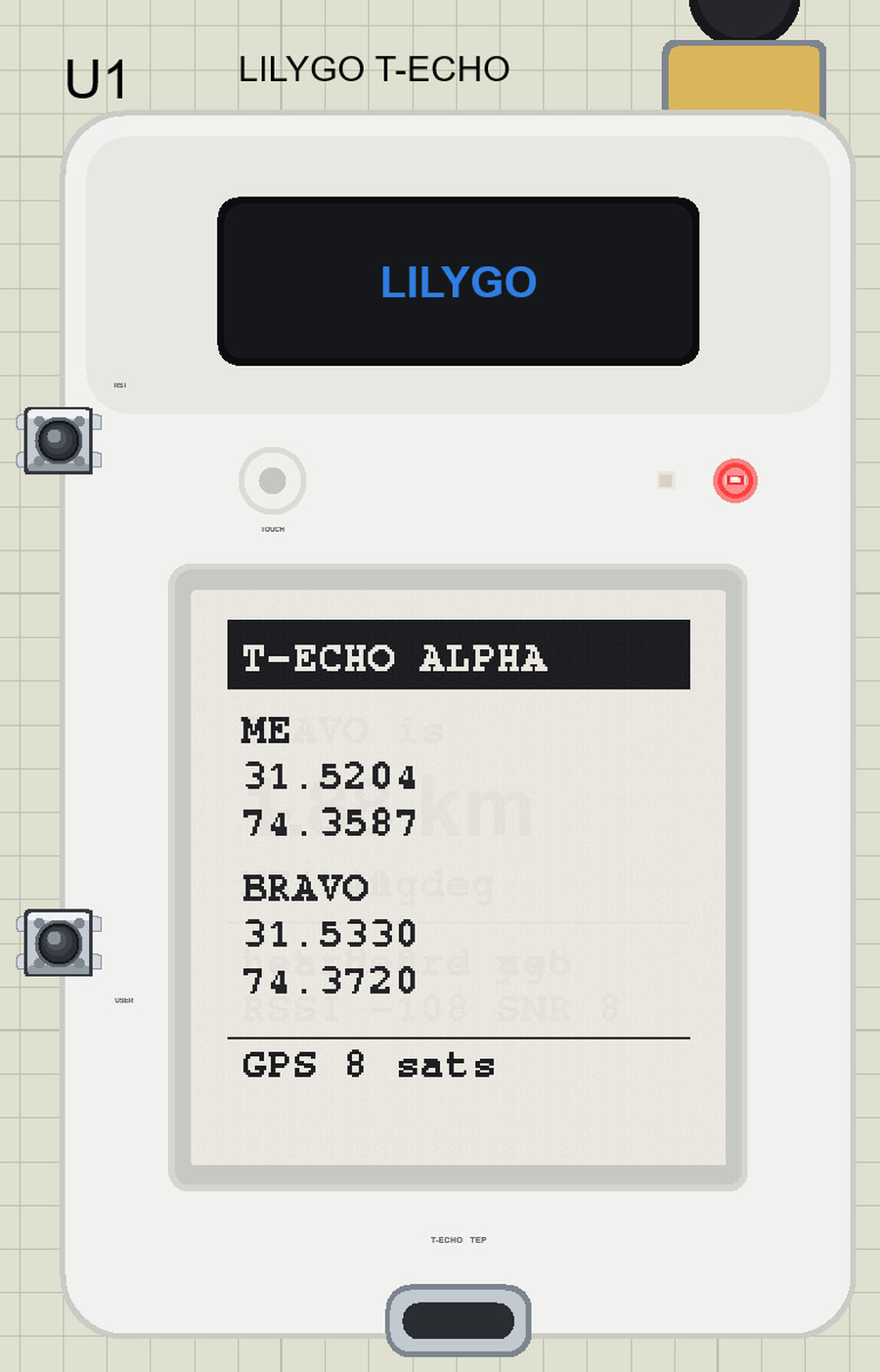
Here are both T-Echos while the simulation runs:
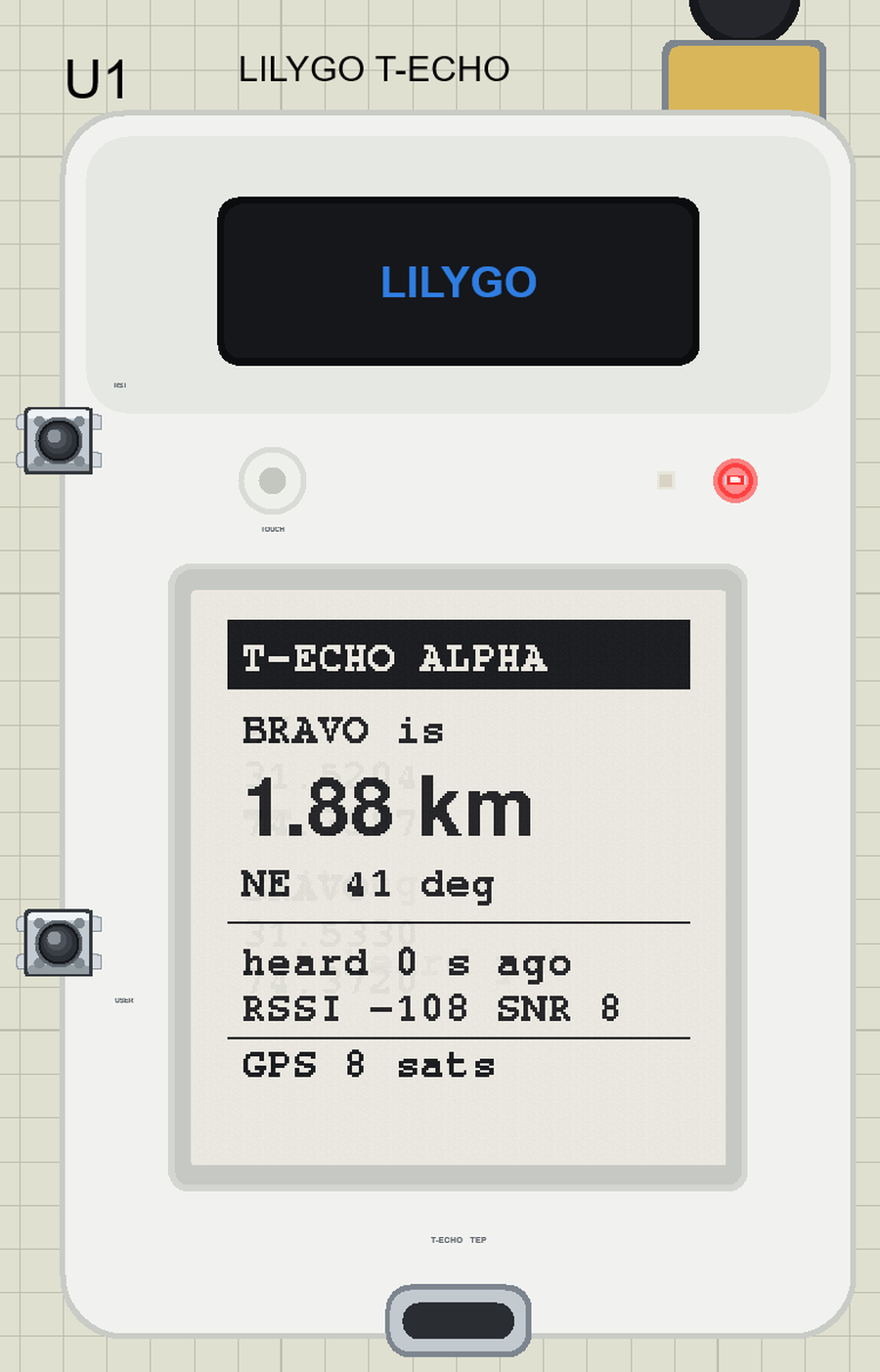
Send Now
Click BRAVO's user button: it sends its position at once, and ALPHA - back on the finder page with another touch - shows the fresh packet:
A Full Update
After seven partial updates the next one is full: the screen flashes black and white once and comes back perfectly clean:
>> ALPHA: TOUCH - the positions page
   ALPHA: the e-paper - a partial update
>> BRAVO: USER - the position now
>> BRAVO: sent B,31.53300,74.37199,8
<< ALPHA: BRAVO at 1.88 km NE (RSSI -108, SNR 8)
>> ALPHA: TOUCH - the finder page
   ALPHA: the e-paper - a partial update
<< ALPHA: BRAVO at 1.88 km NE (RSSI -108, SNR 8)
   ALPHA: the e-paper - a full update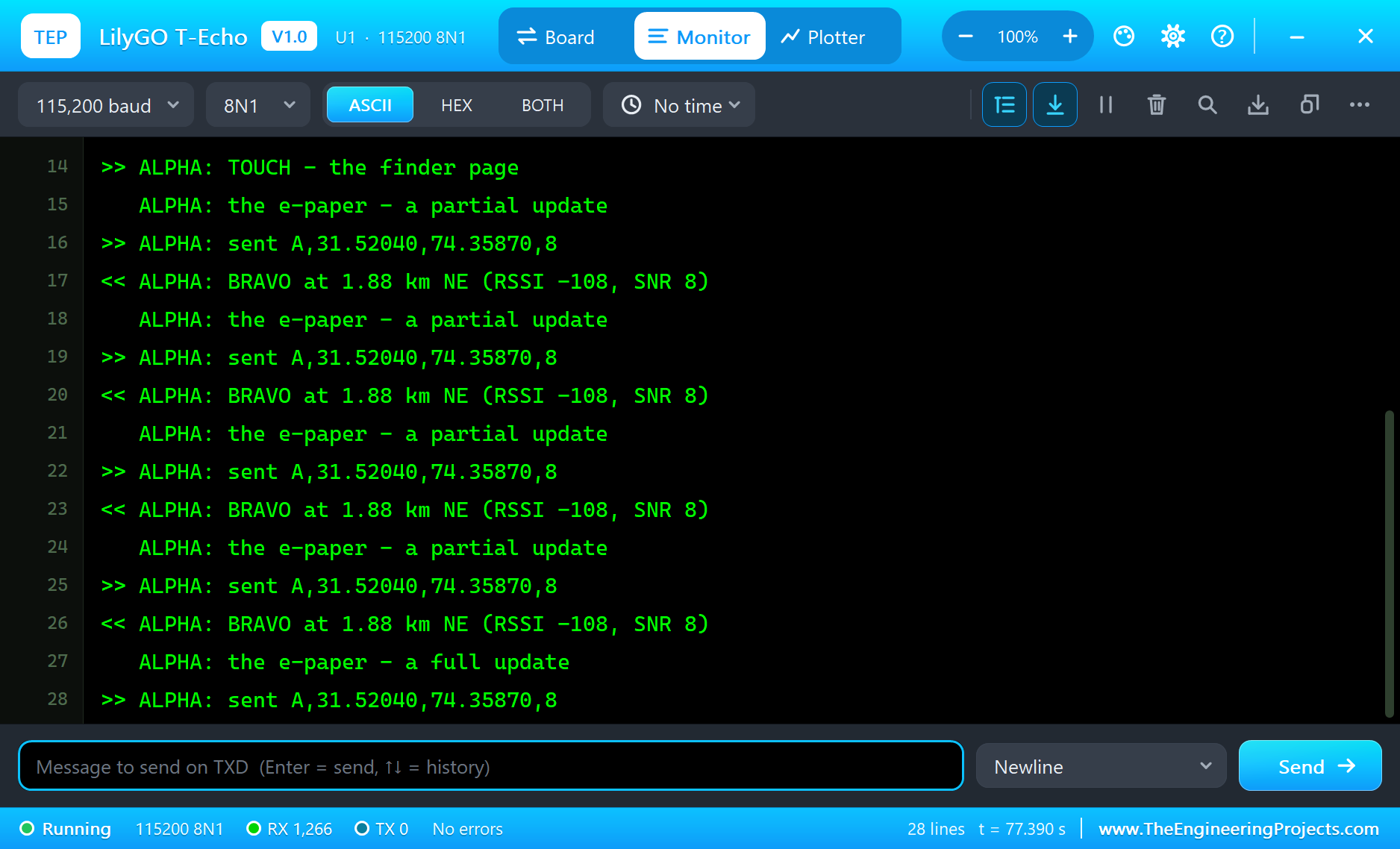
Why Partial and Full Updates?
A partial update drives only the pixels that change, so it is fast and calm - perfect for a number that changes every few seconds. Each one leaves a very faint trace of the old pixels, called ghosting; after many of them a full update, which drives every pixel through black and white, cleans the screen. The model shows both, including the slow build-up of ghosting if you never make a full update.
Ghosting You Can See
Look closely at the positions page above: behind the new text the old finder page is still faintly visible. That is ghosting, exactly as on a real panel after partial updates. It grows a little with every partial update, and the full update the sketch makes every eighth time wipes it away - the picture after the full update is clean again.
NMEA in a Few Words
A GPS module talks in NMEA sentences: lines of text that start with a dollar sign and end with a checksum. $GPGGA carries the time, the latitude and longitude as degrees and minutes with N / S and E / W, the fix quality (0 = no fix), the number of satellites, the precision and the altitude. $GPRMC adds the date, the speed and the heading. The sketch only needs GGA, so it skips every other sentence.
The Tricolour LED
The T-Echo's tricolour LED is three LEDs in one package - red, green and blue - each on its own pin and each lit when its pin is LOW. The demo flashes blue for a packet sent and green for a packet heard; red is free for your own alarms, and mixing the pins gives yellow, cyan or white.
The Touch Key
Above the screen the T-Echo has a touch key that works through the case: the pin reads HIGH while a finger is on it. Because it has no moving parts it suits a device that lives in a pocket or a bag. In the simulation you click it on the part, and the sketch catches the rising edge with an interrupt.
Airtime at SF9
The demo uses spreading factor 9 for more range: a position packet of about 22 bytes is on the air for roughly 0.2 s at 125 kHz. With a packet every 10 s each node uses about 2 % of the time - inside the 868 MHz duty-cycle rules only if you send less often, so a real tracker would send every 30 s or only when it moved.
Two Nodes, One Channel
LoRa has no carrier sense in this simple sketch: if both nodes sent at the same moment, both packets would be lost. That is why ALPHA sends 3 s and BRAVO 8 s after their GPS fix - 5 s apart every cycle. Larger groups use random delays or a mesh protocol such as Meshtastic, which waits for a free channel.
The Haversine Formula
On a sphere the shortest way between two points is an arc of a great circle. The haversine formula finds its length from the two latitudes and the difference in longitude, and it stays accurate for short distances like ours, where simpler formulas lose precision. With the Earth's mean radius of 6371 km the error is under half a percent - plenty for walking to a friend.
Battery Life of an E-paper Device
The e-paper draws power only while it updates, and the nRF52840 and the SX1262 can sleep between packets. That is why a T-Echo with its 850 mAh battery can run a mesh node for days. A battery sketch would update the screen only when something changes, put the GPS in standby and keep the radio listening in short windows.
Try It Yourself
- Draw an arrow on the e-paper that points to the friend.
- Add a third T-Echo "CHARLIE" and show the nearest friend.
- Send an SOS with the user button and show it in big letters.
- Give the GPS a speed and a heading and watch the distance change.
Ideas to Extend the Finder
- Log the friend's track and show the last few positions.
- Send only when the position changed by more than 20 m.
- Show the battery voltage of both nodes.
- Use Bluetooth LE to send the friend's position to a phone map.
Your Own Sketches
Write the sketch in the Arduino IDE with the board LilyGO T-Echo (TEP Proteus), use Sketch > Export Compiled Binary and set the part's PROGRAM property to the .hex. Give each T-Echo in the design its own sketch and its own GPS position.
Moving to a Real T-Echo
- Install the Adafruit nRF52 core and LilyGO's library folder, as LilyGO's T-Echo guide describes.
- Keep GxEPD2 with GxEPD2_154_D67 and the same pins; on the real board switch on the peripherals' power (pin 12) first.
- Keep the LoRa calls of SX126x-Arduino; fill hw_config with the T-Echo's pins as the demo does.
- Read the L76K on Serial1 at 9600 baud.
- Always connect the LoRa antenna before sending, and use a frequency that is legal where you are.
The positions, the formulas and the screen stay the same; on the real T-Echo the Adafruit core takes the place of ours.
Properties of the T-Echo
| Property | What it does |
|---|---|
| PROGRAM | the sketch: a .hex from TEP Boards for Proteus (the LilyGO T-Echo board) |
| MONITOR, BAUD, AUTOOPEN | the built-in serial monitor: on, its baud rate (115200), open at Run |
| LORADIST | the distance to the other LoRa boards: 10 m to 20 km (the demo: 2 km) |
| GPSLAT, GPSLON, GPSALT | the GPS position and altitude |
| GPSSPEED, GPSHEADING, GPSSATS, GPSFIX | a moving GPS, the satellites in use, the seconds to the first fix |
Troubleshooting
- The e-paper stays blank: call
display.init()and draw betweenfirstPage()andnextPage(); every page pass must draw the same picture. - A busy timeout: BUSY is pin 3 - use
GxEPD2_154_D67(30, 28, 2, 3). - Nothing arrives by LoRa: the same frequency, spreading factor, bandwidth and coding rate on both nodes; call
Radio.Rx(0)after every packet; do not let both nodes send at the same moment. - No GPS fix: read
SerialGPSat 9600 baud and look for$GPGGAwith a fix quality above 0. - A number goes wrong above 32767: int is 16 bits in the simulation - use long.
Limitations of the Simulation
- LoRa is point-to-point between TEP LoRa boards; LoRaWAN, Meshtastic and FSK are not modelled.
- The RTC, the BME280, NFC, the QSPI flash, the battery and the e-paper's front light are not modelled.
- Your sketch gets 8 KB of RAM in the simulation, and int is 16 bits there: draw the e-paper in pages.
- LilyGO and T-Echo are names of LILYGO, nRF52840 of Nordic Semiconductor ASA, SX1262 and LoRa of Semtech and Arduino of Arduino; this library is not made or endorsed by them or by Labcenter.
- Tested in Proteus 8.5 in November 2026 (the demo as shipped, about 78 s of simulation). Proteus 7 is not supported.
So, that was all about the LilyGO T-Echo Library for Proteus. I hope it helps you try your LoRa, GPS and e-paper ideas in a simulation before the devices are on your desk. If you have any questions, ask in the comments and I will help you out. Till the next tutorial, take care and have fun!