Hello friends, I hope you all are doing great. Today, I am going to share the nRF9160 Feather Library for Proteus, so you can run a cellular IoT simulation of Circuit Dojo's nRF9160 Feather. This small Feather board carries Nordic's nRF9160 - an Arm Cortex-M33 with an LTE-M and NB-IoT modem and GPS under one shield - so a project can send data and SMS from anywhere with mobile coverage. With this library the board runs your Arduino sketch in Proteus 8.5, talks to its modem with AT commands and sends and receives SMS.
nRF9160 Feather Library for Proteus
Latest version: V1.0 (November 2026, this tutorial)
Other new Arduino boards: UNO R4 WiFi · Nano ESP32 · UNO WiFi Rev2 · Nano 33 IoT · UNO Q · UNO R4 Minima · Nano Every · MKR WiFi 1010 · Nano RP2040 Connect · STM32 Black Pill · Nucleo-F401RE · STM32 Blue Pill · Teensy 4.1 · Arduino Due · Arduino Leonardo · Arduino Micro · BBC micro:bit V2 · GIGA R1 WiFi · MKR WAN 1310 · Nano 33 BLE Sense · XIAO nRF52840 Sense · RAK4631 WisBlock · Nano Matter · nRF52840 DK · nRF5340 DK · nRF9151 DK · nRF7002 DK · Nordic Thingy:53 · xG24 Dev Kit · xG24 Explorer Kit · Thunderboard BG22 · SiWx917 Dev Kit · B-L475E-IOT01A · NUCLEO-WB55RG · NUCLEO-WL55JC1 · NUCLEO-H743ZI2 · SAM R21 Xplained Pro · FRDM-MCXN947 · Portenta H7 · LP-CC2652R7 · PSoC 6 WiFi-BT · Feather nRF52840 · Thingy:91 X · xG26 Dev Kit · nRF52 DK · nRF52833 DK · nRF52840 Dongle · nRF5340 Audio DK · nRF54H20 DK · nRF54LM20 DK · nRF9160 DK · nRF9161 DK · nRF21540 DK · Thingy:52 · Thingy:91 · ItsyBitsy nRF52840 · SparkFun Pro nRF52840 Mini · Adafruit CLUE · XIAO nRF54L15 · Heltec T114
RF modules: nRF24L01 · nRF24L01 PA LNA · CC1101 · RFM69HCW · HC-12 · 433MHz RF · XBee
Temperature and weather sensors: DHT11 / DHT22 · DS18B20 · BME280 · BMP280 · SHT31 · AHT20 · BME680 · MLX90614 · MAX6675
Helping Tools
- Laptop WiFi Monitor: a laptop on the Wi-Fi of your design: a browser, a TCP / UDP terminal and ping
- Mobile WiFi Monitor: a smartphone that opens the pages of your board and sends it commands
- Serial Monitor Advance: a serial terminal window for the UART of your board
For the demo we built a cellular tank level alarm for a water tank on a farm, far from any Wi-Fi. A float sender reports the level; when the tank runs low the board sends a LOW LEVEL SMS, it counts the water used, and the owner asks for a report by SMS.
NOTICE: Proteus has no nRF9160 model, so our team has put a lot of effort into building this board ourselves: the pins, the blue LED, the MODE button and the cellular modem with SMS are all our own model, and your sketch compiles with our free TEP Boards for Proteus add-on. Your feedback is the fuel that keeps us going, so please tell us what you think in the comments below. And if our free libraries help you, you can buy us a coffee. So, let's get started with the nRF9160 Feather Library for Proteus:
What is the nRF9160 Feather?
The nRF9160 Feather is Circuit Dojo's development board for Nordic's nRF9160 SiP, in the popular Feather size: 50.8 x 22.86 mm, the same outline and pin layout as Adafruit's Feather boards. Besides the SiP it carries a USB-C port for serial and firmware updates, a 3.3 V buck regulator, a Li-Po charger with a JST socket, 4 MB of SPI flash, an accelerometer, a low-power real-time clock, two U.FL sockets for the LTE and GPS antennas and a nano-SIM holder on the back. It is designed for battery projects: in standby it draws under 10 microamps.
| Part | The real nRF9160 Feather | In the library |
|---|---|---|
| SiP | nRF9160: Cortex-M33, 1 MB flash, 256 KB RAM, LTE-M / NB-IoT, GPS | your Arduino sketch, the modem on SerialModem |
| Cellular | LTE-M and NB-IoT with a nano-SIM, U.FL antenna | registration and SMS (text mode) |
| GPS | an active antenna on the second U.FL | GNSS answers from the modem |
| LED and buttons | the blue LED on D7 (P0.03), RESET and MODE (P0.12) | the blue LED lit when LOW, MODE clickable |
| On the board | LIS2DH accelerometer, PCF85063A RTC, 4 MB W25Q32JV flash | drawn |
| Power | USB-C, a Li-Po on the JST socket, a buck with under 1 microamp quiescent current | drawn |
| Size | 50.8 x 22.86 mm, 16 + 12 Feather pins | drawn at real size |
Cellular IoT in a Few Words
LTE-M and NB-IoT are the low-power branches of 4G. LTE-M carries more data and moves between cells, which suits trackers; NB-IoT sends small messages from deep inside buildings or far out in a field, which suits meters and sensors. Both run on ordinary mobile networks, so a device works wherever there is coverage - no Wi-Fi and no gateway. SMS is still the simplest way to reach a person's phone.
Talking to the Modem
The sketch talks to the modem with AT commands on SerialModem: AT+CEREG? asks whether the modem is registered on the network, AT+CMGF=1 chooses text-mode SMS and AT+CMGS sends one. The modem answers with lines such as +CEREG: 0,1 - registered at home. On the real chip Nordic's modem library passes the same kind of commands to the modem.
The Feather and the DK
Nordic's own nRF9160 DK is a large kit with Arduino Uno headers and a board controller; the Feather puts the same SiP on a board small enough to go into the final product. If you want the big kit, see our nRF9160 DK Library for Proteus - the two boards share the modem, so a sketch moves from one to the other with only the pin names changed.
A simulation lets you try the whole flow before the board and a SIM are on the desk: the sensor, the modem's answers and the SMS. When the sketch works in the Proteus simulation, the real board only has to confirm it.
Features of the nRF9160 Feather Library for Proteus
- The board as it looks: the green Feather with the nRF9160 SiP under its shield, USB-C, the JST socket, RESET and MODE, the blue LED, the flash, the accelerometer, the RTC and the two U.FL sockets, at its real size, with our small TEP signature.
- Your sketch: a .hex for "Circuit Dojo nRF9160 Feather (TEP Proteus)" with A0 to A5, D2 to D8, SPI, Wire, the blue LED and MODE; the pin numbers are the nRF9160's own GPIO numbers.
- The modem: AT commands on SerialModem - registration, SMS in text mode and GNSS.
- The Phone window: the owner's phone receives and sends SMS, with four quick keys.
- A complete package: about 4.4 MB with the part, the add-on, the potentiometer, the LED, the resistor and the demo, without the source code of the models.
The nRF9160 Feather in Proteus Simulation
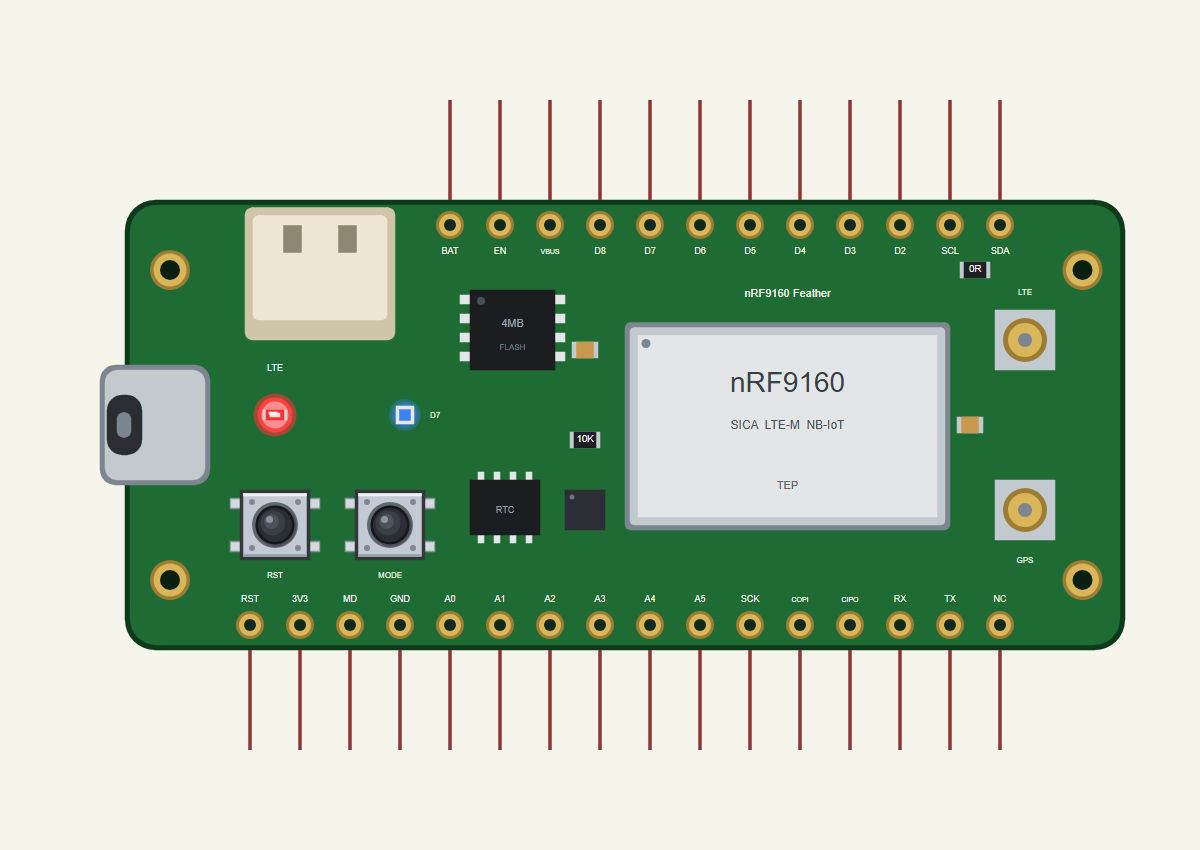
Search NRF9160 FEATHER in Pick Devices; the device NRF9160 FEATHER is in TEPFEATHER9160.LIB (Microprocessor ICs, Cellular Boards), with the prefix U. The USB-C port opens the serial monitor, a click on the SiP the Phone window.
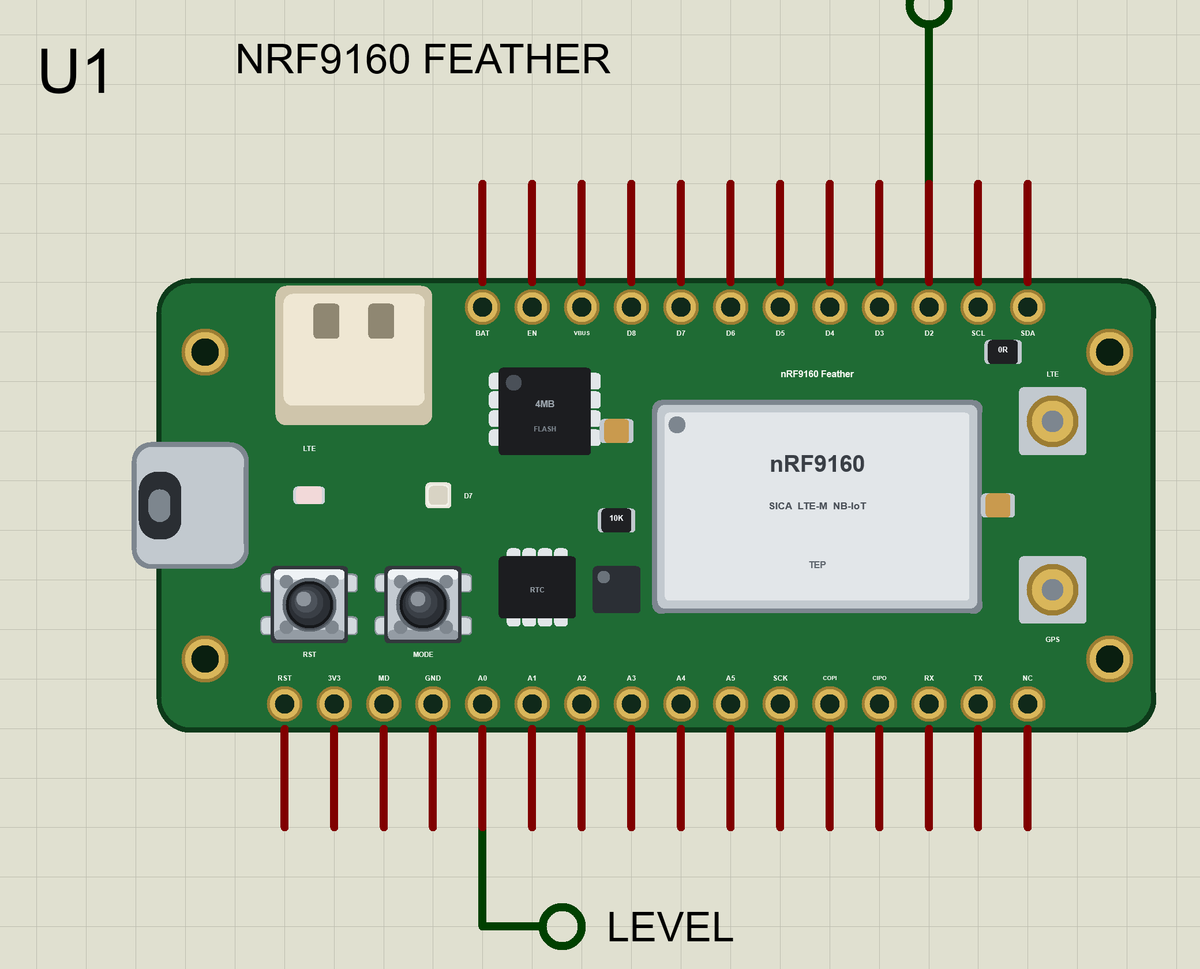
The Pins
| Pins | What the library does with them |
|---|---|
| A0 to A5 (13 to 18) | analogRead 0 to 1023 for 0 to 3.3 V, or GPIO |
| D2 to D8 (29, 30, 0, 1, 2, 3, 4) | GPIO, PWM, interrupt; D7 is also the blue LED, lit when LOW |
| SCK, COPI, CIPO | SPI (19, 21, 22) |
| SDA, SCL | Wire (26, 27) |
| RX, TX | GPIO (23, 24) |
| MD (12) | the MODE button's pin, LOW while MODE is held |
| SerialModem, MODEM_ON | the modem's AT interface; HIGH starts the modem |
Download nRF9160 Feather Library for Proteus
Click the button below to download nRF9160-Feather-Library-for-Proteus-v1.0.zip (about 4.4 MB, without the source code of the models):
nRF9160 Feather Library for Proteus V1.0- README.txt: installation, the demo, the pins, the properties, troubleshooting and the limits.
- Proteus Library Files:
TEPFEATHER9160.LIB, the potentiometer, the LED and the resistor (TEPPOT.LIB,TEPLED5MM.LIB,TEPRESISTOR.LIB) and the phone and laptop libraries for your own designs. - Proteus Model Files:
TEPNET.DLL,TEPPOT.DLL,TEPLED5MM.DLLandTEPRESISTOR.DLL. - Arduino Code: the demo sketch and the TEP Boards for Proteus add-on 1.97.0.
- Proteus Simulation: the demo project, its HEX file and copies of the DLLs.
No Proteus yet? Read How to Download and Install Proteus 7 and 8. New to libraries? Follow How to Install a New Library in Proteus.
How to Install nRF9160 Feather Library for Proteus
- Close Proteus and extract the whole zip file, for example to your Desktop.
- Copy the files from Proteus Library Files into the LIBRARY folder of Proteus.
- Copy the DLLs from Proteus Model Files into the MODELS folder, replacing an older
TEPNET.DLL. - Delete
TEPFEATHER9160.IDXfrom the LIBRARY folder if it is there. - For your own sketches, copy Arduino Code\TEP Boards for Proteus\hardware into your Arduino sketchbook (Documents\Arduino) and restart the Arduino IDE; the board is Circuit Dojo nRF9160 Feather (TEP Proteus).
- Start Proteus, press P and search for NRF9160 FEATHER.
Demo: a Cellular Tank Level Alarm in Simulation
Farms, holiday homes and remote pumping stations store water in tanks that nobody looks at every day. When a tank runs dry the animals go thirsty or a pump runs empty, and a refill truck needs a day's notice. There is rarely Wi-Fi next to a tank, so a cellular board that texts the owner is the natural choice.
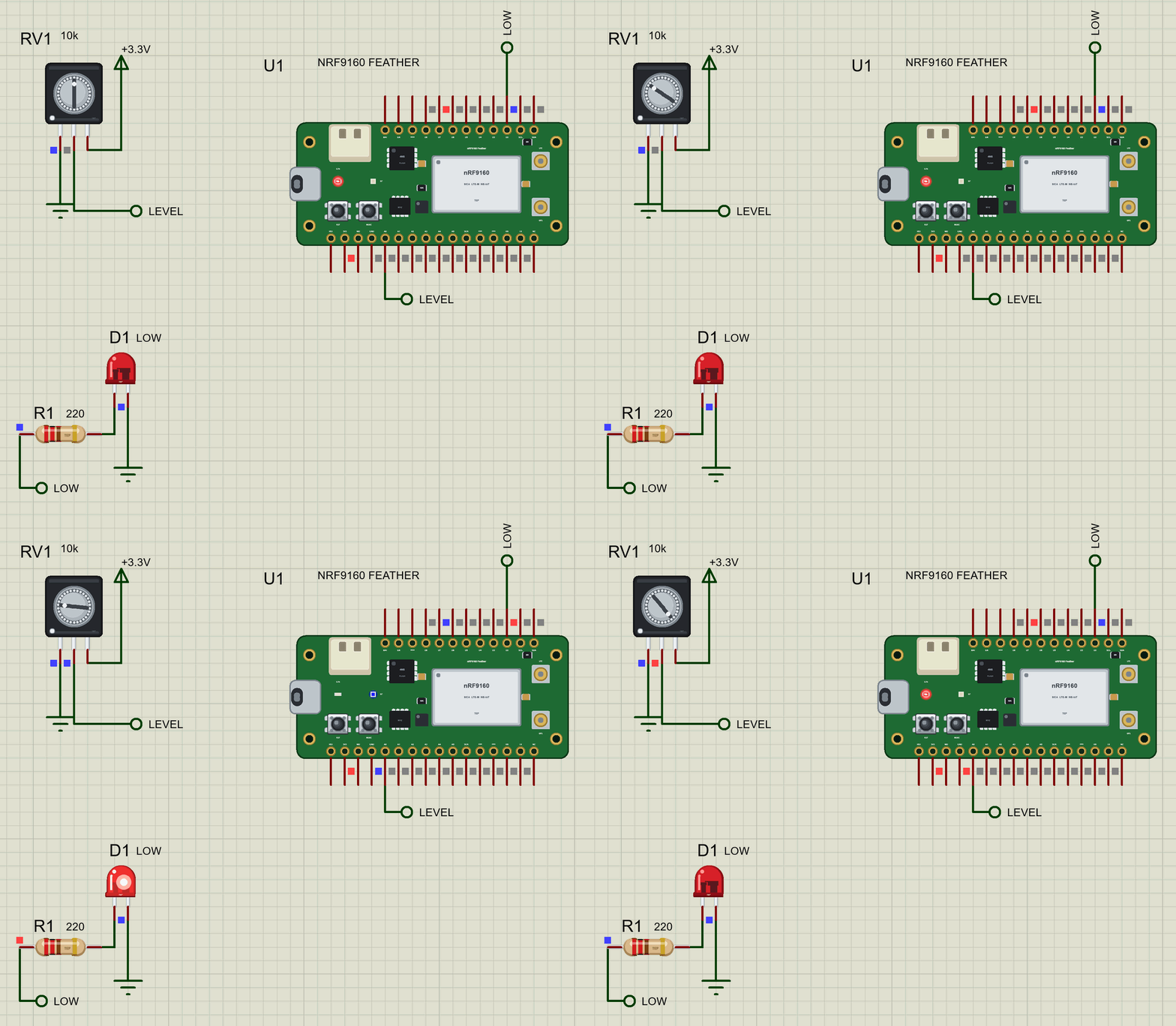
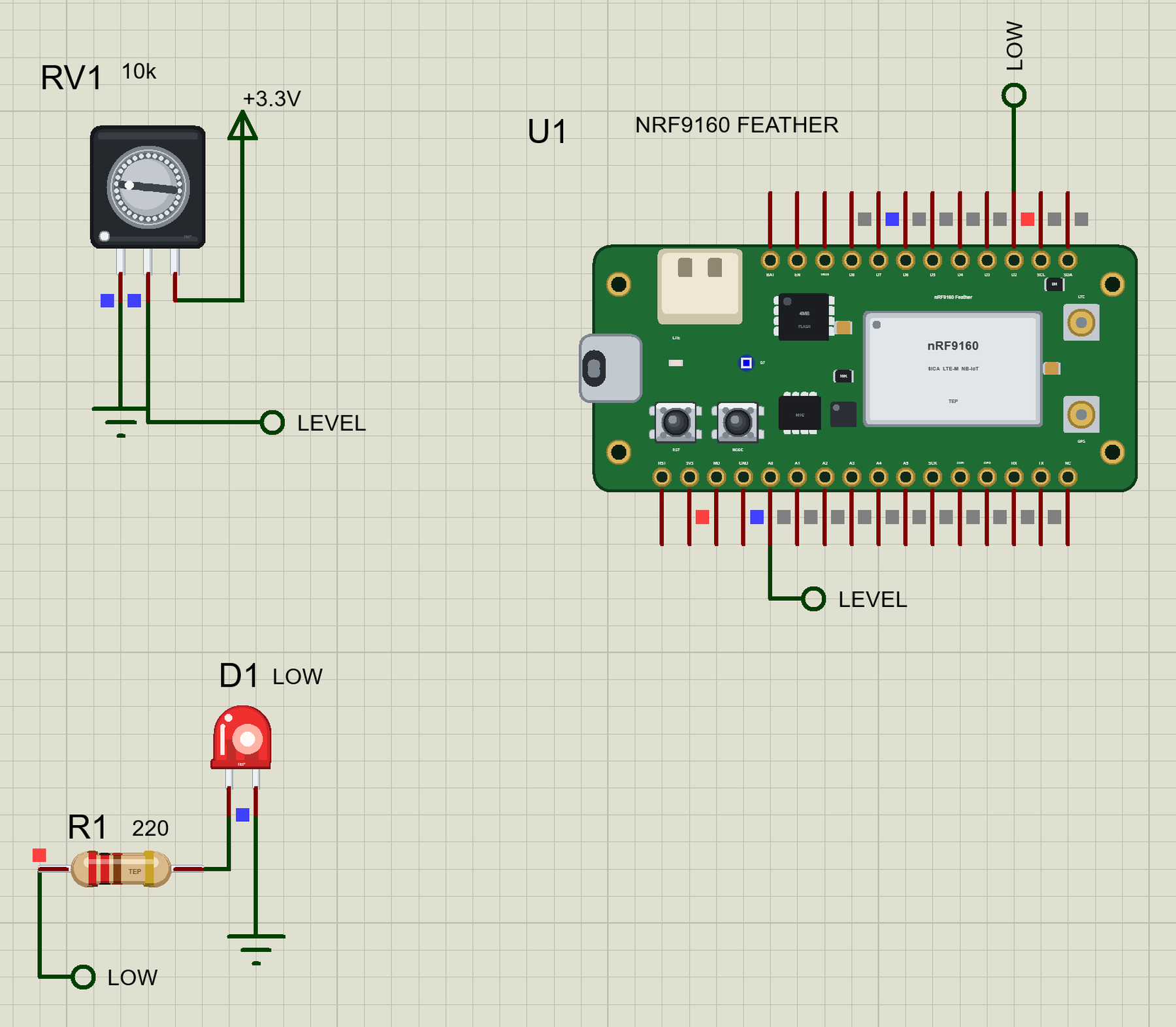
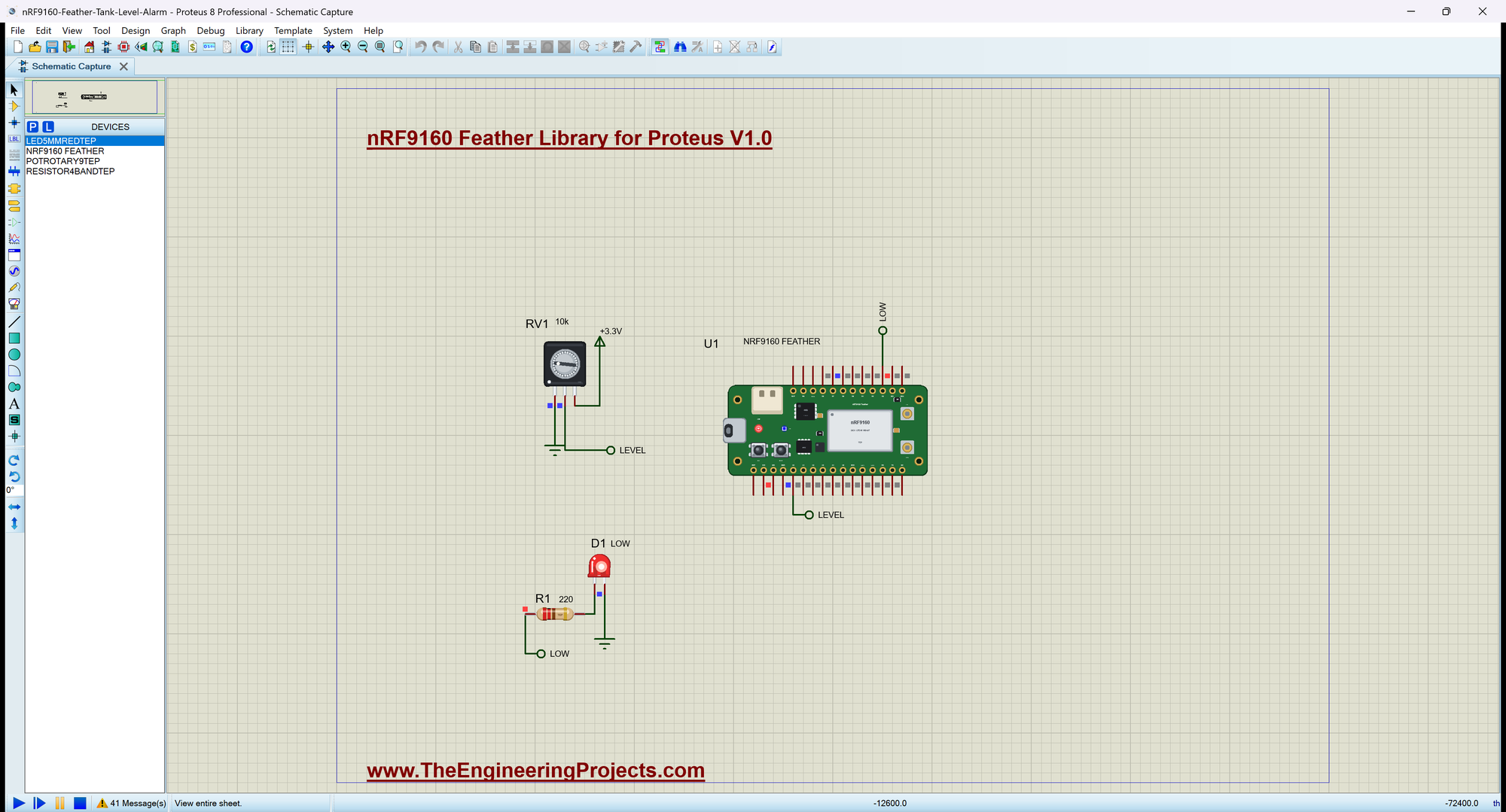
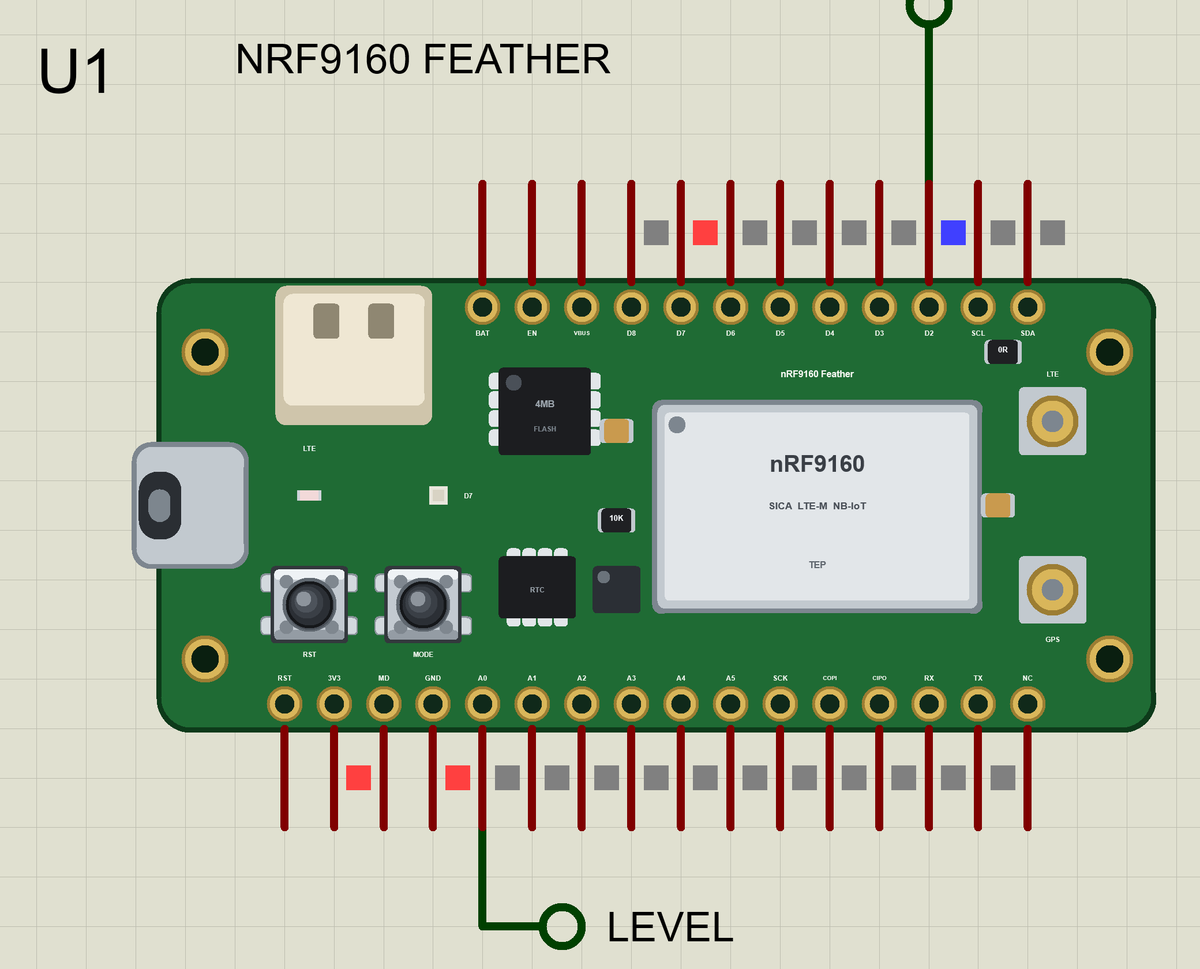
Open nRF9160-Feather-Tank-Level-Alarm.pdsprj. U1 runs Feather9160_Tank_Alarm.hex. RV1, the 10k potentiometer from our Potentiometer Library for Proteus, is the float sender: its ends go to +3.3V and ground, the wiper to A0. D1, a red LED from our 5mm LED Library for Proteus, is the LOW lamp on D2 through R1, 220 ohm from our Resistor Library for Proteus. The owner's phone is the board's own Phone window.
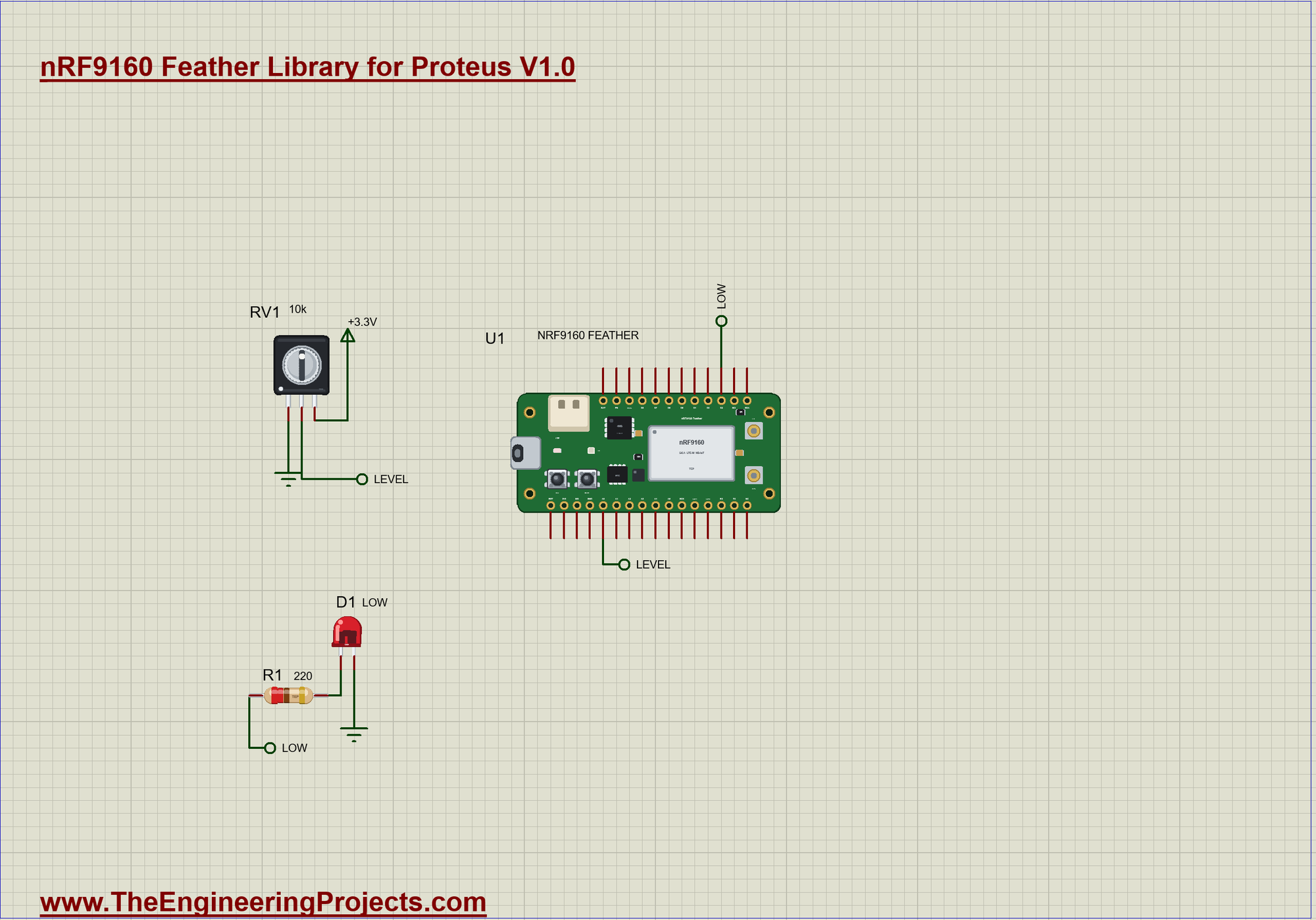
| Light / key | What it means |
|---|---|
| the LTE LED | the modem's network light: it changes its blink when registered |
| the LOW lamp and the blue LED | the tank is below 25 % |
| a short blue flash | an SMS is going out |
| STATUS, USAGE, RESET, HELP | the Phone window's quick keys = the SMS commands |
| MODE | the status by SMS |
From the Float to a Level
readLevel() turns the reading on A0 into 0 to 100 %, rounded to the nearest percent. With a 1000 L tank every percent is 10 litres:
int readLevel() {                                           // the wiper's voltage as 0 .. 100 % (rounded)
  const int raw = analogRead(LEVEL_PIN);
  return (int)(((long)raw * 100 + 511) / 1023);
}
Low, OK and the Water Used
checkLevel() runs twice a second. Every drop of the level adds to the litres used, a jump of 10 % or more is a refill, and the alarm has two limits - LOW below 25 %, OK again only above 35 %:
void checkLevel() {
  const int now = readLevel();
  if (now == level) return;
  if (level >= 0) {
    if (now < level) usedL += (long)(level - now) * TANK_L / 100;   // the water used
    Serial.print(F(">> Level: ")); Serial.println(litres(now));
    if (now - level >= 10) {                                // a refill
      Serial.print(F(">> Refilled: +")); Serial.print((long)(now - level) * TANK_L / 100); Serial.println(F(" L"));
      sendSms(owner, "Refilled: " + litres(now));
    }
  }
  level = now;
  if (!low && level < LOW_PCT) {
    low = true;
    digitalWrite(LOW_LAMP, HIGH); blue(true); flashUntil = 0;
    Serial.print(F(">> LOW LEVEL: ")); Serial.println(litres(level));
    sendSms(owner, "LOW LEVEL: " + litres(level) + " - refill soon");
  } else if (low && level > OK_PCT) {
    low = false;
    digitalWrite(LOW_LAMP, LOW); blue(false);
    Serial.print(F(">> Level OK again: ")); Serial.println(litres(level));
    sendSms(owner, "Level OK again: " + litres(level));
  }
}
Sending an SMS
sendSms() uses the modem's text mode: AT+CMGS with the number, the modem's > prompt, the text and Ctrl+Z to send it. The blue LED flashes while it goes out:
void sendSms(const String &to, const String &text) {
  if (!registered) { Serial.println(F("(no network: the SMS waits)")); return; }
  if (!low) { blue(true); flashUntil = millis() + FLASH_MS; }   // a flash of the blue LED: an SMS is going out
  SerialModem.print(F("AT+CMGS=\""));
  SerialModem.print(to);
  SerialModem.println(F("\""));
  unsigned long end = millis() + 2000;
  while (millis() < end && SerialModem.read() != '>') { }   // the modem's prompt
  SerialModem.print(text);
  SerialModem.write(26);                                    // Ctrl+Z ends the text
  Serial.print(F("SMS to ")); Serial.print(to); Serial.print(F(": ")); Serial.println(text);
  sentSms++;
  delay(200);
}
Commands from the Phone
A new SMS arrives as a +CMT line with the sender, followed by the text. command() acts on the text and answers the sender:
void command(const String &from, String text) {
  text.trim(); text.toUpperCase();
  Serial.print(F("SMS from ")); Serial.print(from); Serial.print(F(": ")); Serial.println(text);
  if (text == "STATUS") sendSms(from, status());
  else if (text == "USAGE") sendSms(from, "Used " + String(usedL) + " L since the last reset, now " + litres(level));
  else if (text == "RESET") {
    usedL = 0;
    Serial.println(F(">> The usage counter is reset"));
    sendSms(from, "Usage counter reset, now " + litres(level));
  }
  else sendSms(from, "Commands: STATUS, USAGE, RESET, HELP");
}
Starting the Modem
startModem() switches the modem on, waits for its OK, turns the echo off, chooses text-mode SMS and asks for new messages straight away:
void startModem() {
  pinMode(MODEM_ON, OUTPUT);
  digitalWrite(MODEM_ON, HIGH);                             // the modem starts (on the real chip: nrf_modem_lib_init())
  SerialModem.begin(115200);
  Serial.println(F("Starting the nRF9160 modem"));
  while (!sendAT("AT", 1000)) { }                           // it answers once it has started
  sendAT("ATE0", 500);
  sendAT("AT+CMGF=1", 500);                                 // SMS as text
  sendAT("AT+CNMI=2,2,0,0,0", 500);                         // a new SMS comes straight to the AT interface
  Serial.println(F("Modem ready: SMS on, waiting for the network"));
}
Run the Simulation
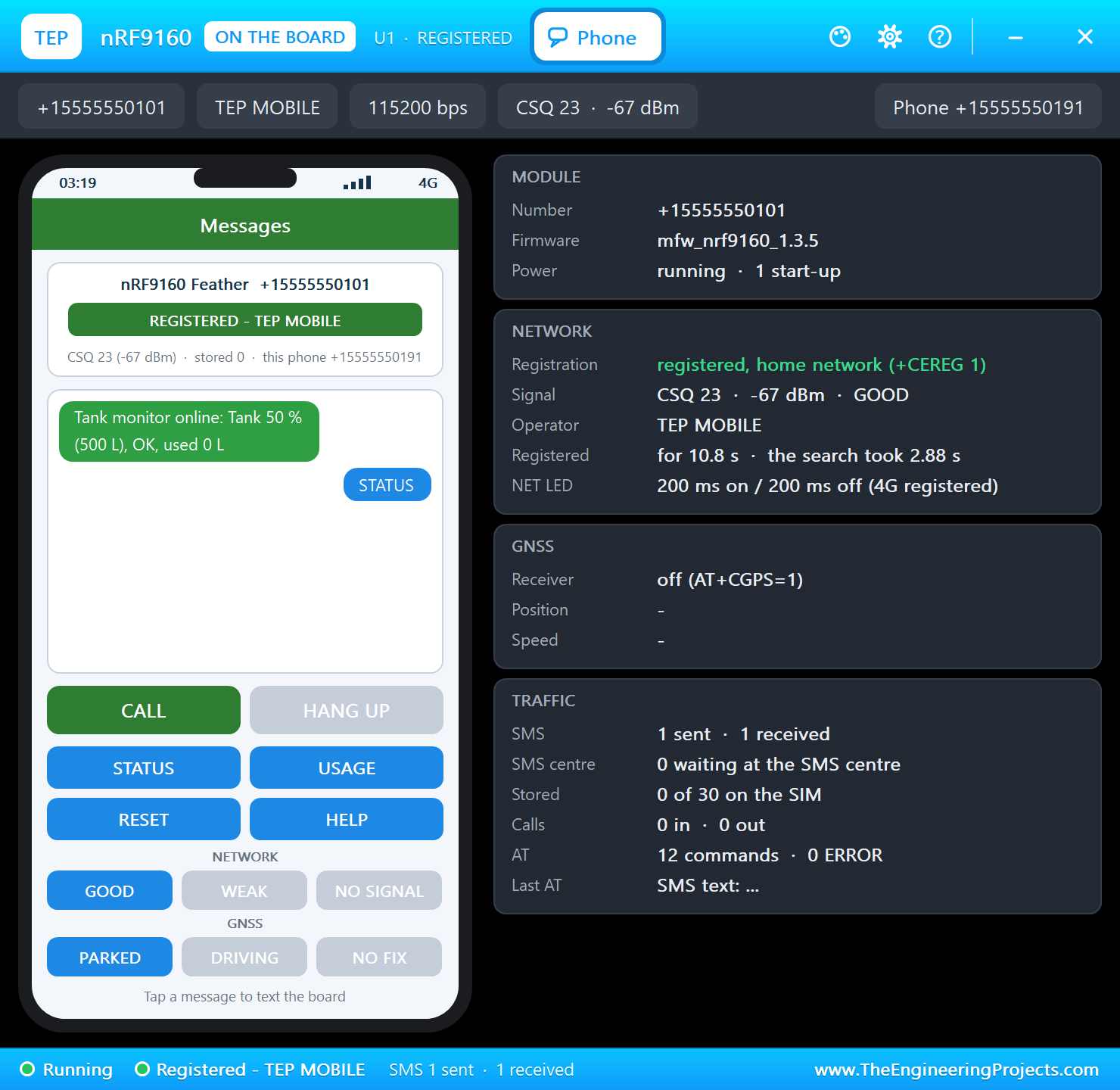
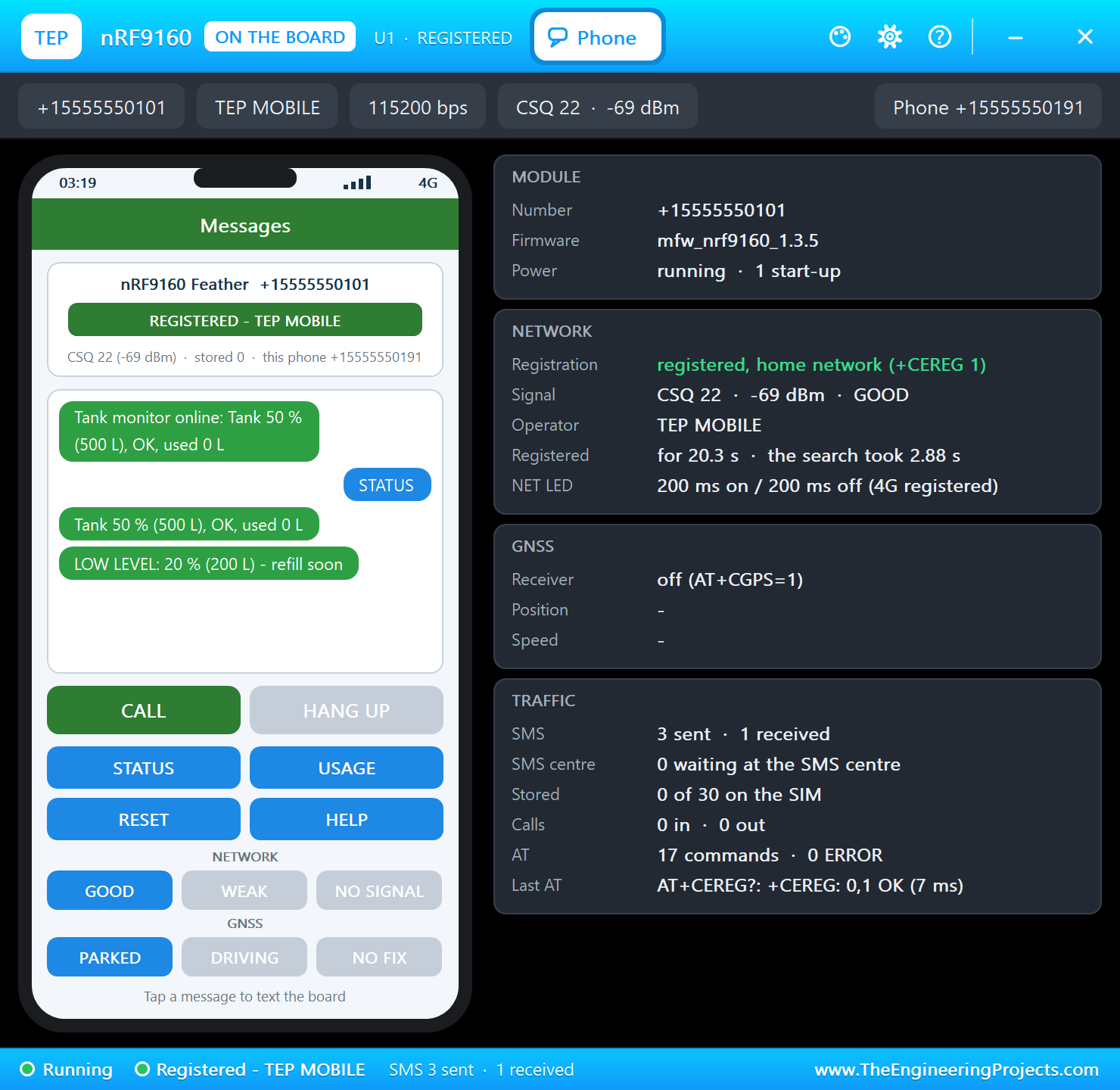
Press Run. The serial monitor - the same window as our TEP Serial Monitor Advance for Proteus - shows the modem starting; the LTE LED blinks while it searches, and once it is registered the board sends "Tank monitor online":
nRF9160 Feather Cellular Tank Level Alarm - The Engineering Projects
Tank: 50 % (500 L)
Starting the nRF9160 modem
Modem ready: SMS on, waiting for the network
SMS: STATUS, USAGE, RESET, HELP   MODE = the status by SMS
Status: LTE searching, Tank 50 % (500 L), OK, used 0 L, SMS sent 0
LTE: registered on the network
SMS to +15555550191: Tank monitor online: Tank 50 % (500 L), OK, used 0 L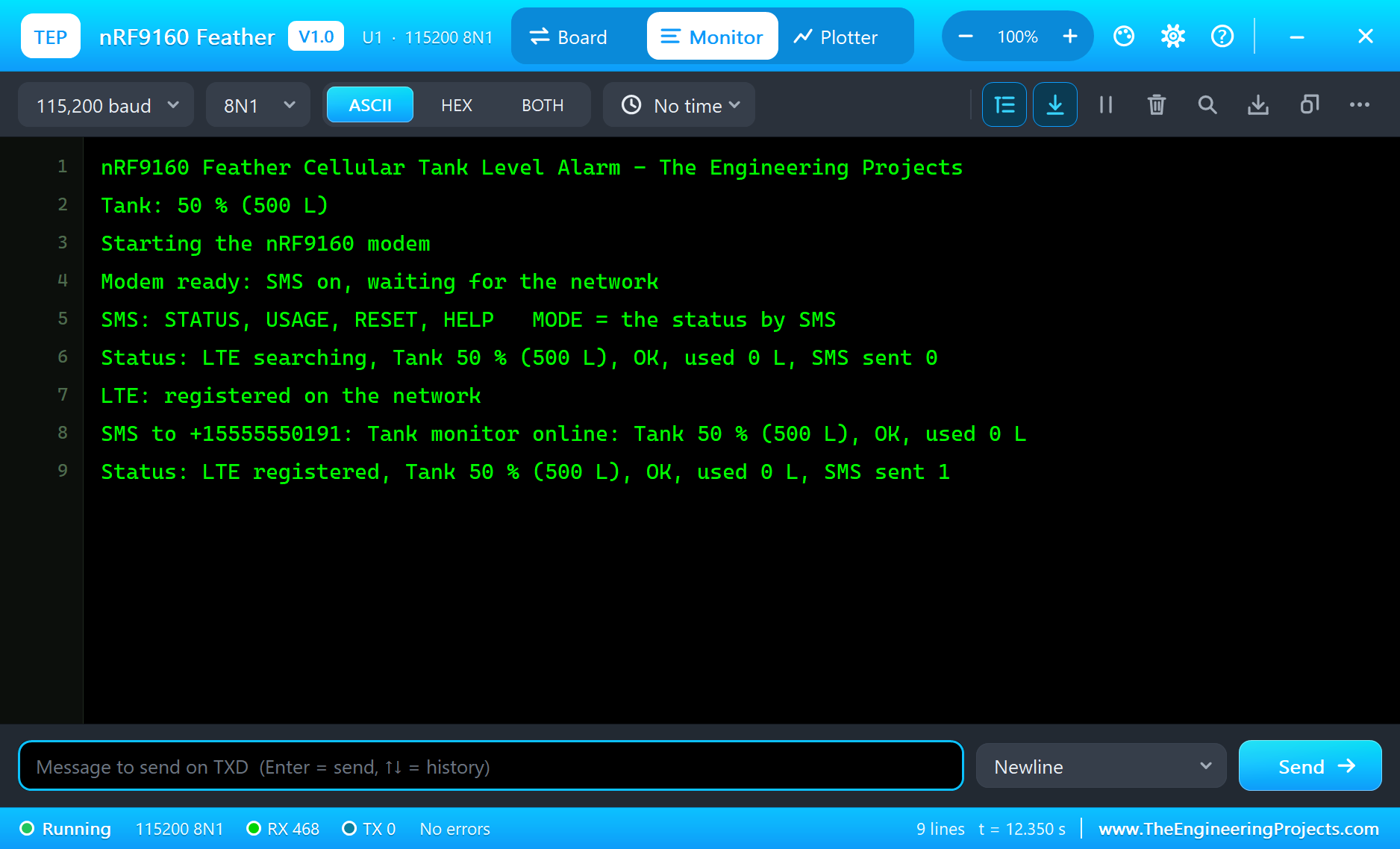
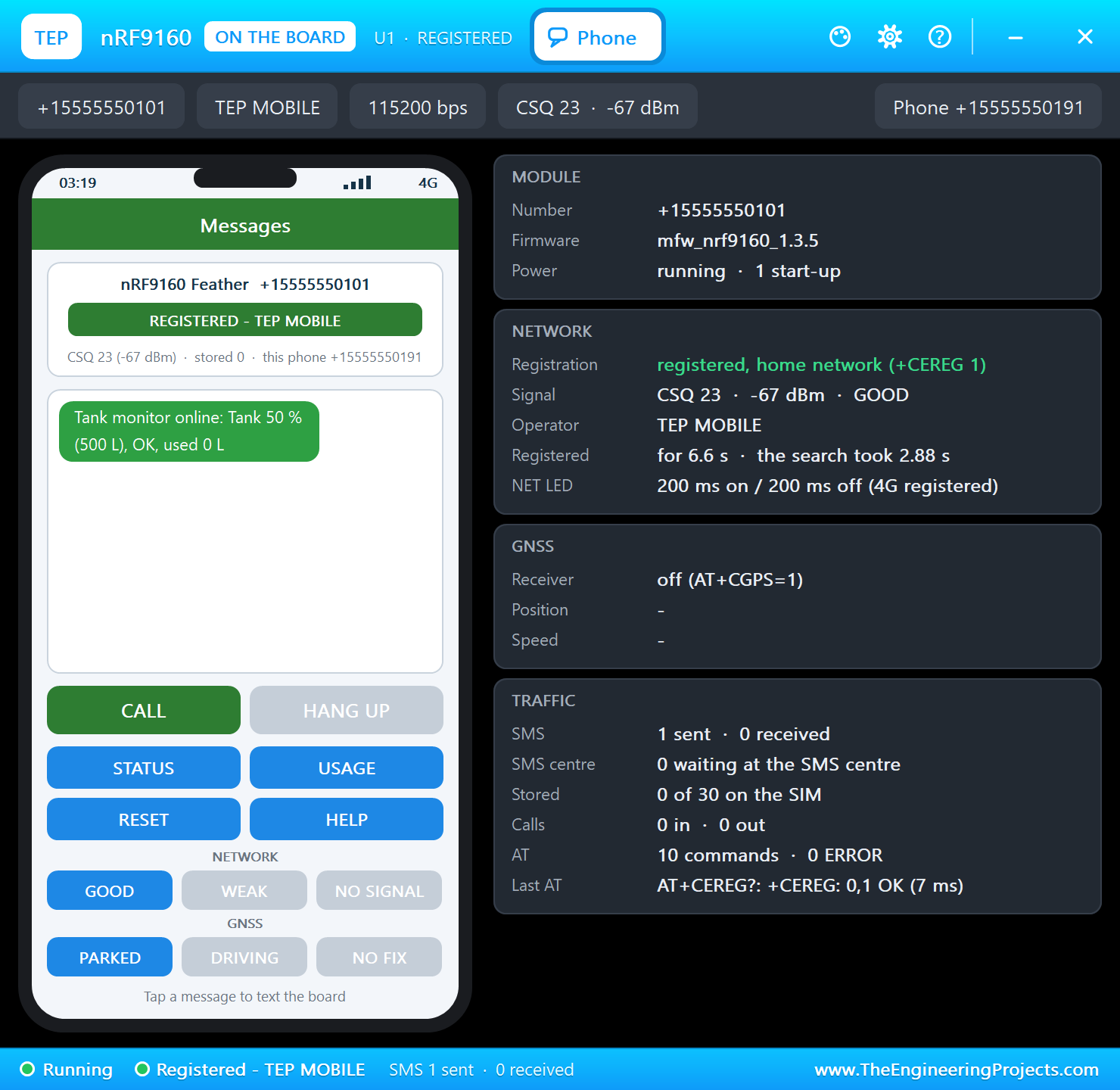
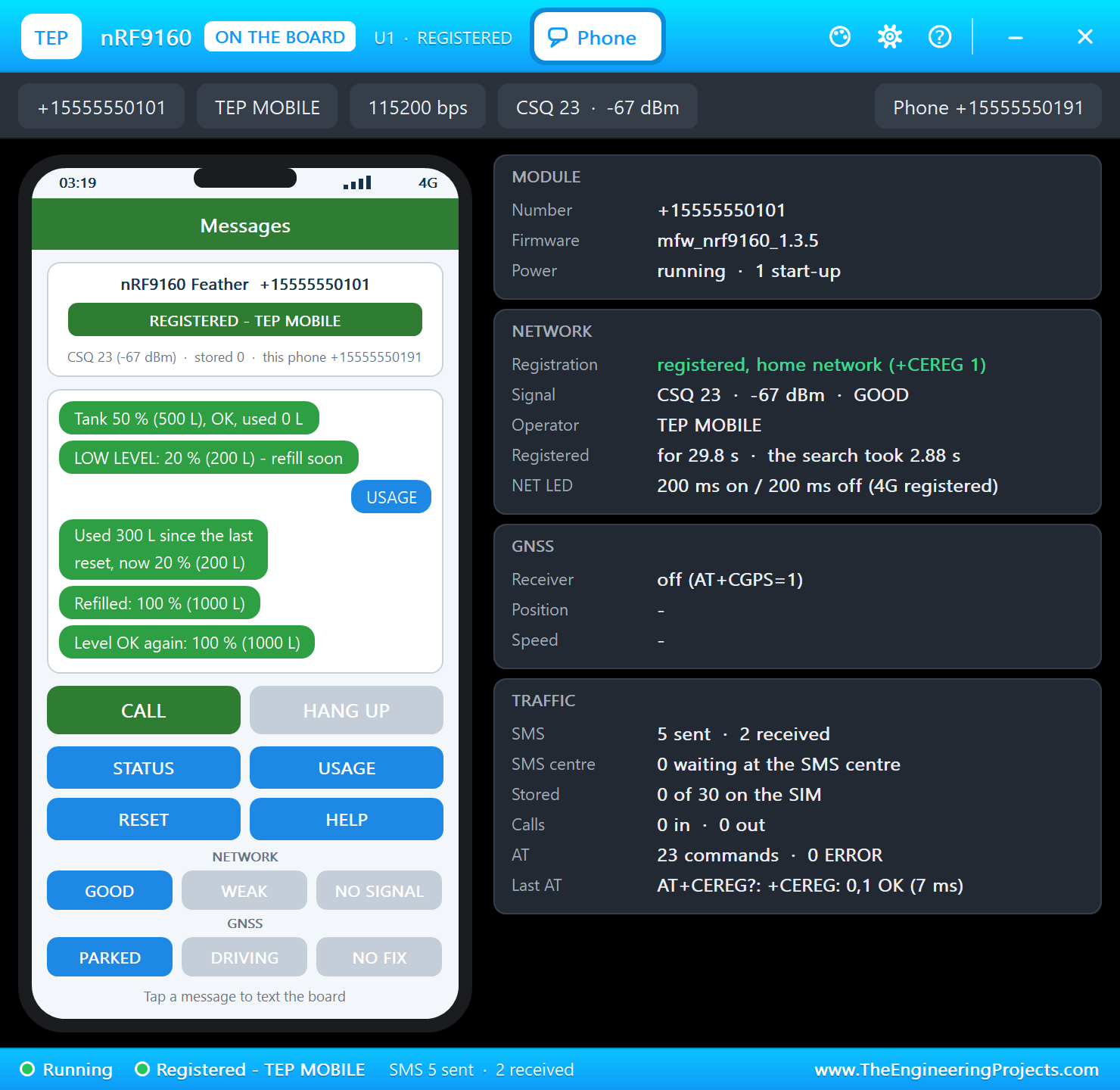
Press STATUS in the Phone window for a report:
The Tank Runs Low
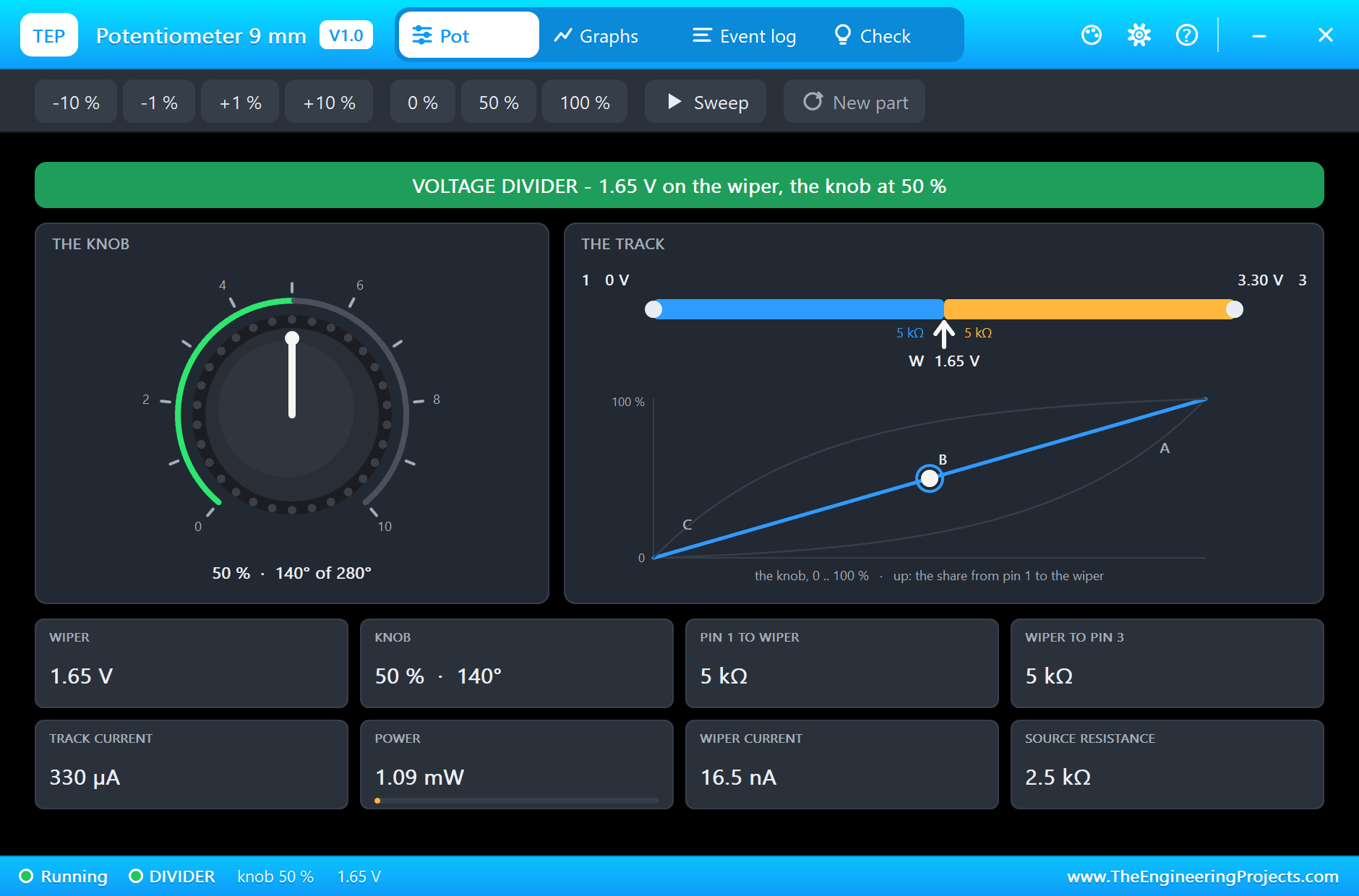
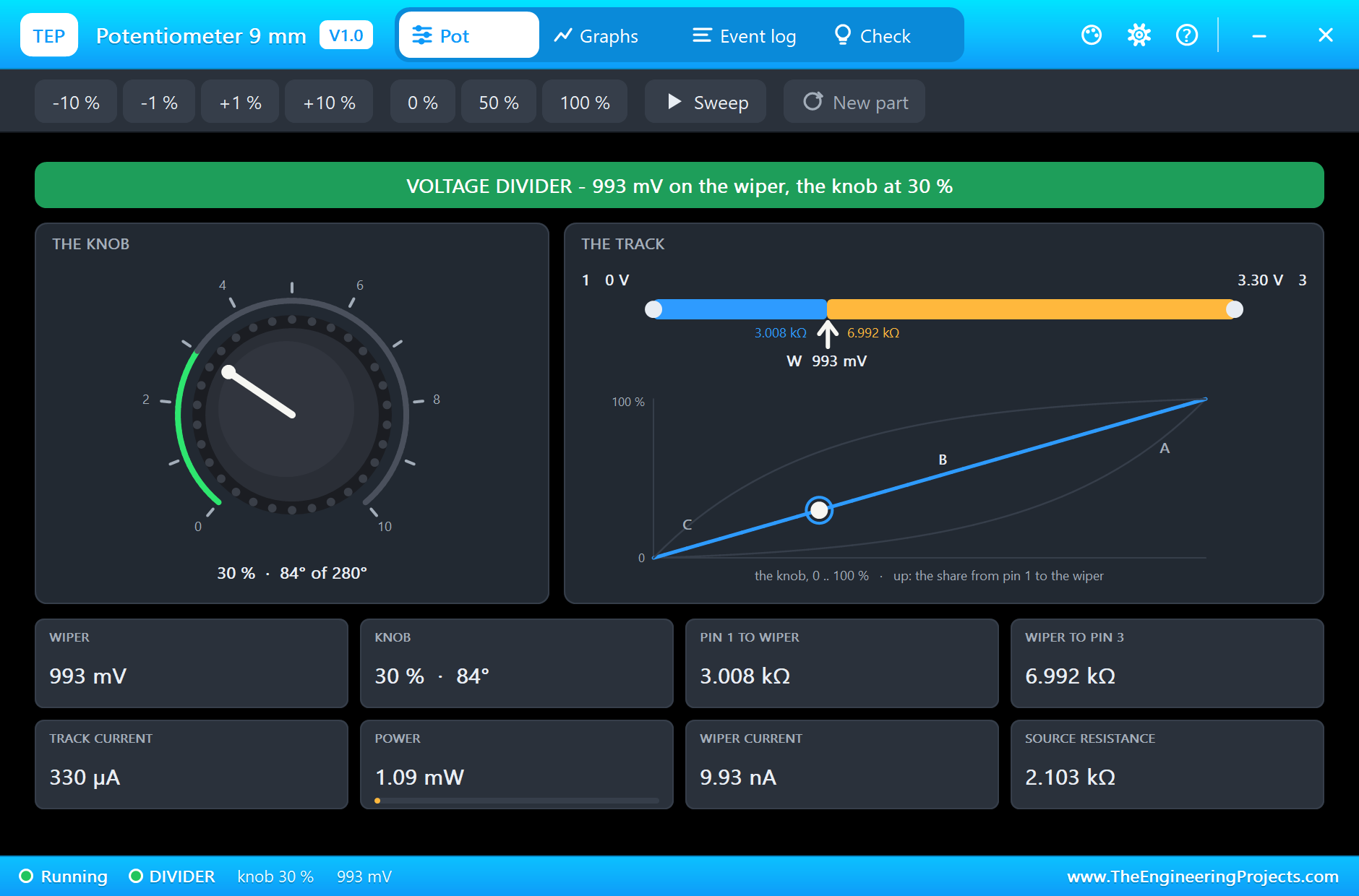
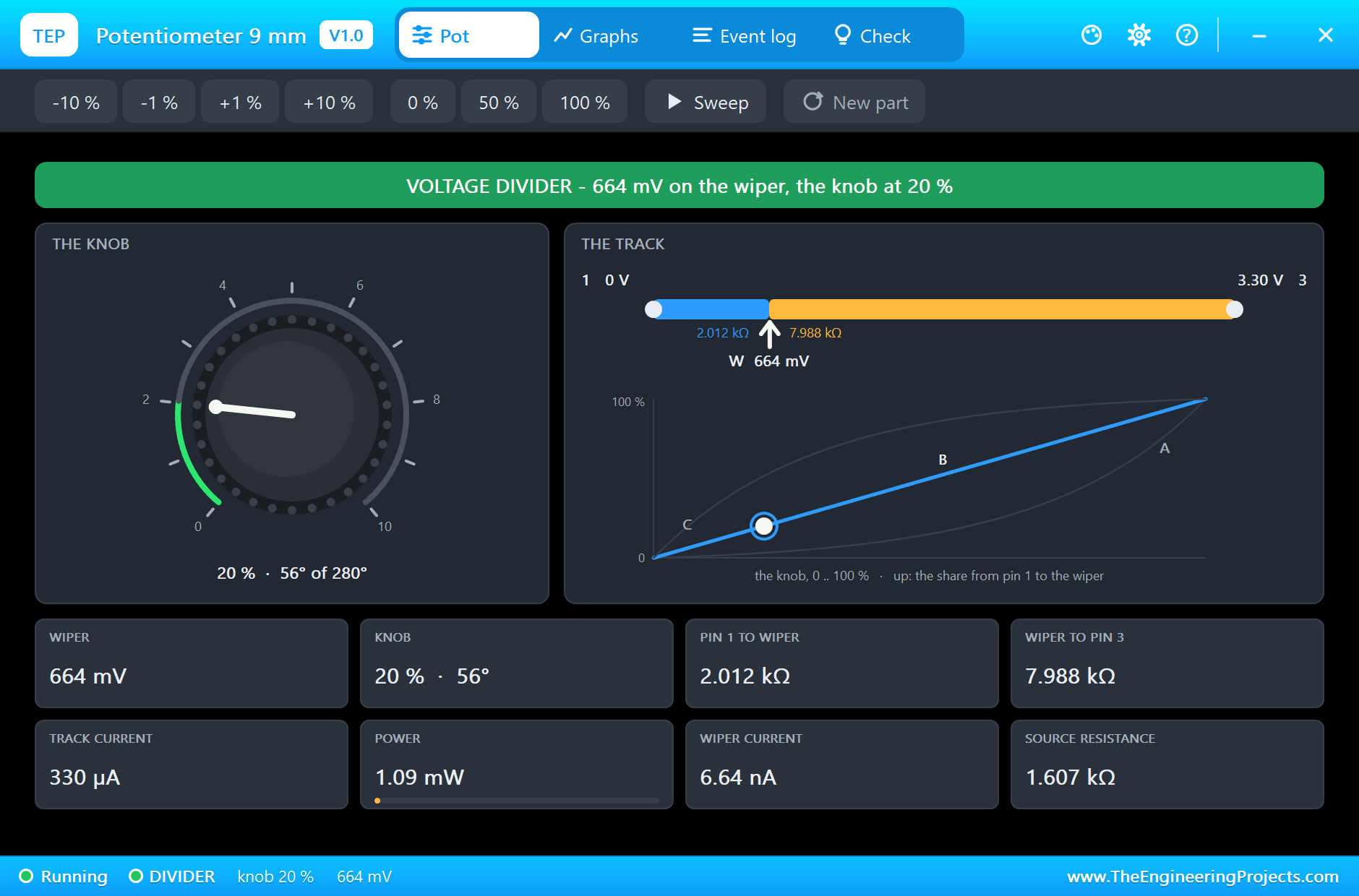
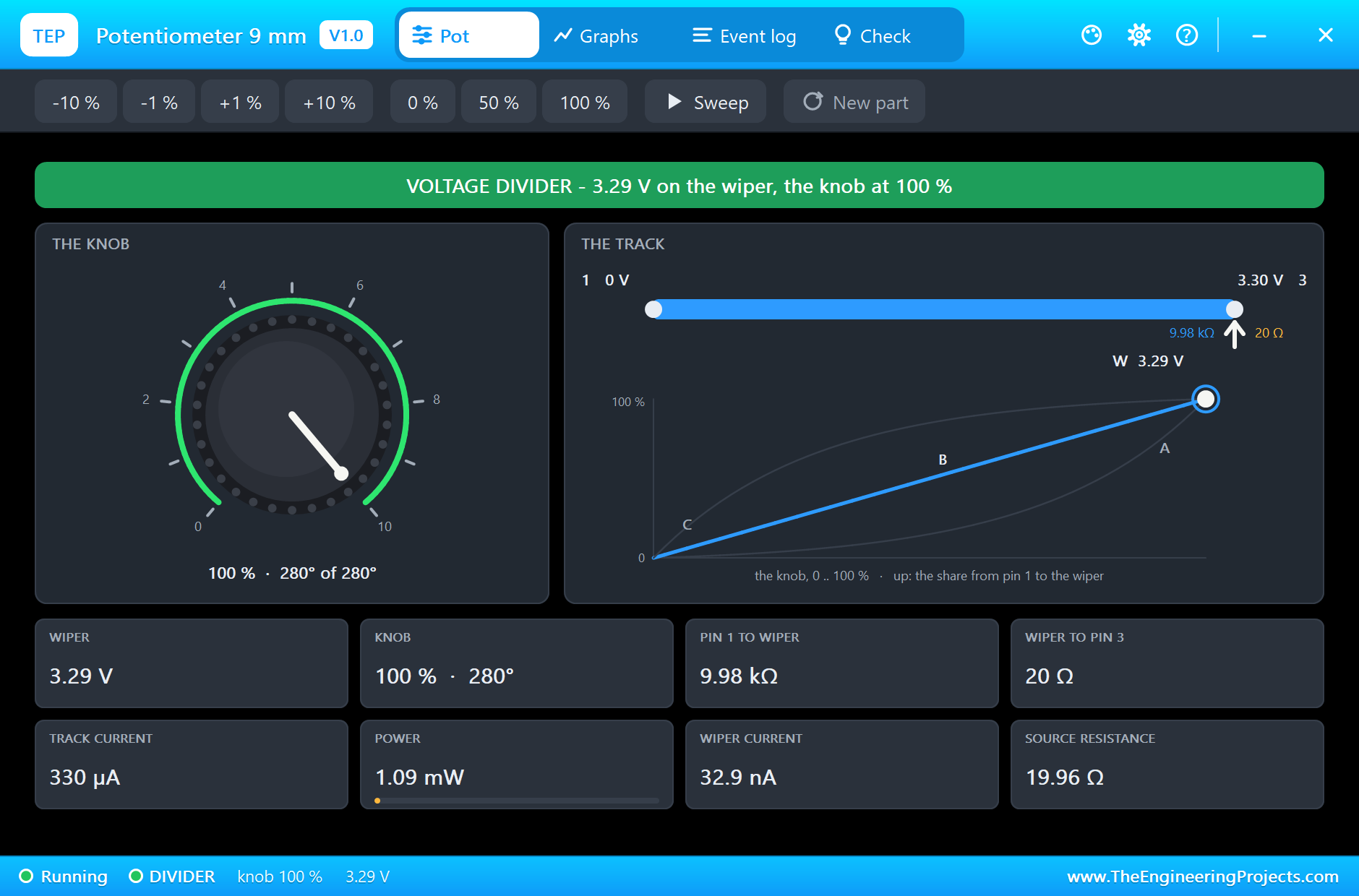
In the potentiometer's window click -10 %: each click is 100 litres used. At 30 % the lamp is still dark; one more click and the level is below 25 % - the LOW lamp and the blue LED light and the LOW LEVEL SMS goes out:
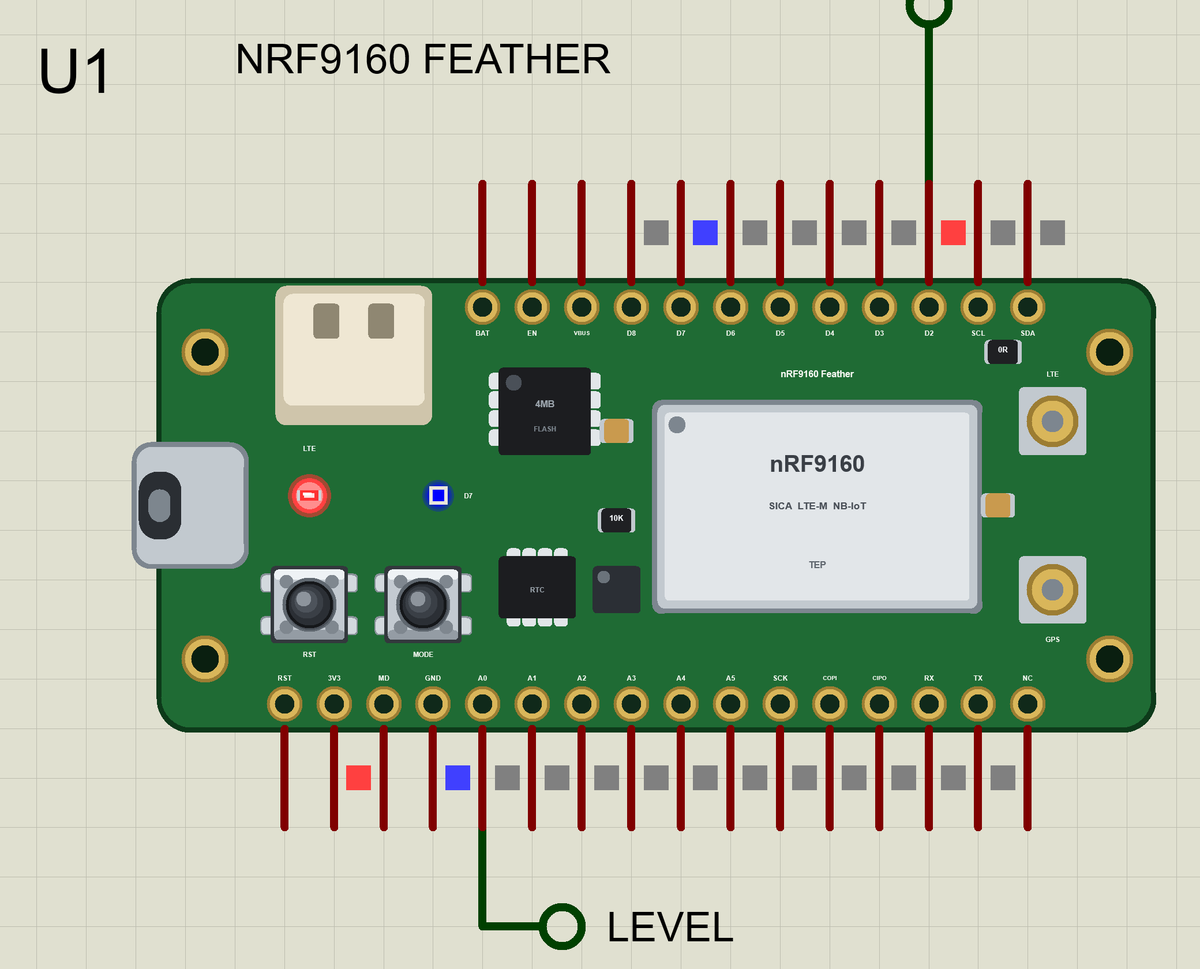
Here is the complete circuit while the simulation runs:
How Much Water Was Used?
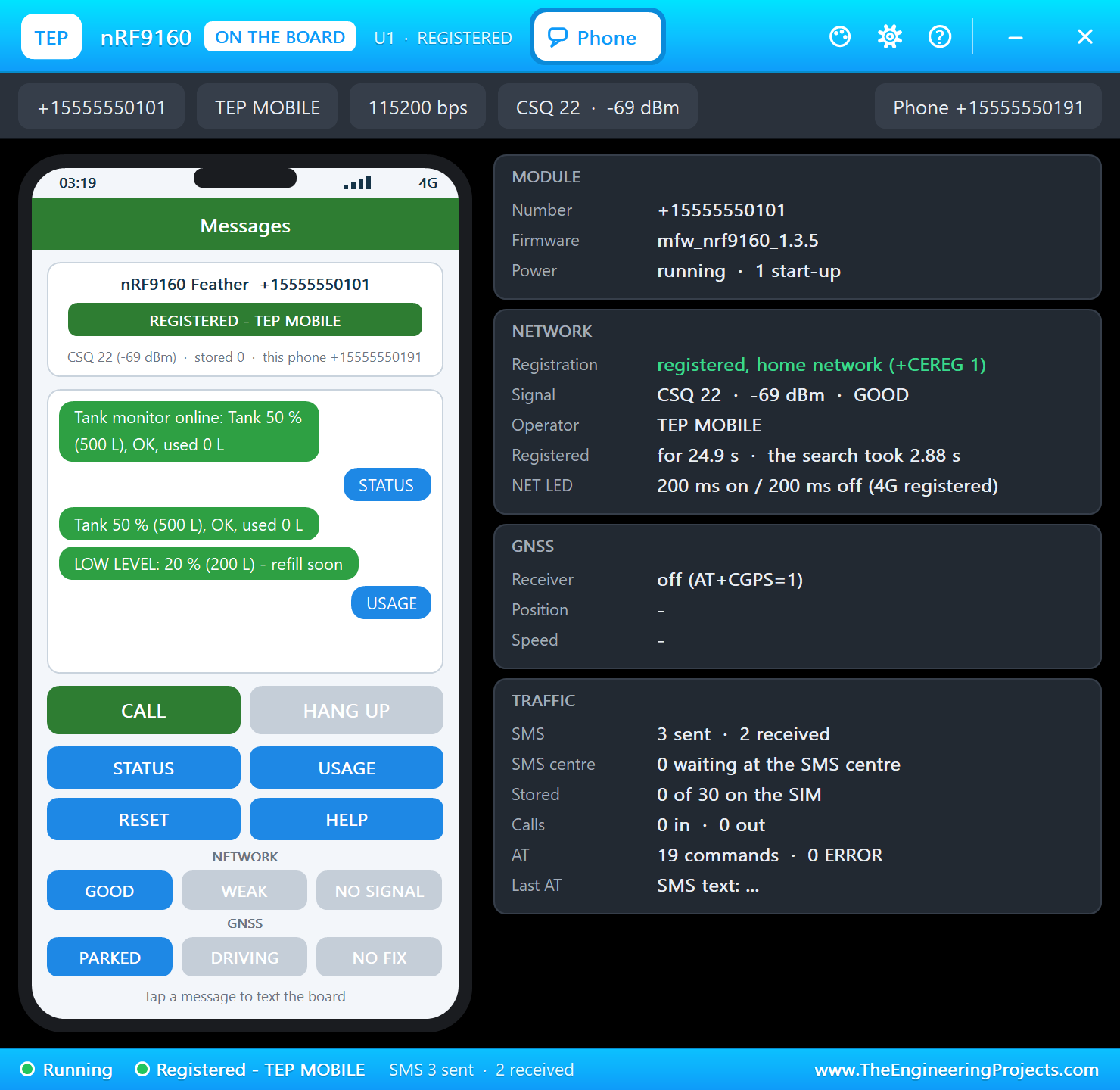
Press USAGE: the board answers with the litres used since the last reset:
The Refill
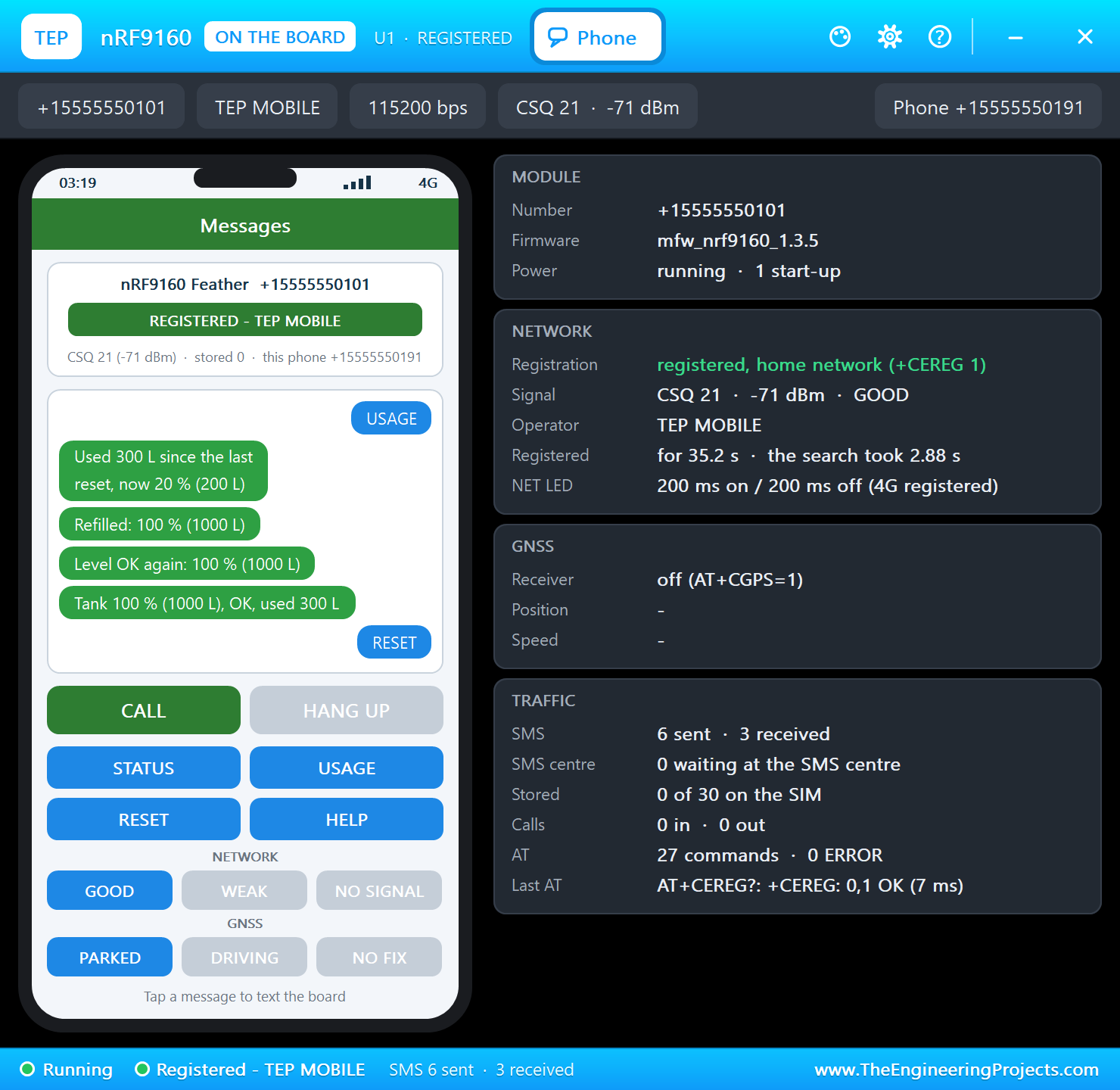
Click 100 % in the potentiometer's window - the truck has filled the tank. The board reports the refill and, above 35 %, "Level OK again"; the lamp goes dark. MODE on the board sends the status, and RESET in the Phone window clears the counter:
SMS from +15555550191: STATUS
SMS to +15555550191: Tank 50 % (500 L), OK, used 0 L
>> Level: 40 % (400 L)
Status: LTE registered, Tank 40 % (400 L), OK, used 100 L, SMS sent 2
>> Level: 30 % (300 L)
>> Level: 20 % (200 L)
>> LOW LEVEL: 20 % (200 L)
SMS to +15555550191: LOW LEVEL: 20 % (200 L) - refill soon
SMS from +15555550191: USAGE
SMS to +15555550191: Used 300 L since the last reset, now 20 % (200 L)
>> Level: 100 % (1000 L)
>> Refilled: +800 L
SMS to +15555550191: Refilled: 100 % (1000 L)
>> Level OK again: 100 % (1000 L)
SMS to +15555550191: Level OK again: 100 % (1000 L)
>> MODE: the status
SMS to +15555550191: Tank 100 % (1000 L), OK, used 300 L
SMS from +15555550191: RESET
>> The usage counter is reset
SMS to +15555550191: Usage counter reset, now 100 % (1000 L)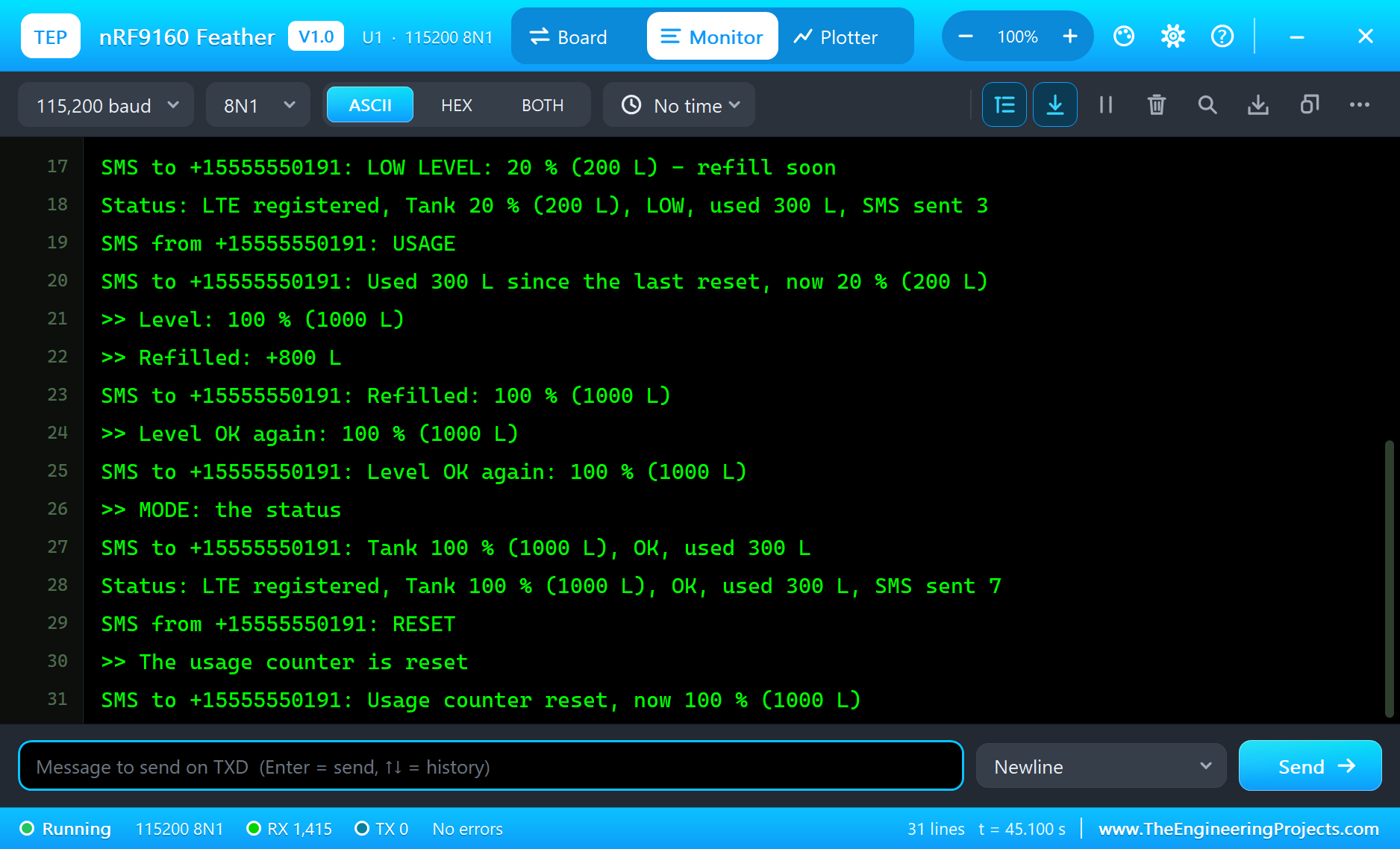
How a Float Sender Works
Most tank gauges use a float on an arm. As the water rises the float lifts the arm, which turns a potentiometer or slides a wiper along a resistor track - the same idea as the fuel gauge in a car. The sender is a variable resistor, so a divider turns it into a voltage the ADC can read. That is why a plain potentiometer is a good stand-in for it in the simulation.
Percent and Litres
In an upright cylinder or a square tank the volume grows evenly with the height, so 1 % of the height is 1 % of the water: 10 litres in our 1000 L tank. A horizontal cylinder is different - it holds less near the top and the bottom than in the middle - and a real sketch would then use a small table to turn the height into litres.
Two Limits Instead of One
Water sloshes and a float bobs, so a reading near a single limit would wobble across it and send a stream of messages. The sketch raises the alarm below 25 % and clears it only above 35 %. The 10 % gap is the hysteresis, the same idea a thermostat uses.
Counting the Water Used
The board adds up every drop of the level and ignores every rise, so the counter shows how much water went out of the tank, even when a refill came in between. A jump of 10 % or more in half a second cannot be use - it is reported as a refill. RESET by SMS starts a new count, for example every month.
Why SMS and Not the Internet?
A cellular modem can also send data to a cloud service over IP, and many products do. SMS has advantages for an alarm: it reaches any phone without an app, it works on the simplest plans, and the phone shows it even when it is locked. The cost is a few cents a message, so the sketch sends only when something changes - the low level, the refill, an answer to a command - and never every second. A status line every 10 s goes to the serial monitor instead, for the person at the desk.
Running on a Battery
A tank is often far from mains power. The real Feather is built for that: a Li-Po on the JST socket, a buck regulator that wastes almost nothing and a standby current under 10 microamps. A battery sketch would read the level every few minutes, keep the modem in its power-saving mode between messages and wake up on the RTC - a small solar panel then keeps it going for years.
Try It Yourself
- Let the owner set the LOW limit by SMS, for example "LOW 30".
- Send a daily report with the level and the water used.
- Switch a pump with a relay on D3 when the level is low.
- Store the usage counter in EEPROM so it survives a reset.
Ideas to Extend the Alarm
- Add a second float sender on A1 for a second tank.
- Allow only the owner's number to reset the counter.
- Send the litres used per day and warn when it jumps - a leak.
- Add the GPS position for a tank on a trailer.
Your Own Sketches
Write the sketch in the Arduino IDE with the board Circuit Dojo nRF9160 Feather (TEP Proteus), use Sketch > Export Compiled Binary and set the part's PROGRAM property to the .hex.
Moving to a Real nRF9160 Feather
- Install Nordic's nRF Connect SDK; the board is circuitdojo_feather (Zephyr).
- Put a nano-SIM with an LTE-M or NB-IoT plan into the holder on the back and fit the LTE antenna.
- Start from Nordic's SMS sample; the modem library sends the same kind of AT commands.
- Wire the float sender: its ends to 3V3 and GND, the wiper to A0 (the pins take up to 3.6 V).
- Move the logic of the demo across: the level, the two limits, the counter and the commands.
The pins, the commands and the messages stay the same; on the real board Nordic's SDK takes the place of the Arduino calls.
Things to Know Before Using a Real nRF9160 Feather
- A SIM and a plan: LTE-M or NB-IoT must be offered where the board is used; SMS must be part of the plan.
- Antennas: the LTE U.FL needs an antenna before the modem transmits; the GPS U.FL takes an active antenna only.
- Programming: the board comes with a bootloader for updates over USB-C; debugging needs an external programmer.
- Battery: use a Li-Po of at least 300 mAh, as Circuit Dojo asks.
Properties of the nRF9160 Feather
| Property | What it does |
|---|---|
| PROGRAM | the sketch: a .hex from TEP Boards for Proteus (board "Circuit Dojo nRF9160 Feather") |
| MONITOR, BAUD, AUTOOPEN | the built-in serial monitor: on, its baud rate (115200), open at Run |
Troubleshooting
- The modem never answers: set
MODEM_ONHIGH and callSerialModem.begin(115200)first; send AT until it answers OK. - No SMS arrives:
AT+CMGF=1andAT+CNMI=2,2,0,0,0bring a new SMS straight to SerialModem. - The level reads 0 or 100 % all the time: the pot's ends go to +3.3V and GND, the wiper to A0.
- The blue LED does the opposite: it lights when the pin is LOW.
- A number goes wrong above 32767: int is 16 bits in the simulation - use long.
Limitations of the Simulation
- Cellular: registration, SMS in text mode and GNSS answers are modelled; data connections, voice, PSM and eDRX are not.
- The accelerometer, the RTC, the SPI flash, the battery and its charger are drawn, not modelled.
- Your sketch gets 8 KB of RAM in the simulation, and int is 16 bits there.
- nRF9160 and Nordic Semiconductor are names of Nordic Semiconductor ASA, Circuit Dojo of Circuit Dojo LLC, Feather of Adafruit Industries and Arduino of Arduino; this library is not made or endorsed by them or by Labcenter.
- Tested in Proteus 8.5 in November 2026 (the demo as shipped, about 45 s of simulation). Proteus 7 is not supported.
So, that was all about the nRF9160 Feather Library for Proteus. I hope it helps you try your cellular IoT ideas in a simulation before the board and a SIM are on your desk - the sensor, the modem and the SMS, all on one sheet. If you have any questions, ask in the comments and I will help you out. Till the next tutorial, take care and have fun!