


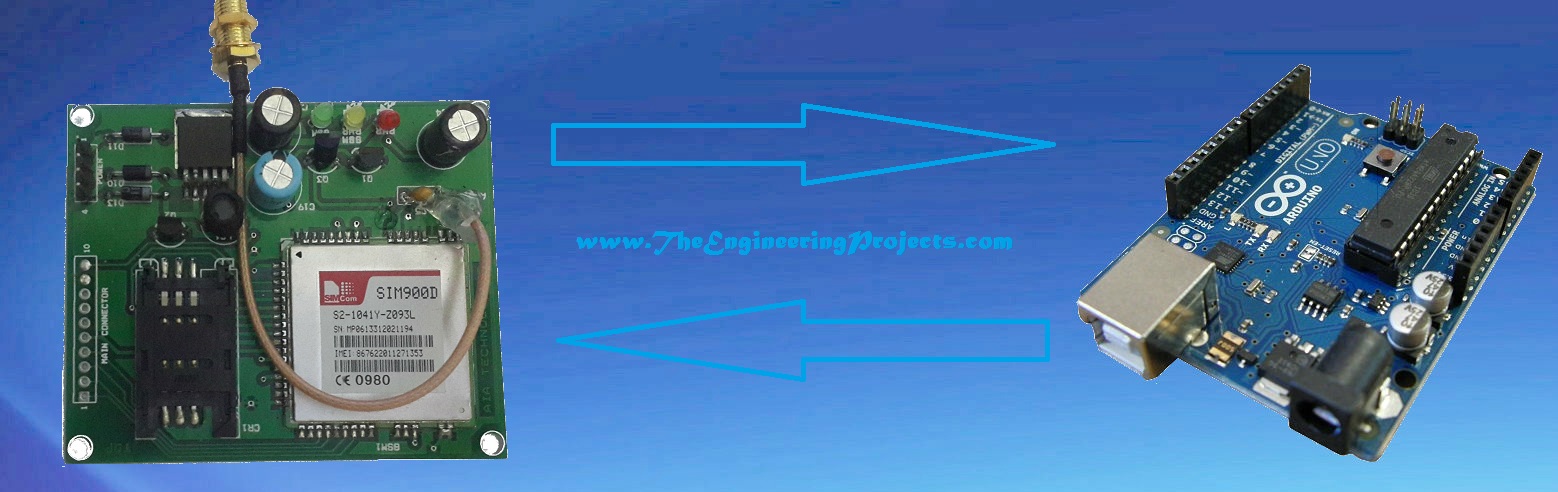
Send SMS with Arduino UNO and SIM900D using AT Commands


Hello friends! Today, we will send an SMS with an Arduino UNO and a SIM900D GSM module using AT commands. We will start with the connections, check that the modem can communicate with the mobile network, and then let the Arduino submit one message. You will also learn how to tell the difference between a successful command and a message that has actually reached its recipient.
SIM900 Simulation Libraries
Latest library: SIM900A Library for Proteus V1.1 (October 2026)
Helping Tools
- Serial Monitor Advance: a serial terminal window for the UART of your board
- Serial Monitor Expert: the serial monitor with extra debugging tools
- LCD Library for Proteus V3.0: 16x2, 20x4 and I2C LCDs to show your readings
The SIM900D handles the radio connection and SMS service. The Arduino sends instructions through a serial connection and reads the modem's replies. We do not need a separate GSM control library for this example; we will use the Arduino serial facilities and send the commands ourselves. This makes the exchange easier to follow when something goes wrong.
This tutorial concerns a legacy 2G modem. Before building the circuit, confirm that a compatible 2G network and SMS service are available from your operator at the installation location. A SIM card that works in a modern phone does not establish that this modem can register. Network retirement is an important consideration for an existing SIM900D project, as discussed in the GSMA network sunset guidance.
What We Need for the SMS Project
For a first experiment, use a documented SIM900D carrier board rather than attempting to power and connect the surface-mount modem directly. Carrier boards differ in their regulators, serial interfaces and power buttons. Identify your board before applying power; two boards carrying the same modem can require different external connections.
| Item | Purpose | What to check |
|---|---|---|
| Arduino UNO | Runs the example and provides a USB debugging connection | Select the UNO board in the Arduino IDE |
| SIM900D carrier board | Connects to the cellular network | Supply input, UART voltage and power-on procedure |
| Compatible SIM and antenna | Provide network access | SMS service, credit or plan allowance, PIN state and local coverage |
| Suitable modem power supply | Supplies the radio during transmission | Transient current capability and short power leads |
| UART level interface | Matches the two devices electrically | Required unless the carrier already provides a compatible interface |
| USB cable and jumper wires | Programming and signal connections | Common ground and reliable contacts |
The original article included the following vendor links for the UNO and modem. They are retained as historical references, rather than a current price comparison. Check the actual product description and interface requirements before choosing a board.
| Original component reference | First vendor link | Second vendor link |
|---|---|---|
| Arduino UNO | Click Here to Buy | Click Here to Buy |
| SIM900-family GSM board | Click Here to Buy | Click Here to Buy |
Understand the Power and Serial Connections
According to the SIMCom SIM900D hardware design guide, the bare module uses a 3.2–4.8 V supply and can demand approximately 2 A during transmit bursts. Those are module requirements, not a universal specification for the power connector on every carrier board. Follow the carrier schematic for its external input.
Do not treat the UNO's small auxiliary power output as a modem supply. The circuit may answer AT commands while idle and reset as soon as the transmitter becomes active. That failure can look like a software timeout even though the cause is a voltage dip. Use a supply and wiring arrangement intended for the modem's load.
Here is a useful wiring calculation. If the combined resistance of the supply and return leads is 0.20 ohm, a 2 A burst produces a voltage drop of V = I × R = 0.40 V. Starting with a nominal voltage that seems adequate does not eliminate that drop. Measure at the modem supply pins, and use an oscilloscope when a brief reset cannot be explained by a steady multimeter reading.
The bare modem's UART is not an RS-232 port and must not receive RS-232 positive and negative voltages. It also must not be assumed tolerant of the UNO's 5 V transmit signal. Use the level interface recommended by the module or carrier documentation. A board marked TX and RX may expose either translated signals or the modem's native logic signals.
Keep the USB Debugging Port Separate
The original circuit used UNO pins 0 and 1. Those pins are also involved in the UNO's USB serial connection, so an attached modem can interfere with uploading or with messages sent from the computer. In the revised example, we use pins 7 and 8 for the modem and reserve the hardware serial port for debugging.
| UNO connection | Modem connection | Explanation |
|---|---|---|
| D7, software RX | TX, through the required interface | The Arduino receives the modem's replies here |
| D8, software TX | RX, through the required interface | The Arduino sends AT commands here |
| GND | GND | Both serial interfaces need the same reference |
| USB | No direct modem connection | Provides the computer's debugging channel |

The photograph above identifies the connections on the board used in the original project. Use it to understand the arrangement, but confirm labels against your own hardware. In particular, the earlier instruction to leave PWRKEY grounded should not be followed as a general rule. SIMCom specifies a low pulse of at least one second for powering on the bare module, followed by release. A carrier may implement that action with a push button or other circuitry.
Check the Modem Before Sending an SMS
First establish a serial conversation. We will use 9600 baud in the example, but the modem must also be operating at that rate or successfully synchronize through its supported autobaud behavior. Random characters usually indicate a baud or electrical problem; changing the SMS text will not help.
A temporary serial bridge lets you type commands into the Arduino Serial Monitor and see the replies. Upload this small sketch first, select 9600 baud, and configure the monitor to send a carriage return after each command. Leave the modem disconnected from UNO pins 0 and 1.
#include <SoftwareSerial.h>
SoftwareSerial modem(7, 8); // RX, TX

void setup() {
  Serial.begin(9600);
  modem.begin(9600);
}

void loop() {
  if (modem.available()) Serial.write(modem.read());
  if (Serial.available()) modem.write(Serial.read());
}
Use the following sequence, reading the complete reply after each command. These are SIM900-family commands documented in the SIMCom AT command manual. An echoed copy of your command is not confirmation that the command succeeded.
| Command | What it checks | Expected information |
|---|---|---|
AT | Basic communication | OK |
ATE0 | Disables command echo | OK |
AT+CPIN? | SIM readiness | +CPIN: READY |
AT+CREG? | Network registration | Registration status 1, or 5 when roaming |
AT+CSQ | Reported signal information | A numeric response; an unknown reading is not usable evidence of reception |
AT+CMGF=1 | SMS text mode | OK |
If the SIM requests a PIN, resolve that deliberately before continuing. Do not repeatedly guess a PIN in an automated loop. If registration fails, investigate the antenna, operator support, SIM provisioning and power supply. A blinking status LED can help, but the meaning of its pattern belongs to the particular board documentation.
How the SMS Command Exchange Works
Sending the destination and sending the message are separate steps. After selecting text mode, the Arduino sends AT+CMGS="recipient" followed by a carriage return. It waits for the modem's > prompt before sending the body. The byte 0x1A, equivalent to Ctrl+Z, ends the body and requests submission.
The modem then performs network work. A successful submission produces a +CMGS: message reference and a final OK; an error may produce +CMS ERROR:. A timeout means our program did not observe a conclusive result. It does not prove that the network never accepted the message. This distinction matters because automatically retrying an uncertain submission can send duplicates.
For a first test, choose a short plain-text message and a recipient you control. Keep the message simple while establishing the hardware and protocol. Longer text, non-Latin characters and multipart messages introduce encoding and billing considerations that deserve a separate implementation.
Arduino Sketch for One Deliberate SMS Attempt
The following example prints the modem conversation to the Serial Monitor. Replace the destination placeholder, complete the readiness checks above, and type an uppercase S to request one attempt. The program locks that attempt until the Arduino is reset. It does not repeatedly send messages from loop().
The receive function recognizes complete result lines, detects explicit errors, and has a timeout. Its fixed-size line buffer also prevents an unexpectedly long reply from overwriting memory. This is a teaching example with blocking waits; a controller that must perform other time-sensitive tasks should use a nonblocking state machine and a suitable hardware UART.
#include <SoftwareSerial.h>
#include <string.h>

SoftwareSerial modem(7, 8);
const char destination[] = "+REPLACE_ME";
bool attempted = false;

// mode 0: final OK; mode 1: SMS prompt; mode 2: +CMGS then OK
bool waitReply(byte mode, unsigned long timeoutMs) {
  char line[96];
  byte used = 0;
  bool overflow = false;
  bool referenceSeen = false;
  unsigned long started = millis();
  while (millis() - started < timeoutMs) {
    if (!modem.available()) continue;
    char c = modem.read();
    Serial.write(c);
    if (mode == 1 && c == '>') return true;
    if (c == '\r') continue;
    if (c != '\n') {
      if (used < sizeof(line) - 1) line[used++] = c;
      else overflow = true;
      continue;
    }
    line[used] = '\0';
    if (overflow) return false;
    if (strcmp(line, "ERROR") == 0 ||
        strncmp(line, "+CMS ERROR", 10) == 0 ||
        strncmp(line, "+CME ERROR", 10) == 0) return false;
    if (strncmp(line, "+CMGS:", 6) == 0) referenceSeen = true;
    if (strcmp(line, "OK") == 0 &&
        (mode == 0 || (mode == 2 && referenceSeen))) return true;
    used = 0;
  }
  return false;
}

bool command(const char *text) {
  modem.print(text);
  modem.write('\r');
  return waitReply(0, 3000);
}

bool configuredNumber() {
  if (destination[0] != '+') return false;
  size_t length = strlen(destination);
  if (length < 8 || length > 16) return false;
  for (size_t i = 1; i < length; ++i)
    if (destination[i] < '0' || destination[i] > '9') return false;
  return true;
}

void sendOneMessage() {
  if (!command("AT") || !command("ATE0") || !command("AT+CMGF=1")) {
    Serial.println(F("Setup failed. Check the printed modem reply."));
    return;
  }
  modem.print(F("AT+CMGS=\""));
  modem.print(destination);
  modem.print(F("\"\r"));
  if (!waitReply(1, 10000)) {
    modem.write(0x1B); // Escape any incomplete text-entry operation
    Serial.println(F("No SMS prompt. No message body was submitted."));
    return;
  }
  modem.print(F("Hello from the Arduino UNO SMS project."));
  modem.write(0x1A);
  if (waitReply(2, 60000))
    Serial.println(F("Submission accepted. Check the receiving phone."));
  else
    Serial.println(F("Submission unconfirmed or rejected. Do not retry blindly."));
}

void setup() {
  Serial.begin(9600);
  modem.begin(9600);
  Serial.println(F("Complete SIM/network checks first. Type S for one attempt."));
}

void loop() {
  while (modem.available()) Serial.write(modem.read());
  if (!Serial.available()) return;
  char key = Serial.read();
  if (key != 'S' || attempted) return;
  if (!configuredNumber()) {
    Serial.println(F("Set destination to your international-format number."));
    return;
  }
  attempted = true;
  sendOneMessage();
}
Upload and Run the Example
- Power down before changing connections, and confirm that the UART interface matches both devices.
- Upload the sketch with your destination number in international format.
- Start the modem using its documented procedure and allow it to register.
- Open the Serial Monitor at 9600 baud. Confirm that the SIM and registration checks were successful using the bridge sketch before relying on this example.
- Type S once. Read the complete conversation rather than judging success from the first received character.
- Check the receiving phone and retain the result printed by the modem.
Opening the Serial Monitor can reset an UNO. The explicit S trigger prevents that reset alone from immediately sending another message. Resetting does clear the attempt lock, however, so this sketch is not a durable duplicate-prevention system. A deployed alarm needs persistent event identifiers and an intentional retry policy.
Troubleshooting the First Message
| Symptom | Likely area | Useful next action |
|---|---|---|
| No response to AT | Power, baud rate or serial wiring | Check startup, shared ground and crossed transmit/receive connections |
| Unreadable characters | Serial format or electrical levels | Match baud rates and inspect the UART interface |
| Modem restarts during submission | Supply transient | Measure voltage at the modem during transmission |
| SIM is not ready | SIM installation or PIN state | Resolve the reported SIM condition before sending |
| Network registration never completes | Coverage or service availability | Confirm local 2G support with the operator |
| No text-entry prompt | Command rejected or incomplete | Inspect the reply and destination command syntax |
| Submission accepted but phone receives nothing | Recipient, network delivery or service | Check the number and distinguish submission from delivery |
Change one variable at a time. For example, do not simultaneously replace the supply, change baud rate and rewrite the receive routine. A short log containing the command, reply and observed power behavior makes the next decision much easier. Remove personal numbers from a log before sharing it publicly.
Timing and Message-State Decisions
The serial link and the cellular network operate on different timescales. With an ordinary 8N1 serial frame, each character uses one start bit, eight data bits and one stop bit. At 9600 baud, a 40-character command takes approximately 40 × 10 / 9600 = 0.0417 seconds to leave the UART. This calculation describes transmission to the modem, not the time needed for the modem to finish the requested operation.
That is why a delay chosen from the command's character count cannot predict SMS completion. The example gives basic commands three seconds and allows a longer interval after submission. These are example application timeouts, not a promise that every network will respond within them. Record the actual result and choose timeout behavior appropriate to the application.
A useful application model has five states: idle, preparing, waiting for the text prompt, waiting for submission result, and finished. Each transition needs an observable reason. An OK completes a preparation command, the prompt permits the body, and the combined message reference and final OK establish accepted submission. An error or timeout enters a separate failure or uncertain-result path.
Keep incoming unsolicited messages separate from command responses in a production driver. A modem can report a network change or an incoming SMS while the application is waiting for another result. Our example prints those lines for inspection, but it does not implement an incoming-message service. A larger program needs to dispatch such notifications without confusing them with the reply to the command currently in progress.
A Small, Controlled Test Record
Before connecting an alarm input, carry out a few deliberate tests with the recipient's agreement. Start with one normal submission and record the modem result, whether the phone received it, and the approximate delay. Next, test the program with the destination placeholder still present; it should refuse to start. Finally, disconnect the modem's serial connection while powered down and confirm that the program reports a communication failure after reconnecting power, rather than reporting a successful message.
These tests answer different questions. The normal case checks the complete path. The placeholder case checks a local configuration guard. The missing-modem case checks that absence of a reply is handled. None of them establishes long-term coverage or proves that a recipient will always receive an alert. Keep that distinction in the project notes so a successful bench demonstration is not mistaken for a reliability guarantee.
Also decide what should happen after power returns. Sending an alert immediately on every restart may produce repeated messages during an unstable supply condition. Conversely, forgetting an unsent event can hide a genuine alarm. Store enough event state to implement the behavior you intend, and make that behavior explicit before adding automatic retries.
Review of the AT-Command Approach
Direct AT commands are useful because we can inspect every step. We know whether the problem happened before the modem responded, during network registration, before text entry or after submission. The tradeoff is that our program must handle those states correctly. A received byte, a fixed delay or an echoed command cannot replace a parsed result.
For a larger project, separate the application event from the modem driver. A temperature alarm should create one pending alert when its threshold condition begins, rather than sending on every loop while the temperature remains high. Add hysteresis, a clear rearming condition and a record of the last submission. This keeps application behavior understandable even when the mobile network is slow.
You can continue with receiving SMS with SIM900 and Arduino, or adapt the same command exchange to a PIC microcontroller SMS project. Our GSM Library for Proteus and SIM900D SMS simulation are useful for studying program flow. A simulation does not establish real network coverage, RF performance or power-supply reliability.
Frequently Asked Questions
Can I use a SIM900 or SIM900A board instead?
Many basic SMS commands are shared across the family, but verify the exact modem manual, frequency bands, power connector and UART interface. The similarity of command names does not make all carrier boards electrically interchangeable.
Does this require an internet connection or an APN?
This example uses SMS rather than an internet data session. It needs usable cellular SMS service. Do not add HTTP or GPRS configuration to solve a basic serial communication problem; establish the SIM and registration state first.
Why do we wait for the greater-than prompt?
The prompt tells us that the modem has entered message-body input. Sending the body earlier can cause it to be interpreted in the wrong command state. The example sends Ctrl+Z only after receiving that prompt.
Does OK mean that the recipient read the message?
No. Even a completed submission is different from delivery to the handset, and delivery is different from a person reading the text. Implement and interpret delivery reports separately if the application requires them.
Can I use this sketch unchanged as a remote alarm?
Use it as a starting point. A remote system needs event handling, a recovery strategy, power monitoring and a supported communications service. First make the single-message exchange reliable and understandable, then add those requirements deliberately.

Tags


what is the pkey used for? Can you please write a small description as to explaining the code. Any help would be appreciated.
thankyou
2 replies
pKey is a trigger for starting GSM shield, you need to send a LOW pulse on it for 2 to 3 seconds and the GSM will get on. Code is quite self explanatory, we are sending AT commands to send sms using GSM shield. Let me know where you are having problems. Thanks.
1 reply
Serial.write(0x1A);
Serial.write(0x0D);
Serial.write(0x0A);
Sir.what does the last 3 codes mean??I am using arduino uno and sim900..But this code not send the sms.
hey i wanna send multiple receptionist message using arduino and gsm module please help me.
please send me on mail id...
i send the low pulse rate to pkey for 2 to 3 second but my GSM shield will turn off after 2 to 3 seconds. and tell me that how to check the conectivity of GSM and arduino. i think their is a problem with conectivity. i did not recieve message on cell phone
1 reply
First of all, let me know that you are using the same gsm shield. In some gsm shields, pkey needs to remain grounded. So try this as well. As the connectivity is concerned, you need to make sure that ground of gsm and arduino should be connected.
Moreover, check the tx and rx pins connectivity using multimeter.
Thanks.
its not working .....
what i should choose the library bc your library file is not mentioned..
After compiling it gives error like bellow...
Sim900_Arduino:11: error: stray '\' in program
Sim900_Arduino:11: error: stray '\' in program
Sim900_Arduino:24: error: stray '\' in program
Sim900_Arduino:24: error: stray '\' in program
Sim900_Arduino:36: error: stray '\' in program
Sim900_Arduino:36: error: stray '\' in program
Sim900_Arduino:36: error: stray '\' in program
Sim900_Arduino:36: error: stray '\' in program
Sim900_Arduino:37: error: stray '\' in program
Sim900_Arduino:37: error: integer constant is too large for 'long' type
Sim900_Arduino:37: error: stray '\' in program
Sim900_Arduino:38: error: stray '\' in program
Sim900_Arduino:38: error: stray '\' in program
Sim900_Arduino:38: error: stray '\' in program
Sim900_Arduino:38: error: stray '\' in program
Sim900_Arduino:40: error: stray '\' in program
Sim900_Arduino:40: error: stray '\' in program
Sim900_Arduino.ino: In function 'void loop()':
Sim900_Arduino:11: error: 'u201cAT' was not declared in this scope
Sim900_Arduino:22: error: 'index' was not declared in this scope
Sim900_Arduino:24: error: 'CMGF' was not declared in this scope
Sim900_Arduino:36: error: 'CMGS' was not declared in this scope
Sim900_Arduino:36: error: 'u201d' was not declared in this scope
Sim900_Arduino:37: error: 'u201c' was not declared in this scope
Sim900_Arduino:38: error: expected `)' before 'u201d'
Sim900_Arduino:40: error: 'u201cA' was not declared in this scope
this code not working give error as mentioned by Muhamamd Ali please guide a bit..
1 reply
Hi,
Remove these signs " " and then place them again and it will start working. Let me know if you still find any problem.
Thanks.
1 reply
will this code work for arduino mega ?
1 reply
Yes it will.
when i copied program in arduino software the it display error like
"sketch_jan07a:8: error: stray '\' in program"
so what it indicate
pls let me know,,
Thanks,
Zain, can't thank you enough for this code. I've been at this for the last three weeks and have had only bad luck - sometimes my SIM board used to conk off, on other occasions standard GSM codes would not run. Today's the day when things are finally running and a big impasse has been broken. Thanks a lot for posting this code as open source to help out us newbies. :-)
4 replies
You are most welcome and thanks for your precious comment.
Hi MS,
May I have your complete code? As I am still new with Arduino. I have tried to figure out Zain's code based on the comments, but still it doesnt work.
Really need your kind help.
Thank you.
Can you please show us your code, because we tried this code (compiled and uploaded) but serial monitor isn't working fine. It is showing ATATATATATATATA over and over.
Regards
Maryam
1 reply
How did you solve this "atatatatat" problem ?
simpi.personal4@gmail.com
Kindly can you send me the working code ?
1 reply
The above code is perfectly working bro.
Sir Kindly tell me why this error masg is coming when i verify this code in software .And how can i solve it.
SendSMS.ino: In function 'void loop()':
SendSMS.ino:19:1: error: 'index' was not declared in this scope
Error compiling.
1 reply
It is saying that index variable is not declared, check the code if it's not declared then declare it
Int index = 0;
Thanks.
I am getting like this in serial monitor :
ATAT
AT+CMGF=1
AT+CMGS="+9194xxxxxxx"
motor is on
AT
AT+CMGF=1
ATATATATAT
AT+CMGF=1
AT+CMGS="+9194xxxxxx"
motor is on
AT
AT+CMGF=1
ATATATATAT
AT+CMGF=1
AT+CMGS="+9194xxxxxxx"
motor is on
But iam not getting any sms to mobile.please do reply.
2 replies
Can't say anything, but seems like you are quite close and need to do more testing.
same problem
Hy, i am new in arduino. Can you explain me what means these lines of code :
Serial.write(0x1A);
Serial.write(0x0D);
Serial.write(0x0A);
I can't understand you explication(i know i'm stupid):The text mentioned in blue color are all AT commands, which are required to send the SMS. I have added the comments infront of these commands but still if you get into any trouble, ask in comments.
Thank you.
Hello sir , i am facing a problem when i upload this program in my arduino uno .
Repeatedly AT is being displayed in the serial monitor . looks something like this ATATATATAT.......and so on.
1 reply
It means it's not working, you are doing some mistake , double check your schematic and make sure sim 900 is active
1 reply
hello Mr Syed
I'm totally new with arduino - working on it for my final project
so the GSM code it little bit difficult
anyways - how do i declare the index=0;
by putting int index=0; , its not declaring the " Int "
this is the error
(
C:\Users\H00272752\Desktop\LEvel 8\PRJ DSG\GSM\libraries---\GSMSHIELD\examples\GSM_GPRSLibrary_AT\GSM_GPRSLibrary_AT.ino: In function 'void loop()':
GSM_GPRSLibrary_AT:19: error: 'Int' was not declared in this scope
Int index = 0;
^
exit status 1
'Int' was not declared in this scope
)
could you help please
Nice answers in return of this query with real arguments and telling the whole thing on the topic of that.
Thanks for sharing the code,
how to fix the error
unknown escape sequence: '40'
occurs in the following command
Serial.print(" AT+CMGS=\ "); // send the SMS number
how to fix this error as well
Error compiling
core.a(main.cpp.o): In function `main':
C:\Program Files\Arduino\hardware\arduino\cores\arduino/main.cpp:40: undefined reference to `setup'
Sir,
I'm new commer for arduino.but i want make home securite system with my arduino and sim 900 .
I want make some warning input(heat,micro swtch,ect......) to arduino ,sim900 through sms ,call to my mobil and send from mobil to sim900,arduino get some action through arduino
Please help me sir
Have you schematic same like this
I will hope your help sir
Thankyou............m.
1 reply
Hi,
Add me on skype and we will discuss it in detail. My Skype id is " theenggprojects ". We can provide you this complete project.
Thanks.
I am getting the foll. errors. PLEASE solve my problem. I can send u a copy of my program if u want me to via mail.
sketch_mar25b.ino:8:1: error: stray '\' in program
sketch_mar25b.ino:8:1: error: stray '\' in program
sketch_mar25b.ino:10:1: error: stray '\' in program
sketch_mar25b.ino:10:1: error: stray '\' in program
sketch_mar25b.ino:17:1: error: stray '\' in program
sketch_mar25b.ino:17:1: error: stray '\' in program
sketch_mar25b.ino:17:1: error: stray '\' in program
sketch_mar25b.ino:18:1: error: stray '\' in program
sketch_mar25b.ino:18:1: error: stray '\' in program
sketch_mar25b.ino:19:1: error: stray '\' in program
sketch_mar25b.ino:19:1: error: stray '\' in program
sketch_mar25b.ino:19:1: error: stray '\' in program
sketch_mar25b.ino: In function 'void setup()':
sketch_mar25b.ino:8:17: error: 'u201cAT' was not declared in this scope
sketch_mar25b.ino:10:25: error: 'CMGF' was not declared in this scope
sketch_mar25b.ino: In function 'void loop()':
sketch_mar25b.ino:17:15: error: 'u201cAT' was not declared in this scope
sketch_mar25b.ino:17:23: error: 'CMGS' was not declared in this scope
sketch_mar25b.ino:17:30: error: 'u201d' was not declared in this scope
sketch_mar25b.ino:18:15: error: 'u201c' was not declared in this scope
sketch_mar25b.ino:19:24: error: expected ')' before 'u201c'
1 reply
Hi,
Bro, in your code you will find these symbols "" simply delete them and put them again and these errors will be resolved.
Thanks.
The replacement of " " works but still the errors remain. I am using a SIM300 with arduino atmega8.
1 reply
What are the errors you are getting now ???
Thank u for a prompt reply. The errors i have mentioned above exist even after replacing the "". the main errors are restated
sketch_mar25b.ino: In function ‘void setup()':
sketch_mar25b.ino:8:17: error: ‘u201cAT’ was not declared in this scope
sketch_mar25b.ino:10:25: error: ‘CMGF’ was not declared in this scope
sketch_mar25b.ino: In function ‘void loop()':
I can send u copy of my program if u can provide me with ur email ID or i can write the whole program here itself in the comments.
hey! am really sorry to ask this question as it might not be that relevant but i need instant help on this!!!!!!!
PROB:- THE NETWORK LED OF MY SIM300 IS NOT BLINKING. I TRIED 3-4 SIMCARDS OF DIFFERENT OPERATORS BUT STILL NOT WORKING. PLEASE HELP ON THIS ASAP!!!!!!
1 reply
It normally means that your module is burnt out so its not working, you have to change your sim300 module.
1 reply
Hello I used you rcode and it worked how can I add another switch so I have 2 switches working
The LED starts to glow but remains ON throughout. Does not blink. Does it still mean that my module is burnt because the LED does turn ON and remains ON all time.
1 reply
Yeah it is burnt .... you need to change your sim900 module.
1 reply
hello
I need to help me
I have project in university
i am used ardunio uno with sim900
if i am connected them open sim900 but without send sms
i try your code and still have problem
GSM_GPRSLibrary_SMS.ino:35:1: error: stray '\' in program
GSM_GPRSLibrary_SMS.ino:35:1: error: stray '\' in program
GSM_GPRSLibrary_SMS.ino:35:1: error: stray '\' in program
GSM_GPRSLibrary_SMS.ino:35:1: error: stray '\' in program
GSM_GPRSLibrary_SMS.ino: In function 'void loop()':
GSM_GPRSLibrary_SMS.ino:19:1: error: 'index' was not declared in this scope
GSM_GPRSLibrary_SMS.ino:35:17: error: 'u201c' was not declared in this scope
Error compiling.
how can solve problem ?
jay how do you solve that errors i also got that same but cant fix it,i also change and rewrite the ""
Arduino: 1.5.7 (Windows 7), Board: "Arduino Uno"
gpsop18.ino: In function 'void loop()':
gpsop18.ino:96:1: error: 'boolbOK' was not declared in this scope
gpsop18.ino:100:1: error: 'bOK' was not declared in this scope
gpsop18.ino:102:4: error: 'bOK' was not declared in this scope
This report would have more information with
"Show verbose output during compilation"
enabled in File > Preferences.
hellow, i created a code to send sms they work fine, but the problem is i want to send the same text to more that one number so i have a function accepting the number, sadly the text wont reach some number. I read somewhere that i need to check the status of availability of gsm before giving it another command. can you help me how to do it using AT command as i find it hard to work with gsm libraries in arduino as per my gsm configuration and connection
1 reply
Add delay of 2000 between send sms commands if it still does not work increase it to 4000 it will work.
I am using SIM 900A.Eventhough after making the corrections mentioned earlier i am getting errors.
My module keeps saying AT ... Any help ?
1 reply
No idea. Check your connections and also increase the delay. Some modules have a slow response.
1 reply
Which delay did you mean sir? My serial monitor also kept showing ATATATA
we have same module of sim900D. After making all the connection as mentioned above the red and yellow led continuously glow but the green Led is not glowing what does it mean?
1 reply
It means you have to buy a new module. Sorry to say but it's burnt.
i have the same module of sim900D .after making all the connections with Arduino mega 2560 .the LED and yellow LED are continuously glowing while green LED in not on what does is mean? .
Thanx
Hi friends
i am moni from delhi First of all, connect Arduino UNO with SIM900D module, which isn’t much difficult. If you have the module in hand then first thing available in the market, so it doesn’t matter which module you are using.
thanks you
i am ravindra dwivedi from delhi mohan garden
hi friends- i am using arduino uno this is very veneficial and i trust for arduino uno because i solve the big to big my problam with arduino uno
Some people think of the entire arduino board as a microcontroller, but this is inaccurate. The arduino board actually is a specially designed circuit board for programming and prototyping with .
Syedbhai u r really very helpful .... sharing knowledge is very good .. THANKS.. good wishes..
on serial monitor I am getting this
AT.
AT
AT+CMGF=1
AT+CMGS="+923*********"
Zain.
AT
AT+CMGF=1
AT+CMGS="+923**********"
A new post is created by Zain.
AT
AT+CMGF=1
but not receiving any sms..
I am Neville from Sri Lanka. I purchased a Neoway M590 gsm gprs module through aliexpress. Impossible to send any sms with the gsm module connected to arduino UNO. Do you have any experience with this gsm module? I feel that a special software is needed for this module. They sent some software but was in chinese. Other gsm modules are above US$20 and this module is only US$8. Nothing works for this module.
1 reply
Hi,
I haven't worked on this module, but I would love to place my hands over it. So, add me on skype and I will check it out. My Skype id is "theenggprojects".
Thanks.
1 reply
Hi Syed, have you been able to do anything with the m590? It is usually marketed as sim900 kit, so I wonder if it works the same then?
is it true this code ?
void SendMessage()
{
float intensite = ((5.0 / 1024) * analogRead(A3) * 5);
mySerial.println("AT+CMGF=1"); //Sets the GSM Module in Text Mode
delay(1000); // Delay of 1000 milli seconds or 1 second
mySerial.println("AT+CMGS=\"40427343\"\r"); // Replace x with mobile number
delay(1000);
mySerial.println("I am SMS from GSM Module");// The SMS text you want to send
delay(100);
mySerial.print("Tension=");
mySerial.print(volt); // voltage
mySerial.println(" V");
mySerial.print("Courant=");
mySerial.print(intensite); // current
mySerial.println(" A");
mySerial.print("Ensol.=");
mySerial.print(ensol); // ensoleillement
mySerial.println("W/m^2 ");
mySerial.print("Temperature=");
mySerial.print(temp); // temperature
mySerial.print((char)223);
mySerial.println("C");
//mySerial.println((char)26);// ASCII code of CTRL+Z
delay(1000);
}
void RecieveMessage()
{
mySerial.println("AT+CNMI=2,2,0,0,0"); // AT Command to recieve a live SMS
delay(1000);
}
Can we give arduino 5 volts from arduino?
Hi,
I am using arduino Uno and GSM SIM 900a module to send a text msg or to call a number,but unable to do so.
I checked the modem using RS-232 by sending AT commands,it works fine and sends OK.But the problem is that when I try to send msg or call using arduino, it fails.It doesn't send any msg or call.I don't know what is the problem?
I know that the GSM module and network is okay as both the power and network leds behave the way they should.But can't send any text msg/call using arduino.
I have made only 3 connections between the two i.e. Tx(arduino)->Rx(GSM) and vice-versa and common gnd to both and used an external 12V adapter to power GSM module.
Please help me in finding out where I am going wrong.
I would be extremely thankful to you.
1 reply
Hi,
Kindly add me on Skype and we will discuss it in detail. My Skype id is theenggprojects. I have to check the hardware.
Thanks.
Hi Zain,
I am very beginner to IOT projects , my task is send and receive messages through arduino uno with GSM shield.
But,I don't know how to pass mobile number/mail id through arduino code and i tried basic GSM send/receive example codes it is not connected to GSM & it is not displaying the "GSM not connected" message also.
Please help me and reply me early as possible.
2 replies
Hi,
Contact me on Skype and I will help you out. My Skype id is theenggprojects.
Thanks.
Hi Siva
I am also the beginner, and have assigned same task as you.
If you you have done it, could you please help me out???
Hope for best response.
waiting for acknowledgement, with pleasures.
Regards: Aqsa.
1 reply
Hi,
If you need help in your final year project then you can add us on Skype or can use our Forums and our team members will help you out.
Thanks.
Hi Zain,
Is it possible to use Neoway M590 in replacement for the GSM board you used for the code? I'm experimenting an alarm utilizing GSM GPS with SW-420 vibration sensor. Many Thanks!
1 reply
No, you have to design a new code because this one will only work with SIM900 module. If you need the code for your project then add me on Skype and we will discuss it in detail. My Skype id is theenggprojects.
Thanks.
Hi!
thank you for your help,Could you make a new project about the GPS by NEO M6 through SIM 900a ' sms by arduino uno.
beside,i added your skype ID and hope your acceptance from you as soon as possible.
thanks a lot.
Hello Syed Zain Nasir
I'd like to help Neville from Sri Lanka with M590.
Could you send him my e-mail: koyaan@op.pl,
or send me his e-mail, please
Marek
hi syed,this is divya. Iam working with microduino. I have stacked microduino core +and microduino bt .i trying to develop a point to point and multihop communication using Bluetooth for my masters research. One of my Phd studentd suggested that it can be done with AT commands within the program. I need to help...!!! please
2 replies
Hi,
Kindly add me on Skype and we will discuss it in detail. My Skype ID is theenggprojects. Btw yes it works on AT commands.
Thanks.
Hi,
Kindly add me on Skype and we will discuss it in detail. My Skype ID is theenggprojects. Btw yes it works on AT commands.
Thanks.
sir this code is not working missing terminting error occur. help me sir
I got the idea of sending SMS to a mobile number using GSM/GPRS interface with Arduino. I think it is possible to send SMS to multiple recipients (numbers) at a time. Can anybody help me to achieve this? I am using Arduino UNO & SIM900A GSM/GPRS shield.
Hi Syed Zain Nasir!
i'm working on my FYP that is GSM based project. plz guide me how to interface GSM sim900 to Arduino Mega 2560? what will connection and code.. please make it simple for me!
can you please tell me some got site or place where gsm/sim808,and ardiuno is availabe
Comments
90