
TEP , The Engineering Projects , Tutorials

Arduino

arduino reset code,reset arduino with code, reset arduino with program
TEP , The Engineering Projects , Boxes

How to Reset Arduino Programmatically

TEP , THe Engineering Projects , Shares 2.5K Views
TEP , The ENgineering Projects , Reaction 40
TEP , The ENgineering Projects , Reaction 700
TEP , The ENgineering Projects , Reaction 60
TEP , The ENgineering Projects , Reaction 25
TEP , The ENgineering Projects , Reaction 60
TEP , The Engineering Projects , Pintrest TEP , The Engineering Projects , Pintrest TEP , The Engineering Projects , Pintrest TEP , The Engineering Projects , Pintrest TEP , The Engineering Projects , Pintrest TEP , The Engineering Projects , Pintrest TEP , The Engineering Projects , Pintrest TEP , The Engineering Projects , Pintrest
Shares: 691
TEP , The Engineering Projects , PCBWAY

arduino reset code,reset arduino with code, reset arduino with program
Hello friends, hope you all are fine and having fun with your lives. Today's post is about How to Reset Arduino Programmatically. Sounds a bit weird, yes it is :) but literally in some cases, this technique is the only choice you have. It recently happened to me in one of my projects, that's why I know How important it is. Before going into details, let's first have a look at the resetting feature of Arduino.

If you have worked on any Arduino board, then you must have noticed the RESET pin in Arduino and you may wonder what's the use of this pin. So, today this pin is gonna get useful. Moreover, you have also noticed that when you upload the code to your Arduino board then the Arduino resets, another way of resetting Arduino is by opening the Serial Terminal in Arduino software, while connecting your Arduino board to your computer. As you open the Serial Terminal, the Arduino automatically gets reset. The third way of resetting Arduino is by pressing the push button. When you press and release the push button, Arduino gets reset. You should also have a look at How to get Hex File from Arduino.

So till now we have seen three ways of resetting Arduino but you have noticed that all of these methods are manual, you have to manually push the button or to open the Serial Terminal or to upload the code. Now in some projects, we have to reset Arduino Programmatically, like we don't do anything and it just reset itself automatically. Now how can we do that, that's the topic of today's tutorial. So, I am gonna share two methods today using which we are gonna reset Arduino programmatically. So, let's start with them.

Reset Arduino Programmatically using RESET Pin

  • In the first method, we are going to reset Arduino Programmatically using the RESET Pin available on the Arduino board.
Note:
  • If you haven't bought your Arduino UNO yet, then you can buy it from this reliable source:
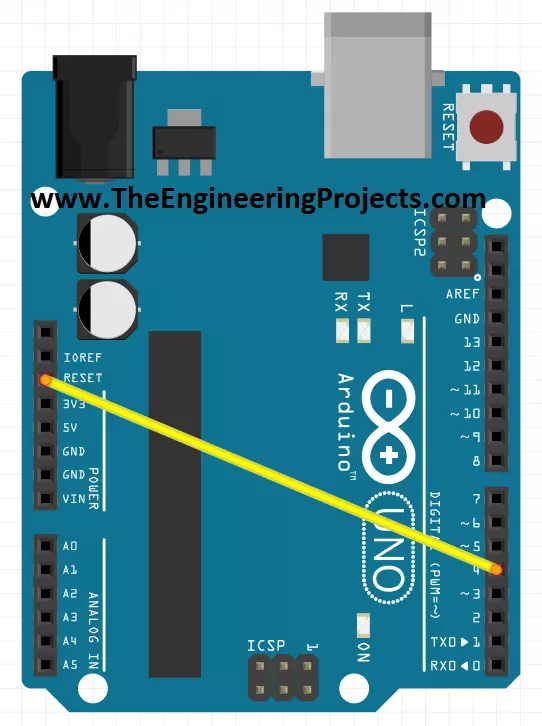
  • So, first of all, connect Arduino Reset Pin with any of the digital pins as I have connected it with Pin#4 shown in the below figure:
arduino reset code,reset arduino with code, reset arduino with program
  • Now upload the below code to your Arduino board:
 
int Reset = 4;

void setup() {  
  digitalWrite(Reset, HIGH);
  delay(200); 
  pinMode(Reset, OUTPUT);     
  Serial.begin(9600);
  Serial.println("How to Reset Arduino Programmatically");
  Serial.println("www.TheEngineeringProjects.com");
  delay(200);
}
void loop() 
{
  Serial.println("A");
  delay(1000);               
  Serial.println("B");
  delay(1000);               
  Serial.println("Now we are Resetting Arduino Programmatically");
  Serial.println();
  delay(1000);
  digitalWrite(Reset, LOW);
  Serial.println("Arduino will never reach there.");

}

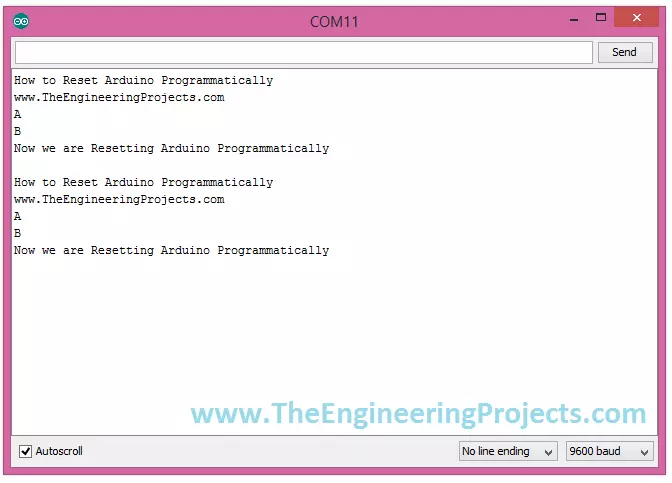
  • Once you have uploaded the code then and open your Arduino Serial Monitor and you will get something as shown in the below figure:
arduino reset code,reset arduino with code, reset arduino with program
  • As you can see in the above figure, our Arduino is not displaying the line "Arduino will never reach there" and got reset and then display from start. So that's how it's going to work.
  • Now let's have a look at the second method of How to Reset Arduino Programmatically.

Reset Arduino Programmatically using reset Function

  • In this method, we are not going to use any hardware pin, instead, we will do everything in programming.
  • So, if you don't know much about Arduino Programming then you should have a look at Getting Started with Arduino Programming.
  • Arduino has a built-in function named as resetFunc() which we need to declare at address 0 and when we execute this function Arduino gets reset automatically.
  • So, no need of doing anything in hardware and simply upload the below code to your Arduino board.
void(* resetFunc) (void) = 0;
 
void setup() {     
  Serial.begin(9600);
  Serial.println("How to Reset Arduino Programmatically");
  Serial.println("www.TheEngineeringProjects.com");
  delay(200);
}

void loop() 
{
  Serial.println("A");
  delay(1000);               
  Serial.println("B");
  delay(1000);               
  Serial.println("Now we are Resetting Arduino Programmatically");
  Serial.println();
  delay(1000);
  resetFunc();
  Serial.println("Arrduino will never reach there.");
 
}
  • Now open your Arduino Serial Terminal and you will get the same output as we get in the first method and shown below:
arduino reset code,reset arduino with code, reset arduino with program
  • In the code you have seen that we defined the function resetFunc() and then where we call that function, our Arduino gets reset at that point.
It was quite a simple tutorial, but if you have any problems then ask in the comments and I will try to resolve them. So that's all for today and will meet in the next tutorial. Till then take care !!! :)
TEP , The Engineering Projects , Tagsarduino reset code
reset arduino with code
reset arduino with program
TEP , The Engineering Projects , Comments

Write a Comment

TEP , The Engineering Projects , WordPress TEP , The Engineering Projects , Google TEP , The Engineering Projects , Twitter TEP , The Engineering Projects , Facebook TEP , The Engineering Projects , User
TEP , The Engineering Projects , Robot
TEP , The Engineering Projects , Comments Comments on ‘’ How to Reset Arduino Programmatically ‘’ (12)
TEP , The Engineering Projects , Comment
TEP , The ENgineering Projects , Reaction 40
TEP , The ENgineering Projects , Reaction 700
TEP , The ENgineering Projects , Reaction 60
TEP , The ENgineering Projects , Reaction 25
TEP , The ENgineering Projects , Reaction 60
When I call resetFunc() my board(Leonardo) goes into an infinite loop. I use the function like this ...... if(messageLength 0) { Serial.println("message to short"); Serial.print(messageLength,DEC); Serial.println(); resetFunc(); } .....
TEP , The Engineering Projects , Comment
TEP , The ENgineering Projects , Reaction 40
TEP , The ENgineering Projects , Reaction 700
TEP , The ENgineering Projects , Reaction 60
TEP , The ENgineering Projects , Reaction 25
TEP , The ENgineering Projects , Reaction 60
When using a pbno as a reset trigger, how can you write a code to tell the arduino on reset to wait 1 minute before starting up again. I am designing a smoke alarm and when reset is hit (when alarm is active) i want there to be a 1 minute delay before recalibrating. Mainly to allow smoke thatd left to dissipate.
TEP , The Engineering Projects , Comment
TEP , The ENgineering Projects , Reaction 40
TEP , The ENgineering Projects , Reaction 700
TEP , The ENgineering Projects , Reaction 60
TEP , The ENgineering Projects , Reaction 25
TEP , The ENgineering Projects , Reaction 60
I'd just like to point out that Arduino *doesn't* have a function resetFunc defined anywhere. The line `void (*resetFunc)(void) = 0` defines a function pointer named resetFunc pointing at address zero. There is NO FUNCTION there that should be run by the Arduino, but the CPU realizes it's not supposed to be there and resets itself.
TEP , The Engineering Projects , Comment
TEP , The ENgineering Projects , Reaction 40
TEP , The ENgineering Projects , Reaction 700
TEP , The ENgineering Projects , Reaction 60
TEP , The ENgineering Projects , Reaction 25
TEP , The ENgineering Projects , Reaction 60
Hi Syed Zain Nasir, If we press the arduino reset button "while there is NO ELECTRICITY on the arduino", will it reset?? My goal is to make a machine in a closed case. And "a person who is not authorized to open a closed body" is to RESET my own SOFTWARE that I have installed when the body is opened. For this, I want to do it with the help of a button that is normally closed (Noff) (parallel to the "reset button") but switches to the open position when it is released. Thanks to this, the arduino will be reset. I have made machine with software (HEX file etc.) I don't want it copied.! I would appreciate it if you could help and provide information. Thanks
TEP , The Engineering Projects , Comment
TEP , The ENgineering Projects , Reaction 40
TEP , The ENgineering Projects , Reaction 700
TEP , The ENgineering Projects , Reaction 60
TEP , The ENgineering Projects , Reaction 25
TEP , The ENgineering Projects , Reaction 60
Hey, guys, I've always looked for this. I appreciate the tip. I used this on Arduino v3 and it worked perfectly. Thank you very much.
TEP , The Engineering Projects , Add

Top PCB Design Service

PCB
TEP, The Engineering Projects, PCB Online
TEP , The Engineering Projects , Add

Embedded Tools

ARDINO
TEP , The Engineering Projects , ARDUINO
TEP , The Engineering Projects , Subscribe

Subscribe Now !!!

Learn Free Pro Tricks

TEP , The Engineering Projects , Mail Receive Quality Tutorials Straight in your Inbox by Submitting your Email ID Below
TEP , The Engineering Projects , Mail
TEP , The Engineering Projects , Books

Engineering Books

TEP , The Engineering Projects , Arduino Programming Book
SALE $20
Text Book for arduino $20
TEP , The Engineering Proects , Star TEP , The Engineering Proects , Star TEP , The Engineering Proects , Star TEP , The Engineering Proects , Star TEP , The Engineering Proects , Star (5.0)
TEP , The Engineering Projects , Arduino Programming Book
SALE $20
Text Book for raspberry pi $20
TEP , The Engineering Proects , Star TEP , The Engineering Proects , Star TEP , The Engineering Proects , Star TEP , The Engineering Proects , Star TEP , The Engineering Proects , Star (3.0)
TEP , The Engineering Projects , Arduino Programming Book
SALE $20
Text Book for arduino $20
TEP , The Engineering Proects , Star TEP , The Engineering Proects , Star TEP , The Engineering Proects , Star TEP , The Engineering Proects , Star TEP , The Engineering Proects , Star (4.7)
TEP , The Engineering Projects , Arduino Programming Book
SALE $20
Text Book for raspberry pi $20
TEP , The Engineering Proects , Star TEP , The Engineering Proects , Star TEP , The Engineering Proects , Star TEP , The Engineering Proects , Star TEP , The Engineering Proects , Star (5.0)
TEP , The Engineering Projects , Category

Categories

TEP , The Engineering Projects , Arduino
TEP , The Engineering Projects , Notification 20K
TEP , The Engineering Projects , Tick 900
TEP , The Engineering Projects , Views 900
TEP , The Engineering Projects , Comments 20K
TEP , The Engineering Projects , Arduino
TEP , The Engineering Projects , Notification 20K
TEP , The Engineering Projects , Tick 900
TEP , The Engineering Projects , Views 900
TEP , The Engineering Projects , Comments 20K
TEP , The Engineering Projects , Arduino
TEP , The Engineering Projects , Notification 20K
TEP , The Engineering Projects , Tick 900
TEP , The Engineering Projects , Views 900
TEP , The Engineering Projects , Comments 20K
TEP , The Engineering Projects , Arduino
TEP , The Engineering Projects , Notification 20K
TEP , The Engineering Projects , Tick 900
TEP , The Engineering Projects , Views 900
TEP , The Engineering Projects , Comments 20K
TEP , The Engineering Projects , Arduino
TEP , The Engineering Projects , Notification 20K
TEP , The Engineering Projects , Tick 900
TEP , The Engineering Projects , Views 900
TEP , The Engineering Projects , Comments 20K
TEP , The Engineering Projects , Arduino
TEP , The Engineering Projects , Notification 20K
TEP , The Engineering Projects , Tick 900
TEP , The Engineering Projects , Views 900
TEP , The Engineering Projects , Comments 20K
TEP , The Engineering Projects , Arduino
TEP , The Engineering Projects , Notification 20K
TEP , The Engineering Projects , Tick 900
TEP , The Engineering Projects , Views 900
TEP , The Engineering Projects , Comments 20K
TEP , The Engineering Projects , Arduino
Matlab
200
TEP , The Engineering Projects , Notification 20K
TEP , The Engineering Projects , Tick 900
TEP , The Engineering Projects , Views 900
TEP , The Engineering Projects , Comments 20K
TEP , The Engineering Projects , Arduino
TEP , The Engineering Projects , Notification 20K
TEP , The Engineering Projects , Tick 900
TEP , The Engineering Projects , Views 900
TEP , The Engineering Projects , Comments 20K