In the previous post we have seen the project description of Voice Recognition Project using EasyVR shield. Today we will have a look at Getting started with EasyVR commander. EasyVR shield is a module which is used for voice recognition. First of all, we save our commands in the EasyVR shield and then we use these commands to control anything. In this project, I need to control the robot with voice commands like when someone says FORWARD then the robot start moving in forward direction.
Now first of all what I need to do is to save this FORWARD voice in the shield, which we will see today how to save the command in the shield and after that I will show you the Interfacing of EasyVR shield with Arduino UNO. So that when I say Forward the motor start to move in forward direction, which we will see in the next post. When I was working on EasyVR Shield then I got into a problem which was How to solve Training Error: Recognition Failed in EasyVR and I solved it so you should also have a look at this tutorial if you got such error.
What is EasyVR Commander?
EasyVR Commander is a software using which we save the voice commands in the EasyVR Shield. You guys can easily find it using google and its totally free.
Download this software and install it.
How to use EasyVR Commander?
First of all connect your EasyVR shield with the Arduino UNO Shield as shown in below figure.
Now be careful in this step as it took the most of my time, on EasyVR shield you will find a jumper J12. Put this jumper on position PC.
Note: When you are adding commands in EasyVR shield using EasyVR Commander, then this jumper J12 must be on position PC and when you are using this shield in the circuit with arduino then this jumper J12 must be on position SW.
Connect your Arduino UNO shield with the computer and run the software EasyVR commander. The software will open up as shown in the figure below.
Now select the COM Port on which Arduino UNO is attached, which in my case was at COM20.
After selecting the COM Port, click the Connect icon as shown in below figure.
When you hit on Connect icon, the software will connect to the COM Port and will open up as shown below:
If you check the left pane, there are many groups and wordset.
In wordset, there are pre defined words, which are already saved in the EasyVR shield.
The words which I want to save in the shield, will be saved in the Groups.
Now to save these words click on any group where you want to save.
In the below figure, I have selected Group 2 and then click on the Add Command button (Click # 1) shown in the figure.
It will add the command in the group as you can see I have saved the command OK.
Now I have saved the command OK but I have to give it some voice to this command.
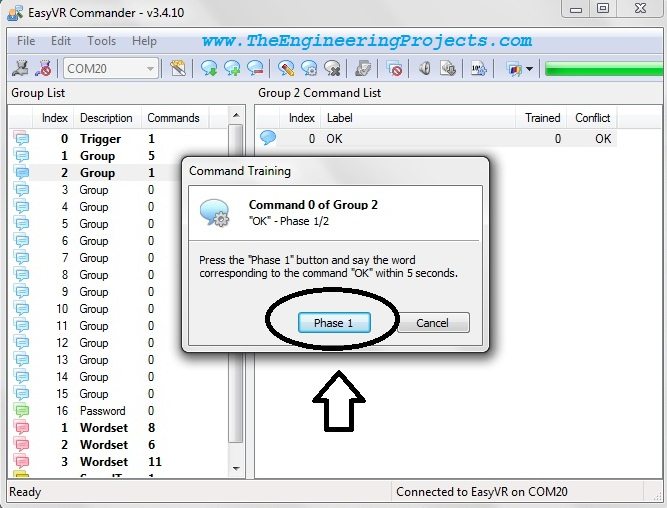
In order to do so, click on the Train Command icon ( Click # 2 ).
Now when you click on the Train Command icon, a message box will pop up as shown in below figure.
Click on the button which says Phase 1.
Now as you click on this button, a box appears which say "speak now", now its the time to say your command in the mic like I said OK.
After listening the command this pop up will again show up and this time the button will be Phase 2.
Again click on the button and it will ask for "speak now" and you again speak the same command in the mic.
After that the software verifies the two words and if they are same it will confirm the command.
In my case, I have saved total 5 commands in my software as shown in the below figure.
These were my five commands to control my robot.
Now after adding the commands, simply close the software as the voice commands are now saved in the EasyVR shield.
Place the jumper J12 back to position SW.
Note:
You can also test your added commands,to do so click on Test Command icon on the software and speak up any of the commands from the selected group.
If the command matches, then the software will indicate it. Test it and you will see.
In the next post we will check the arduino side of controlling this shield. I will post the code as well so that you can easily test it. If someone's having any problem in using this shield post in comments and I will surely help you out and subscribe us via email to get such exciting tutorials rite in your mailbox. Take care !!!
Hi and thanks a lot for your splendid tutorial. I have a problem that I cannot solve!
I have tested the shield with the Easy Vr Commander and at this stage it works fine since I can easily connect the shield to my COM3....but when I upload the test sketch on the arduino ( of course I have changed the jumper putting this on the SW position)..I get a problem. Upload works fine but Opening the serial monitor I see the message: Bridge not started- Easy VR not detected...
What happens????...You are the only one who can help me.
Can you please help me?
Thanks a lot and have my best regards.
Arnaldo
Hi,
I think the problem you are facing is because of the jumper placement. You are not placing it right. Otherwise this problem doesn't occur. Better to add me on skype and we can discuss it through to check where the problem lies.
Thanks.
Hi,
I have just seen your kind reply...
I can assure you that the jumper has been placed in the right place..otherwise I could not upload the sketch...
Jumper is on SW..
Do you have other suggestion?....we can also use skype...I leAve in Italy...so tll me when tou available...
Thanks a lot.
arnaldo
hye really good tutorial....
I try to connect the easyVR with arduino uno..I have set the jumper 12 to UP but when i try to connect the error come said that "cannot detected device connected to COM5"...please help me sir.
tQ
Hi,
You must be making some mistake, First of all, make sure that you have placed the jumper right. Secondly, in the image, Arduino is giving avrdude error which means your arduino driver is not installed corectly, so reinstall the arduino driver and first of all, burn some simple sketch in arduino to check it working fine or not, then move to EasyVR Commander. Let me know about the results.
Thanks.
Hi,
I have a connection problem with my easyvr shield 2.0 with arduino uno. When I connect only arduino uno to computer, it works; there is no problem. First of all, I have placed the jumper right (PC). Secondly, in the image, Arduino is giving avrdude error which means your arduino driver is not installed corectly, so I have reinstalled the arduino driver and first of all, I have burned some simple sketch (blink) in arduino but it did'nt work,it says
"
avrdude: stk500_recv(): programmer is not responding
avrdude: stk500_getsync() attempt 1 of 10: not in sync: resp=0x01
avrdude: stk500_recv(): programmer is not responding
avrdude: stk500_getsync() attempt 2 of 10: not in sync: resp=0x01
avrdude: stk500_recv(): programmer is not responding
avrdude: stk500_getsync() attempt 3 of 10: not in sync: resp=0x01
avrdude: stk500_recv(): programmer is not responding
avrdude: stk500_getsync() attempt 4 of 10: not in sync: resp=0x01
avrdude: stk500_recv(): programmer is not responding
avrdude: stk500_getsync() attempt 5 of 10: not in sync: resp=0x01
avrdude: stk500_recv(): programmer is not responding
avrdude: stk500_getsync() attempt 6 of 10: not in sync: resp=0x01
avrdude: stk500_recv(): programmer is not responding
avrdude: stk500_getsync() attempt 7 of 10: not in sync: resp=0x01
avrdude: stk500_recv(): programmer is not responding
avrdude: stk500_getsync() attempt 8 of 10: not in sync: resp=0x01
avrdude: stk500_recv(): programmer is not responding
avrdude: stk500_getsync() attempt 9 of 10: not in sync: resp=0x01
avrdude: stk500_recv(): programmer is not responding
avrdude: stk500_getsync() attempt 10 of 10: not in sync: resp=0x01"
I try to connect the easyVR with arduino uno..I have set the jumper 12 to PC but when i try to connect the error come said that “cannot detected device connected to COM11″…please help me sir.
Hi,
EasyVR Shield is a real pain, dont get disappointed and just test again and again, check your firmware version, arduino library version etc. Mae sure you have the latest versions for everything and then try it, it will be solved.
Thanks.
As I explained earlier, EasyVR shield is not easy to work with and it requires a lot of testing. Check your software versions, they must be updated to latest plus check out the jumper setting, and after some time it will start working. If the problem still exists then let me know, will help you out.
im using this easyvr shield as my final project.. i just try the control access demo from the easyvr website..but its not working..i already do all the step, but not working..can you help me?any suggestion?
Problem Still Unsolved : "Bridge Not Started. EasyVR not detected"
Jumper Setting : SW
Using : EasyVR 3 with shield on Arduino Uno R3 (all softwares up to date)
Loaded program on Arduino : TestEasyVR (from the EasyVR library example)
Please suggest. I have wasted 3 days figuring this out.
Hello, I have a problem, when I press Generate a code, it gives me an error. Can you help? I didn't find an answer and I was trying so hard for 1 week and I didn't find nothing...