


How to Reset Arduino Programmatically


Hello friends! Today we will learn how to restart an Arduino program deliberately and, more importantly, distinguish a real microcontroller reset from simply starting our application logic again. These operations can look similar on the Serial Monitor while leaving the hardware in different states.
For the main example, we will use a classic Arduino Uno with an ATmega328P and its watchdog timer. We will also revisit the two approaches in the original tutorial: connecting an output pin to RESET and calling a function pointer at address zero. Both need important qualifications before they are used in a project.
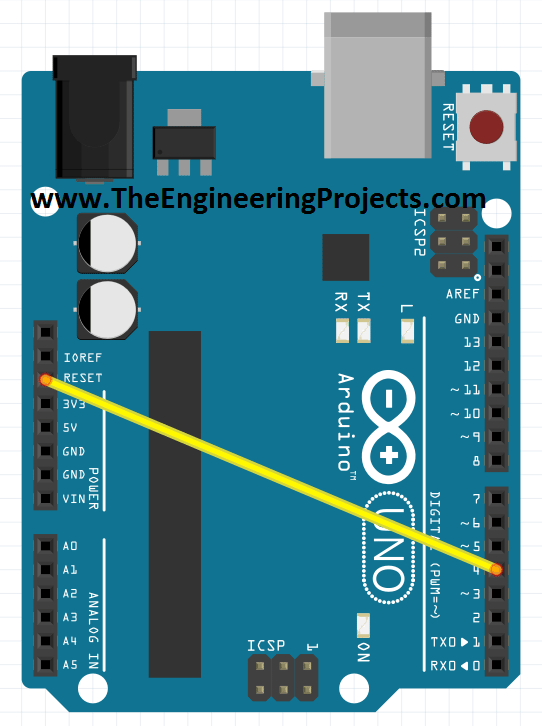
The original wiring image is retained below for reference, but the recommended example does not need that jumper. Remove any output-to-RESET connection before following the watchdog procedure. This tutorial is specific to the classic AVR Uno; other Arduino architectures use different reset facilities.
What Does Resetting an Arduino Actually Mean?
A processor reset returns the microcontroller's execution and hardware control state to the conditions defined by its reset circuitry. Startup code then initializes the application environment before setup and loop begin running.
It does not normally erase the stored sketch. Flash retains the application across a reset, and EEPROM is nonvolatile storage. If your own startup code writes or clears EEPROM, that is an application action rather than an inherent consequence of pressing RESET.
Ordinary initialized variables are prepared again by the runtime. This does not mean the physical SRAM is securely erased in every location. Special retained-memory techniques depend on the startup code and reset cause and should not be confused with normal variables retaining their previous values.
Microchip's AVR reset-source overview describes power-on, external, watchdog and brownout reset mechanisms. They trigger processor restart for different reasons and can leave different diagnostic flags.
Choose the Kind of Restart You Need
| Action | Typical effect | Appropriate use |
|---|---|---|
| Reset application variables | Restarts a task or user interaction while the processor keeps running | Start a new measurement or clear a menu state |
| Microcontroller reset | Re-enters hardware and runtime startup | Controlled processor restart or watchdog recovery |
| Power cycle the assembly | Removes and reapplies power to the affected devices | Recovery that also requires peripheral power removal |
If you only want to restart a countdown, clear its variables and return the state machine to its initial state. Resetting the entire controller unnecessarily also interrupts communication, output control and any unrelated task running on it.
Calling setup again is not equivalent to a processor reset. Global variables may retain their current values, timers may already be running and libraries may allocate or register resources again. Write a separate restartTask function if application-level reinitialization is what you need.
A processor reset also does not power cycle an attached display, modem or sensor. Those devices can remain powered and retain their own state. If a peripheral requires a separate reset or power sequence, include that explicitly in the system design.
Why the Watchdog Can Perform a Real Reset
The ATmega328P watchdog uses a separate on-chip oscillator. In reset mode, it resets the processor if its timer expires without being serviced. Software can deliberately enable it and then stop servicing it to request a reset.
The avr-libc functions in avr/wdt.h perform the required register-access sequences. The watchdog reference documents the timeout constants and startup considerations. Avoid replacing these operations with unexplained register writes copied from a different AVR.
Watchdog timeouts are approximate intervals, not precision timing references. A setting named 120 milliseconds does not promise an exact 120.000 millisecond delay over every supply voltage and temperature.
Also distinguish resetting the watchdog timer from resetting the processor. The function wdt_reset services the timer and postpones expiry. It does not immediately reboot the Arduino.
Check the Bootloader Before Using Watchdog Reset
After a watchdog reset, the bootloader may execute before the sketch. If that bootloader does not handle the active watchdog correctly, the processor can repeatedly reset before reaching your application's setup function.
This matters on boards with old or customized bootloaders. An early watchdog-disable function in the sketch helps only after execution reaches the sketch. It cannot repair a bootloader that resets endlessly before handing control to the application.
The classic Uno's supported bootloader configuration is the intended starting point here. If your board has an unknown bootloader, identify or restore an appropriate version first. Our ATmega328 bootloader tutorial explains the separate ISP programming procedure.
The Arduino AVR core's Optiboot source illustrates bootloader handling of reset causes and the watchdog. Do not assume every board with an ATmega328P contains exactly the same bootloader build.
A Deliberate Watchdog Reset Example
The following sketch waits for the character R on the Serial Monitor. It then prints a message and requests a watchdog reset. It does not reset periodically, so you can observe startup without immediately falling into an intentional reboot loop.
Use the classic Uno board selection and disconnect external loads for this first experiment. The sketch uses only the built-in LED and serial connection. No jumper between D4 and RESET is required.
#include <avr/io.h>
#include <avr/interrupt.h>
#include <avr/wdt.h>

// Run during AVR startup, before normal global initialization.
void earlyWatchdogOff(void)
    __attribute__((naked, used, section(".init3")));

void earlyWatchdogOff(void) {
  MCUSR = 0;
  wdt_disable();
}

void requestProcessorReset() {
  digitalWrite(LED_BUILTIN, LOW);
  Serial.println(F("Requesting watchdog reset..."));
  Serial.flush();
  cli();
  wdt_enable(WDTO_120MS);
  for (;;) {
    // Deliberately do not service the watchdog.
  }
}

void setup() {
  digitalWrite(LED_BUILTIN, LOW);
  pinMode(LED_BUILTIN, OUTPUT);
  Serial.begin(9600);
  Serial.println(F("Started. Send R to reset the Uno."));
}

void loop() {
  if (Serial.available() > 0) {
    const int command = Serial.read();
    if (command == 'R' || command == 'r') {
      requestProcessorReset();
    }
  }
}
The early startup hook follows the AVR startup pattern: clear the reset-status register and disable the watchdog before ordinary initialization. Its naked attribute is specific to this startup section. Do not add Serial calls, local initialization routines or a normal return statement to that function.
Clearing MCUSR in this example intentionally discards its diagnostic flags. The sketch demonstrates a restart rather than a reset-cause recorder. If your application needs those flags, capture them through a bootloader-aware method before clearing them.
The example assumes the normal Uno fuse configuration allows watchdog control. A deliberately programmed watchdog-always-on fuse changes that assumption. Fuse settings are part of the board configuration, not something this sketch silently repairs.
Observe the Restart Step by Step
- Upload the sketch using the normal Uno upload process.
- Open the Serial Monitor at 9600 baud.
- Wait for the startup message.
- Send R once.
- Observe the reset-request message followed by a new startup message.
- Leave the monitor open and confirm the sketch waits for another command.
Carriage return and line feed are ignored because they do not match R. If a terminal repeatedly sends a stored command on reconnect, disable that feature before interpreting repeated restarts as a hardware fault.
Opening the serial port can itself reset a classic Uno through its automatic reset circuit. Separate that initial connection event from the later reset you request with R. Keep the monitor open while performing the comparison.
Serial.flush waits for queued outgoing data to finish transmitting on this core; it does not erase the receive buffer. The sketch calls it before disabling interrupts, because normal serial transmission may rely on interrupts to drain buffered output.
For a fault-recovery path, do not depend on lengthy logging successfully completing. A communication subsystem may itself be the failed component. Keep recovery bounded and move detailed diagnostics to a path that does not prevent the reset.
Why Jumping to Address Zero Is Not a Hardware Reset
The original tutorial declared a function pointer with address zero and called it through the name resetFunc. That name was chosen by the sketch author; it is not a built-in Arduino reset function.
A jump can restart execution at a particular program location, but it does not necessarily reset peripheral registers, interrupt state, timers or every other hardware resource. The startup code may also assume reset conditions that a jump has not established.
Calling a null function pointer is not portable, defined C++ reset behavior. Even if a particular AVR build appears to restart, relying on that result gives the compiler, processor and startup environment assumptions that the source does not safely express.
The avr-libc FAQ discusses software reset and the watchdog approach. Use the processor's documented reset mechanism when a processor reset is actually required.
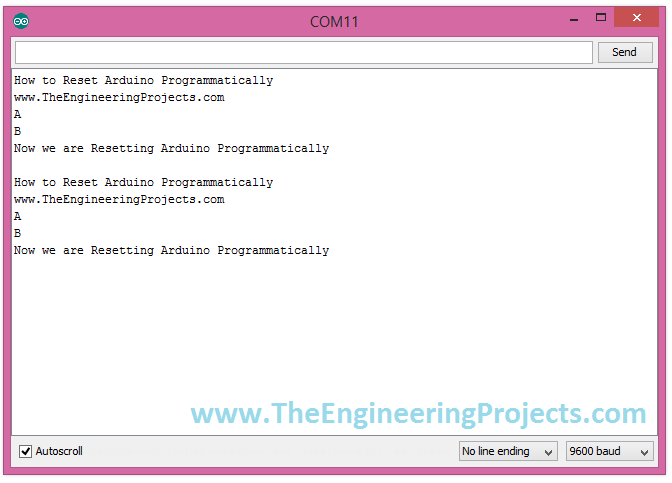
The original Serial Monitor capture is retained as a historical illustration of repeated startup output. Seeing the same text again does not establish that every peripheral underwent a hardware reset. Output appearance alone cannot distinguish these mechanisms.
Why an Output-to-RESET Jumper Is Unreliable
The earlier circuit connected a digital output, D4, directly to the board's RESET input and drove it low. The reset input is active low, but the circuit has an important timing problem: once reset begins, the processor's own output driver returns to its reset state.
The pin that was supposed to hold RESET low can therefore stop driving it before a guaranteed external-reset pulse has been established. The result depends on reset timing, pull-ups and circuit capacitance. A demonstration that sometimes restarts is not a dependable reset-controller design.
Driving that node high can also conflict with another circuit or reset button trying to pull it low. The preferred self-reset example here uses the internal watchdog, which avoids needing an output pin to sustain its own reset pulse.
If an external controller must reset the Uno, use a suitable open-drain or open-collector arrangement or a reset supervisor, with compatible voltage levels and the pulse duration required by the target datasheet. That external controller must remain capable of holding the reset signal for the intended interval.
This second occurrence of the original capture belongs to the historical comparison. It is not a newly measured result from the watchdog sketch and should not be used to infer reset-pulse timing.
Plan What Happens to Outputs During Reset
Software loses active control of its outputs during reset and startup. A relay driver, motor enable or chip-select signal must therefore have an appropriate hardware default. Do not rely on setup executing quickly enough to prevent an unwanted pulse.
For example, an active-high enable can use a suitable pull-down to keep its external driver disabled while the MCU pin is high impedance. An active-low enable may need a pull-up instead. Choose the value from the driver's input characteristics and leakage, rather than assuming every circuit needs the same resistor.
When initialization reaches a controlled output, set its intended output latch value before switching the pin to output mode where the architecture supports that sequence. This reduces an avoidable transition during software initialization, but does not replace the external default resistor.
Keep in mind that the bootloader may use particular pins, including the built-in LED connection. Do not connect a sensitive actuator to such a pin without checking the complete reset and boot behavior of the actual board.
Estimate the Restart Interruption
The time before your application resumes is more than the watchdog timeout alone. A useful planning expression is:
Restart interruption = watchdog expiry time + bootloader time + application initialization time.
For an illustrative system with 0.12 seconds of watchdog delay, 0.50 seconds of bootloader activity and 0.02 seconds of initialization, the total is about 0.64 seconds. These values are an example, not measured timing for every Uno.
The bootloader can take different paths for external and watchdog resets. Application initialization may also wait for sensors or communication. Measure the complete interval on the actual build if a controller must resume within a specified time.
During that interval, the rest of the system needs a defined behavior. A remote interface should display the connection as restarting or unavailable until it receives a new readiness message. It should not continue displaying an old measurement as though it were freshly acquired.
Use a Watchdog to Detect Missing Progress
A watchdog becomes more useful when it monitors whether important work is completing. Periodically servicing it from an interrupt, regardless of application health, can hide a main loop that is stuck forever.
For a multi-task sketch, record progress from the tasks that matter and service the watchdog only after the required set has advanced. Choose a timeout longer than the worst legitimate execution interval, including bounded peripheral delays and any deliberate sleep behavior.
For example, if a healthy acquisition cycle can legitimately need 400 milliseconds, a nominal 250 millisecond timeout is incompatible with that requirement. Increasing the timeout should follow a timing analysis; it should not be a way to conceal an unbounded wait.
A deliberate reboot command and a watchdog health monitor can share the same hardware timer, but their responsibilities differ. The command path stops servicing it on purpose. The health monitor services it only when the application demonstrates enough progress.
Repeated recovery is evidence of an unresolved fault. Add a bounded recovery policy and an observable error state rather than restarting forever without explanation. Avoid writing an EEPROM counter on every fast reset without considering endurance and incomplete writes.
Understand Reset-Cause Logging
The ATmega328P exposes reset-cause flags through MCUSR. However, the bootloader may read, clear or preserve those flags before the sketch starts. Reading MCUSR in setup is therefore not a universal way to recover the original cause.
Some Optiboot versions provide a documented mechanism for passing reset information to the application. The project's reset demonstration explains that version-dependent approach. Use it only with a bootloader that implements the expected convention.
A persistent application record can help explain why software requested a restart, but write it before requesting the reset and design for power failure during the write. Separate “software requested restart” from “hardware reported watchdog reset”; they are related observations, not identical evidence.
Troubleshooting and Practical Review
| Symptom | What to investigate |
|---|---|
| Board restarts continuously | Watchdog handling in the bootloader and early startup, or repeated reset commands |
| Sketch never reaches setup | Bootloader reset loop, clock or power problem |
| Restart message is missing | Serial buffering, baud rate or a reset before transmission completed |
| Peripheral remains stuck after MCU reset | Its own reset or power sequence |
| Load briefly switches during startup | Hardware enable defaults and bootloader pin activity |
| AVR header cannot be found | A non-AVR board architecture was selected |
| MCUSR does not show the expected cause | Bootloader handling and the point where flags are captured |
If a watchdog loop prevents normal uploading, use a documented board-recovery method rather than repeatedly changing unrelated IDE settings. A compatible ISP programmer can restore the intended bootloader or replace the faulty application. A normal power cycle may clear a transient watchdog state, but it cannot correct code that immediately recreates the problem.
For serial observation, see our Arduino Serial Monitor tutorial. Keep the board, bootloader and sketch versions with any timing record so the behavior can be reproduced later.
Frequently Asked Questions
Does resetting delete my sketch?
No. Ordinary reset restarts the stored program. Erasing or replacing flash is a separate programming operation.
Can I just call setup again?
That reruns a function without establishing full reset conditions. Use a separate application-state initialization function when that is the intended behavior.
Is resetFunc a standard Arduino function?
No. In the old example it was a user-created function-pointer name. It should not be mistaken for a supported cross-platform reset API.
Does wdt_reset reboot the processor?
No. It services the watchdog timer. A watchdog reset occurs when the timer expires in reset mode without being serviced.
Will this code work on an Uno R4 or ESP32?
No. The AVR headers and startup section are specific to the AVR toolchain and target. Use the reset API documented by the selected board's core.
Should I reset whenever a sensor reading fails?
Start with bounded retries and recovery of the affected peripheral. Use a whole-controller reset only when the system design requires it and its output behavior is controlled.

Tags


Is there a wayni Can i reset arduino using ir receiver and remote control?
1 reply
yes you can
When I call resetFunc() my board(Leonardo) goes into an infinite loop. I use the function like this
......
if(messageLength 0)
{
Serial.println("message to short");
Serial.print(messageLength,DEC);
Serial.println();
resetFunc();
}
.....
When using a pbno as a reset trigger, how can you write a code to tell the arduino on reset to wait 1 minute before starting up again. I am designing a smoke alarm and when reset is hit (when alarm is active) i want there to be a 1 minute delay before recalibrating.
Mainly to allow smoke thatd left to dissipate.
I'd just like to point out that Arduino *doesn't* have a function resetFunc defined anywhere.
The line `void (*resetFunc)(void) = 0` defines a function pointer named resetFunc pointing at address zero.
There is NO FUNCTION there that should be run by the Arduino, but the CPU realizes it's not supposed to be there and resets itself.
Hi, i just use this:
#include
void reboot() {
wdt_disable();
wdt_enable(WDTO_15MS);
while(1) {}
}
Hi Syed Zain Nasir,
If we press the arduino reset button "while there is NO ELECTRICITY on the arduino", will it reset??
My goal is to make a machine in a closed case. And "a person who is not authorized to open a closed body" is to RESET my own SOFTWARE that I have installed when the body is opened. For this, I want to do it with the help of a button that is normally closed (Noff) (parallel to the "reset button") but switches to the open position when it is released. Thanks to this, the arduino will be reset.
I have made machine with software (HEX file etc.) I don't want it copied.!
I would appreciate it if you could help and provide information.
Thanks
Hey, guys, I've always looked for this.
I appreciate the tip.
I used this on Arduino v3 and it worked perfectly.
Thank you very much.
1 reply
Completing the information: I used Arduino NANO V3
Comments
12